Helpful Hint: cheat sheet watermark
-
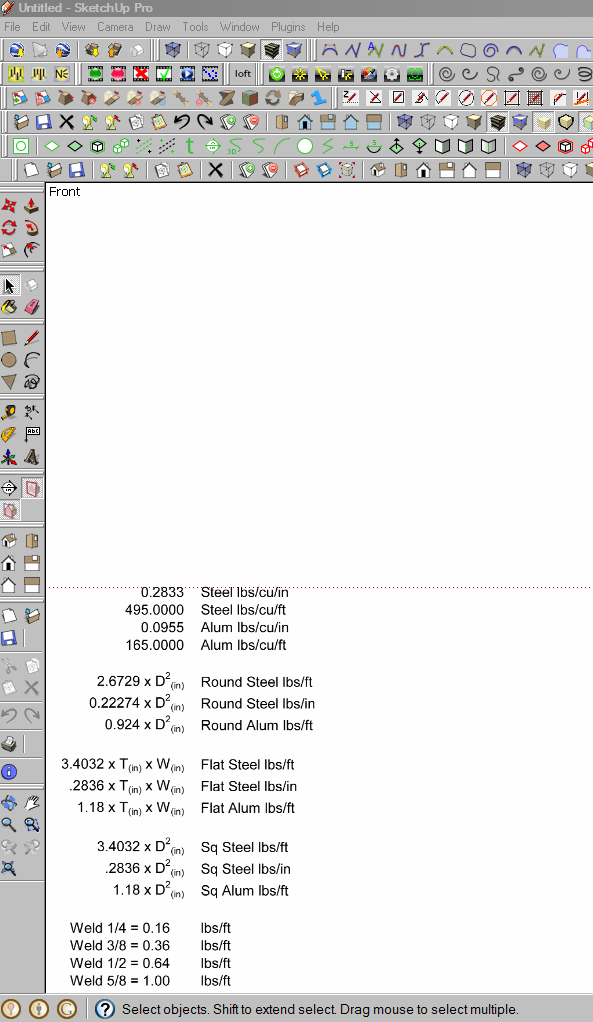
I work in steel, flat, round bar and etc. and I am always losing my cheat sheet for steel weights. Then suddenly it came to me. Make the cheat sheet a watermark. So now I turn on the watermark and have my info right there on the screen.
Don't know if this will help anyone else, but for me, I will continue to add to the cheat sheet and know exactly where I put it.
Ken

-
Sounds like a good idea to have it to hand like that but forgive me if I may sound silly Ken but how do you set it up? what program are you running it on etc?
-
Use it as a Watermark [background or overlay] as part of a [new] Style...
-
@dermotcoll said:
Sounds like a good idea to have it to hand like that but forgive me if I may sound silly Ken but how do you set it up? what program are you running it on etc?
I enter the info into an Excel spreadsheet, print as a PDF. Open the PDF in Photoshop Elements, save as a PGN, and then use Sketchup watermark process in styles and presto, I have my info.
Ken
-
Cheers Guys, I wasn't sure whether you meant whilst working in SU or not thus the confusion!!!
-
Ken, Wow, that's a lot of plugins. You must hate it when your display gets messed up!
Dermontcoll, Just guessing that you have never used SU's watermark before. Goto the menu bar and select: Window > Styles > Edit > Watermark (second icon from the right). Sorry if I am wrong.
-
You are right honolulu, but i dont see what I would need it for at the minute - can you give me some examples of when you use watermarks whilst modelling please and I may incorporate it into my workflow. Thanks.
-
I use watermarks as background images that I can place my model on, or if I want my logo included with a SU image. For a SU image, something like the below. Ken's use would have the number on top of the image.
-
Here is a SU interior with the watermark image in the window. Render below.
-
Thanks for that. I could use that for setting a quick scene in a proposed interior design for my clients.




Hello! It looks like you're interested in this conversation, but you don't have an account yet.
Getting fed up of having to scroll through the same posts each visit? When you register for an account, you'll always come back to exactly where you were before, and choose to be notified of new replies (either via email, or push notification). You'll also be able to save bookmarks and upvote posts to show your appreciation to other community members.
With your input, this post could be even better 💗
Register Login


Advertisement