Section cuts in scenes
-
Hi,
I've recently created a fly through of a cottage using section cuts to remove the roof and show cross sections where required. All was working well until I changed the style of the first scene. Now when I play the annimation the section cuts dont show. I've made sure they are active in the scene and updated the scenes but every time I hit play it just runs through with no section cuts.
Any ideas?
Cheers,
Steve.
-
Hi Steve,
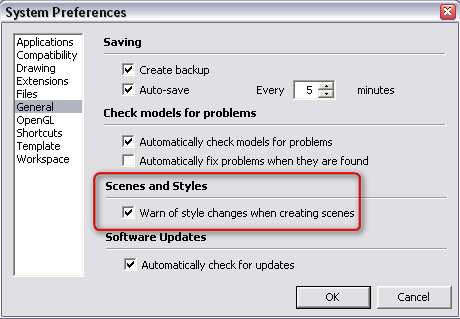
Go to your preferences window (Window menu on PC) > General tab and make sure that the style change warning is on. Now set your preferred style with the section cuts and update the scene (right click the scene tab > update). A popup will ask you if you want to update your style, save it as a new style or do nothing. I guess you need to update your style (but that also depends on your whole model).
Repeat this with the preferred style/cut settings for each scene tab.
-
That's great - Thanks a lot for your help.

Hello! It looks like you're interested in this conversation, but you don't have an account yet.
Getting fed up of having to scroll through the same posts each visit? When you register for an account, you'll always come back to exactly where you were before, and choose to be notified of new replies (either via email, or push notification). You'll also be able to save bookmarks and upvote posts to show your appreciation to other community members.
With your input, this post could be even better 💗
Register Login


Advertisement