Illuminated letters
-
Hi all,
I have a question about lighting. I am creating an exterior concept sign for a hotel and have been trying to illiminate the letters. For now, just for visual effects, I have cheated a bit by putting recessed lights in the model but what I really need is for the HB letters to "light up" so that it appears they are back lit.
Still very new at rendering, I am using Kerkyhea for the render for now but I can't seem to find a KT light that just "illuminates the material". I am contemplating on purchasing Vray hoping they might have such a feature but before I do that I was wondering if anybody has any suggestions for me.Thanks
Esther

-
Hi dutchesse
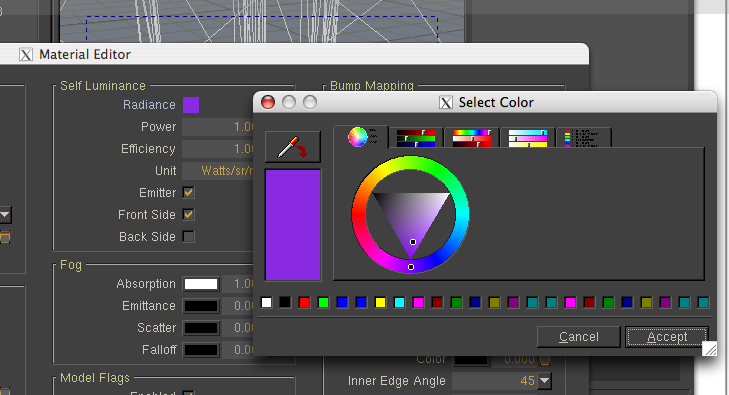
If you search the forum for majid's "Fast start 4Architects" you will find a tutorial and materials library for Kerkythea. In the material library he has a Violet emmitter. If you apply this as a material you can change the color of the material by left clicking on the color swatch in the Self Luminence panel and adjusting the color you want under \select color
-
Hey, thanks for the tip Dale, I'll get on it right away. I actually did save the PDF format manual when I downloaded Kerky but completely forgot I had it :0)
-
Well I actually used it to do exactly what you want to do last week, and it worked well. Good luck.
-
Any surface in KT can be turned to a mesh light (emitter/diffuse light/LEM/...). In case like this it's best to have a unique material assigned to back side of those 3D letters (facing the wood). In KT you can apply a emitter material from a library (basic pack has a diffuse light) or simply turn on emitter under material properties at Self Luminance.
If you want you can use a prefix in SU (material is then automatically created as a emitter when model is exported with SU2KT):
- To make material appear always bright call it 'EmitFake' (This fake emitter only works with photon mapping, otherwise it's considered as a real emitter)
- To turn material into light call it 'Emit[#]' where # stands for power of light (8=~100W)
-
@notareal said:
If you want you can use a prefix in SU (material is then automatically created as a emitter when model is exported with SU2KT):
- To make material appear always bright call it 'EmitFake' (This fake emitter only works with photon mapping, otherwise it's considered as a real emitter)
- To turn material into light call it 'Emit[#]' where # stands for power of light (8=~100W)
To clarify, you would create a new material and name the material as above in SketchUp before export?
-
That works.
-
Thanks

Hello! It looks like you're interested in this conversation, but you don't have an account yet.
Getting fed up of having to scroll through the same posts each visit? When you register for an account, you'll always come back to exactly where you were before, and choose to be notified of new replies (either via email, or push notification). You'll also be able to save bookmarks and upvote posts to show your appreciation to other community members.
With your input, this post could be even better 💗
Register Login


Advertisement