How to distribute items along a line?
-
Hello,
I would like to distribute several windows along a line, but they all need to be equally spaced apart. I have created the lines that they need to go along, and the window is to the correct dimensions.
Thank You
-
There are two ways:
-
Select the object. Press the "Ctrl" key and then use the Move/Copy tool to copy the object to where you want the last object to be. Type in "/#", where # is the number of desired divisions. SU will divide the distance between the first and last objects by that number and place equally spaced objects.
-
If you know the distance between the objects, select the object, press "Ctrl" key, and then use the Move/Copy tool to copy it that distance. Type in "#x" where # is the number of repetitions (in addition to the first object).
The above is for Windows operating system. I think for Mac you press the "Option" key in lieu of the "Ctrl" key.
-
-
If it's a curved line, try PathCopy.rb at Smustard: http://www.smustard.com/script/PathCopy
-
Thanks for the responses, they work perfectly !
-
I amaze a whole lot of people with that trick, I seem to be moving a copy of a power line but then...
Viola! instant line of poles!
-
A valuable tip. Thank you.
DJH -
And for more fun : Components Stringer by Chris Fullmer

Advantage: your have 3 possibilities of the size of the Components along the lines: Uniform, Stretch or none!
And they follow the "orientation" of the curves - lines!
- Random Painter always by Chris Fullmer
You can of course take also a simple divided line with it! (Right Click on the line / Divide)
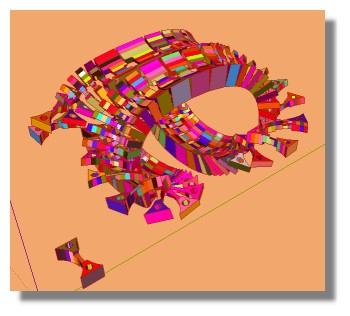
- Random Painter always by Chris Fullmer


Hello! It looks like you're interested in this conversation, but you don't have an account yet.
Getting fed up of having to scroll through the same posts each visit? When you register for an account, you'll always come back to exactly where you were before, and choose to be notified of new replies (either via email, or push notification). You'll also be able to save bookmarks and upvote posts to show your appreciation to other community members.
With your input, this post could be even better 💗
Register Login


Advertisement