sketchucation logo sketchucation
    • Login
    Oops, your profile's looking a bit empty! To help us tailor your experience, please fill in key details like your SketchUp version, skill level, operating system, and more. Update and save your info on your profile page today!
    ⚠️ Update | Sketchucation Tools 5.0.8 released with licensing improvements and bugfixes Download

    How to display Tree structure

    Scheduled Pinned Locked Moved Developers' Forum
    8 Posts 5 Posters 622 Views 5 Watching
    Loading More Posts
    • Oldest to Newest
    • Newest to Oldest
    • Most Votes
    Reply
    • Reply as topic
    Log in to reply
    This topic has been deleted. Only users with topic management privileges can see it.
    • M
      Mcdull
      last edited by

      I have set attributes to all entities,then i want to generate a tree sturcture like this
      buliding
      |_____room1
      | |____wall
      | |____floor
      |room2
      |
      |
      .....

      and this tree can shrink as we can see as usual,such as explorer, is there any method to produce it in sketchup with ruby api?

      1 Reply Last reply
      Reply Quote 0
      • M
        Mcdull
        last edited by

        the wall level and floor level should conect with room level, the previous stucture displayd not well in the page...

        1 Reply Last reply
        Reply Quote 0
        • thomthomT
          thomthom
          last edited by

          @mcdull said:

          and this tree can shrink as we can see as usual,such as explorer, is there any method to produce it in sketchup with ruby api?

          Webdialog?

          @mcdull said:

          the wall level and floor level should conect with room level, the previous stucture displayd not well in the page...

          Use the ruby markup - that will display the text in fixed-width text.

          ` |_____room1

          ____wall
          ____floor
          _____room2
          _____.....`

          Thomas Thomassen — SketchUp Monkey & Coding addict
          List of my plugins and link to the CookieWare fund

          1 Reply Last reply
          Reply Quote 0
          • M
            Mcdull
            last edited by

            i have used a tree.rb to display the structure like this
            %(#FF0000)[* ROOT
            |---+ CHILD1
            | +---> GRANDCHILD1
            +---> CHILD2]

            but i can not hadle it ,suas click and shrink
            thomthom said webdialog,can u teach me detail? i have never used webdialog,and i knew little about web...thank u~

            1 Reply Last reply
            Reply Quote 0
            • Chris FullmerC
              Chris Fullmer
              last edited by

              @mcdull said:

              i have never used webdialog,and i knew little about web...thank u~

              Then run for your life!

              Chris

              Lately you've been tan, suspicious for the winter.
              All my Plugins I've written

              1 Reply Last reply
              Reply Quote 0
              • thomthomT
                thomthom
                last edited by

                To use webdialogs you need knowledge of HTML, CSS and JS. It's not something I can teach in a single post. Best would be to look up some tutorials on the net.

                "tree.rb"?

                Thomas Thomassen — SketchUp Monkey & Coding addict
                List of my plugins and link to the CookieWare fund

                1 Reply Last reply
                Reply Quote 0
                • chrisglasierC
                  chrisglasier
                  last edited by

                  Here's a little machine that I like to give an airing every now and again. The idea is similar to yours but I have used animation to handle cumbersome tree structures. But take note of the others' advice, it ain't easy to achieve.
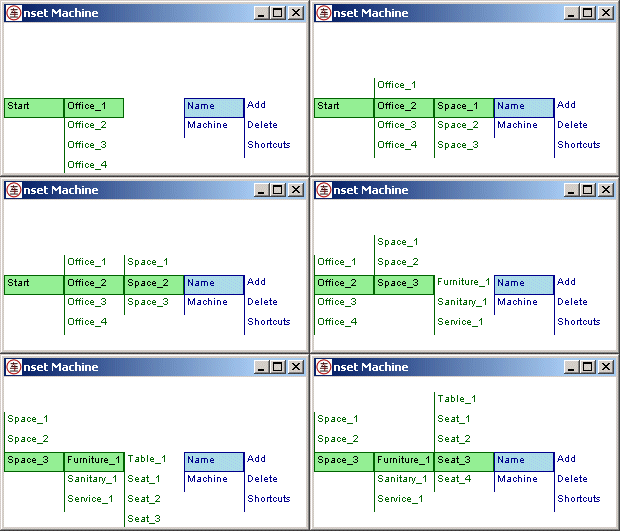

                  2009 Machine.gif

                  With TBA interfaces we can analyse what is to be achieved so that IT can help with automation to achieve it.

                  1 Reply Last reply
                  Reply Quote 0
                  • Al HartA
                    Al Hart
                    last edited by

                    You can also use the SKP "Simple Extrension" API to put your tree structure into a C++ list box.

                    Here is a sample we use to display component categories and select components for placement.

                    (click on image to remove scroll bars)
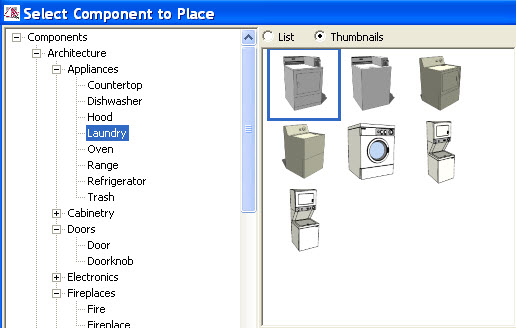
                    tree.jpg

                    Al Hart

                    http://wiki.renderplus.com/images/e/ef/Render_plus_colored30x30).PNG
                    IRender nXt from Render Plus

                    1 Reply Last reply
                    Reply Quote 0

                    Hello! It looks like you're interested in this conversation, but you don't have an account yet.

                    Getting fed up of having to scroll through the same posts each visit? When you register for an account, you'll always come back to exactly where you were before, and choose to be notified of new replies (either via email, or push notification). You'll also be able to save bookmarks and upvote posts to show your appreciation to other community members.

                    With your input, this post could be even better 💗

                    Register Login
                    • 1 / 1
                    • First post
                      Last post
                    Buy SketchPlus
                    Buy SUbD
                    Buy WrapR
                    Buy eBook
                    Buy Modelur
                    Buy Vertex Tools
                    Buy SketchCuisine
                    Buy FormFonts

                    Advertisement