sketchucation logo sketchucation
    • Login
    Oops, your profile's looking a bit empty! To help us tailor your experience, please fill in key details like your SketchUp version, skill level, operating system, and more. Update and save your info on your profile page today!
    ⚠️ Update | Sketchucation Tools 5.0.8 released with licensing improvements and bugfixes Download

    Pages.erase

    Scheduled Pinned Locked Moved Developers' Forum
    11 Posts 4 Posters 980 Views 4 Watching
    Loading More Posts
    • Oldest to Newest
    • Newest to Oldest
    • Most Votes
    Reply
    • Reply as topic
    Log in to reply
    This topic has been deleted. Only users with topic management privileges can see it.
    • thomthomT
      thomthom
      last edited by

      It's probably the indexed being shifted around when you delete the pages.

      Thomas Thomassen — SketchUp Monkey & Coding addict
      List of my plugins and link to the CookieWare fund

      1 Reply Last reply
      Reply Quote 0
      • thomthomT
        thomthom
        last edited by

        Just tried it, if you convert the pages collection to an array first it works.
        Sketchup.active_model.pages.to_a.each { |p| Sketchup.active_model.pages.erase(p) }

        But doing so, the bar where the tabs used to be is still there, even though it's empty. It should disappear.
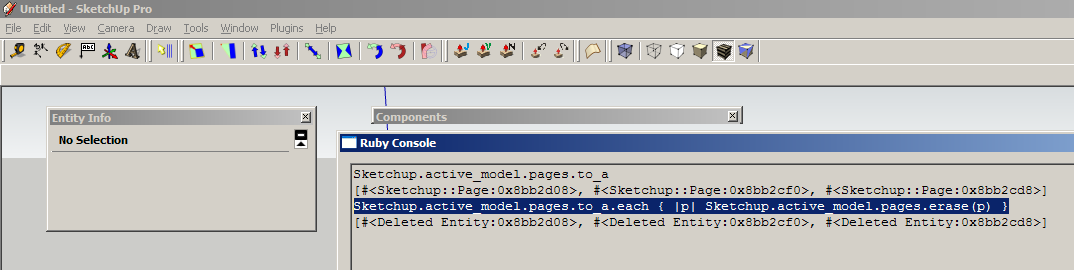

        pages.png

        Thomas Thomassen — SketchUp Monkey & Coding addict
        List of my plugins and link to the CookieWare fund

        1 Reply Last reply
        Reply Quote 0
        • Chris FullmerC
          Chris Fullmer
          last edited by

          you are iterating through the pages object with pages.each. And then on each loop, you are deleting an element from the pages object with pages.erase( e ). So deleting objects from the collection you are iterating over will cause problems like that.

          Instead of iterating over the pages object, turn it into an array of page objects. So just change your code to this:

          model.pages.***to_a***.each{|e| model.pages.erase(e)}

          Then you are iterating over an array and erasing from the page object. So you are working on two separate objects, and avoiding any clashes.

          Did that make any sense?

          Chris

          Lately you've been tan, suspicious for the winter.
          All my Plugins I've written

          1 Reply Last reply
          Reply Quote 0
          • Chris FullmerC
            Chris Fullmer
            last edited by

            Of course thom beat me to it - twice!

            Interseting, it does leave the bar behind....

            Chris

            Lately you've been tan, suspicious for the winter.
            All my Plugins I've written

            1 Reply Last reply
            Reply Quote 0
            • thomthomT
              thomthom
              last edited by

              @chris fullmer said:

              Of course thom beat me to it - twice!

              Where's the point and make fun smiley..?

              @chris fullmer said:

              Interseting, it does leave the bar behind....

              I filed a bug report on this.
              Would be nice if we found a workaround to force the bar to refresh and disappear though...

              Thomas Thomassen — SketchUp Monkey & Coding addict
              List of my plugins and link to the CookieWare fund

              1 Reply Last reply
              Reply Quote 0
              • thomthomT
                thomthom
                last edited by

                @chris fullmer said:

                you are iterating through the pages object with pages.each. And then on each loop, you are deleting an element from the pages object with pages.erase( e ). So deleting objects from the collection you are iterating over will cause problems like that.

                Is this a Ruby bug? It's somewhat unexpected. I'd expect the .each to be able to keep track of the content it iterates.

                Thomas Thomassen — SketchUp Monkey & Coding addict
                List of my plugins and link to the CookieWare fund

                1 Reply Last reply
                Reply Quote 0
                • TIGT
                  TIG Moderator
                  last edited by

                  On a PC only, if you add this line before erasing the scene-tabs it will toggles their bar's visibility - if they are off it will switch the bar on though...

                  Sketchup.send_action 10534
                  

                  TIG

                  1 Reply Last reply
                  Reply Quote 0
                  • thomthomT
                    thomthom
                    last edited by

                    @tig said:

                    On a PC only, if you add this line before erasing the scene-tabs it will toggles their bar's visibility - if they are off it will switch the bar on though...

                    Sketchup.send_action 10534
                    

                    With the unfortunate side-effect that when you later adds pages they are still hidden. 😕

                    Thomas Thomassen — SketchUp Monkey & Coding addict
                    List of my plugins and link to the CookieWare fund

                    1 Reply Last reply
                    Reply Quote 0
                    • TIGT
                      TIG Moderator
                      last edited by

                      @thomthom said:

                      @tig said:

                      On a PC only, if you add this line before erasing the scene-tabs it will toggles their bar's visibility - if they are off it will switch the bar on though...

                      Sketchup.send_action 10534
                      

                      With the unfortunate side-effect that when you later adds pages they are still hidden. 😕

                      BUT the View menu does allow you to switch them back to being visible... 😉

                      TIG

                      1 Reply Last reply
                      Reply Quote 0
                      • R
                        remus
                        last edited by

                        Cheers guys, that makes sense 👍

                        http://remusrendering.wordpress.com/

                        1 Reply Last reply
                        Reply Quote 0

                        Hello! It looks like you're interested in this conversation, but you don't have an account yet.

                        Getting fed up of having to scroll through the same posts each visit? When you register for an account, you'll always come back to exactly where you were before, and choose to be notified of new replies (either via email, or push notification). You'll also be able to save bookmarks and upvote posts to show your appreciation to other community members.

                        With your input, this post could be even better 💗

                        Register Login
                        • 1 / 1
                        • First post
                          Last post
                        Buy SketchPlus
                        Buy SUbD
                        Buy WrapR
                        Buy eBook
                        Buy Modelur
                        Buy Vertex Tools
                        Buy SketchCuisine
                        Buy FormFonts

                        Advertisement


