sketchucation logo sketchucation
    • Login
    Oops, your profile's looking a bit empty! To help us tailor your experience, please fill in key details like your SketchUp version, skill level, operating system, and more. Update and save your info on your profile page today!
    ⚠️ Update | Sketchucation Tools 5.0.8 released with licensing improvements and bugfixes Download

    Looking for a tutorial for drawing a flower

    Scheduled Pinned Locked Moved Newbie Forum
    sketchup
    14 Posts 9 Posters 4.5k Views 9 Watching
    Loading More Posts
    • Oldest to Newest
    • Newest to Oldest
    • Most Votes
    Reply
    • Reply as topic
    Log in to reply
    This topic has been deleted. Only users with topic management privileges can see it.
    • Mike LuceyM
      Mike Lucey
      last edited by

      Hi Oma,

      I am not aware of any particular tutorials for flower making but you could learn a lot by downloading some flowers from 3D Warehouse and dissect them to see how they were modeled and put together. Its really not as complex as it looks at first glance. Be sure to switch 'ON' Hidden Geometry in the View Menu as it shows the construction.

      I am attaching a picture of a flower modeled by Top Sketch and uploaded to the 3D Warehouse. This is the link, http://sketchup.google.com/3dwarehouse/details?mid=e96e0f3375e5f601bd54aff0ec2d4573&prevstart=0

      Keep us posted on your progress.

      Mike
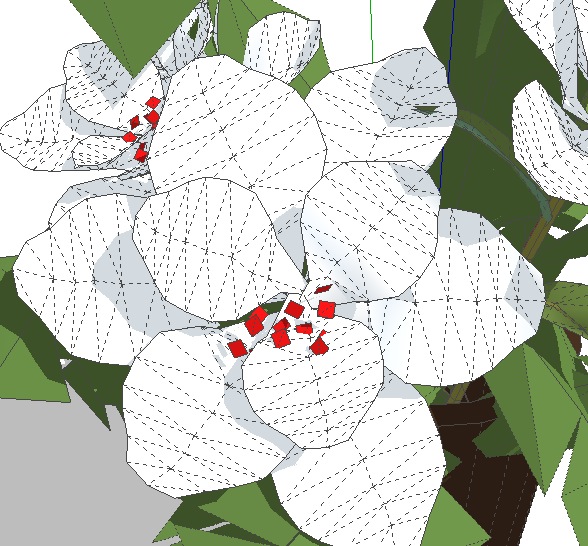

      Flowers.jpg

      Support us so we can support you! Upgrade to Premium Membership!

      1 Reply Last reply
      Reply Quote 0
      • O
        Oma
        last edited by

        thanks you I managed to get the download and the hidden geometry showing. but from there I'm at a total loss. I'm so new to this 3d graphics I'm not sure what all the little mesh like lines indicate on the drawing.

        so its back to square one for me. thanks for trying to help.

        ciao OMA

        1 Reply Last reply
        Reply Quote 0
        • E
          Ecuadorian
          last edited by

          @oma said:

          I'm so new to this 3d graphics

          I think you should first try modeling simpler things before attempting to model a flower. First stop, the video tutorials:
          http://sketchup.google.com/training/videos/new_to_gsu.html

          On second thought, I don't think SketchUp is the best program for modeling flowers. It was created for modeling buildings. Some of the things you see in the 3D warehouse were actually modeled in another program and then converted to SketchUp. You might want to try other options, such as Z-brush, MOI, Blender, etc.

          -Miguel Lescano
          Subscribe to my house plans YouTube channel! (30K+ subs)

          1 Reply Last reply
          Reply Quote 0
          • D
            d12dozr
            last edited by

            Here are a couple links to help you model irregular surfaces in sketchup:

            This site is FULL of excellent tips, tricks, and methods:
            http://sites.google.com/site/sketchupsage/tips-tricks

            3D Printing with SketchUp Book
            http://goo.gl/f7ooYh

            1 Reply Last reply
            Reply Quote 0
            • D
              d12dozr
              last edited by

              😲 Wow, Johnny, that's really good...thanks for your ideas!

              3D Printing with SketchUp Book
              http://goo.gl/f7ooYh

              1 Reply Last reply
              Reply Quote 0
              • Mike LuceyM
                Mike Lucey
                last edited by

                Thanks for doing the Tut Jean. Hey! you 'squeezed' a lot of petals in there 😉

                Support us so we can support you! Upgrade to Premium Membership!

                1 Reply Last reply
                Reply Quote 0
                • O
                  Oma
                  last edited by

                  thanks you for the tut. I now have some reading to do to figure out how to do each of these steps. It will take me a bit but to get my flower done but now I at least know the proper sequence.

                  thanks ever so much

                  ciao OMA

                  1 Reply Last reply
                  Reply Quote 0
                  • mitcorbM
                    mitcorb
                    last edited by

                    Just an observation here. I tried to download Jean Lemire's flower.skp
                    I cannot open it, because it requires Sketchup 7.1
                    I do not currently have 7.1
                    This may be a difficulty for others, also.

                    I take the slow, deliberate approach in my aimless wandering.

                    1 Reply Last reply
                    Reply Quote 0
                    • Jean LemireJ
                      Jean Lemire
                      last edited by

                      Hi Oma, hi folks.

                      See this SU file for ideas.


                      Flower.skp

                      Jean (Johnny) Lemire from Repentigny, Quebec, Canada.

                      1 Reply Last reply
                      Reply Quote 0
                      • GaieusG
                        Gaieus
                        last edited by

                        SU 7.0 should open SU 7.1 files just fine. I've "downgraded" the file above to version 6 however.

                        Gai...

                        1 Reply Last reply
                        Reply Quote 0
                        • Jean LemireJ
                          Jean Lemire
                          last edited by

                          Hi Gaieus, hi folks.

                          Thanks, I am so used with SU 7 now that I have forgotten that some peoples are still using SU 6.

                          Best regards.

                          Jean (Johnny) Lemire from Repentigny, Quebec, Canada.

                          1 Reply Last reply
                          Reply Quote 0
                          • AnssiA
                            Anssi
                            last edited by

                            Thanks Jean,

                            I love your modeling tutorials. It's like being a small kid again, watching as my father started to shape something out of a small piece of wood or tin, wondering what it would become, and usually it became something totally unexpected...

                            Anssi

                            securi adversus homines, securi adversus deos rem difficillimam adsecuti sunt, ut illis ne voto quidem opus esset

                            1 Reply Last reply
                            Reply Quote 0
                            • W
                              wayne06oh
                              last edited by

                              Hi Jean I cant seem to get to step 8 as the program says there is a limit problem. how do i get through that??


                              1 Reply Last reply
                              Reply Quote 0

                              Hello! It looks like you're interested in this conversation, but you don't have an account yet.

                              Getting fed up of having to scroll through the same posts each visit? When you register for an account, you'll always come back to exactly where you were before, and choose to be notified of new replies (either via email, or push notification). You'll also be able to save bookmarks and upvote posts to show your appreciation to other community members.

                              With your input, this post could be even better 💗

                              Register Login
                              • 1 / 1
                              • First post
                                Last post
                              Buy SketchPlus
                              Buy SUbD
                              Buy WrapR
                              Buy eBook
                              Buy Modelur
                              Buy Vertex Tools
                              Buy SketchCuisine
                              Buy FormFonts

                              Advertisement