sketchucation logo sketchucation
    • Login
    Oops, your profile's looking a bit empty! To help us tailor your experience, please fill in key details like your SketchUp version, skill level, operating system, and more. Update and save your info on your profile page today!
    ⚠️ Update | Sketchucation Tools 5.0.8 released with licensing improvements and bugfixes Download

    Newbie Tutorial - How to close any face in Sketchup

    Scheduled Pinned Locked Moved SketchUp Tutorials
    sketchup
    35 Posts 19 Posters 76.6k Views 19 Watching
    Loading More Posts
    • Oldest to Newest
    • Newest to Oldest
    • Most Votes
    Reply
    • Reply as topic
    Log in to reply
    This topic has been deleted. Only users with topic management privileges can see it.
    • EarthMoverE
      EarthMover
      last edited by

      Thanks Xrok1! Good suggestion....I never thought of that! πŸ‘

      3D Artist at Clearstory 3D Imaging
      Guide Tool at Winning With Sketchup
      Content Creator at Skapeup

      1 Reply Last reply
      Reply Quote 0
      • GaieusG
        Gaieus
        last edited by

        Cool video indeed. We all know that sometimes tracking down some tiny modelling glitches to find out why a particular face doesn't want to create is a PITA.

        The projection tools you used last can also be "supplemented" by the Drape tool.

        Gai...

        1 Reply Last reply
        Reply Quote 0
        • EarthMoverE
          EarthMover
          last edited by

          Thanks Csaba πŸ‘ ...that's another good one. The drape tool is actually easier and quicker I think. I never thought of the drape tool to drape upward, but it indeed works well. The other difference of using the drape tool vs. using the projection plugin is that the drape tool will project the edges into a grouped face and put them inside the group. The projection plugin puts the edges onto the outside of the group. Drape tool will make the edges automatically into a face and the projection plugin has to be done manually by redrawing a line or running Make Faces 1.1. Man, I learn something new everyday!!

          Xrok1 - I tried some experimenting with using the Fredoscale to make all edges co-planar, but had no luck. I used the scale to target, clicked on the Z handle, hit tab and tried to enter 0, but it doesn't seem to allow a zero input. Is there another way to work that?

          3D Artist at Clearstory 3D Imaging
          Guide Tool at Winning With Sketchup
          Content Creator at Skapeup

          1 Reply Last reply
          Reply Quote 0
          • M
            MercurialArts
            last edited by

            Why yes, this is frustrating! So, I am an artist making images in photoshop, using magic tracer 2.0 to convert from raster to dxf. Once I import into SU, I can't get a face on the outline, which seems to act as a component. The end result of this process would be dxf files a water jetter or laser cutter could use to cut metal and glass shapes, and the SU drawing being my working drawings. Stray lines finds nothing. But I still can't fill or extrude this shape. Where do I get the projection tools? I tried drape, it only takes the outline, and I have internal stuff as well. I have watched the video several times.... I don't have the bucks to buy more plugins, the software I have cost me my flex funding..

            1 Reply Last reply
            Reply Quote 0
            • urgenU
              urgen
              last edited by

              ....and WELD πŸ˜‰
              weld.rar

              ....and very simple-SUNDBOX+SKIN πŸ˜†
              sundbox.rar

              --pupil forever...------

              1 Reply Last reply
              Reply Quote 0
              • M
                MercurialArts
                last edited by

                So, when I try weld, its says pick at least 2 edges, when I try the sandbox contour method, it says I must choose contours. When I select even one line of my imported dxf the whole thing is selected with a box around it. Every line is blue. What does this mean? It would seem that all the lines are connected... but again, not a solid, no extrusion... Wha?

                1 Reply Last reply
                Reply Quote 0
                • M
                  MercurialArts
                  last edited by

                  Ah, what a dork, yes, its a component, edit component, check for stray lines brought up 13 items, I am solid and extruded. Thanks for the tips, I just needed to figure out how to apply all those neeto tricks to my object! dxf gets imported as a component.
                  I had to
                  select component,
                  edit menu, component, edit component
                  then go through and use stray line tool and weld tool to fix it up. Tiny little problems that are super hard to see, but between repeated uses of both tools, wazambo!

                  1 Reply Last reply
                  Reply Quote 0
                  • GaieusG
                    Gaieus
                    last edited by

                    You can also edit a component/group from the context ("right click") menu - or even better; just double click on it. If you triple click, you will end up "inside" its editing context PLUS all the geometry inside selected already.

                    Gai...

                    1 Reply Last reply
                    Reply Quote 0
                    • broomstickB
                      broomstick
                      last edited by

                      awesome video, man. You taught me something i did' nt know about stray lines, and you introduced me to projection tools πŸ˜„

                      My I have your permission to do a similar video for my blog in Italian?

                      1 Reply Last reply
                      Reply Quote 0
                      • EarthMoverE
                        EarthMover
                        last edited by

                        No problem Broomstick! Glad it was helpful. Feel free to use it as you wish.

                        Here is also a quick follow up video on Closing a face with the Drape Tool.

                        favicon

                        (www.screencast.com)

                        3D Artist at Clearstory 3D Imaging
                        Guide Tool at Winning With Sketchup
                        Content Creator at Skapeup

                        1 Reply Last reply
                        Reply Quote 0
                        • broomstickB
                          broomstick
                          last edited by

                          thanks you are very kind. I'll aknowledge you in the video, and post the link as soon as it is up πŸ˜„

                          1 Reply Last reply
                          Reply Quote 0
                          • M
                            mpkarch
                            last edited by

                            Earthmover,

                            I am curious to know where you got all the icons in your tutorial.

                            MPKArch

                            1 Reply Last reply
                            Reply Quote 0
                            • brookefoxB
                              brookefox
                              last edited by

                              I posted a link to this, Adam, and send along my thanks as well. Duh... 'stray lines' was sitting lonely in my PI folder unnoticed and forgotten by me...

                              ~ Brooke

                              1 Reply Last reply
                              Reply Quote 0
                              • EarthMoverE
                                EarthMover
                                last edited by

                                No problem. Some new plugins have been released since this tutorial that change the technique a bit.

                                Particularly "Edge Tools" from ThomThom - http://forums.sketchucation.com/viewtopic.php?t=24593 has the feature Close Gaps. This is much easier than "label stray lines" as it does the work of solving the gaps as well.

                                Also another one I find helpful with a stubborn face is "Flatten & Extrude" from ThomThom. -http://forums.sketchucation.com/viewtopic.php?t=23491. Once the gaps are closed you can group the edges and run the Flatten script and it will move all the verts to the same Z and close all the faces. (TIG's "Drop Verticies" will do similar on ungrouped edges but will not close the face automatically - http://forums.sketchucation.com/viewtopic.php?t=39251)

                                Hope this helps.

                                3D Artist at Clearstory 3D Imaging
                                Guide Tool at Winning With Sketchup
                                Content Creator at Skapeup

                                1 Reply Last reply
                                Reply Quote 0
                                • brookefoxB
                                  brookefox
                                  last edited by

                                  Great... but given the omnipresence of the issue your tut is good enough to warrant updating and sticking somewhere! (G man πŸ€“)

                                  ~ Brooke

                                  1 Reply Last reply
                                  Reply Quote 0
                                  • P
                                    pisosse
                                    last edited by

                                    @brookefox said:

                                    Great... but given the omnipresence of the issue your tut is good enough to warrant updating and sticking somewhere! (G man πŸ€“)

                                    CONCUR...!

                                    1 Reply Last reply
                                    Reply Quote 0
                                    • S
                                      ScrubBrush
                                      last edited by

                                      @xrok1 said:

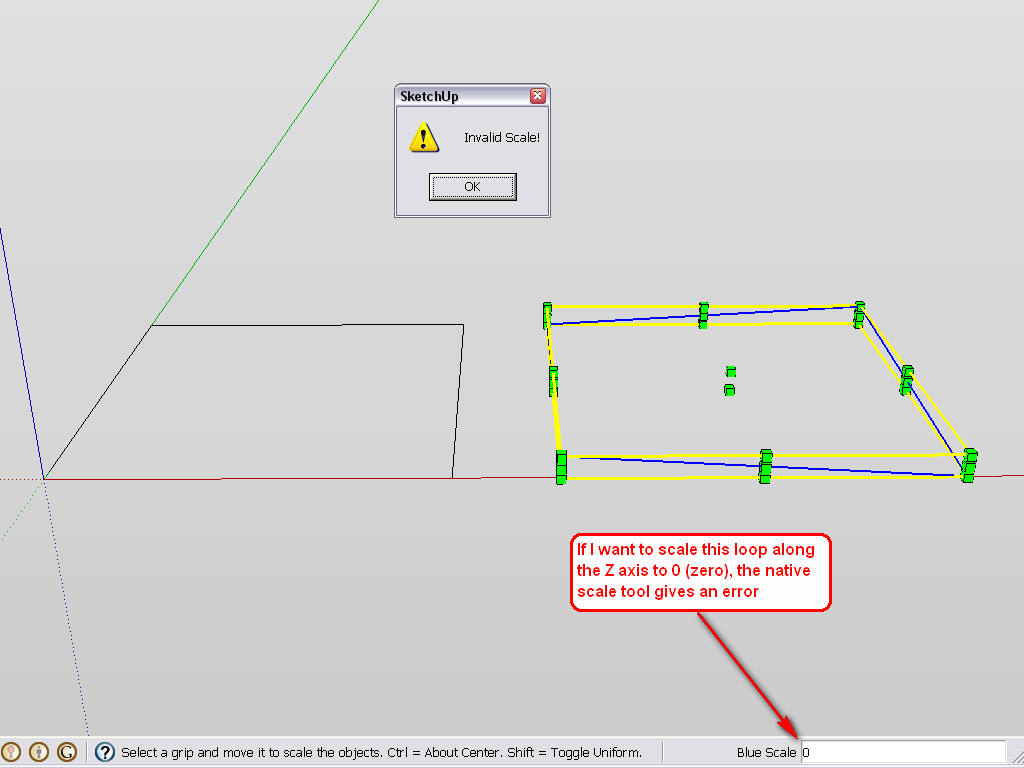
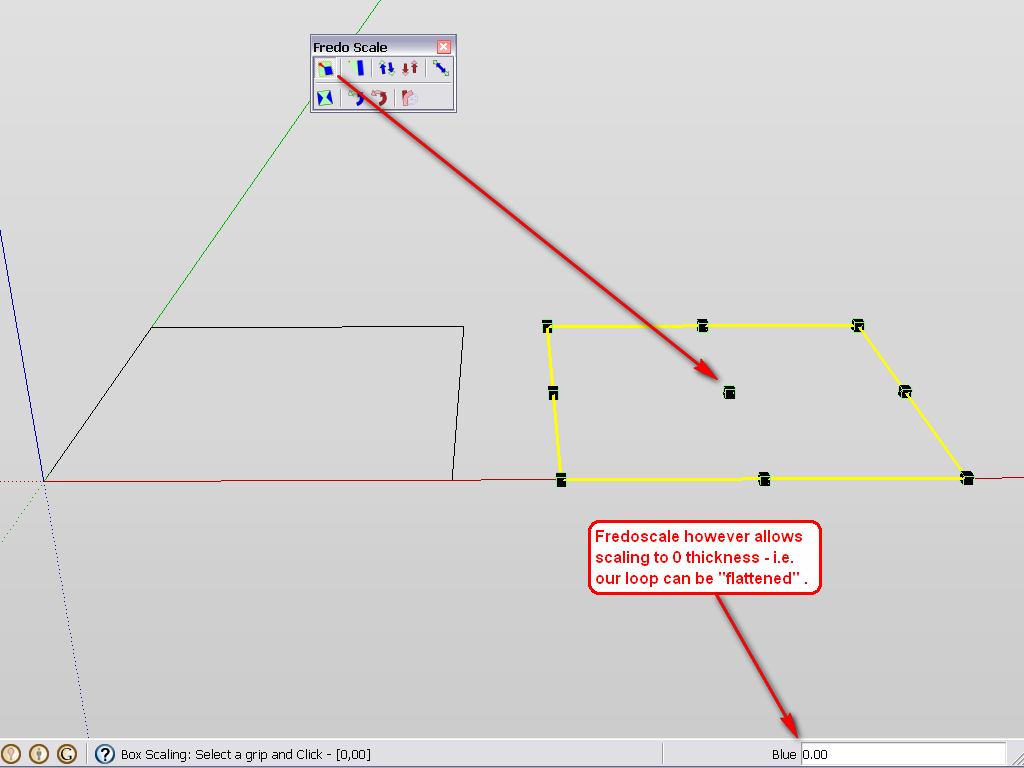
                                      you forgot freedo scale. scale to 0 in the z axis to make edges coplanar πŸ˜‰

                                      I know this is way behind the curve, but could someone put this into english for us nubs?

                                      1 Reply Last reply
                                      Reply Quote 0
                                      • GaieusG
                                        Gaieus
                                        last edited by

                                        Fredo scale is a plugin (a very complex and powerful one actually) that takes a lot of SketchUp's native tools to a next level.

                                        I have been reading (and approving) your posts this morning as I got up and suggest to "learn how to walk before you start running" though but of course, learning how to install and use plugins should also be in your "curriculum".

                                        In short, here is Fredo scale: http://forums.sketchucation.com/viewtopic.php?t=17948

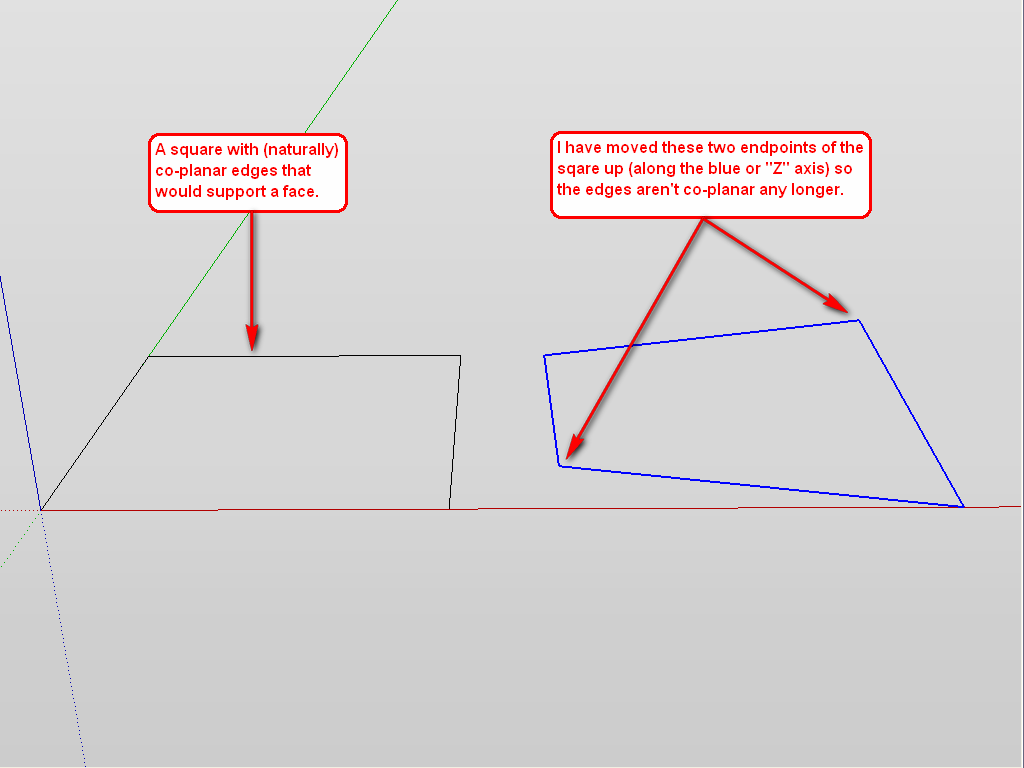
                                        And what xrok meant here is that you can scale any loop of edges that is not co-planar to "Zero" which makes it co-planar then.

                                        Here are some screenshots.

                                        coplanar-1.png


                                        coplanar-2.png


                                        coplanar-3.png

                                        Gai...

                                        1 Reply Last reply
                                        Reply Quote 0
                                        • mitcorbM
                                          mitcorb
                                          last edited by

                                          And this is a DUH moment for me regarding the scale to zero trick.

                                          I take the slow, deliberate approach in my aimless wandering.

                                          1 Reply Last reply
                                          Reply Quote 0
                                          • GaieusG
                                            Gaieus
                                            last edited by

                                            It was for me, too. Just checked it out after the question made me curious. πŸ˜‰

                                            Gai...

                                            1 Reply Last reply
                                            Reply Quote 0

                                            Hello! It looks like you're interested in this conversation, but you don't have an account yet.

                                            Getting fed up of having to scroll through the same posts each visit? When you register for an account, you'll always come back to exactly where you were before, and choose to be notified of new replies (either via email, or push notification). You'll also be able to save bookmarks and upvote posts to show your appreciation to other community members.

                                            With your input, this post could be even better πŸ’—

                                            Register Login
                                            • 1
                                            • 2
                                            • 1 / 2
                                            • First post
                                              Last post
                                            Buy SketchPlus
                                            Buy SUbD
                                            Buy WrapR
                                            Buy eBook
                                            Buy Modelur
                                            Buy Vertex Tools
                                            Buy SketchCuisine
                                            Buy FormFonts

                                            Advertisement