Texture tweaking
-
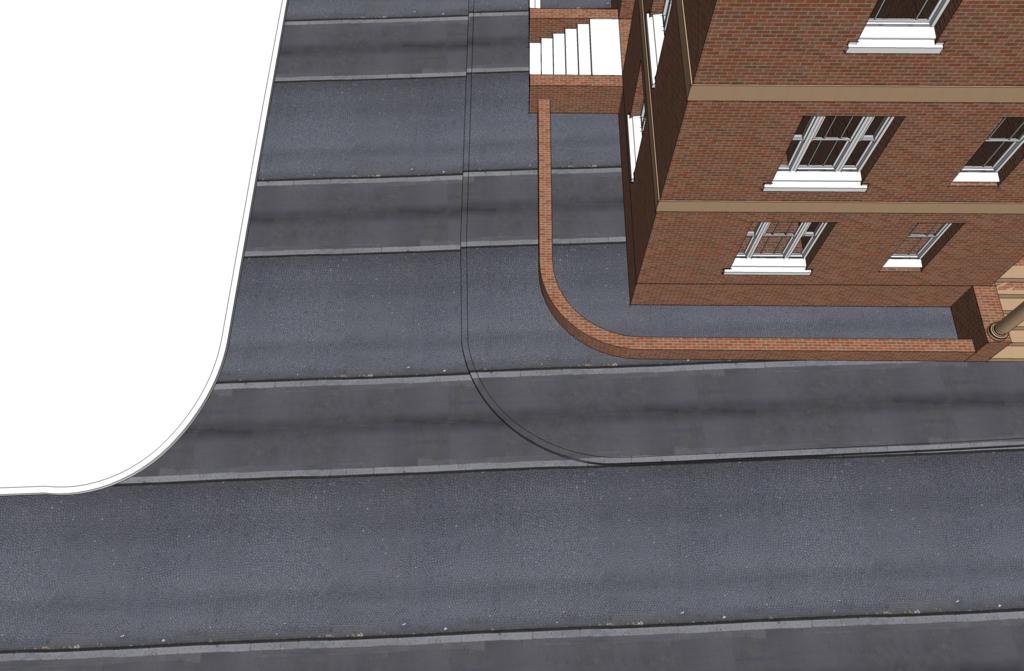
Okay guys, here's a tricky one for you. I have a street scene where my road turns a corner and I have an image of a road which I'm using as the texture. Now my texture only shows the road going in a straight line, is there any way I can tweak the texture so that it follows the path of the road and pavement?
-
Hi Kevin,
Problem is that they are one single face and a texture can only be positioned one way on a face. You should at lest divide the streets at the junction and rotate the texture on the upper road. This would still leave an ugly"seam" where the two textures meet which you could only avoid by further dividing the area and positioning the texture maybe with Thom's new "UV Toolkit" plugin
-
personally id spend a bit of time making a generic road texture and then a separate texture for the pavement. then you dont have to mess around with bending the texture and things.
-
Kev
There is always the tried and tested Photoshop method, extract an above view of only the road, take into PS and paint your road complete with lines and all then save as a texture and apply to road.


Hello! It looks like you're interested in this conversation, but you don't have an account yet.
Getting fed up of having to scroll through the same posts each visit? When you register for an account, you'll always come back to exactly where you were before, and choose to be notified of new replies (either via email, or push notification). You'll also be able to save bookmarks and upvote posts to show your appreciation to other community members.
With your input, this post could be even better 💗
Register Login


Advertisement