[Plugin] [CityGen] - Core [WIP] (0.1.3a) — 19 September 2009
-
Crazy, I had no idea there were so many options! I really appreciate you guys with experience helping point us in the right directions. I'll dig around the ones you have listed and see if I come to any conclusions (not likely
 )
)Chris
-
@thomthom said:
Are any of these free services?
If you decide to go with Mercurial, bitbucket free version offers 150Mb of space. As mentioned, github is free for open source projects and it offers 300Mb of space. You can use Hg-Git plugin to use Mercurial for version control. I never tried it, though. Maybe the Git itself is good choice (the man behind it is Linus Torvalds...)?
Or you can go free with Google code (it uses both Subversion - you can use tortoise if you want GUI frontend and Mercurial for version control), or Sourceforge or something similar...
-
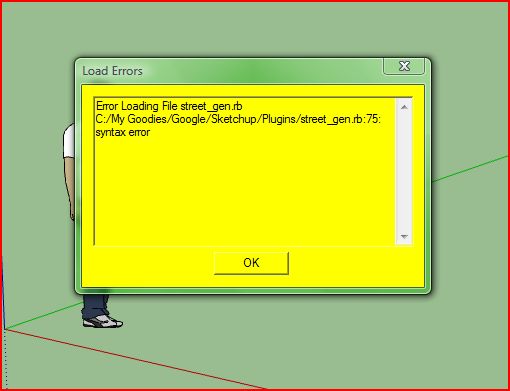
Is there a way to fix this error?
@unknownuser said:
@thomthom said:
Close, but still not 100% the correct thread. This is the Core thread. Not the Street Generator.

(I had a feeling making all there threads would be confusing. But how would you avoid confusion of the discussion on all the modules where in one thread? Someone got a suggestion to how we can do this?)
(I'll post the answer in the Street Generator thread sepo.
)I am affraid that forum is not the best option to collaborate on project like this... at least not in the long run. I do not want to turn you away from SketchUcation forum, which is great to discuss things, yet it does not provide (nor does any other forum) things like version control, task tracking, ... which you will definitely want. Maybe you shuould consider something like GitHub, which seems to be very popular choice for OS projects these days? It can make collaboration on project like CityGen much more manageable and easy...
-
I think that error was already reported and fixed. Try re-downloading and installing it. Let me know if that does not work,
Chris
-
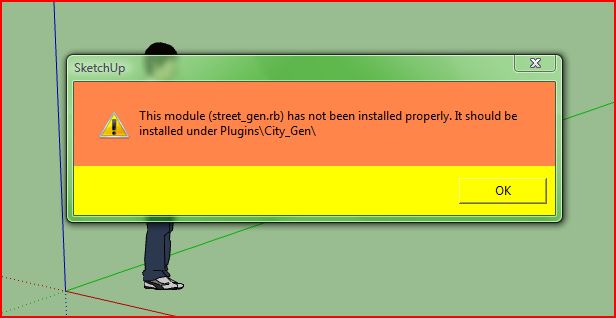
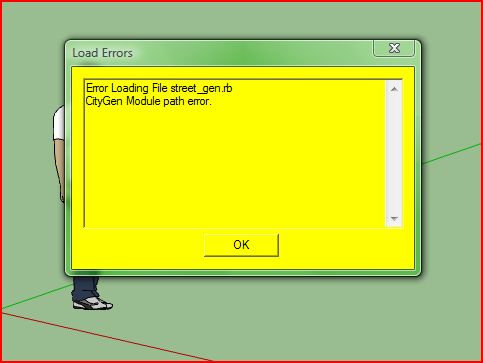
I Tried re-downloading and installing it. I got the following errors:
@chris fullmer said:
I think that error was already reported and fixed. Try re-downloading and installing it. Let me know if that does not work,
Chris
-
Did you place it in the correct folder? It's going into the "Plugins\City_Gen" folder, not "Plugins".
-
So now its letting you know that you've got it installed in the wrong spot.
put the city_gen.rb file in the plugins folder, then there should be a folder called City_Gen and the street file should go in there.
This is project is in the VERY easrly development phases, so its buggy and not well organized. And its only going to get worse as we keep adding to it. Just a warning.
Chris
-
Yes..
@thomthom said:
Did you place it in the correct folder? It's going into the "Plugins\City_Gen" folder, not "Plugins".
-
And there isn't a copy left in the plugins folder?
Is the Core file also updated?btw: are you on a mac?
-
ok great , idea
i have to iterrest to help for project but iam not coder
i propose my help for test your module and make feedback
best regard
philippe BEAU
-
I have an HP with Microsoft Windows Vista Home Premium 64-bit.
I finally figured it out, took a while. But, finally got it to work when putting the files in the correct place. I must of had it in reversed. Is this normal, I applied the street generator to the lines, I noticed that it left behind hidden geometry on each corner to where it bends, is that normal? I was checking. Thanks.
@thomthom said:
And there isn't a copy left in the plugins folder?
Is the Core file also updated?btw: are you on a mac?
-
@mpowell1234567890 said:
I noticed that it left behind hidden geometry on each corner to where it bends, is that normal? I was checking. Thanks.
Yes. That's currently by design. it generates a road segment per edge. So if have two connected edges. and run the Make Street command on each of them separately, it'll still work.
-
Cool. Thanks.

@thomthom said:
@mpowell1234567890 said:
I noticed that it left behind hidden geometry on each corner to where it bends, is that normal? I was checking. Thanks.
Yes. That's currently by design. it generates a road segment per edge. So if have two connected edges. and run the Make Street command on each of them separately, it'll still work.
-
Hi Thomthom! Very powerfull tool indeed- I started to use it for handrailings and curtain walls

2 things:
1/ Could your baby keep last entered values (even more: to remember after the file is closed)?
2/ Are st.Andrew crosses unavoidable?
P.S. 2 threads about the same plug-in (with inner interchangeable links) is extremly confusing thing
-
@rv1974 said:
1/ Could your baby keep last entered values (even more: to remember after the file is closed)?
Yes. That's coming.
@rv1974 said:
2/ Are st.Andrew crosses unavoidable?
@rv1974 said:
P.S. 2 threads about the same plug-in (with inner interchangeable links) is extremly confusing thing
It is not the same plugin. CityGen is a collaboration project. Remus and Chris is working on modules to create buildings. I'm working on the module to create streets. All these modules need this 'core' file to load.
So actually, anything that relates to the street generator, should be posted in that thread.
This thread is intended for the core file.Since this is a Work In Progress, we're in the very early alpha stages - testing ideas, things will be a wee bit messy. Once things start shaping up, we'll be able to organize these threads better and make packages that include all the modules for easier installation. So until this project reaches that stage, things will be in flux. And there will be things missing. It's probably worth skimming through the pages of replies to get an overview.
-
I meant diagonal lines on crossroads. St. Andrew was crucified on X shaped cross. Now it's on the scottish and russian navy flags for example.
-
I had been thinking of a cleanup option. But I'll have to see how this fit in with the rest of the modules. We might end up needing them lines for further processing.
-
Nice plugin, Thanks!
-
Can we make the Core and modules sticky so they always have their fixed position at the top? Preferable with the Core at the very top.
-
Done, but i think the order depends on what has the most recent posts, so can't help there.


Hello! It looks like you're interested in this conversation, but you don't have an account yet.
Getting fed up of having to scroll through the same posts each visit? When you register for an account, you'll always come back to exactly where you were before, and choose to be notified of new replies (either via email, or push notification). You'll also be able to save bookmarks and upvote posts to show your appreciation to other community members.
With your input, this post could be even better 💗
Register Login


Advertisement