Help Me please - my sketch up is on hold
-
Hi
I am using sketch up 7 and it has been running o.k until now !
as you can see from the picture it sort of cuts into walls and I dont know if its something I have done or a bug ?
when I get close to the object I wont to add detail to it just disapeirs and shows me what is behind if you know what I mean!Many thanks
Zumo.
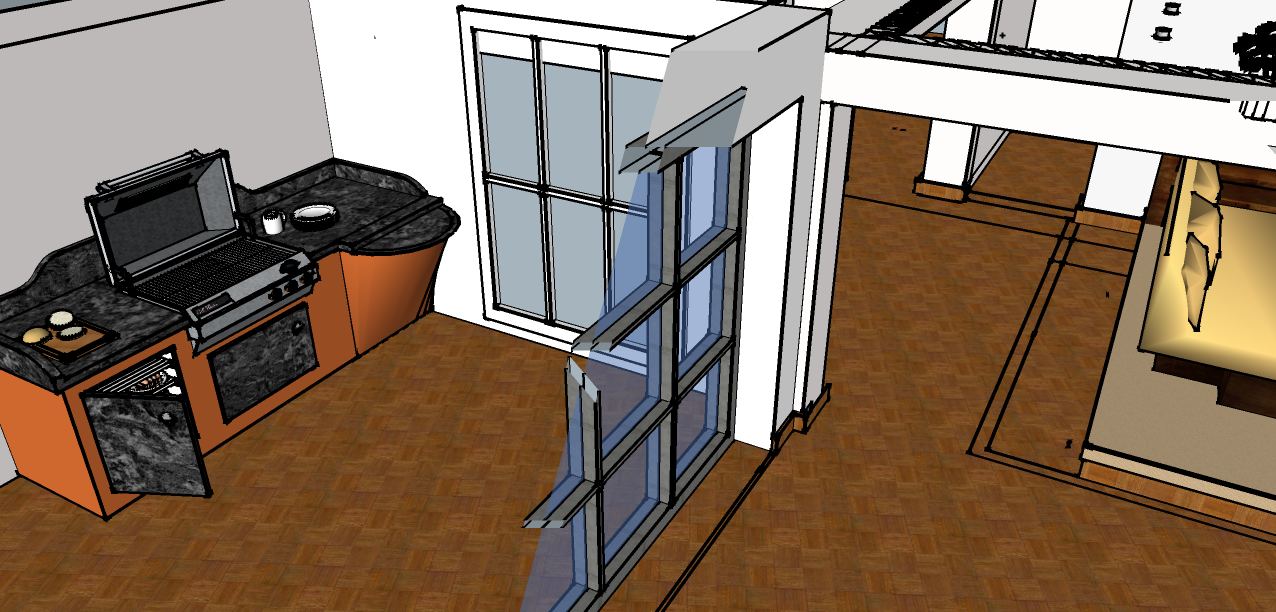
-
I'm guessing that your model is located far away from the origin. Or that you have some geometry very far of. SU doesn't deal with very large coordinates very well. You see this often if you for instance import a DWG of some plans which are located in real world coordinates. Moving the model closer to the origin should fix it.
-
i also get this sometimes even though it is at the origin, restarting it usually fixes it...
-
ounce again sketchucation has proven it is better to work together than alone!
many thanks for your kind advise!
zumo
-
i like the look of your house there anyway looking forward to seeing a few renders....
-
That's the "classical" clipping issue. Indeed, the model (physical) extent, like being far away from the origin is one of the main culprits - but there can be other reasons as well. Check out the link and possible troubleshooting/workarounds for the future.


Hello! It looks like you're interested in this conversation, but you don't have an account yet.
Getting fed up of having to scroll through the same posts each visit? When you register for an account, you'll always come back to exactly where you were before, and choose to be notified of new replies (either via email, or push notification). You'll also be able to save bookmarks and upvote posts to show your appreciation to other community members.
With your input, this post could be even better 💗
Register Login


Advertisement