[REQ]Grow by TIG
-
Does it possible to add a Rotation for the Selection / Center point? A "rose-window"

Here rotation is only Size Move Rotation object/ own axes object /Z axe
Whish


-
That might be complicated. I haven't thought about "Grow" for some years ! I do recall quite recently that Chris Fullmer made a Ruby to rotate selected components about their insertion points [ http://www.sketchucation.com/forums/scf/viewtopic.php?p=139946#p139946 ]. Perhaps you could use that after "Growing" these Components ?
Let me know what happens...
[Ce pourrait être compliqué. Je n'ai pas pensé à "Grow" pendant des années! Je me rappelle tout à fait récemment que Chris Fullmer a fait un Ruby pour tourner les composants choisis au sujet de leurs points d'insertion. Peut-être que vous pourriez l'utiliser après "Growing" ces composants?
Permettez-moi de savoir ce qui se passe...
Traduit par "Babel Fish" + Firefox ...] -
And I see You have a new line to components !

Maybe this last one can be useful too
-
Problem of the Chris plug is that the scale & rotation is randomized and not growing one by one!
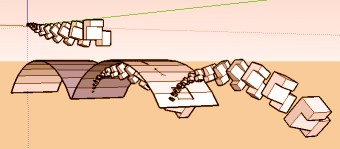
I have thought to use your "Grow" as a "line of objects" rotation & scaled then drop this line with "Smart Drop" plug on a cylinder for obtain an half circular line of objects
Its' funny but some complicated A simple rotation / Center Point will be more easy and more regular for obtain a circle!
-
just fun with grow by Tig
Then bend on the left with Free scale2 by Fredo6



Hello! It looks like you're interested in this conversation, but you don't have an account yet.
Getting fed up of having to scroll through the same posts each visit? When you register for an account, you'll always come back to exactly where you were before, and choose to be notified of new replies (either via email, or push notification). You'll also be able to save bookmarks and upvote posts to show your appreciation to other community members.
With your input, this post could be even better 💗
Register Login


Advertisement