sketchucation logo sketchucation
    • Login
    Oops, your profile's looking a bit empty! To help us tailor your experience, please fill in key details like your SketchUp version, skill level, operating system, and more. Update and save your info on your profile page today!
    🚨 Skimp | 25% Off until March 30 Buy Now

    Transferring from SketchUp 7 Pro to Photoshop CS3 Extended

    Scheduled Pinned Locked Moved Newbie Forum
    sketchup
    12 Posts 3 Posters 954 Views 3 Watching
    Loading More Posts
    • Oldest to Newest
    • Newest to Oldest
    • Most Votes
    Reply
    • Reply as topic
    Log in to reply
    This topic has been deleted. Only users with topic management privileges can see it.
    • L Offline
      ltooker
      last edited by

      I am in the process of creating a molding book. Looking for tips and advice... Having trouble transferring files from Sketchup to Photoshop. Or maybe a different program should be used to create this catalog?

      1 Reply Last reply Reply Quote 0
      • R Offline
        remus
        last edited by

        I assume you want to take pictures of your sketchup model and take them in to photoshop...if so, just go file->export->2d graphic to export a picture. You can then open this in photoshop and do whatever you need to.

        If you want to preserve the vector information, would would be better of using illustrator as it is designed to handle vectors. You could then go file->export->2d graphic, and choose the .dwg/.dxf format, as they preserve vector information. You could then open this in illustrator and manipulate them to your hearts content.

        http://remusrendering.wordpress.com/

        1 Reply Last reply Reply Quote 0
        • L Offline
          ltooker
          last edited by

          I imported the image into Photoshop but a piece of the image is missing. See attached.

          1 Reply Last reply Reply Quote 0
          • GaieusG Offline
            Gaieus
            last edited by

            @ltooker said:

            ...See attached.

            Ehm... Where is that attachment?

            Gai...

            1 Reply Last reply Reply Quote 0
            • L Offline
              ltooker
              last edited by

              The attachment was a eps file, didn't realize that couldn't be uploaded? Jpg is attached. I think?
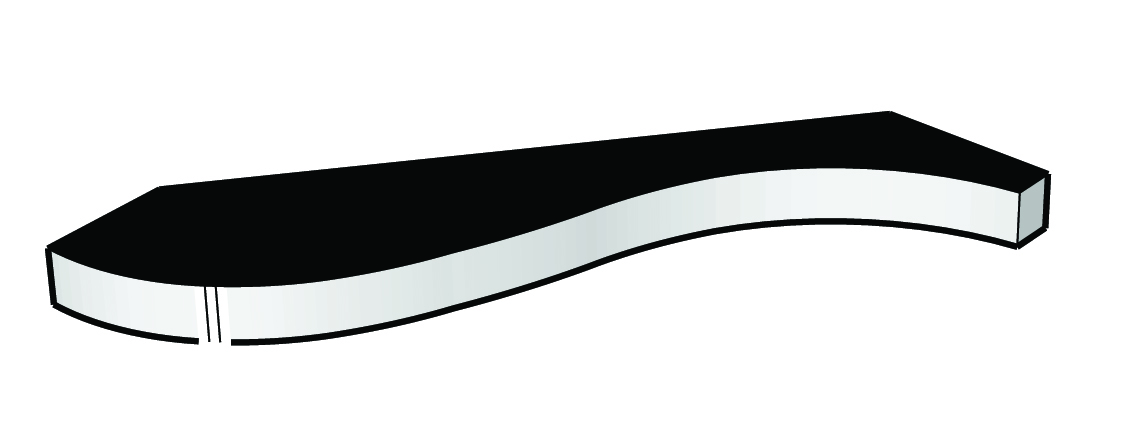
              M653 Missing Piece.jpg


              M653 Missing Piece.jpg

              1 Reply Last reply Reply Quote 0
              • GaieusG Offline
                Gaieus
                last edited by

                In SU, are you using any of those "sketchy" styles?

                Gai...

                1 Reply Last reply Reply Quote 0
                • L Offline
                  ltooker
                  last edited by

                  No, I am importing a dwg file from auto cad then.

                  1 Reply Last reply Reply Quote 0
                  • GaieusG Offline
                    Gaieus
                    last edited by

                    And what are those extremely thick lines? Can you share the skp file?

                    Gai...

                    1 Reply Last reply Reply Quote 0
                    • L Offline
                      ltooker
                      last edited by

                      SketchUp file attached. I think those lines are kinda think too. Maybe you can advise me on how I can thin them out?


                      M619.skp

                      1 Reply Last reply Reply Quote 0
                      • GaieusG Offline
                        Gaieus
                        last edited by

                        Hm... I don't have any problems like that with it. I turned off profiles however. But the whole shape looks different from what you posted!
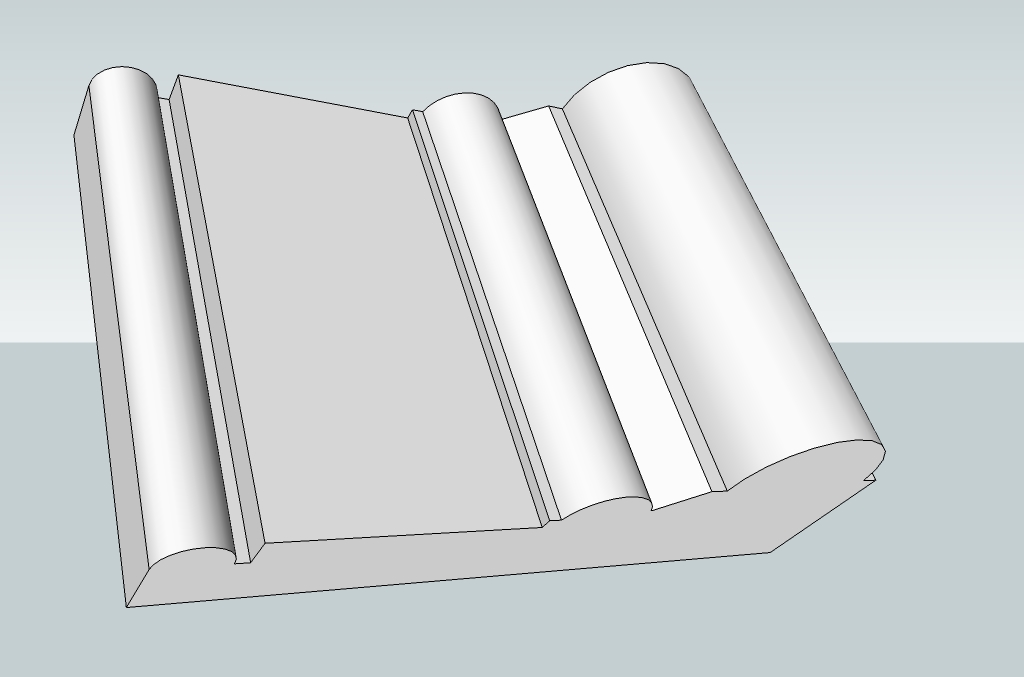

                        M619.jpg

                        Gai...

                        1 Reply Last reply Reply Quote 0
                        • L Offline
                          ltooker
                          last edited by

                          That looks perfect! How do you turn off profiles? Did you do anything else that I should do to make my file look like yours?

                          1 Reply Last reply Reply Quote 0
                          • GaieusG Offline
                            Gaieus
                            last edited by

                            It's at Window (at least on the PC) > Styles > In model (the little house icon) > Edit > Edge settings. But profiles are just set o 3 pixels so it shouldn't explain that huge difference!

                            Gai...

                            1 Reply Last reply Reply Quote 0

                            Hello! It looks like you're interested in this conversation, but you don't have an account yet.

                            Getting fed up of having to scroll through the same posts each visit? When you register for an account, you'll always come back to exactly where you were before, and choose to be notified of new replies (either via email, or push notification). You'll also be able to save bookmarks and upvote posts to show your appreciation to other community members.

                            With your input, this post could be even better πŸ’—

                            Register Login
                            • 1 / 1
                            • First post
                              Last post
                            Buy SketchPlus
                            Buy SUbD
                            Buy WrapR
                            Buy eBook
                            Buy Modelur
                            Buy Vertex Tools
                            Buy SketchCuisine
                            Buy FormFonts

                            Advertisement