How to make a window in thick walls?
-
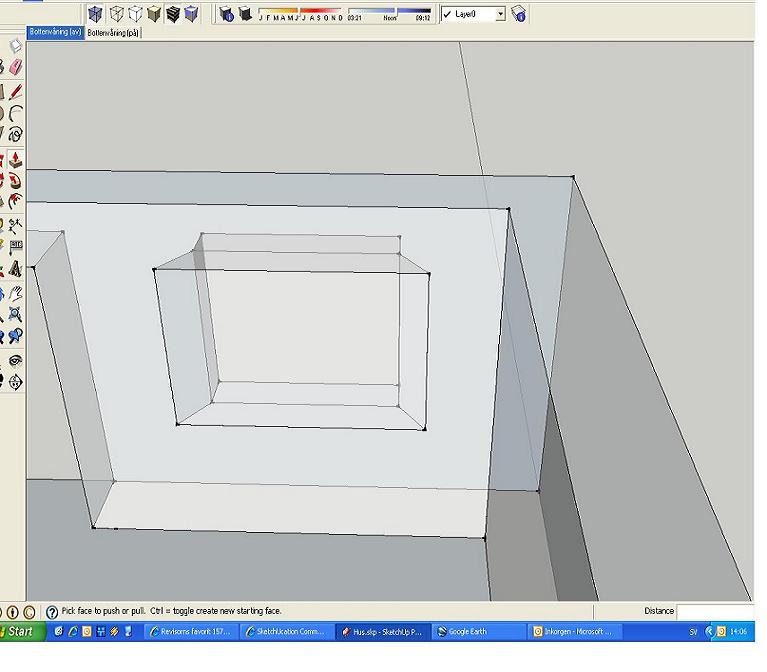
I'm trying to SkechUp my houseplan(not built yet). I'm planing to build a passive house with extra thick walls. The walls are about 50 cm so we plan to make an extra angel to get more of the sunlight. I've attached a .jpg to explain. I know that push/pull can't be used so...how?
-
Hi WB and welcome!
Could you be a bit more specific about those angels (probably angles)? Until then, here is a small tutorial about how to use two componants to cut holes on both faces of a thick wall:
http://www.sketchucation.com/forums/scf/viewtopic.php?f=18&t=744&p=4261#p4261
I will also move this topic to the SketchUp forum because it ha nothing to do with LayOut, which is a separate application.
-
Aha, now I can see your image (I couldn't when you posted first).
So what you can do is:
- start the Push/Pull operation from outside but P/P only to the (say) middle of the wall thickness.
- Hit the Ctrl key and now push the rest. This will leave a face behind in the midst of the wall thickness.
- If the face inside was deleted by the P/P tool, redraw an edge of it to heal the hole.
- select the face inside and scale it proportionally about the center (using the Shift+Ctrl keys while scaling and grabbing a side grip).
This works fine if your window is a square (as I can see it MAY be one). - If not, you will have use the Offset tool to offset your window equally around the current one and while scaling WITHOUT the Shift+Ctrl combination with the side grips, you can easil snap to them.
In this cae you could even use the move tool but the Scale tool is easier.
I think that's all
-
Worked just fine! And of course..angle

-
Okay, cool. I wasn't sure I was explaining it clearly enough.

Hello! It looks like you're interested in this conversation, but you don't have an account yet.
Getting fed up of having to scroll through the same posts each visit? When you register for an account, you'll always come back to exactly where you were before, and choose to be notified of new replies (either via email, or push notification). You'll also be able to save bookmarks and upvote posts to show your appreciation to other community members.
With your input, this post could be even better 💗
Register Login


Advertisement