sketchucation logo sketchucation
    • Login
    Oops, your profile's looking a bit empty! To help us tailor your experience, please fill in key details like your SketchUp version, skill level, operating system, and more. Update and save your info on your profile page today!
    ⚠️ Update | Sketchucation Tools 5.0.8 released with licensing improvements and bugfixes Download

    Preferences>Image Editor for MAC

    Scheduled Pinned Locked Moved SketchUp Discussions
    sketchup
    27 Posts 12 Posters 4.3k Views 12 Watching
    Loading More Posts
    • Oldest to Newest
    • Newest to Oldest
    • Most Votes
    Reply
    • Reply as topic
    Log in to reply
    This topic has been deleted. Only users with topic management privileges can see it.
    • GaieusG
      Gaieus
      last edited by

      What is Paint? πŸ˜’

      Joking aside, Susan, I would really assume that if one is already at a stage using an app like SU, he/she would already be familiar with some more advanced image editor than something like Paint in Windows so they would most probably have at least something like Gimp.

      Certainly this is not certain but I think there is nop problem in at least suggesting something more advanced.

      Gai...

      1 Reply Last reply
      Reply Quote 0
      • R
        remus
        last edited by

        microsoft paint, the staple crappy drawing program for windows. go start->accesories->paint to see for yourself. And then have a look at this: http://uk.youtube.com/watch?v=uk2sPl_Z7ZU

        http://remusrendering.wordpress.com/

        1 Reply Last reply
        Reply Quote 0
        • GaieusG
          Gaieus
          last edited by

          Remus, read between the lines (or the lines: "Joking aside...")
          πŸ˜‰

          Obviously Paint is the first application in Windows that you change to something else as a default image editor.

          Gai...

          1 Reply Last reply
          Reply Quote 0
          • R
            remus
            last edited by

            I must be going blind!

            http://remusrendering.wordpress.com/

            1 Reply Last reply
            Reply Quote 0
            • S
              sorgesu
              last edited by

              Hi Gai, this is for a template that can be used uniiversally without the possiblity of an error. It is to demonstrate, in the middle of some texture tweaking exercise that SketchUp has this wonderful internal link. Only once I demo how it is working will I then show them where to set up the link.
              So I can't assume that they have Gimp. I don't. I have Photoshop. What if my MAC user has PHotoshop?

              We won't be doing anything fancy in the paint program anyway. It is mostly a demonstration of possibilities. See?

              Susan Sorger
              Former Seller Hand Rendered Entourage
              Former Canadian Authorized Training Centre, SketchUp

              1 Reply Last reply
              Reply Quote 0
              • GaieusG
                Gaieus
                last edited by

                No, I meant Gimp just a an example it can be PS or Corel PhotoPaint or anything.

                But wait a minute; Preferences (unlike Model info settings or Styles) won't inherit in Templates (or again, am I missing something here?).

                Gai...

                1 Reply Last reply
                Reply Quote 0
                • S
                  sorgesu
                  last edited by

                  no, you are right Gai. I mispoke> I needed that information to provide to people in the class manual and in the class, in case they do not have gimp or something of that sort on the laptop they bring.
                  In the classes I teach the computer labs all have Windows and those definitely will not have anything extra loaded so I will need to use paint. Die hard MAC users bring a laptop to work on. I can't tell you how often they bring someone else's machine or one that isn't really powerful enough becuase they don't usually use it for SketchUp. So I need to have that generic instruction.

                  So remus woult the path to iphoto be /Applicatons/iphoto.app ????

                  Susan Sorger
                  Former Seller Hand Rendered Entourage
                  Former Canadian Authorized Training Centre, SketchUp

                  1 Reply Last reply
                  Reply Quote 0
                  • L
                    larinUP1
                    last edited by

                    Not sure iphoto will meet your needs. There is a Shareware program, GraphicConverter, that will work. However, I found it to have a steep learning curve. The program can be downloaded from Apple's website or lemkesoftDOT.com.

                    For info on Gimp> wwwDOT.gimp.org/downloads/

                    Remove DOT from l

                    Have you asked students using a Mac what graphics program they use?

                    Larry

                    1 Reply Last reply
                    Reply Quote 0
                    • S
                      sorgesu
                      last edited by

                      Sorry,again, the question is not what they use. The question is what comes native with MAC. We won't really be doing anything much. Painting over something and that's it. It is just a demo. 2 seconds no more. So I just need the path. I'll ask some MAC friends somewhere.

                      Susan Sorger
                      Former Seller Hand Rendered Entourage
                      Former Canadian Authorized Training Centre, SketchUp

                      1 Reply Last reply
                      Reply Quote 0
                      • D
                        Double Espresso
                        last edited by

                        @sorgesu said:

                        Sorry,again, the question is not what they use. The question is what comes native with MAC. We won't really be doing anything much. Painting over something and that's it. It is just a demo. 2 seconds no more. So I just need the path. I'll ask some MAC friends somewhere.

                        Are you talking about exporting a 2D into something like PhotoShop? Mac's don't come with a built in Image Editor and I can't imagine iPhoto being of any benefit. Graphic Converter is not a freebie.
                        DE

                        1 Reply Last reply
                        Reply Quote 0
                        • S
                          sorgesu
                          last edited by

                          There is now a direct function from within SketchUp that allows you to select an applied texture on a face and that snippet gets transferred to the assigned image editor. ( its a right click for the textures context menu and it is a sub menu item under that. When you finish with it in your image editor it gets returned to the same spot in SketchUp and you can actually merge it with the rest of the texture.

                          So MAC people don't get the equivalent of "paint" you say? Really?

                          Susan Sorger
                          Former Seller Hand Rendered Entourage
                          Former Canadian Authorized Training Centre, SketchUp

                          1 Reply Last reply
                          Reply Quote 0
                          • K
                            Kazai
                            last edited by

                            Hi,

                            Not sure about Iphoto will do the task. If you want to see if there's any Mac freewares that can do image editings, you can try looking up the Pure Mac web site ( http://www.pure-mac.com/ ) and go to Graphics under Multimedia. Mac version's GIMP is listed there. Also, you can try the free version of ArtRage at http://www.ambientdesign.com/artrage.html.

                            Hope this will help.

                            vince

                            1 Reply Last reply
                            Reply Quote 0
                            • pbacotP
                              pbacot
                              last edited by

                              Poor Susan, no one quite understands. To confirm.

                              Nope, iPhoto is not an image editor of the sort one would use.

                              Nope, Apple does not ship a default pixel editing tool with the OS.

                              (From what I hear, Paint is not that useful either? I know you just need it for an example.)

                              MacOSX MojaveSketchUp Pro v19 Twilight v2 Thea v3 PowerCADD

                              1 Reply Last reply
                              Reply Quote 0
                              • S
                                sorgesu
                                last edited by

                                Thank you. That is a direct answer. Everyone, you were all so very kind to answer and I really do apperciate it that you all tried so hard to help me. But yes, you weren't quite understanding.
                                No paint doesn't do anything much and we'll problably do no more than some silly scribble on the image.
                                I suppose even iphoto would do even if it does nothing just to show that we can exit and re-enter.

                                If you could just confirm the path????? Thanks much.

                                Susan Sorger
                                Former Seller Hand Rendered Entourage
                                Former Canadian Authorized Training Centre, SketchUp

                                1 Reply Last reply
                                Reply Quote 0
                                • pbacotP
                                  pbacot
                                  last edited by

                                  /Applications/iPhoto

                                  MacOSX MojaveSketchUp Pro v19 Twilight v2 Thea v3 PowerCADD

                                  1 Reply Last reply
                                  Reply Quote 0
                                  • O
                                    otb designworks
                                    last edited by

                                    Susan, the path to iphoto is:

                                    Macintosh HD/Applications/iphoto

                                    As was mentioned before, though, iphoto is basically useless and you may be doing your students a disservice in steering them that direction. Perhaps better to suggest GraphicConverter, Photoshop, Gimp, etc.

                                    The path to those would be identical to the one I have above, though with some (photoshop, for sure) has an additional folder you need to bore through to get to the actual program.

                                    Macintosh HD/Applications/Adobe Photoshop CS3/Adobe Photoshop CS3 for example

                                    Cheers, Chuck

                                    OTB Designworks is on Youtube

                                    6 core nMP, 32 gig RAM, (2) D700 GPU's, dual monitors

                                    1 Reply Last reply
                                    Reply Quote 0
                                    • Chris FullmerC
                                      Chris Fullmer
                                      last edited by

                                      This really is a remarkably painful thread Susan..... Good luck,

                                      Chris

                                      Lately you've been tan, suspicious for the winter.
                                      All my Plugins I've written

                                      1 Reply Last reply
                                      Reply Quote 0
                                      • EdsonE
                                        Edson
                                        last edited by

                                        iphoto is more of a picture organizer. macs do not ship with any app for photo editing.

                                        edson mahfuz, architect| porto alegre β€’ brasil
                                        http://www.mahfuz.arq.br

                                        1 Reply Last reply
                                        Reply Quote 0
                                        • S
                                          sorgesu
                                          last edited by

                                          Funny, you guys are so good at reading and understanding very complicated instructions on using software applications.

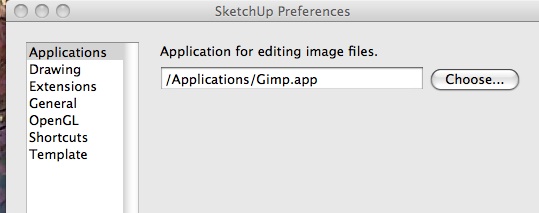
                                          If I could ask just one more thing, and please if you don't mind, no more kind suggestions of any other program to use, Iphoto will do for the demonstration: wouldn't the correct path end with iphoto.app as in the visual example from sketchUP way above with gimp which is gimp.app?

                                          Thanks much. Thanks Chris.

                                          Susan Sorger
                                          Former Seller Hand Rendered Entourage
                                          Former Canadian Authorized Training Centre, SketchUp

                                          1 Reply Last reply
                                          Reply Quote 0
                                          • O
                                            otb designworks
                                            last edited by

                                            yes.

                                            /applications/iphoto.app

                                            Cheers, Chuck

                                            OTB Designworks is on Youtube

                                            6 core nMP, 32 gig RAM, (2) D700 GPU's, dual monitors

                                            1 Reply Last reply
                                            Reply Quote 0

                                            Hello! It looks like you're interested in this conversation, but you don't have an account yet.

                                            Getting fed up of having to scroll through the same posts each visit? When you register for an account, you'll always come back to exactly where you were before, and choose to be notified of new replies (either via email, or push notification). You'll also be able to save bookmarks and upvote posts to show your appreciation to other community members.

                                            With your input, this post could be even better πŸ’—

                                            Register Login
                                            • 1
                                            • 2
                                            • 1 / 2
                                            • First post
                                              Last post
                                            Buy SketchPlus
                                            Buy SUbD
                                            Buy WrapR
                                            Buy eBook
                                            Buy Modelur
                                            Buy Vertex Tools
                                            Buy SketchCuisine
                                            Buy FormFonts

                                            Advertisement