[Obsolete] Catmull-Rom Spline
-
Edit 19 Oct 08: I released a comprehensive version of BezierSpline,version 1.2, which includes this extension. It is advised to refere to the following post:
http://www.sketchucation.com/forums/scf/viewtopic.php?f=180&t=13563#p100509Here is an extension to the BezierSpline plugin for drawing Catmull-Rom splines (in 3D).
You need to drop the two attached files (BZ__Catmull.rb and BZ_Catmull.png) in the BZ_Dir subfolder.As for Cubic Bezier, this type of curve passes through all the control pointsand a move of a control point will only affect the shape of the curve locallyaround this control point (exactly the portion before and the two after).
Note that it can be 'nicely' closed by a Catmull spline, not by an approximate Bezier curve, as I do for other curves.
All this said, Cubic Bezier and Catmull splines are quite close, though Catmull seems to stay closer to the polygon of control points.
Below is a comparison:
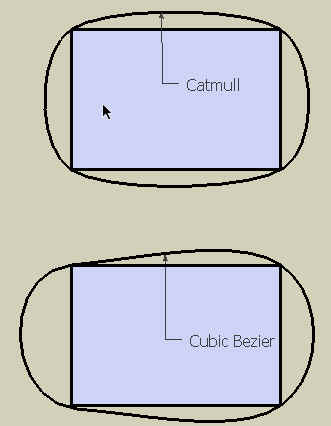
PS: You probably noticed that the icon is mine!
to drop in the BZ_Dir subfolder

-
@unknownuser said:
PS: You probably noticed that the icon is mine!
Not for long, I'm sure

Nice one, thanks again Fredo
-
Thank you Fredo6 !
-
-
Hey ! Great icons ! Thank you CadFather !
There are still 2 icons :
Courbette Polyline divider

-
Thank you

Much appreciated.The surface tools really have become a wonderful toolpack.
-
Thank you, Fredo. And Max, for the icons.
-
@matt666 said:
There are still 2 icons
Thanks for that Matt!! will give it a shot this eve..

PS. it's actually pretty cool, i'll get more thanks than Fredo!

-
thanks, FREDO, FREDO, FREDO!!!
(and thanks CadFather for the icons)
-
@unknownuser said:
The surface tools really have become a wonderful toolpack.
These 2 new tools are surface tools?
-
Bezier toolpack...
-
Thanx Fredo!!!
-
thanks Fredo & Cadfather for icons
-
@plot-paris said:
thanks, FREDO, FREDO, FREDO!!!
(and thanks CadFather for the icons)well, here's the set with courbette - i think BZ_divider was already included (am i wrong?)

Fredo, i tried to add/rename the icons _24 or _16 but the toolbar does not update like TOS.
if it is something you can do in some spare time it would be great (though we can still keep 2 sets one of which we just drop in the BZ folder)here they are:
-
Neat tools bar!










Hello! It looks like you're interested in this conversation, but you don't have an account yet.
Getting fed up of having to scroll through the same posts each visit? When you register for an account, you'll always come back to exactly where you were before, and choose to be notified of new replies (either via email, or push notification). You'll also be able to save bookmarks and upvote posts to show your appreciation to other community members.
With your input, this post could be even better 💗
Register Login


Advertisement