[REQ] Advanced drape tool
-
Hey everyone, I was wondering if anyone of our awesome ruby scripters could make some tool which would work like the drape tool, but on any plane, I mean, doesn't have to drape straight down, but just drapes onto the selected mesh according to the mesh's relative position to it? Maybe use a vector to specify the direction in which to drape.
Here's an illustration of what I mean. Here the circle is draped onto the rectangle.
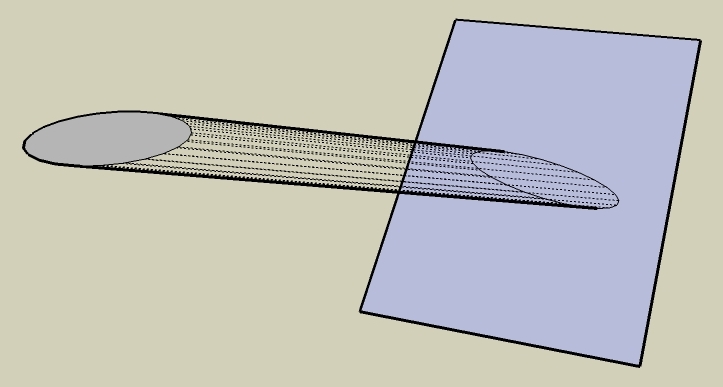
I don't know how you're going to do it in ruby, but here's how I do it in sketchup, it might help: I draw whatever shape I want to drape, then push-pull it along a vector pointing towards and into the mesh on which I want to drape (if it's a closed loop), or project it along a vector (if it's not a closed loop), and then intersect it with the model.
Can that be done in ruby?
Thanks a lot.
-
Hi,
Maybe my projection tools pack could help.
Search for "projection_v6.zip" here:
http://www.crai.archi.fr/RubyLibraryDepot/Ruby/em_edi_page.htm
The circle or any faces/lines/edges set can be draped in any direction, perpendicular to a plane, according to a vector, etc.
Hope this helps, -
Oh, didn't know it could do that. I've downloaded it before but then forgot to try it out. Works great!

Thanks Didier!!
-
Uh Didier, there's a little problem, it only works on a single face or plane, but I want to drape a circle on a mesh, consisting of many faces. To use the ordinary drape tool, I have to position the shape so that it's right under the lines I want to drape, and rotated accordingly. Even after doing all that anyway, the drape tool gives me the fastest bug splat I've ever seen. Sketchup just exits faster than if I hit "close", and doesn't even say that a bug splat has happened (this is just with the current file I'm working on, curiously). I had to do it with the push-pull and intersect way, but I thought that if a better drape tool was available, it would be a breeze.
-
Hi Justry,
What if you project your model onto a single face and drape thatline work onto the mesh?
-
I may have to speed up the delivery of my (future) DrapeOnSurface tool, as this will be doing more or less what Justry is describing: Take a plane collection of segments and faces, and lay it down onto a surface, with choice of orientation (and scaling).
-
Wow!! Thanks Fredo!! It's like you read my mind!!
 I love your plugins man! Waiting for that one, cause the sketchup drape tool is just giving me a headache.
Gaieus, I understand what you mean, but what I want to drape is already line work, it's what I want to drape ontothat's not. I know I can use the drape tool, but that means I'll have to rotate the whole model to do it, and even still I don't know why that particular model keeps giving me a bug splat whenever I use the drape tool. And Didier's projection tools can only drape onto plane faces. So that left me with having to project then intersect, which is a long process and doesn't nearly give as good results as the drape tool.
-
@unknownuser said:
I may have to speed up the delivery of my (future) DrapeOnSurface tool, as this will be doing more or less what Justry is describing: Take a plane collection of segments and faces, and lay it down onto a surface, with choice of orientation (and scaling).
Wow, that's cool

A little question. Will it be able to drape objects as well?
I know that would be similar to SketchyPhysics capability (drop by gravity), but it still would be nice to have seperately, as sketchyphysics is a little complex to use.
It would be cool to have a clean way to create realistic scenes, for instance to fill a bowl with pralines etc... -
Unfortunately, DrapeOnSurface would take a planar drawing and just drape it onto the surface.
To adjust volumes along a shaped surface requires much more work and a very different approach, since basically you would need to deform the whole 3D shape, with changes to the original geometry (just imagine a cube falling in the bowl!)



Hello! It looks like you're interested in this conversation, but you don't have an account yet.
Getting fed up of having to scroll through the same posts each visit? When you register for an account, you'll always come back to exactly where you were before, and choose to be notified of new replies (either via email, or push notification). You'll also be able to save bookmarks and upvote posts to show your appreciation to other community members.
With your input, this post could be even better 💗
Register Login


Advertisement