Line help
-
Sorry if this is in the wrong forum! If there is a tutorial on this, please direct me to it.
So, I just read the "How a Pro Builds a House in Sketchup" tutorials a few days ago, and it has helped a lot! I have a problem that the tutorial doesn't address - adding a roof. I raised my walls and now, it's just a bunch of walls with nothing connecting them. I've tried using the rectangle tool to fill in the spaces, but then on the roof, I see the lines of the walls that have been raised up.
Can someone please explain to me how I can make a flat roof without the lines showing?
-
dimerang,
I don't understand the problem. Could you attach a copy of your model so far or a screen shot that shows the issue.
Tom
-
If you draw a rectangle over the top of the walls you will see the lines of the walls through the face. You need to push/pull and give thickness.
As Tom suggested, if you post an image, or better still upload your .skp, we can give you a better answer and help you more accurately. -
^Thank you! But when I do that, only the faces remain, but the wall thickness disappears? The faces of the inside walls are gone. Am I doing something wrong?
-
Have you grouped your wall prior to copying their top lines? If so, you have to close the group before you paste in place the lines (sorry, I didn't write it - now added to the workflow).
-
Hi dimerang,
I think I know what your problem is. Do this:
- To be safe, go to Camera > Parallel projection (for this first step at least).
- Select all your walls and group them.
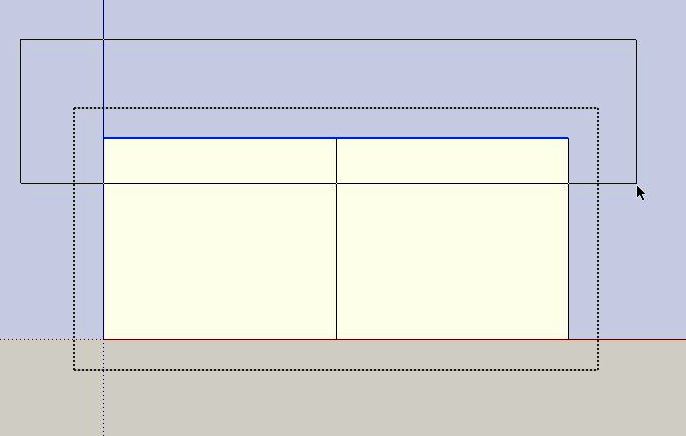
- edit the group (double cluick) and with a left-to-right selection, select the top liners and copy them to the clipboard.
See screenshot here:
- Now close (and hide) the group and go to Edit > Place in place.
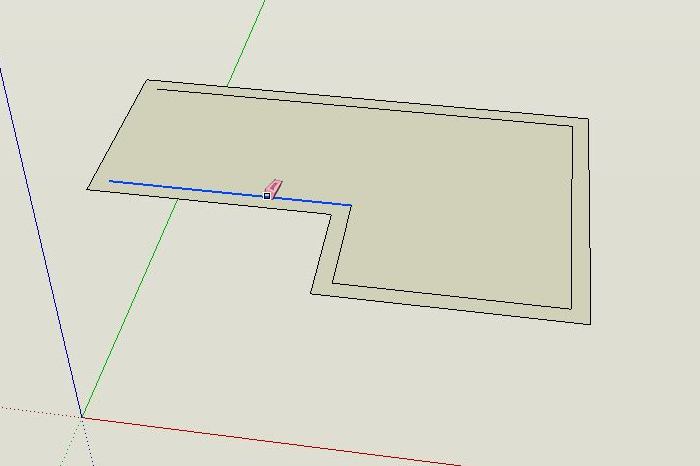
- start deleting the inside lines - the face should remain there
See screenshot here (I went back to perspective projection)
- When done, Push-pull your "ceiling" up to give it a bit of thickness
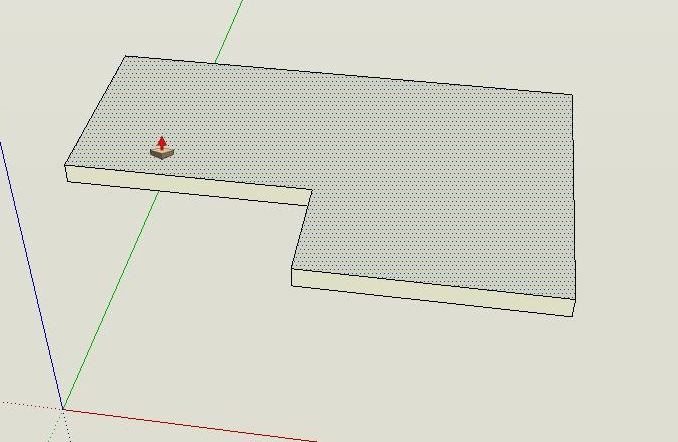
After you are done, Go to Edit > unhide all / last and your walls will reappear. Now go to this tutorial and follow Eric's suggestions how to create a nice looking roof in a couple of minutes.
-
Success! Thanks again


Hello! It looks like you're interested in this conversation, but you don't have an account yet.
Getting fed up of having to scroll through the same posts each visit? When you register for an account, you'll always come back to exactly where you were before, and choose to be notified of new replies (either via email, or push notification). You'll also be able to save bookmarks and upvote posts to show your appreciation to other community members.
With your input, this post could be even better 💗
Register Login


Advertisement