sketchucation logo sketchucation
    • Login
    1. Home
    2. wikii
    3. Posts
    Oops, your profile's looking a bit empty! To help us tailor your experience, please fill in key details like your SketchUp version, skill level, operating system, and more. Update and save your info on your profile page today!
    ⚠️ Important | Libfredo 15.6b introduces important bugfixes for Fredo's Extensions Update
    W
    Offline
    • Profile
    • Following 0
    • Followers 0
    • Topics 33
    • Posts 151
    • Groups 1

    Posts

    Recent Best Controversial
    • RE: [Plugin] SUTool: a new way to manager your RB script

      @fletch said:

      Hi Wikii! This is just what I've been wishing for! Great work! Thank you!

      Sorry to write with a problem...

      I downloaded this: SUTool_v0.08en.rar

      It seems to load just fine, but I get this...

      Just try to click "SUTool Rebuild" in plugins menu~

      posted in Plugins
      W
      wikii
    • RE: In Development: Subdivide and Smooth

      What?!!!!!!!!!!
      So great!

      posted in Developers' Forum
      W
      wikii
    • RE: North angle and GS6 free version

      It's very useful!
      And,it works good in SU 6 PRO!

      posted in Developers' Forum
      W
      wikii
    • RE: [Plugin] SUTool: a new way to manager your RB script

      V0.08 has corrected two bugs that cause SUTool loading error.
      Now,SUTool window can remembers it's size and position,Thank to Jim!

      posted in Plugins
      W
      wikii
    • RE: [Plugin] SUTool: a new way to manager your RB script

      here SUTool v0.08 comes.


      SUTool v0.07.rar


      SUTool_v0.08en.rar

      posted in Plugins
      W
      wikii
    • RE: Can I set a WebDialog Box to the screen center?

      to all,
      I hava tried to get screen size using JavaScript in html with get_element_value methods,it can work in SU ruby panel.

      In html:

      @unknownuser said:

      <script language="javascript">
      document.write('<div style="display:none;" ><input type="text" name="textfield" id="screen_width" style="width:150px;" value="'+ screen.width + '" /></div>')</javascript>

      In rb program:

      @unknownuser said:

      $dlg.get_element_value "screen.width"

      when the program is running, $dlg.get_element_value "screen.width" always get nothing;but in ruby panel,$dlg.get_element_value "screen.width" return "1680",that's exact my screen width!

      posted in Developers' Forum
      W
      wikii
    • RE: [Plugin] SUTool: a new way to manager your RB script

      Jim
      WebDialog has no methods to get the window's position, 😞
      I hava tried to get screen size using JavaScript in html with get_element_value methods,it can work in SU ruby panel.

      In html:

      @unknownuser said:

      <script language="javascript">
      document.write('<div style="display:none;" ><input type="text" name="textfield" id="screen_width" style="width:150px;" value="'+ screen.width + '" /></div>')</javascript>

      In rb program:

      @unknownuser said:

      $dlg.get_element_value "screen.width"

      when the program is running, $dlg.get_element_value "screen.width" always get nothing;but in ruby panel,$dlg.get_element_value "screen.width" return "1680",that's exact my screen width!
      If somebody can tell me why and give me some advice, SUTool will go farther.

      If not, I will add a setting file to SUTool.User can modify it manually.

      Another question,Jim,have you installed the full Ruby language?

      posted in Plugins
      W
      wikii
    • RE: [Plugin] SUTool: a new way to manager your RB script

      @zuosiyang said:

      haha ...wikii....you... i'm orange

      Hi,Fly_Orange.. 😍

      posted in Plugins
      W
      wikii
    • RE: [Plugin] SUTool: a new way to manager your RB script

      Try to copy iconv.so(in plugins\sutool\ro) to plugins folder...

      posted in Plugins
      W
      wikii
    • RE: [Plugin] SUTool: a new way to manager your RB script

      Do you copy RUTool folder, in the rar file ,to SketchUp's plugins?

      posted in Plugins
      W
      wikii
    • [Plugin] SUTool: a new way to manager your RB script

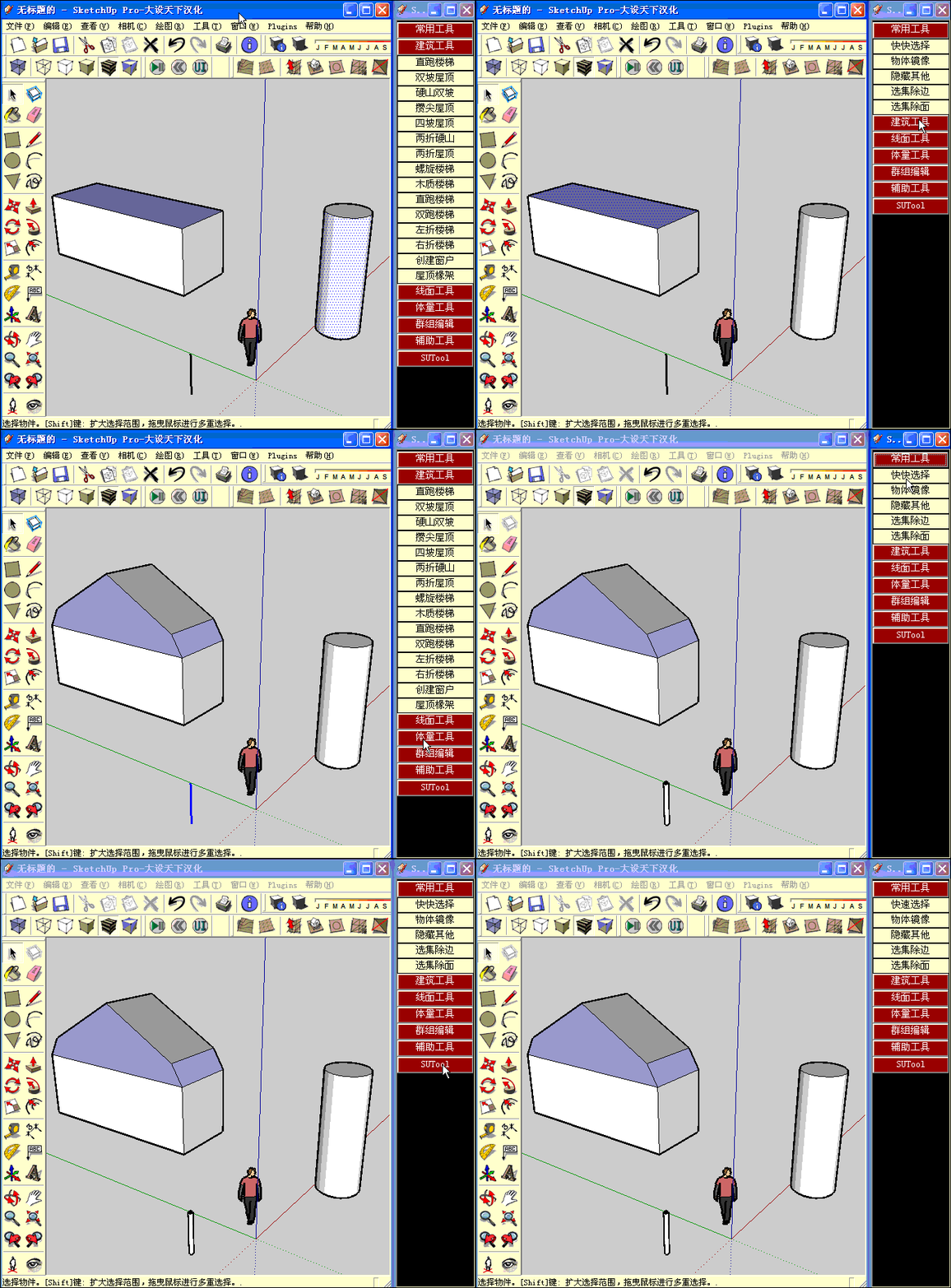
      Add a RB script to:
      Drop down menu? difficult to use~
      Toolbar? cost a lot screen area to display~
      Context menu? it is already too long~

      SUTool organises RB scripts in a AutoCAD_screen_menu_like sidemenu ,as the Gif show.

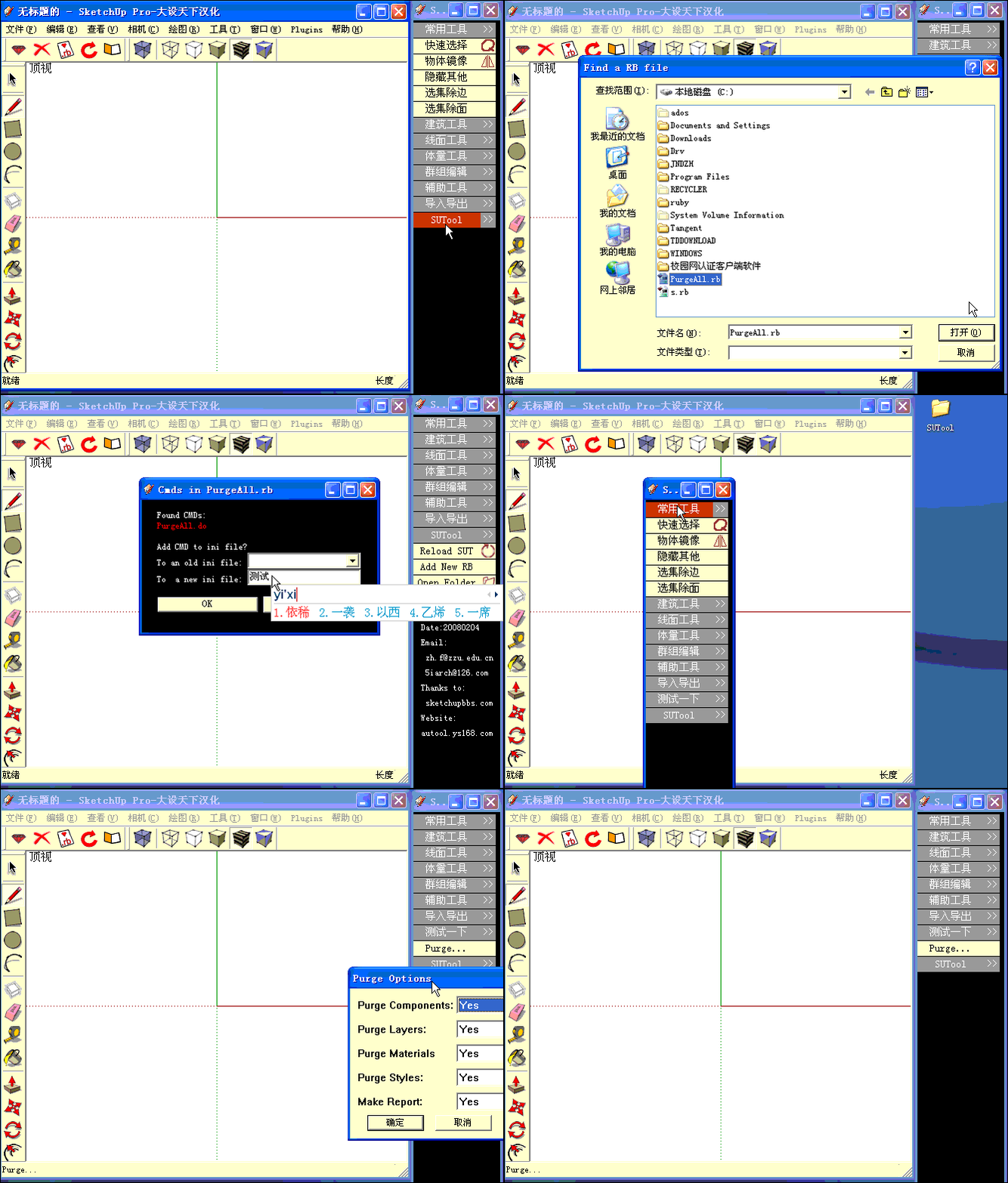
      SUTool v0.06 has ability to add in a new RB script automatically,as the Gif show.

      In chinese:
      SUTool是一个以类似CAD屏幕菜单方式组织SU插件的工具,用户可以通过自定义INI文件,增加或者减少项目。让大家能够方便的管理自己喜欢的插件!

      SUTool v0.06 可以自动添加新的插件:直接对RB文件进行分析,并将其中的命令自动添加到用户指定的ini文件中,只需Reload SUT一下,即可使用新的插件。 注意,被分析的RB文件不要放在含有中文字符的路径下,比如桌面。


      SUT 0.01.gif


      su61.gif

      posted in Plugins
      W
      wikii
    • 1 / 1