sketchucation logo sketchucation
    • Login
    1. Home
    2. soldatino
    3. Posts
    Oops, your profile's looking a bit empty! To help us tailor your experience, please fill in key details like your SketchUp version, skill level, operating system, and more. Update and save your info on your profile page today!
    ⚠️ Important | Libfredo 15.8b introduces important bugfixes for Fredo's Extensions Update
    S
    Offline
    • Profile
    • Following 0
    • Followers 0
    • Topics 4
    • Posts 58
    • Groups 1

    Posts

    Recent Best Controversial
    • RE: Jpg textures in *.skp

      another FIX in vers 0.0.8a http://www.imitidicthulhu.it/skp2jpg.zip

      case : missing path, jpg file found in SU RootDir(?)
      no slashes found, possible prefix to filename (at end of SU file block) = &FF &FE [&??] [&??]
      it seems working, anyway a possible error involves only the exact filename...

      posted in Developers' Forum
      S
      soldatino
    • RE: Jpg textures in *.skp

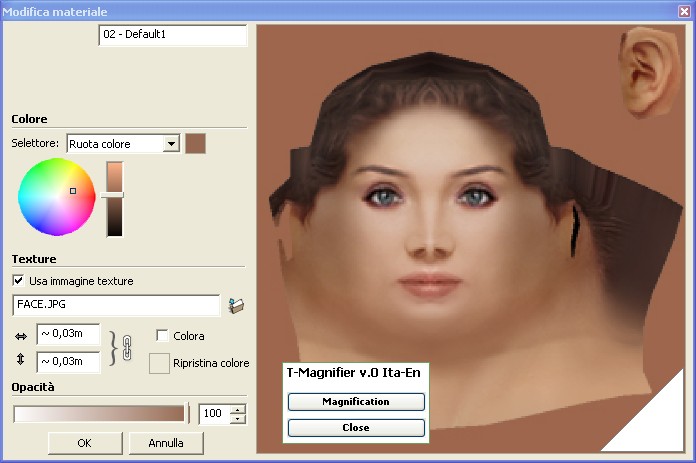
      Added in the zip the stand alone utility T-Magnifier.
      You can see better the selected picture that you study and/or edit.
      This is the v.0, next I will add the Extract button about the current picture.
      This trick requires SU 8, English or Italian languages
      (skp2jpg.exe extracts actually only all the files of the SKP)
      NOTE: not checked with SU version 8 Pro.


      T-Magnifier000.jpg

      posted in Developers' Forum
      S
      soldatino
    • RE: Jpg textures in *.skp

      bug found! πŸ˜•
      if the model has two files primarily stored by the autor in two different folders but with the same filename the program is confused and fails attempting to save the two files ... I am working about it to fix this unusual but possible recurrence..

      [EDIT] fixed in vers 0.0.8


      Clipboard01.jpg

      posted in Developers' Forum
      S
      soldatino
    • RE: Jpg textures in *.skp

      skp2jpg Updated at version 7a
      Some lost jpg now are succesfully extracted
      All jpg filenames are saved, instead of xxx_num.jpg

      posted in Developers' Forum
      S
      soldatino
    • RE: Jpg textures in *.skp

      Current skp2jpg.exe version 5, same link
      http://www.imitidicthulhu.it/skp2jpg.zip
      allows you to extract PNG files also (checked with few SU models...)

      EDIT version 5b (large PNGs slow fixed) 😳

      posted in Developers' Forum
      S
      soldatino
    • RE: Jpg textures in *.skp
      require 'sketchup.rb'
      if( not file_loaded?("skp2jpg.rb") )
      UI.menu("Plugins").add_item("skp2jpg execute"){UI.openURL("skp2jpg.exe")}
      end
      file_loaded("skp2jpg.rb")
      

      this plugin run skp2jpg.exe in the drawing session (checked on XP)
      skp2jpg.exe and 3Drgb.dll have to be in system32 or windows

      posted in Developers' Forum
      S
      soldatino
    • RE: Jpg textures in *.skp

      ok, it'is working
      http://www.imitidicthulhu.it/skp2jpg.zip
      probably a lot of bugs ...
      very slow on large file (I will improve the scan using blocks-buffer...)
      and the filenames of jpg supplied by SketchUp have to clean from some starting characters (it need a table of SU files)

      ps: at the end of each jpg there is garbage (SU notes)... but usefull for the debug, and it does not corrupt the file...

      update 002 extract fast!
      update 003 SU default Materials filenames fixed

      posted in Developers' Forum
      S
      soldatino
    • RE: Jpg textures in *.skp

      @unknownuser said:

      fwiw, you might want to check out file juicer for ideas:
      http://echoone.com/filejuicer/

      that apps extracts all image files from a .skp (file thumbnails, scene thumbnails, textures, images etc.) [and it will extract other file types if they happen to be in the .skp]

      Thaks, I think to add other types of files also. Usually they have the header that it is more legible than the JPG...

      posted in Developers' Forum
      S
      soldatino
    • RE: Jpg textures in *.skp

      @thomthom said:

      @soldatino said:

      0xFF, 0xD9 are the last bytes of the file and are important because I don't know the filesize.

      There is an signed/unsigned integer in the four bytes immediately before SOI that gives you the size of the image.

      The size of image or the offset of the end of jpg file?

      @thomthom said:

      I've attached my notes on the .skp format. It's far from complete, and is in some places wrong. (I think I found some new info last time I looked which I haven't written down in these notes yet.)
      Also attached is a 010 template I use when poking around in the .skp format.

      Really interesting! I am finishing the first version (a couple of hours for interface) of my jpg extractor then I will study it!

      posted in Developers' Forum
      S
      soldatino
    • RE: Jpg textures in *.skp

      @thomthom said:

      @soldatino said:

      Yes, 0xFF, 0xD9

      D9 ? - from what I find ont he JPEG format it's D8... ??

      @soldatino said:

      and (transforming always in lowcase) "tp:","j" and

      what are you transforming to lower case? Isn't this something you should compare on a byte level?

      @soldatino said:

      The start point of the name of the default textures, because it have not "" before. I must to write a filenames table...
      But due the garbage the scan has not 100% certainty.

      Are you looking for more than just the JPEG data? Are you also trying to get the texture filename?
      Getting just the JPEG data extracted should be possible to reliably do - but if you're trying to get other meta data out of the .skp, that might be more troublesome - depending on what you try to extract.

      I apologize, my english is bad.
      0xFF, 0xD8 are the bytes at the start of the file, that continues with some bytes including "j" and "if" for sure, but h-l case depending by the editor that generated the jpg.
      0xFF, 0xD9 are the last bytes of the file and are important because I don't know the filesize.
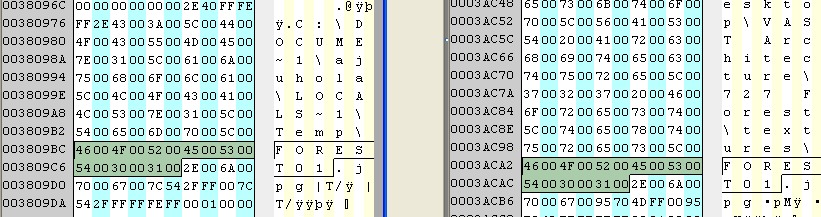
      After these bytes, SU writes a information block, where the presence of slashes and ".jpg" string means that the jpg original file was in the PC of the creator, differently, if they are not and you find "tp:" the file was downloaded from the web, and there is a url instead of a filename. If you find nothing and only ".jpg", the file is a SU texture in his folder.
      Warning : the "name" is written n+chr$(0)+a+chr$(0)+m+chr$(0)+e+chr$(0)+. ......etc
      Thank Tig and ThomThom for the infos, I will search for the API also.
      posted in Developers' Forum
      S
      soldatino
    • RE: Jpg textures in *.skp

      @thomthom said:

      SOI (0xFF, 0xD8) and found both.

      Yes, 0xFF, 0xD9 and (transforming always in lowcase) "tp:","j" and "if" in the range of the following bytes...
      Thanks, at this time one problem seems to be unsolvable.The start point of the name of the default textures, because it have not "" before. I must to write a filenames table...
      But due the garbage the scan has not 100% certainty.
      Thanks!

      posted in Developers' Forum
      S
      soldatino
    • Jpg textures in *.skp

      I am confused about the structure of the *.skp files.
      I wrote a code using my preferred programming language that saves all the jpg files of the skp, but I have a problem, because the jpg has not a true header that I can use like a pointer with all the file's informations.
      So I saved all the jpg files, (searching some typical start strings), but also a lot of garbage (I think that the presence of garbage in the file is due the overwriting of the editor of SketchUp).
      So I recognize if it is a valid file if it has a termination block including the string of the jpg filename or his url. But it is really a very inelegant trick.
      Some suggestion?
      Thanks in advance!

      posted in Developers' Forum
      S
      soldatino
    • RE: Best way to get all Face's in model?

      @thomthom said:

      ............
      2. Exploding is very slow in SU. ( and if your script should fail at some point and halt - you're left with a broken model. )

      ok! I changed my way and it seems work alot faster! (for my plugin converter 2 POV-Ray script).
      note: At this time I get only the color of the parent object(s) and not texture...

       def pov_find_faces(entities,tform,layername)
        entities.each do |entity|
          if entity.is_a?(Sketchup;;Face)
            pov_write_face(entity, tform)
          elsif entity.is_a?(Sketchup;;Group)
            if entity.material
              if entity.material.color
                $levelcolor[$level]=entity.material.color
              else
                $levelcolor[$level]=$levelcolor[$level-1]
              end
              if entity.material.alpha
                $levelalpha[$level]=entity.material.alpha.to_s
              else
                $levelalpha[$level]=$levelalpha[$level-1]
              end
            else
              $levelcolor[$level]=$levelcolor[$level-1]
              $levelalpha[$level]=$levelalpha[$level-1]
            end
            $level+=1
            pov_find_faces(entity.entities,tform * entity.transformation,entity.name)
          elsif entity.is_a?(Sketchup;;ComponentInstance)
            if entity.material
              if entity.material.color
                $levelcolor[$level]=entity.material.color
              else
                $levelcolor[$level]=$levelcolor[$level-1]
              end
              if entity.material.alpha
                $levelalpha[$level]=entity.material.alpha.to_s
              else
                $levelalpha[$level]=$levelalpha[$level-1]
              end
            else
              $levelcolor[$level]=$levelcolor[$level-1]
              $levelalpha[$level]=$levelalpha[$level-1]
            end
            $level+=1
            pov_find_faces(entity.definition.entities,tform * entity.transformation,entity.name)
          end  
        end
        $level=$level-1
        #UI.messagebox($level.to_s)
      end
      
      
      posted in Developers' Forum
      S
      soldatino
    • RE: Small face fails

      @jim said:

      You may be able to use a PolygonMesh instead of adding each Face. The mesh will also be faster to create than individual faces; but which is better depends on your goal.

      See also:
      http://code.google.com/apis/sketchup/docs/ourdoc/entities.html#add_faces_from_mesh
      http://code.google.com/apis/sketchup/docs/ourdoc/entities.html#fill_from_mesh

      Yes I thank you, but I am working about some interfaces between SketchUp and other CAD system. At this moment I am unable to find the unique criterion that SkUp uses to dispense the order of the ponts in the mesh. Especially about faces edited by subtraction of other faces or with holes.
      The mesh is really difficult to decode because the vertexes seem to hop and to return using a lot of different combinations. This is really laborious and so I use to split triangular faces, that in CAD is a 4 vertexs faces with a duplicated vertex, or, where it'i possible, a couple of SkUp triangles that are a unique (cad) 3DFACE.
      Anyway I thank you very much, because I'll to import also textures, and I will need of the meshes also, I fear...
      Excuse my bad english..

      posted in Developers' Forum
      S
      soldatino
    • RE: Small face fails

      @dan rathbun said:

      Sketchup's internal accuracy is only 0.001 inch for geometry.

      thanks Dan, I think this means that in my parser is probably best to turn all points in a single array and turn on my scale before launching the drawing operations for all the faces....

      posted in Developers' Forum
      S
      soldatino
    • Small face fails
      stv=pts[0].vector_to(pts[2]).parallel? pts[0].vector_to(pts[3])
        if stv==false
          face = entities.add_face pts[0], pts[2], pts[3]
        end
      

      I have these 3 points:
      -7.628099 15.463042 39.735762
      -7.627601 15.463536 39.735292
      -7.634701 15.538607 39.416031
      if I use before the transformation with Ratio=39.37007874 the face works
      but if I don't use Ratio transform on the points, or I use Ratio=1, the face fails
      NOTE: the smallest edge of this face is long 0.0008, if I use Ratio=2 it becomes 0.0016, and in this case the face works. The "parallel?" works ever with these small points, but face does not. Strange. What's wrong?
      Thanks in advance!

      posted in Developers' Forum
      S
      soldatino
    • RE: Best way to get all Face's in model?

      Thanks for your responce!
      Yes, teorically the strings compare is ever slow ... but here the difference is irrelevant more than in other languages, I checked a large file, and the part of the scanning and explode sub is the 99.99% of the working code of my parser.

      if entity.is_a?(Sketchup::ComponentInstance)
      and groups ...
      start 13:49:42 -> end 14:08:26

      if entity.typename=="ComponentInstance"
      and groups ..
      start 14:11:30 -> end 14:29:07

      In the second reason (explode is slow insted of get from material list) you are right 100%, but it is a bit complicated for me at this time (I am new about skup database).... but next time I must to improve at...
      I was hoping that there are something like these easy :
      group_parent.face .... group_parent.group ...
      but the only parent seems to be the entire list of materials...
      Thanks again, I apologize for my bad english.

      posted in Developers' Forum
      S
      soldatino
    • RE: Best way to get all Face's in model?

      I had the same problem, but I need to get the "material" of each face.
      So I had a lot of problems because the "material" is hereditary if there is (or not) in the groups of faces (or nested groups). So it is really difficult to get the tree of the materials of all the faces.
      So I wrote this inelegant recursive sub, and it works fine for me.

      def pov_ex()
         model=Sketchup.active_model 
         entities=model.entities
         entities.each do |entity|
              if entity.typename=="ComponentInstance"
                  entity.explode
                  pov_ex()
              elsif entity.typename=="Group"
                  entity.explode
                  pov_ex()
              end
         end
      end
      

      at the end, after material's extraction, I wrote a "model.abort_operation" so all the entities return to original state and are not corrupted by explode.
      But a question... this code works really slow, I'd like to find a better way....

      posted in Developers' Forum
      S
      soldatino
    • 1
    • 2
    • 3
    • 3 / 3