sketchucation logo sketchucation
    • Login
    1. Home
    2. jtri
    3. Posts
    Oops, your profile's looking a bit empty! To help us tailor your experience, please fill in key details like your SketchUp version, skill level, operating system, and more. Update and save your info on your profile page today!
    ⚠️ Important | Libfredo 15.6b introduces important bugfixes for Fredo's Extensions Update
    J
    Offline
    • Profile
    • Following 0
    • Followers 0
    • Topics 15
    • Posts 102
    • Groups 1

    Posts

    Recent Best Controversial
    • 4 Beam Marking Gauge

      I like to use a cutting gauge rather than a marking gauge and many times need a few on the bench different set to different dimensions.

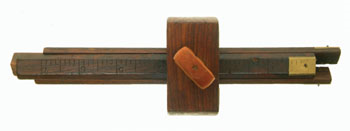
      The Sholl 4 beam marking gaugeSholl 4 beam marking gauge.png inspired me to make one. I decided to have each beam be able to be secured independently
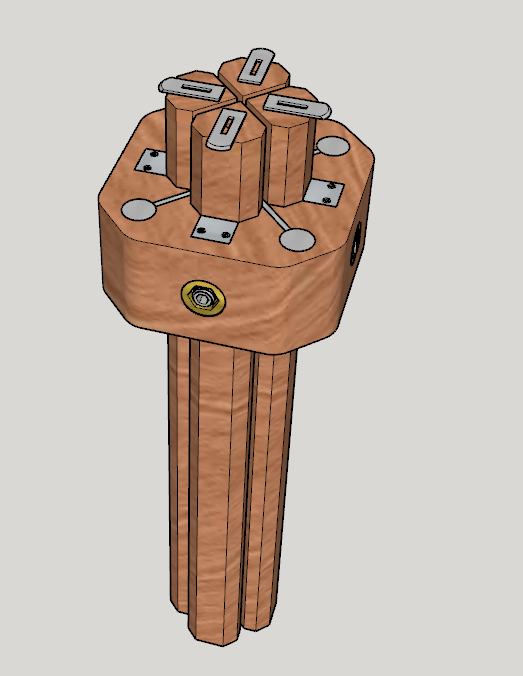
      It was a straight forward model SketchUp Model 4 beam marking gauge.png
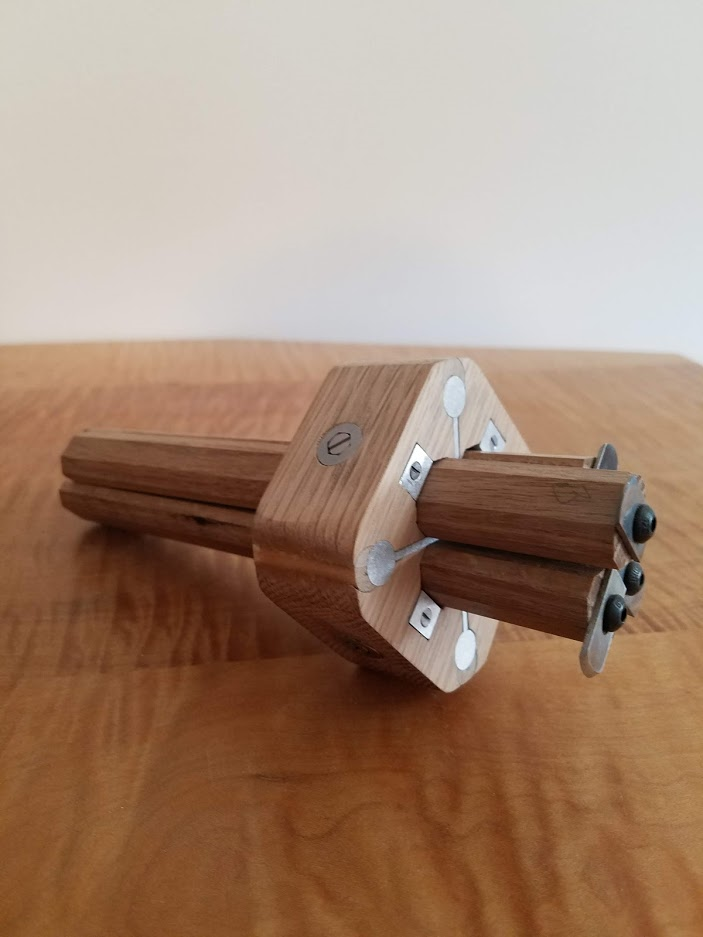
      The prototype I made works well 20190420_122321.png A lot of fussy work to get it all made and fit, but the feel in my hand is fine and it functions well.

      I have a piece of Rosewood that I will be working on to make a final version and was thinking of adding a ruler to the beams to speed up setup. Anyone with an opinion?

      Thanks
      Jeff

      posted in Woodworking
      J
      jtri
    • RE: Old wood expansion plugin

      Box
      Thanks again for your suggestion (also all of your modeling tips!) and looking at the plugin to find the author, as I had forgotten where I had found the plugin. I emailed Joe Zeh and he sent me the files required and this very useful plug in is now working. If anyone is looking for this contact Joe - jpz@srww.com
      Great community we have here
      Jeff

      posted in Plugins
      J
      jtri
    • RE: Old wood expansion plugin

      Thanks will do

      posted in Plugins
      J
      jtri
    • RE: Old wood expansion plugin

      Any other thoughts on how to get this old plugin to work would be greatly appreciated.

      posted in Plugins
      J
      jtri
    • RE: Levels

      Yes that is tiger maple on a desk I made. It is a photograph not a render. Guess I need to be clearer or learn to render.......

      posted in Woodworking
      J
      jtri
    • RE: Old wood expansion plugin

      They are set at unrestricted

      posted in Plugins
      J
      jtri
    • RE: Old wood expansion plugin

      error message.pdf
      It did not work. Operator error?

      posted in Plugins
      J
      jtri
    • Old wood expansion plugin

      I havewood_expansion_calculator.rb this old wood expansion plugin and tried changing the extension to .rbz and it does not load in SketchUp 2019. If someone can easily modify the plug in so it can be used in the current version of SketchUp I would be very grateful as it is a very handy tool when designing in solid wood.
      Thanks
      Jeff

      posted in Plugins
      J
      jtri
    • RE: Levels

      Thanks guys, It was a fun project. I would not call it difficult, more fussy work. Fun to get out of your comfort zone.
      I am working on another fun project, should be ready to show soon

      posted in Woodworking
      J
      jtri
    • Levels

      The brass bound rosewood levels made by Stanley, Goodell-Pratt and Stratton Brothers always interested me. If you can find a rosewood one at a reasonable price they are not in the best of shape so buying a rosewood bodied one has not yet happened. I do have a nice mahogany one that I restored. The levels I have got me thinking. If I were to make one today what would I do? I would start with a small 9" one.
      It was an easy SketchUp model. Now I needed to make one. So some khaya and wenge scraps were re-purposed and had a lot of fun making these using similar details from the Stanley level I have. Learned a bunch, now I need some Mesquite (most stable wood easily available) better vials and I will make a 24" or 30" version.


      Level Model.pdf


      Levels.pdf

      posted in Woodworking
      J
      jtri
    • RE: Small Cherry Table

      Very nice model. Thanks Dave
      Making a piece out of one board is a very worthwhile project. I stumbled upon a 16/4 board of cherry that became a chest of drawers. It was a fun challenge.

      posted in Woodworking
      J
      jtri
    • RE: Seeking upholstery suggestions

      Nice model David. Thanks for sharing your process and problems. Let us know how you finally decided to finish the model.

      posted in Woodworking
      J
      jtri
    • RE: Would you start with Sketchup or on the bench?

      I have decided on finishing my sketchup models and meeting with a silversmith. Need to get a feel for the costs involved to see if this will go forward. I am also going to get a quote on casting them in stainless. If it is not outrageously costly then to then bench and then back to sketchup. Might 3d scan what I carve to get what I want into the computer. Lots to sort out to make this happen.
      As for the wood not decided yet but the construction of the handles I am going to make 2 halves to go over the tang. The tang will be almost the full length of the wood then glue it all together with no rivets. I have done this with knives and like the results. As for this batch, if it goes ahead I will be rough carving the handles on a CNC.
      Thanks
      Jeff

      posted in Woodworking
      J
      jtri
    • Would you start with Sketchup or on the bench?

      I have decided to design and build some silverware maybe service for 8. (Do not tell my wife as there are so many other things I should be doing!) They are going to have wood handles and either silver or stainless steel blades. Lots of details to work out with the metal, but that is not my major issue at this time.
      I started out drawing in sketchup but now I am rethinking my approach. As these need to feel and balance just right in your hand, I am thinking I want to carve them 1st to get what I want then either draw them or maybe 3d scan them, then clean up the scan on the computer.

      So sketchUcation how would you approach this design problem? Bench 1st or Sketchup 1st?

      Also does anyone have any experience with casting stainless steel for this application? There is a jewelry casting house that says they do this for utensils. I am skeptical.

      Tahnks
      Jeff

      posted in Woodworking
      J
      jtri
    • RE: Madam, I'm Adam

      Fantastic model! For the drawer face field (looks to be orange colored) is that to be satinwood?

      posted in Woodworking
      J
      jtri
    • RE: Bucket Chain for Marbles

      Wood chain? sorry not patient enough to wait for the tutorial. Oh and yes very cool!
      Thanks Dave

      posted in Woodworking
      J
      jtri
    • RE: Furniture and exploded view

      David I agree lots of scenes are need, thanks for pointing out Tim's approach. Dave 36 x 48 paper is my choice as well and thanks for the examples, they very clearly present what is required and are easy to read.
      I found that sketch up and layout make it very easy to present a great deal of information. I needed to pause my drawing and revamp my presentation flow before I get too deep into a set of drawings.
      Thanks
      Jeff

      posted in Woodworking
      J
      jtri
    • RE: Furniture and exploded view

      Thanks guys. I have no issues with creating scenes ( David thanks for your insights) or exploded views (I like to create them manually pilou). Also I am doing OK with learning layout. What I am trying to do is set up a set of rules for myself on how my final product, the shop drawings will look.
      Where best to present the information? Do people like it when all the details are on the detail pages? With this method you start with detail one and just go till your done. You might fill up many pages of details.
      The other approach is to have as many details with the elevations on the same page so there is a lot less flipping drawings.
      I am looking to start a discussion as to why people organize drawing sets the way they do rather than the how to aspect of sketchup.
      I read architectural drawings all day at work. No 2 are the same most are not even alike. I certainly have my preferences and would like to hear from others
      Jeff

      posted in Woodworking
      J
      jtri
    • Furniture and exploded view

      I am working on learning and using layout for furniture and I like using exploded views, so I am looking for opinions and comments on how best to use this view.
      My current thinking is the layout cover page is the beauty shot, next page will be elevations with only a few overall dimensions and an exploded view showing the sub assemblies.
      Next page (s) will be a sub assembly further exploded and each piece of the sub assembly then shown with all elevations with detailed dimensions and enlarged details.
      As you can see I am not proposing to use traditional sections. Is this a good idea?
      Also would it be too cluttered to put dimensions in the exploded view?
      How do you guys organize your drawings for furniture and what are your thoughts.
      Thanks
      Jeff

      posted in Woodworking
      J
      jtri
    • RE: Wormley Desk

      Great render thanks for posting.

      posted in Woodworking
      J
      jtri
    • 1
    • 2
    • 3
    • 4
    • 5
    • 6
    • 2 / 6