sketchucation logo sketchucation
    • Login
    1. Home
    2. cjthompson
    3. Posts
    Oops, your profile's looking a bit empty! To help us tailor your experience, please fill in key details like your SketchUp version, skill level, operating system, and more. Update and save your info on your profile page today!
    πŸ”Œ Easy Offset | Offset selected faces in SketchUp in positive and negative offsets. Download
    C
    Offline
    • Profile
    • Following 0
    • Followers 0
    • Topics 19
    • Posts 151
    • Groups 1

    Posts

    Recent Best Controversial
    • RE: Lock inference to X, Y or Z_

      basically, just create 2 input points: one at the origin of the line you want to inference to, and another input point offset from that origin along the vector.

      here is a really quick example:

      class TestTool
      	def initialize
      		@ip = Sketchup;;InputPoint.new
      	end
      	def self.add_tool
      		Sketchup.active_model.tools.push_tool(TestTool.new)
      	end
      	def onKeyDown(key,repeat,flags,view)
      		ip1,ip2 = Sketchup;;InputPoint.new,Sketchup;;InputPoint.new
      		origin2d = view.screen_coords([0,0,0])
      		if(key == VK_UP)
      			z2d = view.screen_coords([0,0,100])
      			ip1.pick(view,origin2d[0],origin2d[1])
      			ip2.pick(view,z2d[0],z2d[1])
      			view.lock_inference(ip1,ip2)
      			puts "up"
      		elsif(key == VK_LEFT)
      			y2d = view.screen_coords([0,100,0])
      			ip1.pick(view,origin2d[0],origin2d[1])
      			ip2.pick(view,y2d[0],y2d[1])
      			view.lock_inference(ip1,ip2)
      			puts "left"
      		elsif(key == VK_RIGHT)
      			x2d = view.screen_coords([100,0,0])
      			ip1.pick(view,origin2d[0],origin2d[1])
      			ip2.pick(view,x2d[0],x2d[1])
      			view.lock_inference(ip1,ip2)
      			puts "right"
      		elsif(key == VK_DOWN)
      			view.lock_inference
      			puts "down"
      		end
      	end
      	def onMouseMove(flags,x,y,view)
      		@ip.pick(view,x,y)
      		view.invalidate
      	end
      	def draw(view)
      		@ip.draw(view)
      	end
      end
      
      posted in Developers' Forum
      C
      cjthompson
    • RE: Optimization Tips

      @cjthompson said:

      Has anyone looked into Enumerable.grep()? it seems pretty useful, but I don't know how fast it is.

      well, since no one seems to be listening... 😒
      I ran my own test (for: is using a for loop, grep: is using Enumerable.grep)
      speedTest for: entities - 0.016 grep: entities - 0.015 for: entities array - 0.0 grep: entities array - 0.016 for: range - 0.219 grep: range - 0.203 for: range array - 0.219 grep: range array - 0.218 for: strings - 0.469 grep: strings - 0.234 nil

      here is the code I used:

      def speedTest
      	entities = Sketchup.active_model.entities
      	entitiesArray = entities.to_a
      	range = 0..1000000
      	rangeArray = range.to_a
      	strings = range.collect{|number| number.to_s}
      	
      	## Entities
      	
      	results = []
      	start = Time.now
      	for ent in entities
      		if(ent.class == Sketchup;;Edge)
      			results << ent
      		end
      	end
      	puts "for; entities - " + (Time.now - start).to_s
      	
      	results = []
      	start = Time.now
      	results = entities.grep(Sketchup;;Edge)
      	puts "grep; entities - " + (Time.now - start).to_s
      	
      	## Entities array
      	
      	results = []
      	start = Time.now
      	for ent in entitiesArray
      		if(ent.class == Sketchup;;Edge)
      			results << ent
      		end
      	end
      	puts "for; entities array - " + (Time.now - start).to_s
      	
      	results = []
      	start = Time.now
      	results = entitiesArray.grep(Sketchup;;Edge)
      	puts "grep; entities array - " + (Time.now - start).to_s
      	
      	## Range
      	
      	results = []
      	start = Time.now
      	for num in range
      		if(num == 318256)
      			results << num
      		end
      	end
      	puts "for; range - " + (Time.now - start).to_s
      	
      	results = []
      	start = Time.now
      	results = range.grep(318256)
      	puts "grep; range - " + (Time.now - start).to_s
      	
      	## Range Array
      	
      	results = []
      	start = Time.now
      	for num in rangeArray
      		if(num == 318256)
      			results << num
      		end
      	end
      	puts "for; range array - " + (Time.now - start).to_s
      	
      	results = []
      	start = Time.now
      	results = rangeArray.grep(318256)
      	puts "grep; range array - " + (Time.now - start).to_s
      	
      	## Strings
      	
      	results = []
      	start = Time.now
      	for str in strings
      		if(str.match(/312\Z/))
      			results << str
      		end
      	end
      	puts "for; strings - " + (Time.now - start).to_s
      	
      	results = []
      	start = Time.now
      	results = range.grep(/312\Z/)
      	puts "grep; strings - " + (Time.now - start).to_s
      	
      end
      

      and the model I tested on:


      test1k.skp

      posted in Developers' Forum
      C
      cjthompson
    • RE: [script] Sketchup 7.1 all hiden action :lol:

      I just emptied out my plugins folder and they were still there. Is it even possible for a plugin to add actions to Sketchup?

      BTW, this is the command I used to find them:
      Object.constants.grep(/CMD./).sort.join("\n")

      posted in Developers' Forum
      C
      cjthompson
    • RE: [script] Sketchup 7.1 all hiden action :lol:

      I was browsing Object.constants and I found these.

      just use them with Sketchup.send_action as constants, not strings.

      CMD_ARC
      CMD_CAMERA_UNDO
      CMD_CIRCLE
      CMD_COPY
      CMD_CUT
      CMD_DELETE
      CMD_DIMENSION
      CMD_DISPLAY_FOV
      CMD_DOLLY
      CMD_DRAWCUTS
      CMD_DRAWOUTLINES
      CMD_ERASE
      CMD_EXTRUDE
      CMD_FREEHAND
      CMD_HIDDENLINE
      CMD_LINE
      CMD_MAKE_COMPONENT
      CMD_MEASURE
      CMD_MOVE
      CMD_NEW
      CMD_OFFSET
      CMD_OPEN
      CMD_ORBIT
      CMD_PAGE_DELETE
      CMD_PAGE_NEW
      CMD_PAGE_NEXT
      CMD_PAGE_PREVIOUS
      CMD_PAGE_UPDATE
      CMD_PAINT
      CMD_PAN
      CMD_PASTE
      CMD_POLYGON
      CMD_POSITION_CAMERA
      CMD_PRINT
      CMD_PROTRACTOR
      CMD_PUSHPULL
      CMD_RECTANGLE
      CMD_REDO
      CMD_ROTATE
      CMD_RUBY_CONSOLE
      CMD_SAVE
      CMD_SCALE
      CMD_SECTION
      CMD_SELECT
      CMD_SELECTION_ZOOM_EXT
      CMD_SHADED
      CMD_SHOWGUIDES
      CMD_SHOWHIDDEN
      CMD_SKETCHAXES
      CMD_SKETCHCS
      CMD_TEXT
      CMD_TEXTURED
      CMD_TRANSPARENT
      CMD_UNDO
      CMD_VIEW_BACK
      CMD_VIEW_BOTTOM
      CMD_VIEW_FRONT
      CMD_VIEW_ISO
      CMD_VIEW_LEFT
      CMD_VIEW_PERSPECTIVE
      CMD_VIEW_RIGHT
      CMD_VIEW_TOP
      CMD_WALK
      CMD_WIREFRAME
      CMD_ZOOM
      CMD_ZOOM_EXTENTS
      CMD_ZOOM_WINDOW

      posted in Developers' Forum
      C
      cjthompson
    • RE: Archaeoastronomy and Sketchup II

      I might be able to help a bit with the math, although I'm definitely no mathmatician. πŸ˜†

      @honoluludesktop:
      if I was able to get the Point3d, would your plugin be able to handle the rest?

      posted in Developers' Forum
      C
      cjthompson
    • RE: Retrieve the size of bounding box of selection

      @tig said:

      
      >   ssg=ents.add_group(ssa)
      > 
      

      This is a bit off subject, but how do you add entities to a group as you're creating it, without crashing Sketchup?

      posted in Developers' Forum
      C
      cjthompson
    • RE: Retrieve the size of bounding box of selection

      Otherwise, you can add the bounding boxes together into a new bounding box. but that could potentially affect the size.

      posted in Developers' Forum
      C
      cjthompson
    • RE: Optimization Tips

      Has anyone looked into Enumerable.grep()? it seems pretty useful, but I don't know how fast it is.

      posted in Developers' Forum
      C
      cjthompson
    • RE: Download Sketchup API in PDF ???

      will this work?

      http://www.alexschreyer.net/cad/sketchup-ruby-api-cheatsheet/

      posted in Developers' Forum
      C
      cjthompson
    • RE: Hiding edges with fill_from_mesh

      It looks like that's what the problem was. Now I just have to figure out how to combine meshes. πŸ˜„

      posted in Developers' Forum
      C
      cjthompson
    • RE: Hiding edges with fill_from_mesh

      this script isn't for any use in particular, I'm just trying to get the hang of polygon meshes.

      the best way to describe what I'm doing is trying to turn all model entities into a mesh, delete the original entities, then put the mesh back, hopefully keeping the original stucture.

      @thomthom said:

      what if... you use the mesh you get from the face as a temporary mesh. Then iterate the polygons in that mesh and recreate a new one - but in the new one you add negative indexes for the edges you want to hide?

      the problem isn't getting the negative numbers, it's making Sketchup recognize those numbers. it seems to completely ignore them. (if you puts face.mesh.polygons, you can see that there are already negative numbers there).

      posted in Developers' Forum
      C
      cjthompson
    • RE: Hiding edges with fill_from_mesh

      ok. I tried that, but I want to seperate faces that aren't coplanar.

      Basically, I'm trying to go from a face to a mesh, then back to a face again, so there is no visible difference between the original and the face from the mesh. It sounds like that isn't really possible.

      posted in Developers' Forum
      C
      cjthompson
    • RE: Hiding edges with fill_from_mesh

      even when I set weld to true, I still get the triangulation.

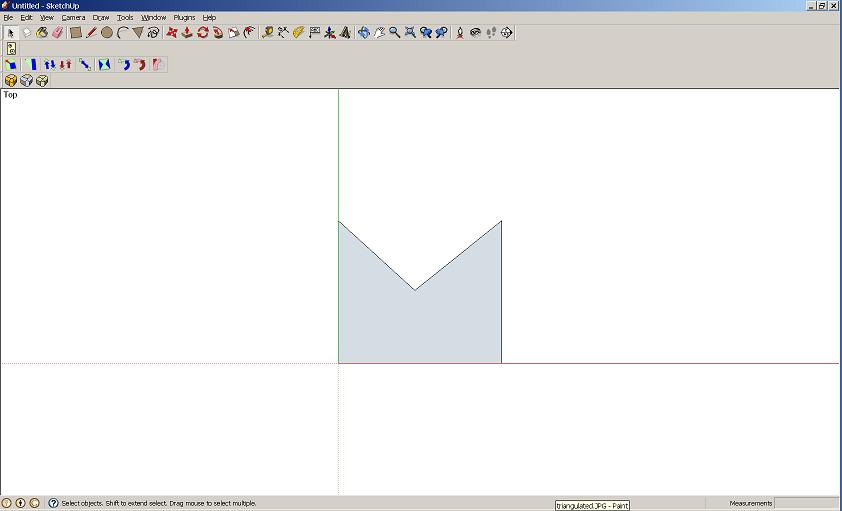
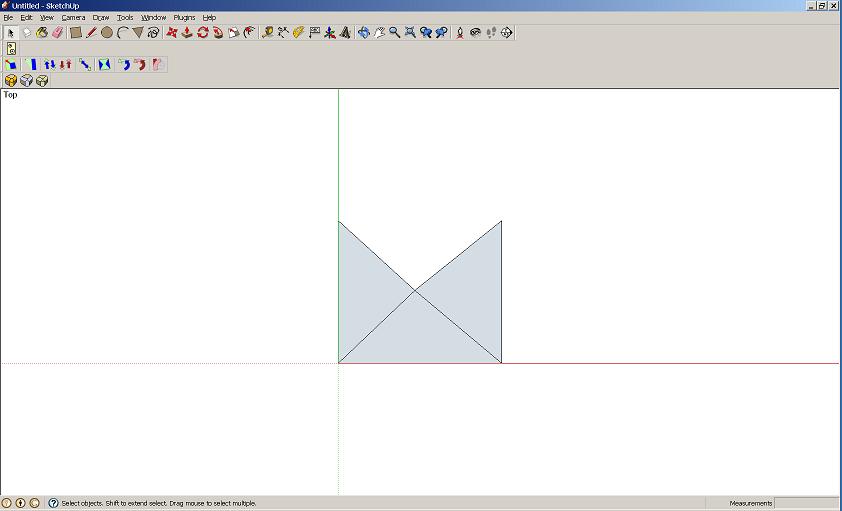
      here is an example:
      I start with this. then I use mesh = face.mesh
      untriangulated.JPG

      but when I try adding the mesh to the entities, it triangulates regardless of the flag setting:
      triangulated.JPG

      posted in Developers' Forum
      C
      cjthompson
    • RE: Hiding edges with fill_from_mesh

      I tried using entities.fill_from_mesh(mesh,false,8) and entities.add_faces_from_mesh(mesh,8). it only works on faces with four or less edges.

      Are these the same arguments that you are using?

      posted in Developers' Forum
      C
      cjthompson
    • Hiding edges with fill_from_mesh

      Is there any way to hide the triangulated edges in a PolygonMesh when you use either fill_from_mesh or add_faces_from_mesh?

      I noticed that there can be negative indexes in a polygon, but I can't find any way for either method to hide those edges.

      posted in Developers' Forum
      C
      cjthompson
    • RE: Vector3d.linear_combination alternative form

      It looks like it's like it's the same as the four argument version, but works with 3 vectors at once, instead of just 2.

      posted in Developers' Forum
      C
      cjthompson
    • RE: Open URL on local disk

      Just to make sure we aren't all going insane: what happens when you double click a .htm file?

      posted in Developers' Forum
      C
      cjthompson
    • RE: Open URL on local disk

      @tig said:

      Try UI.openURL("C:/Windows/System32/notepad.exe")

      UI.openURL("notepad.exe") or even just UI.openURL("notepad") will also work.

      posted in Developers' Forum
      C
      cjthompson
    • RE: Open URL on local disk

      I haven't had any problems. do you have a code example?

      posted in Developers' Forum
      C
      cjthompson
    • RE: New API doc - typos and questions

      http://code.google.com/apis/sketchup/docs/ourdoc/face.html#classify_point

      @unknownuser said:

      The classify_point method is used to determine if a given Point3d is on your face. The return value will be from this list:

      0: PointUnknown,
      1: PointInside,
      2: PointOnVertex,
      4: PointOnEdge,
      8: PointOnFace,
      16: PointOutside

      the list should be:
      0: PointUnknown,
      1: PointInside,
      2: PointOnEdge,
      4: PointOnVertex,
      8: PointOnPlane,
      16: PointOutside

      posted in Developers' Forum
      C
      cjthompson
    • 1 / 1