sketchucation logo sketchucation
    • Login
    Oops, your profile's looking a bit empty! To help us tailor your experience, please fill in key details like your SketchUp version, skill level, operating system, and more. Update and save your info on your profile page today!
    ⚠️ Update | Sketchucation Tools 5.0.8 released with licensing improvements and bugfixes Download

    3dskb to 2d dwg

    Scheduled Pinned Locked Moved SketchUp Discussions
    sketchup
    11 Posts 6 Posters 2.2k Views 6 Watching
    Loading More Posts
    • Oldest to Newest
    • Newest to Oldest
    • Most Votes
    Reply
    • Reply as topic
    Log in to reply
    This topic has been deleted. Only users with topic management privileges can see it.
    • D
      dylan
      last edited by

      Hi Rodin, welcome to SCF.

      Yes you can export a 2d drawing to use in ACAD.
      As you mentioned, choose your required view then switch to parallel projection.

      Go to File/Export/2D Graphic
      You can then choose your desired filetype from the drop down box (Export Type)
      Obviously you require DWG.
      You then have an Options box to adjust the export settings such as scale and Autocad version.

      http://dmdarchitecture.co.uk/

      1 Reply Last reply
      Reply Quote 0
      • GaieusG
        Gaieus
        last edited by

        Note however (and/or for the information of others) that this is a Pro only function.

        Gai...

        1 Reply Last reply
        Reply Quote 0
        • R
          rodin
          last edited by

          Thanks!
          this is exactly what I wanted to know. I noticed that the shadows are omitted. Is there a way to export them as well?

          rodin

          1 Reply Last reply
          Reply Quote 0
          • GaieusG
            Gaieus
            last edited by

            Rodin,

            Shadows are rendering issues, they don't go along with a vector set. In your other application however you can set your shadows if that is possible.

            Gai...

            1 Reply Last reply
            Reply Quote 0
            • R
              Rob D
              last edited by

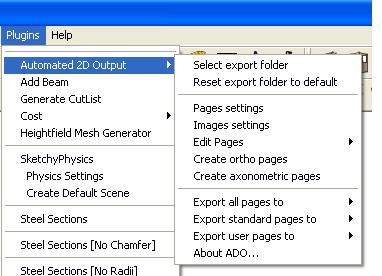
              There's a Ruby available somewhere which automatically creates orthographic projections (ie. Top, left, right, front etc.) then exports them to .dwg files. Very useful but can't remember where I got it πŸ˜•

              Automatic output to AutoCAD

              1 Reply Last reply
              Reply Quote 0
              • GaieusG
                Gaieus
                last edited by

                It's here (ado.zip) at Didier's site:
                http://www.crai.archi.fr/RubyLibraryDepot/Ruby/em_fil_page.htm

                Gai...

                1 Reply Last reply
                Reply Quote 0
                • D
                  dylan
                  last edited by

                  Did not know about that ruby, thanks guys.

                  http://dmdarchitecture.co.uk/

                  1 Reply Last reply
                  Reply Quote 0
                  • Didier BurD
                    Didier Bur
                    last edited by

                    It's good to have friends that make you remember what I've done long ago πŸ˜†

                    DB

                    1 Reply Last reply
                    Reply Quote 0
                    • GaieusG
                      Gaieus
                      last edited by

                      And I'm proud that you call me a "friend"!
                      πŸ˜„

                      Gai...

                      1 Reply Last reply
                      Reply Quote 0
                      • A
                        archtech
                        last edited by

                        That's a handy ruby, thanks. I often export the my sketchup models to 2d AutoCAD drawings, particularly at the concept stage of the project.

                        1 Reply Last reply
                        Reply Quote 0

                        Hello! It looks like you're interested in this conversation, but you don't have an account yet.

                        Getting fed up of having to scroll through the same posts each visit? When you register for an account, you'll always come back to exactly where you were before, and choose to be notified of new replies (either via email, or push notification). You'll also be able to save bookmarks and upvote posts to show your appreciation to other community members.

                        With your input, this post could be even better πŸ’—

                        Register Login
                        • 1 / 1
                        • First post
                          Last post
                        Buy SketchPlus
                        Buy SUbD
                        Buy WrapR
                        Buy eBook
                        Buy Modelur
                        Buy Vertex Tools
                        Buy SketchCuisine
                        Buy FormFonts

                        Advertisement