Why dont we have "hidden lines" in vector ??
-
Hello
The Topic says it all..... Why dont we have hidden lines in Vector ?? I dont get it.. WHYYYY ??.. I dont get it. Anyone knows ?? It cant be that complicated..
-
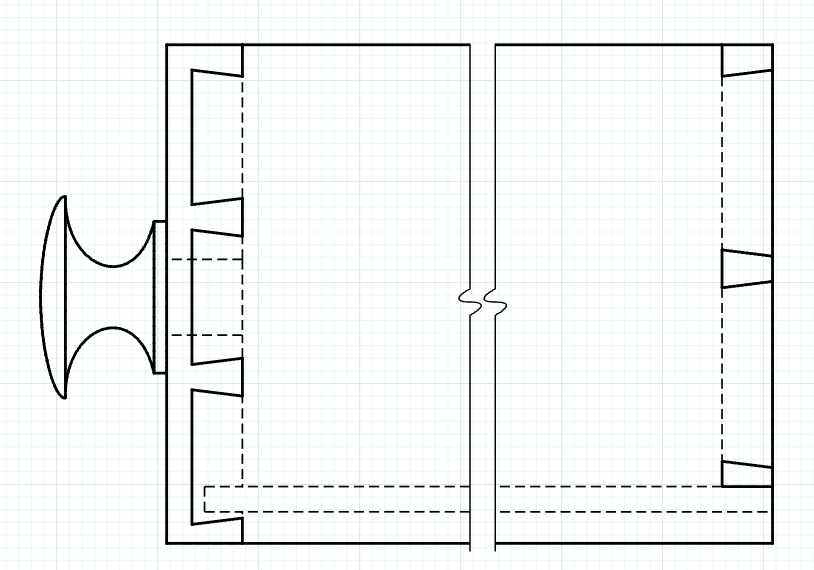
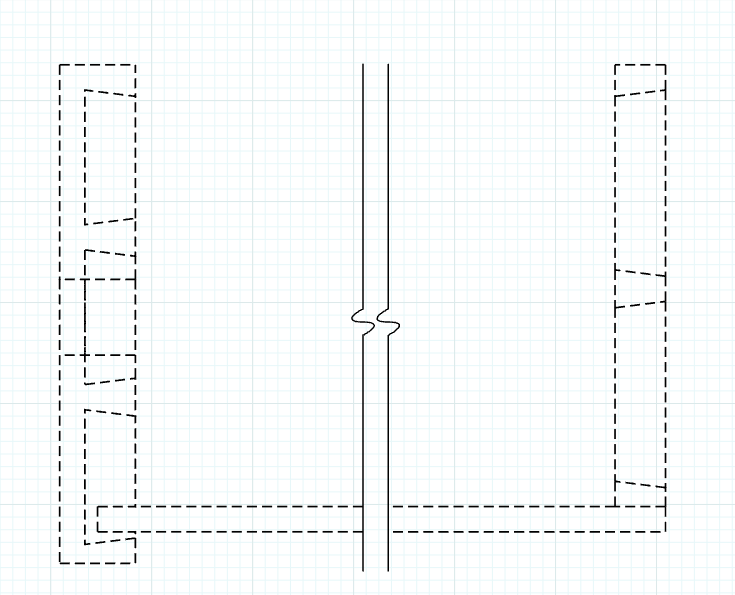
Are you referring to Back Edges? If so, they don't appear in Vector rendered viewports in LayOut because they are a raster thing and Raster line work is not displayed in with Vector or Hybrid rendering. You can leave the viewport set to Raster render and see the back edges. A better way to show them or to show hidden features in LayOut with Vector rendering is to use a suitable style and select a dash style for the tag. With Stacked viewports this is dead simple and gives you better control over what hidden lines are shown and which are not. You have no control over that with the Back Edges face style.
Example:

Hello! It looks like you're interested in this conversation, but you don't have an account yet.
Getting fed up of having to scroll through the same posts each visit? When you register for an account, you'll always come back to exactly where you were before, and choose to be notified of new replies (either via email, or push notification). You'll also be able to save bookmarks and upvote posts to show your appreciation to other community members.
With your input, this post could be even better 💗
Register Login


Advertisement