How to install old .rb file to Sketchup Pro 21?
-
I'm restarting with Sketchup on version 21 and reinstalling some of my old plugins but cannot find a way to add .rb files as the extension manager only has a .rbz option.
Is there some other files that needs to be added to help it see older files? or something else?
My specific .rb is Drop 1.52 (no programmer id in file), it drops any selected objects to a user-defined height so it 'drops' upwards as well!
-
from appdata, find the plugin folder in your version of sketchup and drop the file there
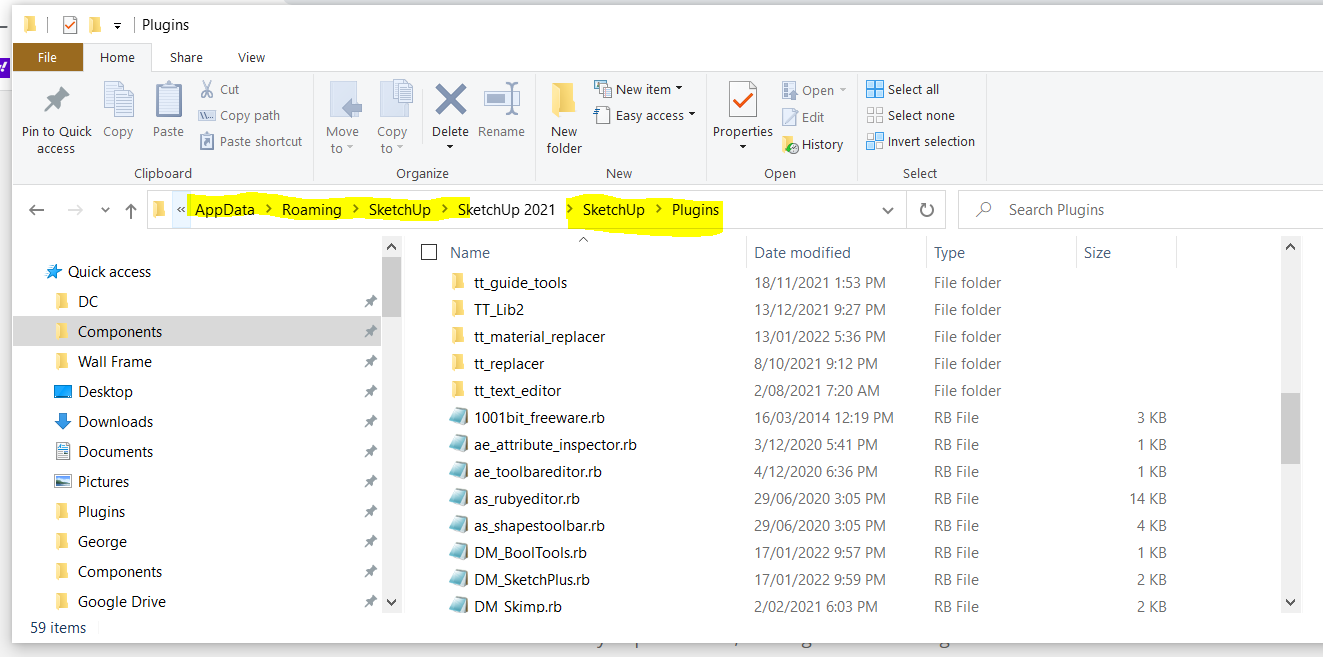
it will load with the rest the next time you open sketchup, so close if already open
-
If you can't find the folder that pcmoor is referring to you can zip the .rb, rename the .zip to .rbz and install using the Extension Manager.
-
Thank you both, and I now have a working drop.rb - and know how to load my other old scripts.

Hello! It looks like you're interested in this conversation, but you don't have an account yet.
Getting fed up of having to scroll through the same posts each visit? When you register for an account, you'll always come back to exactly where you were before, and choose to be notified of new replies (either via email, or push notification). You'll also be able to save bookmarks and upvote posts to show your appreciation to other community members.
With your input, this post could be even better 💗
Register Login


Advertisement