Broken line segments still generates a surface area?
-
Hello There !,
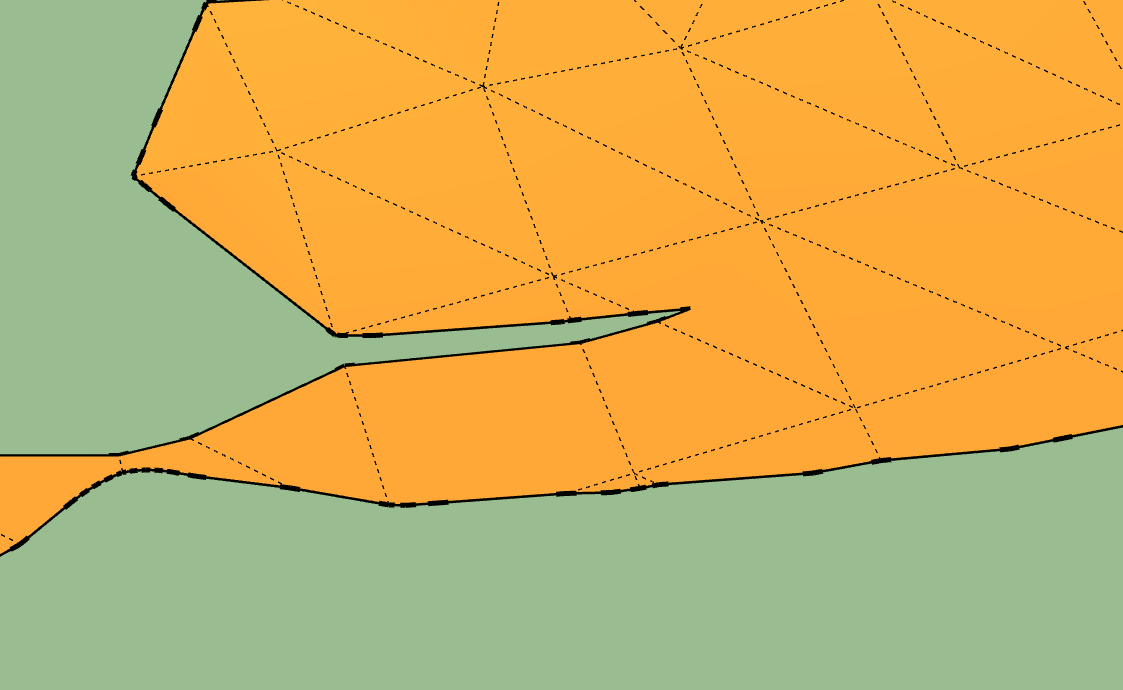
I am trying to extrude attached surface area into a solid to do some volume calculations (merge / subtract operations) But I am getting a lot of errors on the edges of my extruded shape. I am pretty sure it has to do with the fact that the border edges are broken into segments whilst there are no triangulation lines. How can Sketchup still generate a surface area and how do I get rid of this (without doing it manually?) and generate a proper surface to extrude?
Thanks
Michiel
-
Better if you can send your skp (save as version 6) for a more large audience!

-
@mluy said:
Hello There !,
I am trying to extrude attached surface area into a solid to do some volume calculations (merge / subtract operations) But I am getting a lot of errors on the edges of my extruded shape. I am pretty sure it has to do with the fact that the border edges are broken into segments whilst there are no triangulation lines. How can Sketchup still generate a surface area and how do I get rid of this (without doing it manually?) and generate a proper surface to extrude?
Thanks
Michiel
-
@mluy said:
Hello There !,
I am trying to extrude attached surface area into a solid to do some volume calculations (merge / subtract operations) But I am getting a lot of errors on the edges of my extruded shape. I am pretty sure it has to do with the fact that the border edges are broken into segments whilst there are no triangulation lines. How can Sketchup still generate a surface area and how do I get rid of this (without doing it manually?) and generate a proper surface to extrude?
Thanks
Michiel
-
@pilou said:
Better if you can send your skp (save as version 6) for a more large audience!
Thanks, I just uploaded the file.
-
You can resize your object by 1000
then use CleanUp by Thomthom it finds many problems and repears
Then Joint PushPull by Fredo for give a thicknessThen solid Solver by Tig
But despit of that seems there are always problems, too little surfaces, maybe intersect faces etc...
where does this object come from? An unfolding one ?...
-
@pilou said:
You can resize your object by 1000
then use CleanUp by Thomthom it finds many problems and repears
Then Joint PushPull by Fredo for give a thicknessThen solid Solver by Tig
But despit of that seems there are always problems, too little surfaces, maybe intersect faces etc...
where does this object come from? An unfolding one ?...
Thanks Piloe, its the result of an intersection with two solids from a topographic survey but its a complete mess. I just spend 3 hours to do it manually and finally managed to get a clean solid (joint push pull V) I guess there is no easy way when you get a shape like this

Hello! It looks like you're interested in this conversation, but you don't have an account yet.
Getting fed up of having to scroll through the same posts each visit? When you register for an account, you'll always come back to exactly where you were before, and choose to be notified of new replies (either via email, or push notification). You'll also be able to save bookmarks and upvote posts to show your appreciation to other community members.
With your input, this post could be even better 💗
Register Login


Advertisement