sketchucation logo sketchucation
    • Login
    Oops, your profile's looking a bit empty! To help us tailor your experience, please fill in key details like your SketchUp version, skill level, operating system, and more. Update and save your info on your profile page today!
    ⚠️ Important | Libfredo 15.6b introduces important bugfixes for Fredo's Extensions Update

    [Plugin] Universal Importer - v1.2.6 - 30 July 2024

    Scheduled Pinned Locked Moved Plugins
    445 Posts 108 Posters 451.7k Views 108 Watching
    Loading More Posts
    • Oldest to Newest
    • Newest to Oldest
    • Most Votes
    Reply
    • Reply as topic
    Log in to reply
    This topic has been deleted. Only users with topic management privileges can see it.
    • A Offline
      Ahmed0007
      last edited by

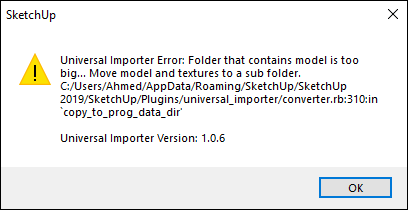
      i import this model with v1.0.1 without any problem but v1.0.6 give me this error why?
      please help.

      Capture.PNG


      800085a7-0000-fd00-b63f-84710c7967bb.zip

      1 Reply Last reply Reply Quote 0
      • OxerO Offline
        Oxer
        last edited by

        @ahmed0007 said:

        i import this model with v1.0.1 without any problem but v1.0.6 give me this error why?
        please help.

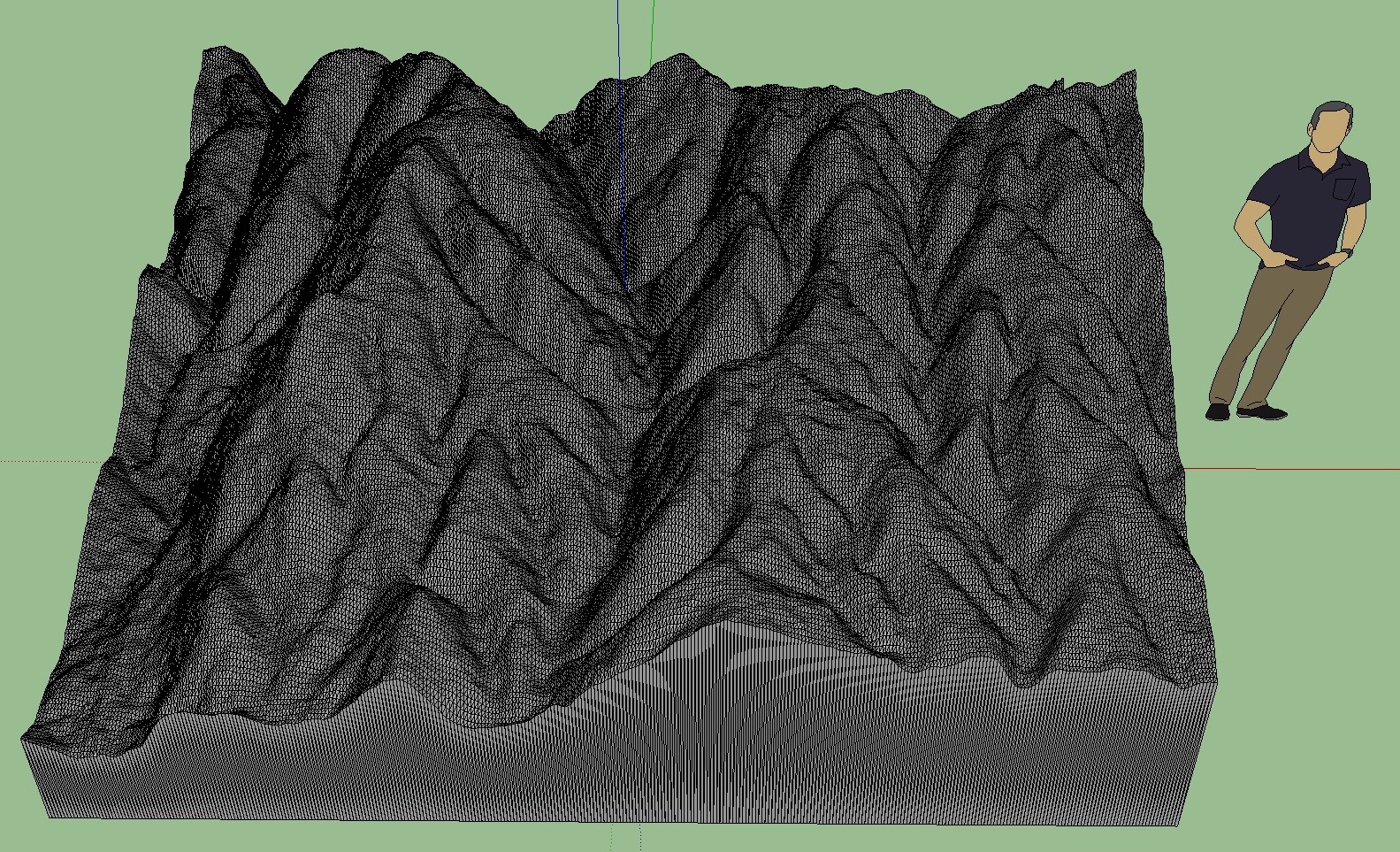
        On macOS 10.13.6 & SU2017 the v1.0.6 works fine with your model.
        On macos ok.jpg

        "The result is the end what is important is the process" by Oxer
        [http://www.oxervision.blogspot.com/(http://www.oxervision.blogspot.com/)]

        1 Reply Last reply Reply Quote 0
        • OxerO Offline
          Oxer
          last edited by

          @einstein said:

          By the way, I think it would be cool to also have polygon reduction as standalone tool for meshes that already exist in SketchUp. Because we haven't had a decent free polyreducer in SketchUp so far. It's just a suggestion.

          It's a good idea πŸ‘

          "The result is the end what is important is the process" by Oxer
          [http://www.oxervision.blogspot.com/(http://www.oxervision.blogspot.com/)]

          1 Reply Last reply Reply Quote 0
          • samuel_tS Offline
            samuel_t
            last edited by

            @ahmed0007 said:

            i import this model with v1.0.1 without any problem but v1.0.6 give me this error why?
            please help.

            In recent versions of plugin there's a mechanism that prevents copy of a too big folder. To fix this issue: Create a sub folder in your Documents then place model and textures inside that sub folder. Re-import.

            1 Reply Last reply Reply Quote 0
            • samuel_tS Offline
              samuel_t
              last edited by

              @einstein said:

              Hi!

              I downloaded the latest update but I'm still getting the same bug with every file format. I cannot import any file to SketchUp 😞

              [...]

              Hi!

              Could you please upload your model (textures included) to a file hoster or here? So I could debug it.

              1 Reply Last reply Reply Quote 0
              • A Offline
                Ahmed0007
                last edited by

                @samuel_t said:

                @ahmed0007 said:

                i import this model with v1.0.1 without any problem but v1.0.6 give me this error why?
                please help.

                In recent versions of plugin there's a mechanism that prevents copy of a too big folder. To fix this issue: Create a sub folder in your Documents then place model and textures inside that sub folder. Re-import.

                Still Same error ?

                1 Reply Last reply Reply Quote 0
                • samuel_tS Offline
                  samuel_t
                  last edited by

                  @ahmed0007 said:

                  @samuel_t said:

                  @ahmed0007 said:

                  i import this model with v1.0.1 without any problem but v1.0.6 give me this error why?
                  please help.

                  In recent versions of plugin there's a mechanism that prevents copy of a too big folder. To fix this issue: Create a sub folder in your Documents then place model and textures inside that sub folder. Re-import.

                  Still Same error ?

                  What's size of model in MB?

                  1 Reply Last reply Reply Quote 0
                  • A Offline
                    Ahmed0007
                    last edited by

                    @samuel_t said:

                    @ahmed0007 said:

                    @samuel_t said:

                    @ahmed0007 said:

                    i import this model with v1.0.1 without any problem but v1.0.6 give me this error why?
                    please help.

                    In recent versions of plugin there's a mechanism that prevents copy of a too big folder. To fix this issue: Create a sub folder in your Documents then place model and textures inside that sub folder. Re-import.

                    Still Same error ?

                    What's size of model in MB?

                    8 mb

                    1 Reply Last reply Reply Quote 0
                    • samuel_tS Offline
                      samuel_t
                      last edited by

                      @ahmed0007 said:

                      @samuel_t said:

                      @ahmed0007 said:

                      @samuel_t said:

                      @ahmed0007 said:

                      i import this model with v1.0.1 without any problem but v1.0.6 give me this error why?
                      please help.

                      In recent versions of plugin there's a mechanism that prevents copy of a too big folder. To fix this issue: Create a sub folder in your Documents then place model and textures inside that sub folder. Re-import.

                      Still Same error ?

                      What's size of model in MB?

                      8 mb

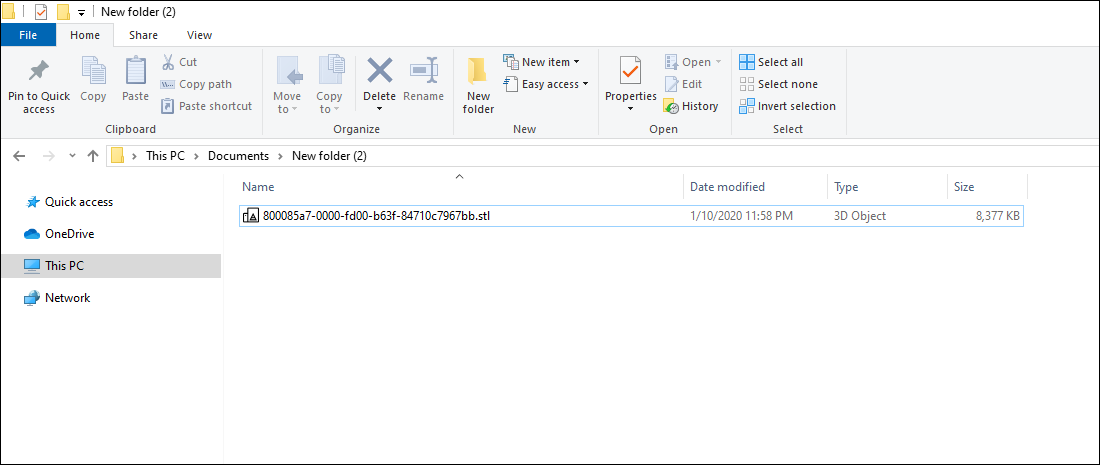
                      OK. Could you please post a screen capture of folder containing model (aka a Windows Explorer view)?

                      1 Reply Last reply Reply Quote 0
                      • TutorialsUpT Offline
                        TutorialsUp
                        last edited by

                        Now i'm also unable to import this model again
                        https://www.youtube.com/watch?v=owXwypsZIHY

                        file type .obj
                        size 110 mb
                        located in Documents folder \Documents\obj 2

                        1 Reply Last reply Reply Quote 0
                        • A Offline
                          Ahmed0007
                          last edited by

                          @samuel_t said:

                          @ahmed0007 said:

                          @samuel_t said:

                          @ahmed0007 said:

                          @samuel_t said:

                          @ahmed0007 said:

                          i import this model with v1.0.1 without any problem but v1.0.6 give me this error why?
                          please help.

                          In recent versions of plugin there's a mechanism that prevents copy of a too big folder. To fix this issue: Create a sub folder in your Documents then place model and textures inside that sub folder. Re-import.

                          Still Same error ?

                          What's size of model in MB?

                          8 mb

                          OK. Could you please post a screen capture of folder containing model (aka a Windows Explorer view)?

                          C:\Users\Ahmed\Documents\New folder (2)

                          Capturee.PNG

                          1 Reply Last reply Reply Quote 0
                          • samuel_tS Offline
                            samuel_t
                            last edited by

                            @ahmed0007 said:

                            @samuel_t said:

                            @ahmed0007 said:

                            @samuel_t said:

                            @ahmed0007 said:

                            @samuel_t said:

                            @ahmed0007 said:

                            i import this model with v1.0.1 without any problem but v1.0.6 give me this error why?
                            please help.

                            In recent versions of plugin there's a mechanism that prevents copy of a too big folder. To fix this issue: Create a sub folder in your Documents then place model and textures inside that sub folder. Re-import.

                            Still Same error ?

                            What's size of model in MB?

                            8 mb

                            OK. Could you please post a screen capture of folder containing model (aka a Windows Explorer view)?

                            C:\Users\Ahmed\Documents\New folder (2)

                            Everything seems OK. I don't understand why you can't import... πŸ˜• There are no hidden files, isn't?

                            1 Reply Last reply Reply Quote 0
                            • A Offline
                              Ahmed0007
                              last edited by

                              Everything seems OK. I don't understand why you can't import... πŸ˜• There are no hidden files, isn't?[/quote]

                              did you try this on your own pc
                              No! There are no hidden files
                              i think i should stick with older version.

                              1 Reply Last reply Reply Quote 0
                              • samuel_tS Offline
                                samuel_t
                                last edited by

                                @ahmed0007 said:

                                did you try this on your own pc
                                No! There are no hidden files
                                i think i should stick with older version.

                                Yes. I tried to import a model with this path: "C:\Users\Samuel\Documents\New folder (2)" and it's OK.

                                1 Reply Last reply Reply Quote 0
                                • samuel_tS Offline
                                  samuel_t
                                  last edited by

                                  @Ahmed0007

                                  Could you please upload your model to a file hoster? This way I can verify if the model is the problem.

                                  1 Reply Last reply Reply Quote 0
                                  • TutorialsUpT Offline
                                    TutorialsUp
                                    last edited by

                                    .

                                    1 Reply Last reply Reply Quote 0
                                    • A Offline
                                      Ahmed0007
                                      last edited by

                                      @samuel_t said:

                                      @Ahmed0007

                                      Could you please upload your model to a file hoster? This way I can verify if the model is the problem.

                                      i uplode the model in my first comment

                                      1 Reply Last reply Reply Quote 0
                                      • samuel_tS Offline
                                        samuel_t
                                        last edited by

                                        @tutorialsup said:

                                        Now i'm also unable to import this model again
                                        https://www.youtube.com/watch?v=owXwypsZIHY

                                        file type .obj
                                        size 110 mb
                                        located in Documents folder \Documents\obj 2

                                        OK. I'm gonna release a hotfixed version.

                                        1 Reply Last reply Reply Quote 0
                                        • A Offline
                                          Ahmed0007
                                          last edited by

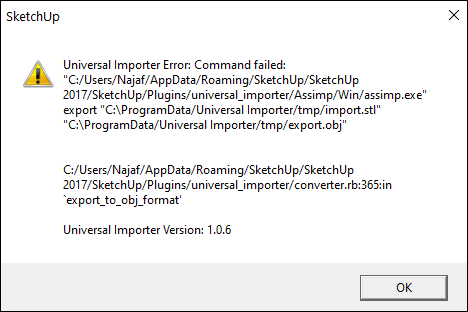
                                          i tried on another pc and get this error
                                          and on one another file get "model is too big error" model size was 11mb

                                          Capture.PNG

                                          1 Reply Last reply Reply Quote 0
                                          • samuel_tS Offline
                                            samuel_t
                                            last edited by

                                            1.0.7 version fixes "anti big copy" bug.

                                            Download latest Universal Importer plugin from SketchUcation PluginStore.

                                            1 Reply Last reply Reply Quote 0
                                            • 1
                                            • 2
                                            • 7
                                            • 8
                                            • 9
                                            • 10
                                            • 11
                                            • 22
                                            • 23
                                            • 9 / 23
                                            • First post
                                              Last post
                                            Buy SketchPlus
                                            Buy SUbD
                                            Buy WrapR
                                            Buy eBook
                                            Buy Modelur
                                            Buy Vertex Tools
                                            Buy SketchCuisine
                                            Buy FormFonts

                                            Advertisement