sketchucation logo sketchucation
    • Login
    Oops, your profile's looking a bit empty! To help us tailor your experience, please fill in key details like your SketchUp version, skill level, operating system, and more. Update and save your info on your profile page today!
    Mac User? | Join the Rayscaper Beta for Mac Learn More

    Twinmotion is now free

    Scheduled Pinned Locked Moved Hardware, Software & Gadgets
    89 Posts 29 Posters 52.3k Views 29 Watching
    Loading More Posts
    • Oldest to Newest
    • Newest to Oldest
    • Most Votes
    Reply
    • Reply as topic
    Log in to reply
    This topic has been deleted. Only users with topic management privileges can see it.
    • pilouP
      pilou
      last edited by

      @unknownuser said:

      is it possible to change the backgroundsphere to my own equirectangular pano?

      Seems yes πŸ˜‰

      Minute 0.57 second video! Sorry in French... but here the transllation πŸ˜‰

      The key is to use a textured dome for create a "context"

      Step 1 - Load textured examples created by Jesus Carbajal

      Step 2 - Save them inside user Library of Twinmotion

      Step 3 - Launch TwinMotion. Domes are organized bottom of the user Library.
      drag & drop them to the scene

      Step 4 - Select the Dome's texture with the ink-dropper. Like this you open the dock of the materials parameters where you can adjust the texture's position.

      Use these domes as example, for create your own environement, you can replace the texture by another 360Β° images.

      PS Not sure you can with these free version.
      .

      Frenchy Pilou
      Is beautiful that please without concept!
      My Little site :)

      1 Reply Last reply
      Reply Quote 0
      • pilouP
        pilou
        last edited by

        You can find the doms here πŸ˜‰

        But where is the User Library folder on computer inside this TwinMotion version for input these files ...that's the mystery! πŸ˜„
        And make our own tmi another one! πŸ˜›

        Maybe also try with the Library/ Volume/ Sphere Reflexion Probe...

        Frenchy Pilou
        Is beautiful that please without concept!
        My Little site :)

        1 Reply Last reply
        Reply Quote 0
        • jo-keJ
          jo-ke
          last edited by

          thank you.

          I will have a look

          here's a new video

          http://www.zz7.de

          1 Reply Last reply
          Reply Quote 0
          • pilouP
            pilou
            last edited by

            Solution of the localisation Path for the Domes files tmi above so you put them inside!
            "C:\Users\your_user_name\Documents\Twinmotion2019\UserLibrary"

            Thx Tenrev at the Forum Biblio3D πŸ˜„

            Stay the problem : how generate new landscapes 360Β° like the domes above?

            Frenchy Pilou
            Is beautiful that please without concept!
            My Little site :)

            1 Reply Last reply
            Reply Quote 0
            • HornOxxH
              HornOxx
              last edited by

              @pilou said:

              You can find the doms here πŸ˜‰ But where is the User Library folder on computer inside this TwinMotion version for input these files ...that's the mystery! πŸ˜„
              And make our own tmi another one! πŸ˜› ...

              this whole dom process remains a mystery to me. Pilou, where exactly does your link lead to? πŸ˜„ ❓

              never trust a skinny cook

              1 Reply Last reply
              Reply Quote 0
              • jo-keJ
                jo-ke
                last edited by

                I can paste the dome to my model but when I change the texture the old one remains and is someway overlapped to the new one.... Strange...

                Also in the lower parts there is Fog. Now Idea how to erase the fog....

                http://www.zz7.de

                1 Reply Last reply
                Reply Quote 0
                • pilouP
                  pilou
                  last edited by

                  @HornOox if you scrool inside my above link, you will found these domes used in the tutorial video(s) πŸ˜‰

                  @unknownuser said:

                  1.Download the textured dome examples created in .tmi format.
                  https://drive.google.com/file/d/1Gm3FlhxLmPtyKDd6qkyj1Ccn0jd8uWxB/view?fbclid=IwAR0_j9y4x9KE-F69q5n_LagVLT0wD2t4CHk66F2Qky7NHbWrdS17mgyCQ2w

                  @Joke : no special problem for me : exactly like the videos ! πŸ˜„
                  Maybe Meteo / Effects/ Pollution are enable for any reasons ?

                  Frenchy Pilou
                  Is beautiful that please without concept!
                  My Little site :)

                  1 Reply Last reply
                  Reply Quote 0
                  • pilouP
                    pilou
                    last edited by

                    And bingo I have found the trick for made our own "Texture 360Β°" β˜€

                    From this image (or any image of anything) here mine MagicaVoxel image! πŸ˜„
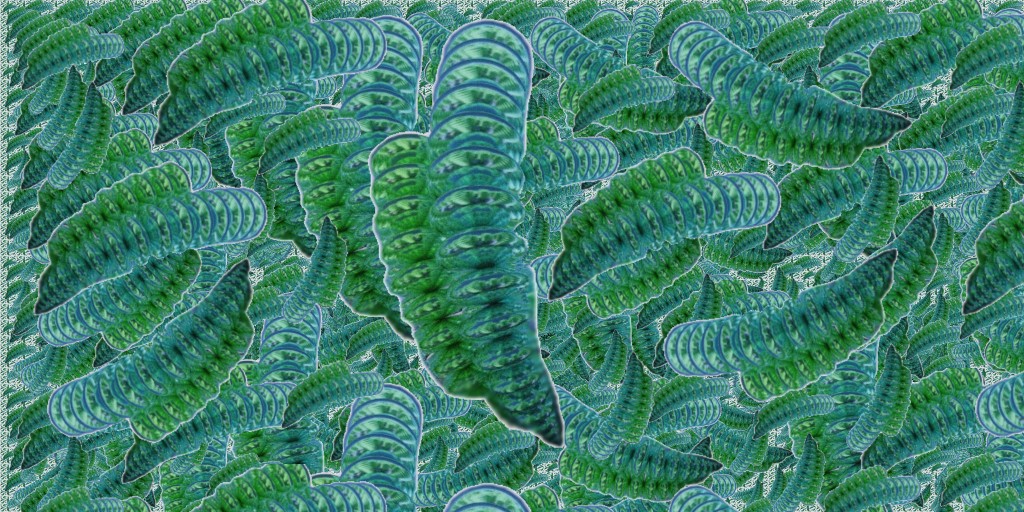
                    https://i.postimg.cc/HkYhm9vp/green-worms.jpg

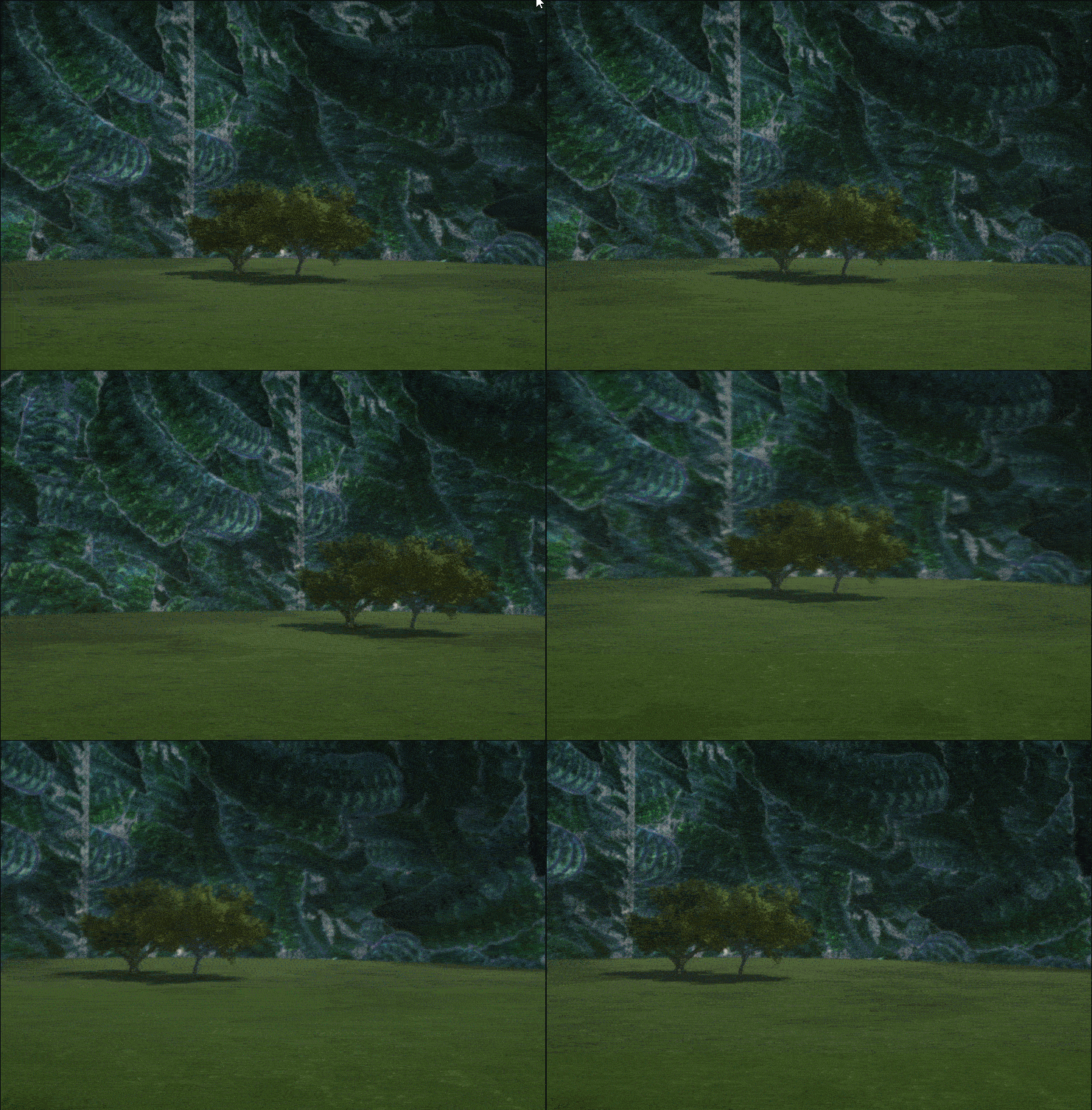
                    You obtain that! πŸ˜„ Alas (you must make some rotate because here we are just on the seam ! : )
                    So Ink-Dropper/ Scale / Offset for have it on the back! πŸ˜„ (not made here)

                    https://i.postimg.cc/MZ5j378Z/Gif-fond-comp1.gif

                    Vegetable Menu / Materials Menu

                    • Take any texture - Clic "Color Plus" to get the Texture Menu
                    • Apply this texture to the dome! (Drag & Drop)
                    • Click on "Texture" word - load any image
                    • Right Click on the Control Globe that contains the new Texture / Add to User Library
                      The native texture is obviously not destroyed!

                    You get your own personalized "Texture Dome"! The famous".tmi" file! πŸ€“

                    https://i.postimg.cc/0jS5v1Bq/process-dome.jpg

                    Last but not the least : how make the "domes above" (surrely with a sphere Glass Double Face etc...)

                    Frenchy Pilou
                    Is beautiful that please without concept!
                    My Little site :)

                    1 Reply Last reply
                    Reply Quote 0
                    • pilouP
                      pilou
                      last edited by

                      @Joke
                      About fog! πŸ˜‰

                      Frenchy Pilou
                      Is beautiful that please without concept!
                      My Little site :)

                      1 Reply Last reply
                      Reply Quote 0
                      • david_hD
                        david_h
                        last edited by

                        So. . .I just downloaded the engine. I must say the videos look fun. .. but I hope this doesn't end up giving me a headache. Thea is hard enough for me. . . πŸ’š

                        If I make it look easy...It is probably easy

                        1 Reply Last reply
                        Reply Quote 0
                        • pilouP
                          pilou
                          last edited by

                          No headache! It's one of the more friendly interface that you can find! β˜€
                          No need to be a 3D veteran for use it! 😎

                          Frenchy Pilou
                          Is beautiful that please without concept!
                          My Little site :)

                          1 Reply Last reply
                          Reply Quote 0
                          • david_hD
                            david_h
                            last edited by

                            Thanks Pilou. I would think I AM a 3D veteren... . just not a very good one. πŸ’š

                            If I make it look easy...It is probably easy

                            1 Reply Last reply
                            Reply Quote 0
                            • david_hD
                              david_h
                              last edited by

                              Thank you! That was terrific! I'm going to go thru some Tuts this weekend!

                              Thx

                              D

                              If I make it look easy...It is probably easy

                              1 Reply Last reply
                              Reply Quote 0
                              • jo-keJ
                                jo-ke
                                last edited by

                                Pilou, your tip worked fantastic. Thank you.

                                I am rendering a new video...

                                http://www.zz7.de

                                1 Reply Last reply
                                Reply Quote 0
                                • pilouP
                                  pilou
                                  last edited by

                                  The part about of TwinMotion Take a look at 59.59 minutes! πŸ˜‰

                                  Frenchy Pilou
                                  Is beautiful that please without concept!
                                  My Little site :)

                                  1 Reply Last reply
                                  Reply Quote 0
                                  • D
                                    dtrarch
                                    last edited by

                                    Easy to understand but some of the functions just do not work for me at all?
                                    Could this be the graphic card requirements and what is the min needed?
                                    Info please
                                    Thanks too.
                                    dtr

                                    1 Reply Last reply
                                    Reply Quote 0
                                    • pilouP
                                      pilou
                                      last edited by

                                      From https://www.unrealengine.com/en-US/faq

                                      @unknownuser said:

                                      For developing with UE4, we recommend a desktop PC with Windows 7 64-bit or a Mac with Mac OS X 10.9.2 or later, 8 GB RAM and a quad-core Intel or AMD processor, and a DX11 compatible video card. UE4 will run on desktops and laptops below these recommendations, but performance may be limited.

                                      they don't speak about the DX 11 in the FAQ but I suppose that is the same for TwinMotion! πŸ˜‰

                                      Frenchy Pilou
                                      Is beautiful that please without concept!
                                      My Little site :)

                                      1 Reply Last reply
                                      Reply Quote 0
                                      • srxS
                                        srx
                                        last edited by

                                        RTX+Unreal+Twinmotion free with Archicad 23 https://youtu.be/FrNeoe_viyY

                                        www.saurus.rs

                                        1 Reply Last reply
                                        Reply Quote 0
                                        • D
                                          dtrarch
                                          last edited by

                                          Pilou
                                          Thanks for the info.
                                          Time to upgrade my card.

                                          πŸ‘ πŸ‘
                                          dtrarch

                                          1 Reply Last reply
                                          Reply Quote 0
                                          • SchuppeS
                                            Schuppe
                                            last edited by

                                            .....another Video.
                                            I`m not a stop-motion artist, itΒ΄s easy to see. hahaha
                                            But iΒ΄m workin on it πŸ˜„


                                            Rexi in motion

                                            1 Reply Last reply
                                            Reply Quote 0

                                            Hello! It looks like you're interested in this conversation, but you don't have an account yet.

                                            Getting fed up of having to scroll through the same posts each visit? When you register for an account, you'll always come back to exactly where you were before, and choose to be notified of new replies (either via email, or push notification). You'll also be able to save bookmarks and upvote posts to show your appreciation to other community members.

                                            With your input, this post could be even better πŸ’—

                                            Register Login
                                            • 1
                                            • 2
                                            • 3
                                            • 4
                                            • 5
                                            • 2 / 5
                                            • First post
                                              Last post
                                            Buy SketchPlus
                                            Buy SUbD
                                            Buy WrapR
                                            Buy eBook
                                            Buy Modelur
                                            Buy Vertex Tools
                                            Buy SketchCuisine
                                            Buy FormFonts

                                            Advertisement