Shrink Plugin Window
-
Hi,
I have installed the Round Corner plugin and when I open it I get this shrink window (see snapshot).
Has anyone faced this problem before and sorted?
Any help will be appreciate it.
Regards
LeandroNOTE. The version of Sketchup I´m running at the moment is Sketchup 2016 Pro and I´m using a Microsoft Surface Book 2 13´´ laptop.

-
Yes I'm constantly get similar problems with Surface Pro 4. Not only in Sketchup . There is no real solution just compromise. Until the programmers will not apply proper programming for the high resolution displays. (I'm talking about windows programmers, application programmers and plugin programmers...)
I assume, the problem is the high DPI screen.
1, You can try to override the default high DPI setting for Sketchup like this:
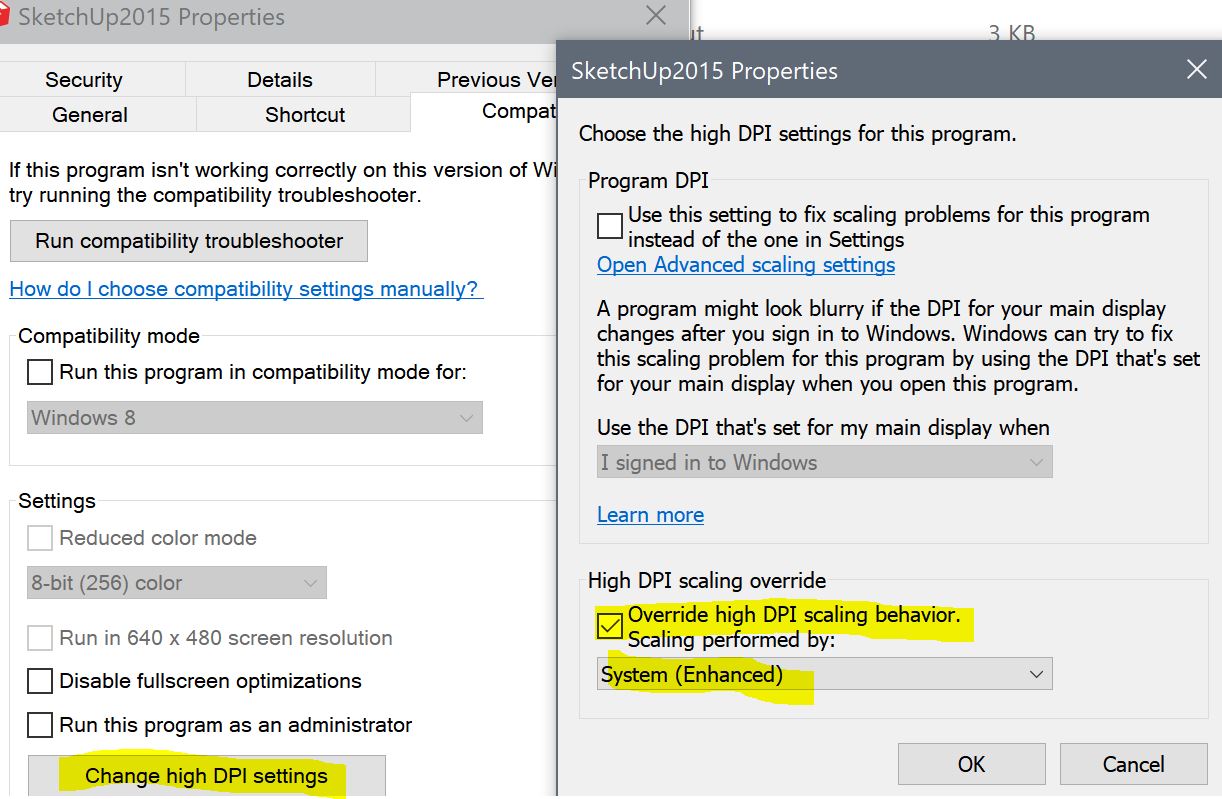
2, Try to change: in the windows display setting : Scale and/or resolution
-
Hi Dezmo,
Thanks for your reply.
I have tried you suggestion but this creates other Sketchup windows to shrink or oversize too.
Thus, I left the compatibility as it was before.
Regards
Leandro
Hello! It looks like you're interested in this conversation, but you don't have an account yet.
Getting fed up of having to scroll through the same posts each visit? When you register for an account, you'll always come back to exactly where you were before, and choose to be notified of new replies (either via email, or push notification). You'll also be able to save bookmarks and upvote posts to show your appreciation to other community members.
With your input, this post could be even better 💗
Register Login


Advertisement