sketchucation logo sketchucation
    • 登入
    Oops, your profile's looking a bit empty! To help us tailor your experience, please fill in key details like your SketchUp version, skill level, operating system, and more. Update and save your info on your profile page today!
    🔌 Smart Spline | Fluid way to handle splines for furniture design and complex structures. Download

    Automatic walls, doors & windows

    已排程 已置頂 已鎖定 已移動 Plugins
    55 貼文 13 Posters 34.6k 瀏覽 13 Watching
    正在載入更多貼文
    • 從舊到新
    • 從新到舊
    • 最多點贊
    回覆
    • 在新貼文中回覆
    登入後回覆
    此主題已被刪除。只有擁有主題管理權限的使用者可以查看。
    • mariochaM 離線
      mariocha
      最後由 編輯

      Update 5.1 !!
      After Windows on demand,
      introducing Doors on demand.
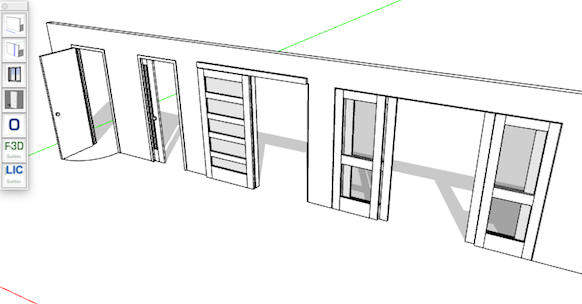
      A first set of interior doors. Plain and multiple glass panes.
      Each has opened and closed doors on respective layers.
      Wood grain respectful !
      Ask if you need a particular door. Maybe I can add it.

      closed.png


      opened.png

      %(#008000)[Mario C.
      Every rule has exceptions, but some.]

      1 條回覆 最後回覆 回覆 引用 0
      • jujuJ 離線
        juju
        最後由 編輯

        As stated, more complex walls are of interest. Simple block ones are not a problem at all.

        Save the Earth, it's the only planet with chocolate.

        1 條回覆 最後回覆 回覆 引用 0
        • mariochaM 離線
          mariocha
          最後由 編輯

          How more complex ?
          What purpose ?
          An example ?

          %(#008000)[Mario C.
          Every rule has exceptions, but some.]

          1 條回覆 最後回覆 回覆 引用 0
          • jujuJ 離線
            juju
            最後由 編輯

            @mariocha said:

            How more complex ?

            Probably at least 2 - 5 entities deep (depending on specifications and the way one models), may or may not be different groups on different layers.

            @mariocha said:

            What purpose ?

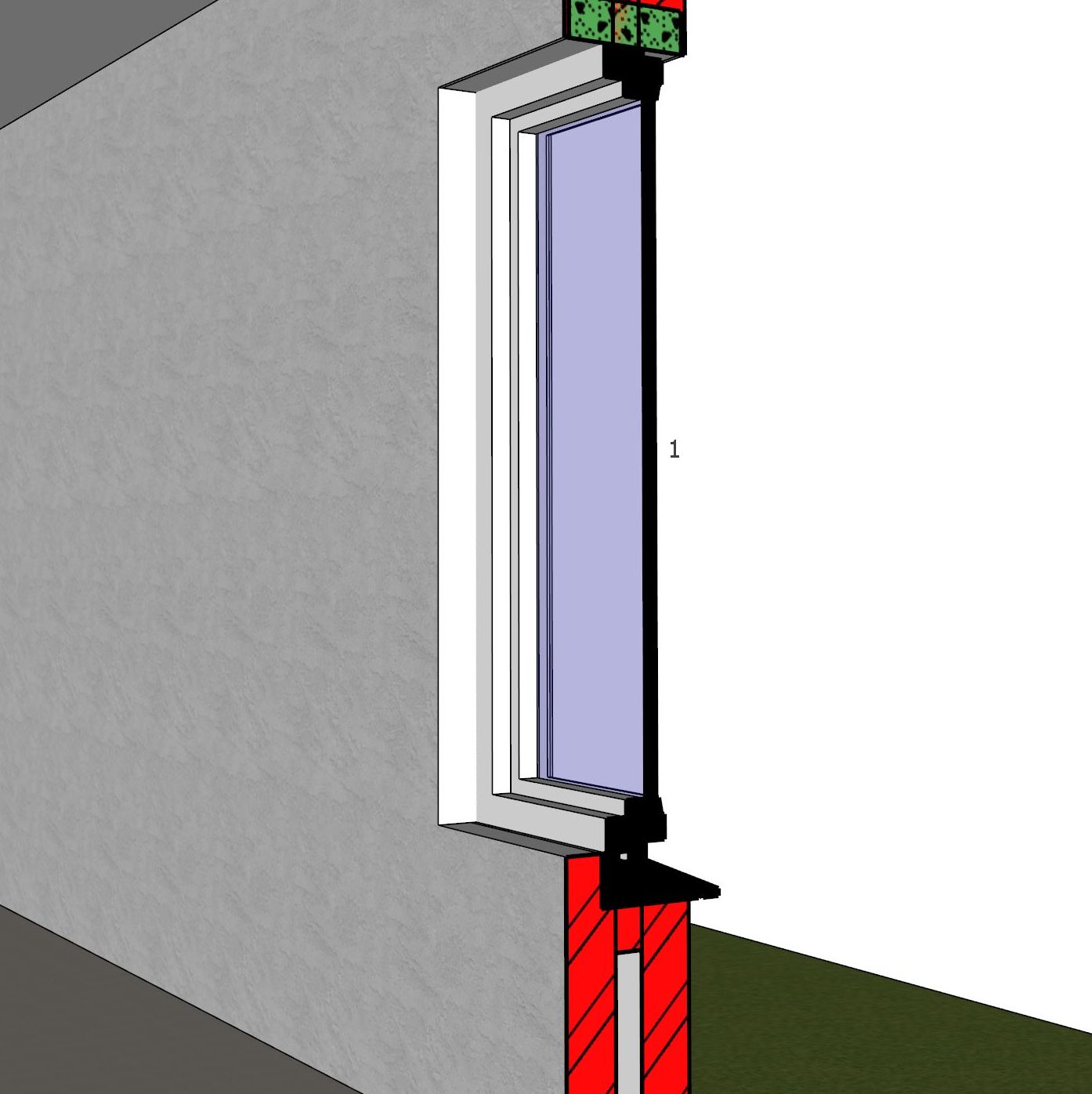
            I would have thought that was self evident? So you can pick your door/window, insert it into the wall with it cutting the hole through all of the various entities automatically; not only healing the geometry, but also construct the reveal geometry. That way you don't have to generate the additional geometry manually (and change it manually should size / position change).

            Hopefully something could be worked out so one can include the lintels also being automatically generated and inserted.

            Would also love to be able to pre-determine the layers the groups for the various geometries will be assigned to (for when you're working on a layering template).

            @mariocha said:

            An example ?
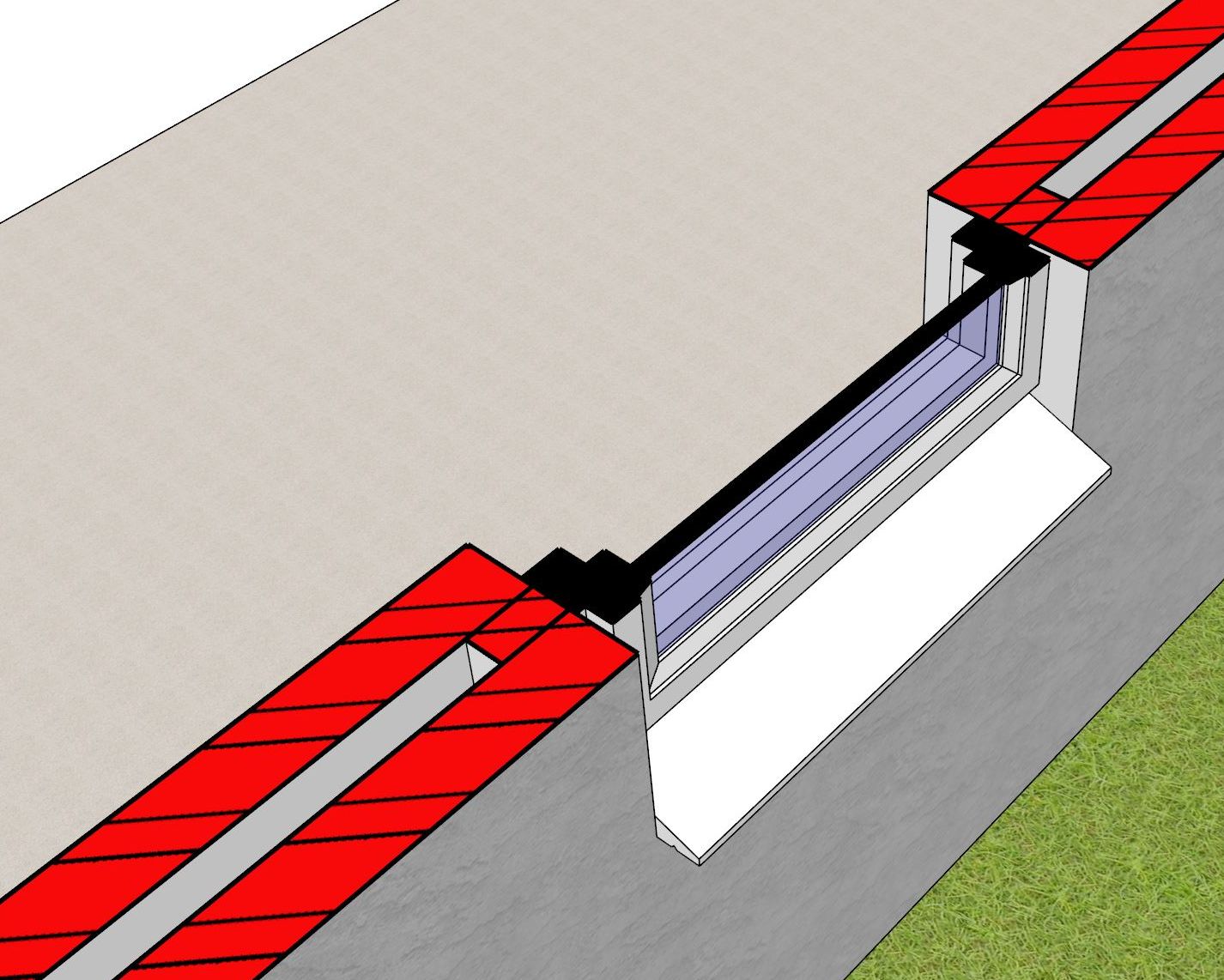
            plan.JPG
            sect.JPG

            Save the Earth, it's the only planet with chocolate.

            1 條回覆 最後回覆 回覆 引用 0
            • mariochaM 離線
              mariocha
              最後由 編輯

              Ah I see. Purpose is construction docs.
              No I do not want to go there. I left that way of producing docs.
              Now I do simple walls (ease of design) and the complex things are shown later on details (ease of change)
              And if the details impact on the walls, being simple makes them easy to adjust.

              %(#008000)[Mario C.
              Every rule has exceptions, but some.]

              1 條回覆 最後回覆 回覆 引用 0
              • mariochaM 離線
                mariocha
                最後由 編輯

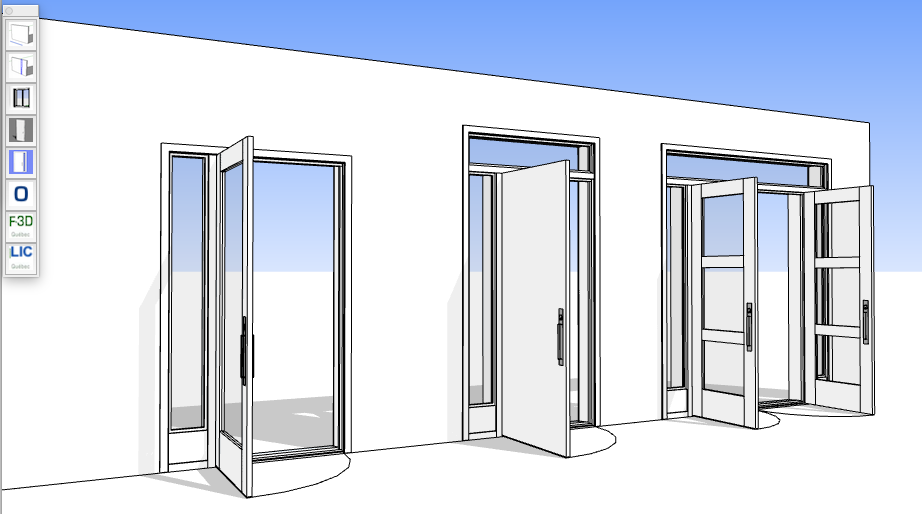
                EXTERIOR DOORS: first set. Includes sidelights & transom.
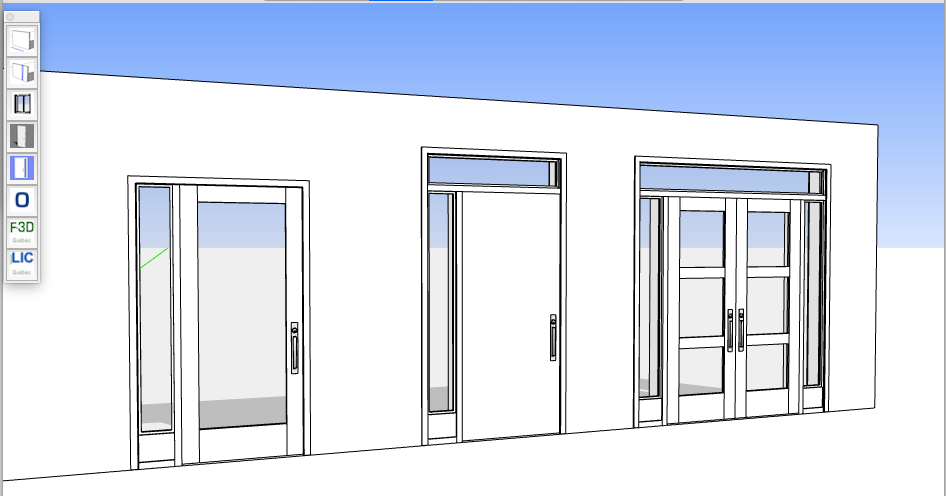

                ext-doors-clo.png


                ext-doors-ope.png

                %(#008000)[Mario C.
                Every rule has exceptions, but some.]

                1 條回覆 最後回覆 回覆 引用 0
                • mariochaM 離線
                  mariocha
                  最後由 編輯

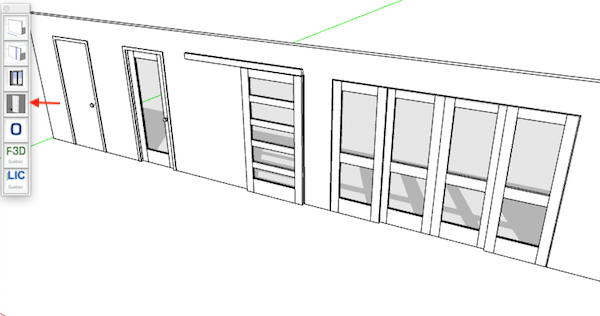
                  Better Doors on Rail (suspended) and Multiple Glass now even spaced.
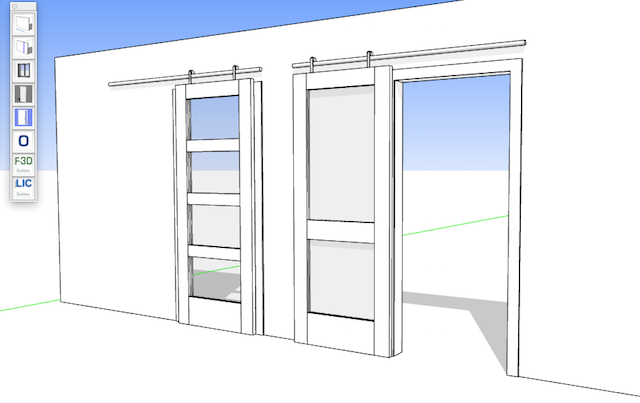

                  Doors on Rail.png

                  %(#008000)[Mario C.
                  Every rule has exceptions, but some.]

                  1 條回覆 最後回覆 回覆 引用 0
                  • Bob JamesB 離線
                    Bob James
                    最後由 編輯

                    @__juju__

                    I think the awesomely detailed construction extensions being created by Nathaniel Wilkerson (medeek) is what you're looking for.

                    i7-4930K 3.4Ghz, 2x GTX780 6GB, 32GB DDR3-1600 ECC, OCZ Vertex 4 500GB, WD Black 3TB, 32TB NAS, 4x 27" Monitors, SpaceMouse Pro, X-keys XK-60

                    1 條回覆 最後回覆 回覆 引用 0
                    • jujuJ 離線
                      juju
                      最後由 編輯

                      @bob james said:

                      @__juju__

                      I think the awesomely detailed construction extensions being created by Nathaniel Wilkerson (medeek) is what you're looking for.

                      Hi Bob, I agree that Nathaniel makes some really great extensions and he's extremely dedicated. I am keeping an eye on his new wall framing extension (in beta 0.74 now I believe), but we don't really use that method of construction where I'm at.

                      I'll have to look and see what can be done with it, but I think I'm kinda stuck with what I want / need at the moment. I use Profile Builder 2 (by whaat, another of the many great coders) for walls and such which helps speed things up.

                      I'm starting to think one of the solutions would be not to create walls as they're built, thus as a single volume, but this doesn't communicate correctly on the construction documentation. I also use Skalp 3 (by layer method) and am hoping that they will be able to develop their Pattern Designer so I can create a complex pattern to represent a complex / cavity wall when cutting through a single volume wall.

                      Save the Earth, it's the only planet with chocolate.

                      1 條回覆 最後回覆 回覆 引用 0
                      • Bob JamesB 離線
                        Bob James
                        最後由 編輯

                        @juju said:

                        I use Profile Builder 2

                        So do I since I don't need construction details, but I'm looking Forward to Nathaniel's extensions for when/if I do 😄

                        i7-4930K 3.4Ghz, 2x GTX780 6GB, 32GB DDR3-1600 ECC, OCZ Vertex 4 500GB, WD Black 3TB, 32TB NAS, 4x 27" Monitors, SpaceMouse Pro, X-keys XK-60

                        1 條回覆 最後回覆 回覆 引用 0
                        • pbacotP 離線
                          pbacot
                          最後由 編輯

                          Juju,

                          I know how you feel I think. Actually the walls we usually use are closer to Medeek walls in construction, but then there's always something different. I have long gone to "outline walls" in building sections and use detail sections of specific parts. I have used SU a little for the empty volume sections. Usually find that the builder doesn't need to know how to build a wall and we have structural plans and details for everything that's not obvious and whatever the code compliance needs. We will sometimes also work out the preliminary sections in CAD for us and the engineer, but not necessarily use them for the final drawings. So I am not sure if I'll ever get to the total BIM model concept or need it.

                          MacOSX MojaveSketchUp Pro v19 Twilight v2 Thea v3 PowerCADD

                          1 條回覆 最後回覆 回覆 引用 0
                          • mariochaM 離線
                            mariocha
                            最後由 編輯

                            The download is only from the site http://www.formation-sketchup.quebec. It is kinda quick and discreet. Have you checked your folder ?
                            Update: NOT NEEDED ANYMORE, so removed

                            %(#008000)[Mario C.
                            Every rule has exceptions, but some.]

                            1 條回覆 最後回覆 回覆 引用 0
                            • mariochaM 離線
                              mariocha
                              最後由 編輯

                              Walls as single volume is the first step, for me. Once all windows and doors are in, I use Fredo Joint PushPull to add inner material faces.

                              %(#008000)[Mario C.
                              Every rule has exceptions, but some.]

                              1 條回覆 最後回覆 回覆 引用 0
                              • mariochaM 離線
                                mariocha
                                最後由 編輯

                                UPDATE
                                See V8.4 video at beginning of post.

                                %(#008000)[Mario C.
                                Every rule has exceptions, but some.]

                                1 條回覆 最後回覆 回覆 引用 0
                                • N 離線
                                  neil_M58
                                  最後由 編輯

                                  new user. how do you change units to metric?

                                  1 條回覆 最後回覆 回覆 引用 0
                                  • mariochaM 離線
                                    mariocha
                                    最後由 編輯

                                    @neil_m58 said:

                                    new user. how do you change units to metric?

                                    Once SketchUp is set to metrics, just enter your metric values in the dialogs, they will replace the default values.

                                    %(#008000)[Mario C.
                                    Every rule has exceptions, but some.]

                                    1 條回覆 最後回覆 回覆 引用 0
                                    • mariochaM 離線
                                      mariocha
                                      最後由 編輯

                                      This plugin is now Renamed to Sketch-Int
                                      and moved to SketchUp Extension Warehouse.

                                      %(#008000)[Mario C.
                                      Every rule has exceptions, but some.]

                                      1 條回覆 最後回覆 回覆 引用 0
                                      • D 離線
                                        dtrarch
                                        最後由 編輯

                                        Sounds like a good idea for a plugin but a trial is always a good thing to view first.
                                        It is installed but???
                                        The trial email to validate does not show up in my mailbox after multiple tries to have it sent?
                                        I would hate to pay and have the same thing happen again.
                                        Is pay to play the only option that works to validate.?
                                        OK with me but need to know please.

                                        dtrarch

                                        1 條回覆 最後回覆 回覆 引用 0
                                        • mariochaM 離線
                                          mariocha
                                          最後由 編輯

                                          Sketch-Int will be available soon on SketchUp EW, trial also.

                                          %(#008000)[Mario C.
                                          Every rule has exceptions, but some.]

                                          1 條回覆 最後回覆 回覆 引用 0
                                          • pbacotP 離線
                                            pbacot
                                            最後由 編輯

                                            And on SketchUcation? What's the name about?

                                            MacOSX MojaveSketchUp Pro v19 Twilight v2 Thea v3 PowerCADD

                                            1 條回覆 最後回覆 回覆 引用 0
                                            • 1
                                            • 2
                                            • 3
                                            • 2 / 3
                                            • 第一個貼文
                                              最後的貼文
                                            Buy SketchPlus
                                            Buy SUbD
                                            Buy WrapR
                                            Buy eBook
                                            Buy Modelur
                                            Buy Vertex Tools
                                            Buy SketchCuisine
                                            Buy FormFonts

                                            Advertisement