CityEngine to SketchUp: Remove faces Collada tree model
-
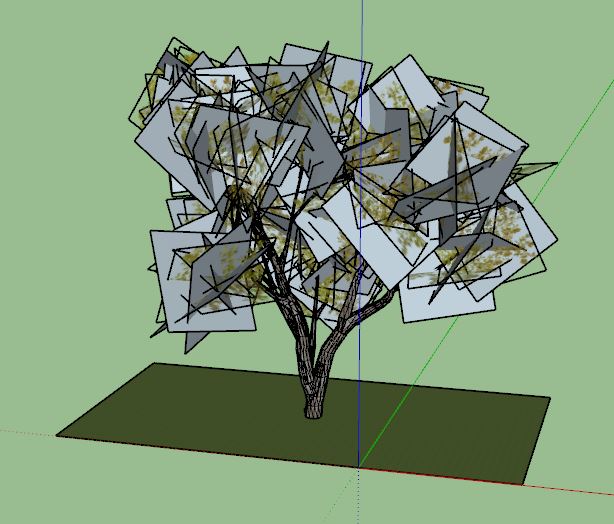
This model was created in CityEngine and exported as a Collada. Does anybody know how to get this into SketchUp without the rectangular faces around the leaves (i.e., adjusti the export settings in City Engine)? Or does anybody know how to only remove the faces but keep everything else once it is in SketchUp?
-
The faces cannot and should not be removed. They are the diffuse color of a material. It's probably a jpg image.
That material should also have a clip or alpha map. Which can also be a jpg image.
That clip/alpha is black and white image where black goes for the empty space and white the leaf itself.
What you can do is create a png image based on the diffuse+alpha maps in an image editor. Use the diffuse jpg as base image and insert the clip/alpha as mask.
Then save it as png.
Go to Sketchup material editor and replace the texture by this png.

Hello! It looks like you're interested in this conversation, but you don't have an account yet.
Getting fed up of having to scroll through the same posts each visit? When you register for an account, you'll always come back to exactly where you were before, and choose to be notified of new replies (either via email, or push notification). You'll also be able to save bookmarks and upvote posts to show your appreciation to other community members.
With your input, this post could be even better 💗
Register Login


Advertisement