sketchucation logo sketchucation
    • 登入
    Oops, your profile's looking a bit empty! To help us tailor your experience, please fill in key details like your SketchUp version, skill level, operating system, and more. Update and save your info on your profile page today!
    🔌 Smart Spline | Fluid way to handle splines for furniture design and complex structures. Download

    Medeek Wall Plugin

    已排程 已置頂 已鎖定 已移動 Plugins
    1.5k 貼文 27 Posters 1.1m 瀏覽 26 Watching
    正在載入更多貼文
    • 從舊到新
    • 從新到舊
    • 最多點贊
    回覆
    • 在新貼文中回覆
    登入後回覆
    此主題已被刪除。只有擁有主題管理權限的使用者可以查看。
    • medeekM 離線
      medeek
      最後由 編輯

      Version 1.2.0b - 01.16.2020

      • Fixed a bug with wall presets introduced with the addition of the stud spacing offset parameter.

      ***** CRITICAL BUG FIX *****
      If you have previously installed Version 1.1.8 thru Version 1.2.0 then you will want to update your installation to this latest version. The bug was introduced into the wall presets module on 01/06/2020 when the stud spacing offset parameter was added. This bug fix should resolve that bug and allow the creation of wall presets with this latest parameter added to the list of wall parameters.

      Nathaniel P. Wilkerson PE
      Medeek Engineering Inc
      design.medeek.com

      1 條回覆 最後回覆 回覆 引用 0
      • medeekM 離線
        medeek
        最後由 編輯

        Version 1.2.1 - 01.17.2020

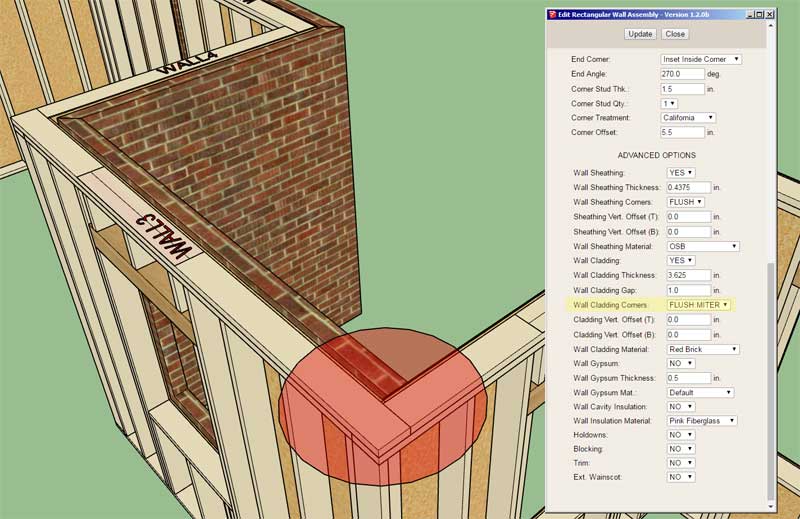
        • Added FLUSH:MITER and MITER:FLUSH option to the Wall Cladding Corners parameter.
        • Fixed a second bug with wall presets introduced with the addition of the stud spacing offset parameter.
        http://design.medeek.com/resources/trussplugin/images/truss_su625_800.jpg

        The additional options for the Wall Cladding Corners parameter is specifically for situations where you encounter a wall cladding material/thickness change at an inside corner as shown.

        Nathaniel P. Wilkerson PE
        Medeek Engineering Inc
        design.medeek.com

        1 條回覆 最後回覆 回覆 引用 0
        • medeekM 離線
          medeek
          最後由 編輯

          Version 1.2.1b - 01.17.2020

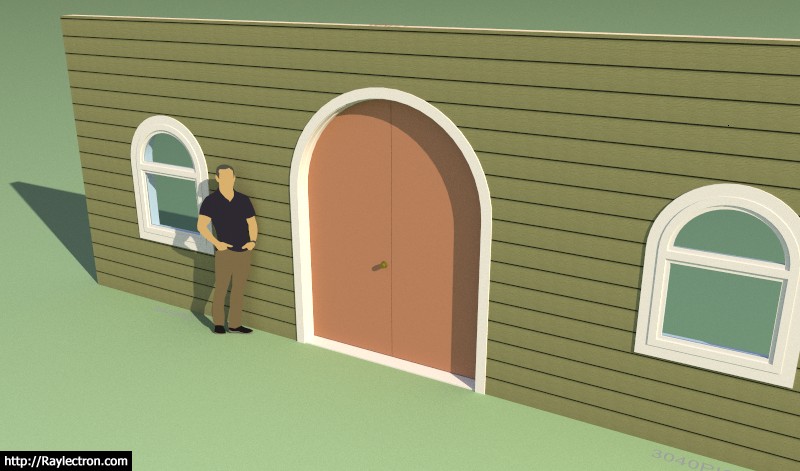
          • Added (segmental and half round) arched double doors to the door module.
          http://design.medeek.com/resources/trussplugin/images/truss_su626_800.jpg

          View model here:

          Link Preview Image
          3D Warehouse

          3D Warehouse is a website of searchable, pre-made 3D models that works seamlessly with SketchUp.

          favicon

          (3dwarehouse.sketchup.com)

          Nathaniel P. Wilkerson PE
          Medeek Engineering Inc
          design.medeek.com

          1 條回覆 最後回覆 回覆 引用 0
          • G 離線
            Glenn at home
            最後由 編輯

            Looking good Nathan!

            SketchUp Pro 2025/2026 Dell XPS 8950 i9-12900K 64GB Ram RTX 3080

            1 條回覆 最後回覆 回覆 引用 0
            • medeekM 離線
              medeek
              最後由 編輯

              I've been considering add an advanced option for Quoins (outside corners only):

              https://aws1.discourse-cdn.com/sketchup/original/3X/e/a/ea8cec59ed5a90224595423ed0bcd18e3db59f6b.jpeg

              The required parameters would probably be:

              Style:
              Length 1:
              Length 2:
              Height:
              Spacing:
              Thickness:
              Material:

              View model here:

              Link Preview Image
              3D Warehouse

              3D Warehouse is a website of searchable, pre-made 3D models that works seamlessly with SketchUp.

              favicon

              (3dwarehouse.sketchup.com)

              Nathaniel P. Wilkerson PE
              Medeek Engineering Inc
              design.medeek.com

              1 條回覆 最後回覆 回覆 引用 0
              • medeekM 離線
                medeek
                最後由 編輯

                Version 1.2.1c - 01.17.2020

                • Fixed a number of bugs related to stacked doors, door sidelites and backward compatibility with previous versions.
                • Added (segmental and half round) arched half glass doors to the door module.
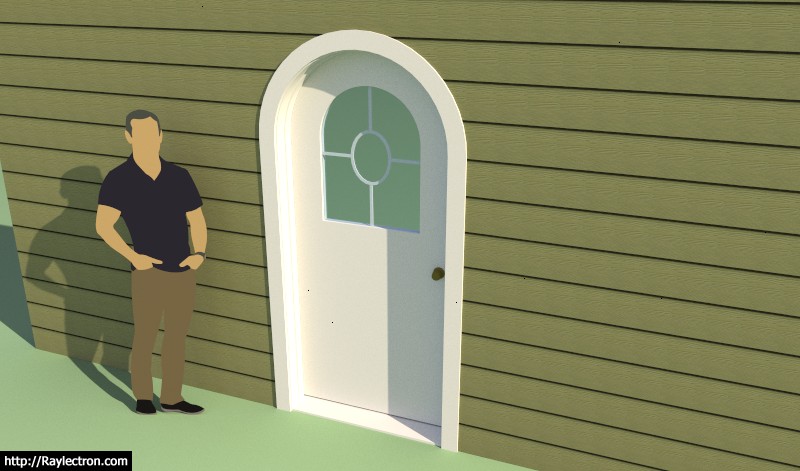
                http://design.medeek.com/resources/trussplugin/images/truss_su629_800.jpg

                Half glass option per customer request.

                Nathaniel P. Wilkerson PE
                Medeek Engineering Inc
                design.medeek.com

                1 條回覆 最後回覆 回覆 引用 0
                • medeekM 離線
                  medeek
                  最後由 編輯

                  Version 1.2.1d - 01.18.2020

                  • Fixed the praire and perimeter grille style for arched half glass and full glass doors.
                  • Added (segmental and half round) arched full glass doors to the door module.
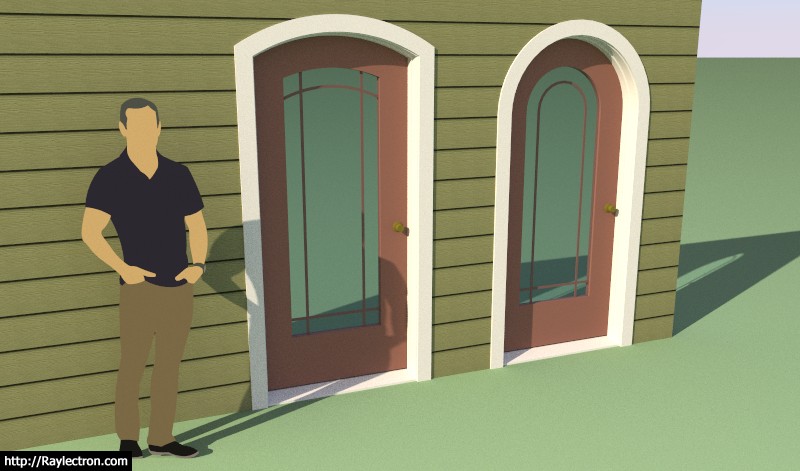
                  http://design.medeek.com/resources/trussplugin/images/truss_su630_800.jpg

                  It seems like there is always more with doors. The items still needing attention with the door module are:

                  • Option for transom window above rectangular and arched doors.
                  • Sidelites for arched doors.
                  • Additional door types for arched doors (ie. six panel, double half glass, double full glass etc...)
                  • Sliding doors
                  • Pocket doors
                  • Closet bi-fold doors

                  View model here:
                  https://3dwarehouse.sketchup.com/model/771d1d73-3aea-429f-99d8-caeb9c4c2fa3/Arch-Full-Glass-Doors

                  Nathaniel P. Wilkerson PE
                  Medeek Engineering Inc
                  design.medeek.com

                  1 條回覆 最後回覆 回覆 引用 0
                  • jujuJ 離線
                    juju
                    最後由 編輯

                    @medeek said:

                    I've been considering add an advanced option for Quoins (outside corners only)

                    Keep the main thing the main thing.

                    Save the Earth, it's the only planet with chocolate.

                    1 條回覆 最後回覆 回覆 引用 0
                    • medeekM 離線
                      medeek
                      最後由 編輯

                      @juju said:

                      @medeek said:

                      I've been considering add an advanced option for Quoins (outside corners only)

                      Keep the main thing the main thing.

                      It would actually be just another type of corner trim.

                      Nathaniel P. Wilkerson PE
                      Medeek Engineering Inc
                      design.medeek.com

                      1 條回覆 最後回覆 回覆 引用 0
                      • medeekM 離線
                        medeek
                        最後由 編輯

                        Version 1.2.2 - 01.25.2020

                        • Added (segmental and half round) arched half glass double doors to the door module.
                        • Added (segmental and half round) arched full glass double doors to the door module.

                        https://aws1.discourse-cdn.com/sketchup/original/3X/a/c/acf98db1261a18280611b3dd46da16ae68b0119b.jpeg

                        https://aws1.discourse-cdn.com/sketchup/original/3X/b/6/b61dfda7770c9fa4dc8980d434e97dd804a2ba86.jpeg

                        https://aws1.discourse-cdn.com/sketchup/original/3X/a/6/a68c703cded86d0e0427848d70438cfd33d2bdb3.jpeg

                        https://aws1.discourse-cdn.com/sketchup/original/3X/b/1/b15899668da857a32c2489122fcffe0a100df4b6.jpeg

                        Nathaniel P. Wilkerson PE
                        Medeek Engineering Inc
                        design.medeek.com

                        1 條回覆 最後回覆 回覆 引用 0
                        • medeekM 離線
                          medeek
                          最後由 編輯

                          Version 1.2.3- 01.30.2020

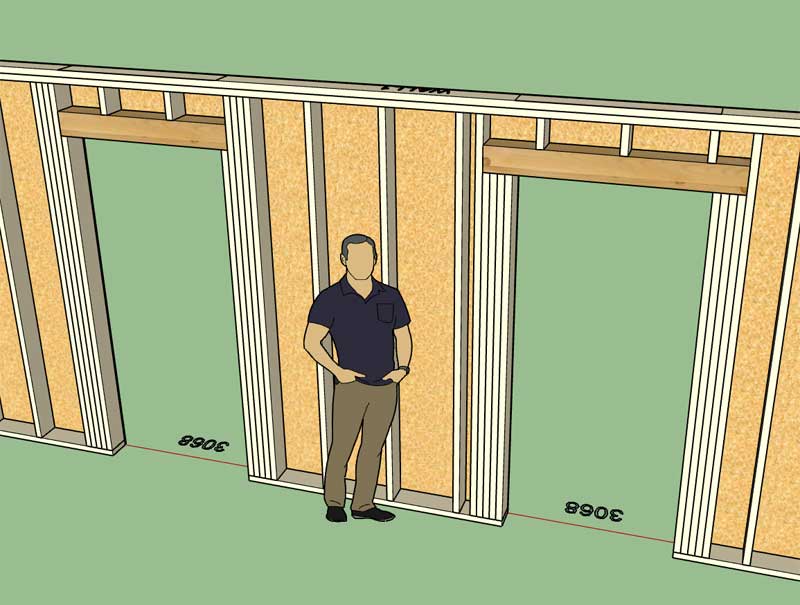
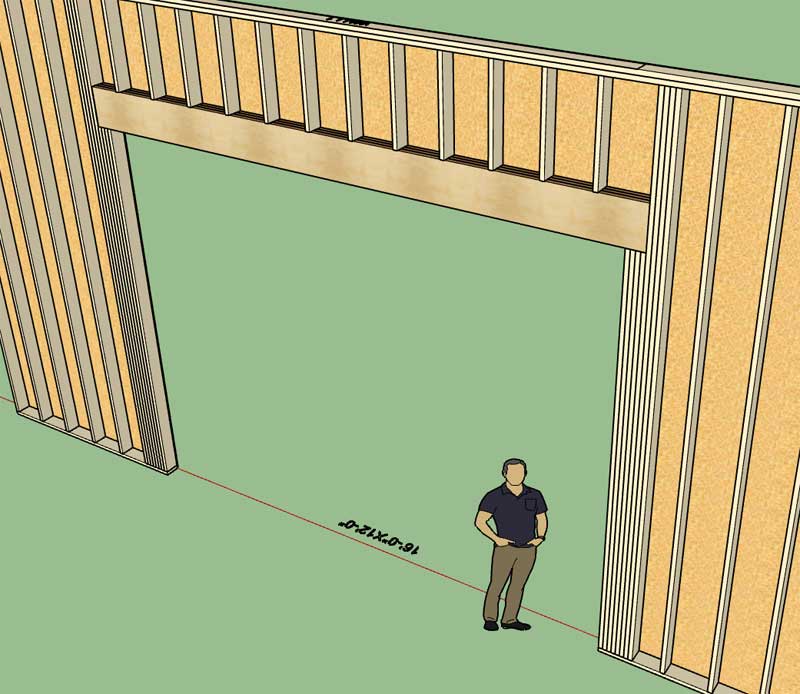
                          • Enabled up to four king and/or four trimmer studs for windows.
                          • Enabled up to four king and/or four trimmer studs for doors.
                          • Enabled up to four king and/or four trimmer studs for garage doors.
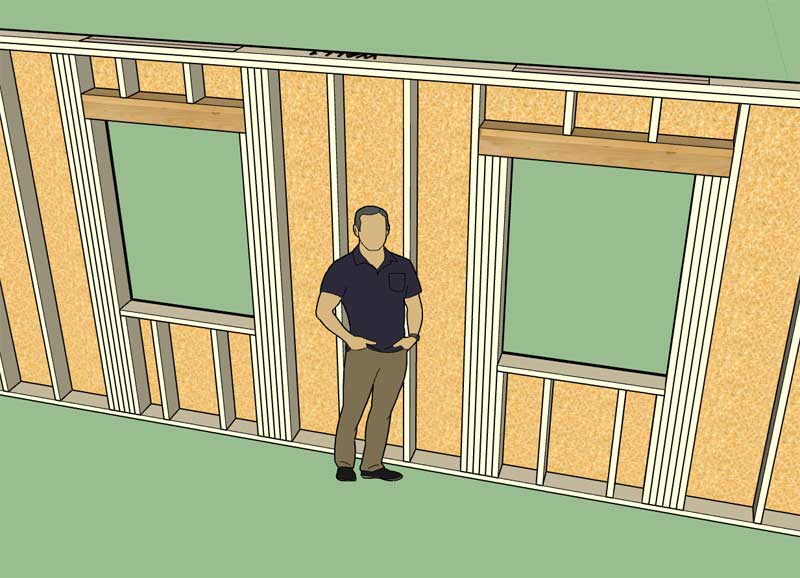
                          http://design.medeek.com/resources/trussplugin/images/truss_su637_800.jpg

                          http://design.medeek.com/resources/trussplugin/images/truss_su638_800.jpg

                          http://design.medeek.com/resources/trussplugin/images/truss_su639_800.jpg

                          Eight studs deep may seem a bit excessive but it's there if you need it.

                          Nathaniel P. Wilkerson PE
                          Medeek Engineering Inc
                          design.medeek.com

                          1 條回覆 最後回覆 回覆 引用 0
                          • medeekM 離線
                            medeek
                            最後由 編輯

                            Version 1.2.4 - 02.07.2020

                            • Fixed a bug with the gypsum wrap for rectangular and arched door openings of interior walls.
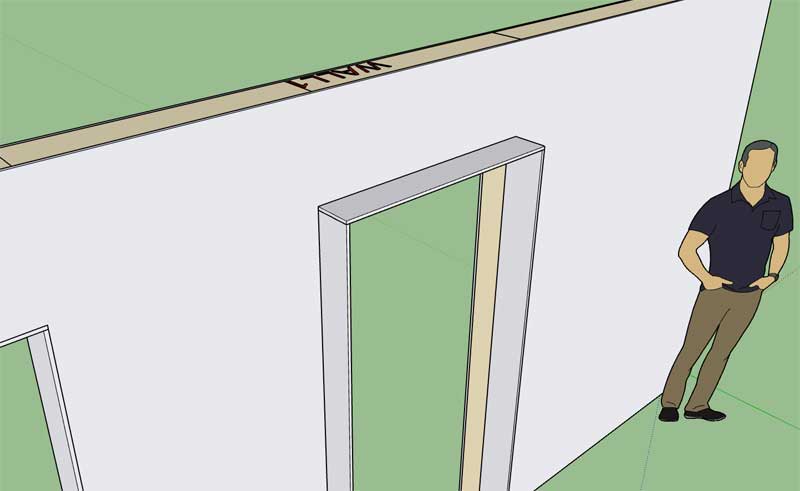
                            http://design.medeek.com/resources/trussplugin/images/truss_su643_800.jpg

                            Nathaniel P. Wilkerson PE
                            Medeek Engineering Inc
                            design.medeek.com

                            1 條回覆 最後回覆 回覆 引用 0
                            • medeekM 離線
                              medeek
                              最後由 編輯

                              Version 1.2.4b - 02.08.2020

                              • Added a T1-11 built-in material into the material library.
                              • Fixed the move wall tool so that it no longer requires a negative number for offsetting to the exterior side of the wall.
                              • Enabled the display of the offset dimension next to the blue movement arrow for the move wall tool.
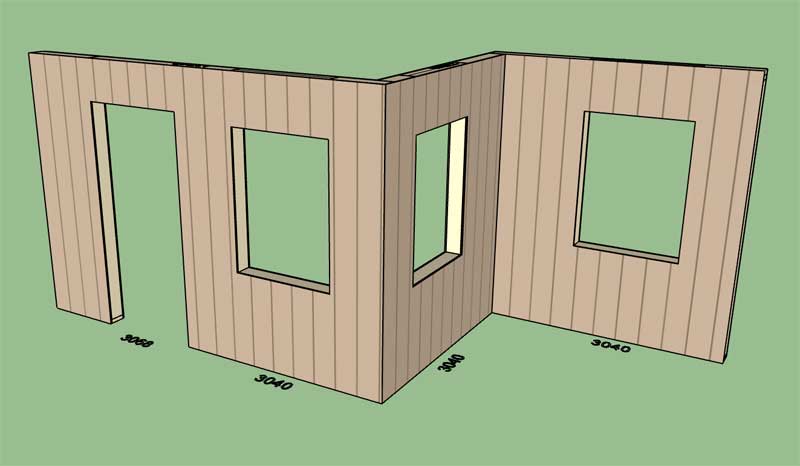
                              http://design.medeek.com/resources/trussplugin/images/truss_su644_800.jpg

                              The elimination of the negative offset should make the wall move tool a lot more intuitive to use. Please feel free to give me further feedback in this regard.

                              Nathaniel P. Wilkerson PE
                              Medeek Engineering Inc
                              design.medeek.com

                              1 條回覆 最後回覆 回覆 引用 0
                              • medeekM 離線
                                medeek
                                最後由 編輯

                                In some cases you may frame up something like this:

                                https://aws1.discourse-cdn.com/sketchup/original/3X/c/1/c1a0e2ca91722a1d3f7fd74c35243c083bb55765.jpeg

                                Rather than a tee intersection you have two walls forming a corner and then a third wall tying in at the corner. Currently I really don't have a good solution for this scenario since one would probably need to offset the sheathing or gypsum back where the tertiary wall ties in.

                                I will need to give this some further thought. Any ideas or suggestions are always welcome.

                                I've identified a possible bug or issue where the top plate cutout algorithm tries to cut out a zero thickness slice from the adjacent top plate in this particular scenario, I will release a fix for that shortly.

                                Nathaniel P. Wilkerson PE
                                Medeek Engineering Inc
                                design.medeek.com

                                1 條回覆 最後回覆 回覆 引用 0
                                • medeekM 離線
                                  medeek
                                  最後由 編輯

                                  Version 1.2.5 - 02.15.2020

                                  • Enabled custom materials (Material Library) for all doors and windows: Trim, Casing, Door Frame, Door, Window Frame, Shutters.
                                  • Addressed a minor bug with multiple walls coming together at a corner.
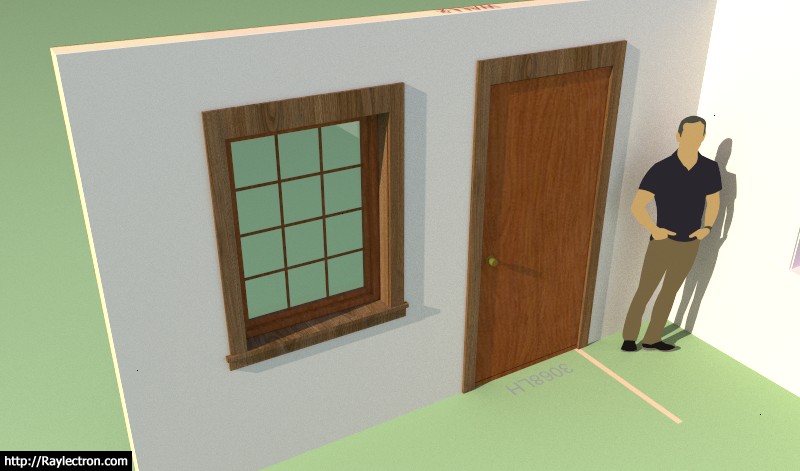
                                  http://design.medeek.com/resources/trussplugin/images/truss_su648_800.jpg

                                  ***** IMPORTANT WARNING *****

                                  This latest update is a necessary and major rewrite of the window and door modules. As such, this update will break compatibility with previous versions of the Wall plugin. It is highly suggested not to upgrade to this latest version for existing projects that were created with previous versions of the plugin.

                                  Nathaniel P. Wilkerson PE
                                  Medeek Engineering Inc
                                  design.medeek.com

                                  1 條回覆 最後回覆 回覆 引用 0
                                  • medeekM 離線
                                    medeek
                                    最後由 編輯

                                    Version 1.2.5b - 02.17.2020

                                    • Fixed a critical bug with the recently updated window and door edit menus.

                                    ***** IMPORTANT *****
                                    This is a critical bug fix to Version 1.2.5. When the source code was compiled for this version the updated HTML files (window and door edit menus) were somehow not updated as they should have been. I strongly suggest that you update from version 1.2.5 to version 1.2.5b, otherwise you may not be able to edit your windows and doors.

                                    Nathaniel P. Wilkerson PE
                                    Medeek Engineering Inc
                                    design.medeek.com

                                    1 條回覆 最後回覆 回覆 引用 0
                                    • medeekM 離線
                                      medeek
                                      最後由 編輯

                                      I apologize I was trying to upload Version 1.2.5b yesterday but for some reason I was unable to access the plugin store. I've noticed a number of upgrades and installations of Version 1.2.5 through out the day and this evening. Please upgrade to 1.2.5b since the previous version (1.2.5) has a critical flaw with the edit menus for both windows and doors and will not allow you to edit them. The problem was fully resolved with the fix in Version 1.2.5b.

                                      Nathaniel P. Wilkerson PE
                                      Medeek Engineering Inc
                                      design.medeek.com

                                      1 條回覆 最後回覆 回覆 引用 0
                                      • medeekM 離線
                                        medeek
                                        最後由 編輯

                                        Working on the Wall Stretch Tool this morning.

                                        Essentially I've boiled this tool down to a three click process:

                                        1.) Select the Wall that you want to stretch or shrink.

                                        2.) Select the start or end of the wall panel:

                                        https://aws1.discourse-cdn.com/sketchup/original/3X/7/c/7c77ea67edba293e66598a56c6dd5aca494c5a75.jpeg

                                        3.) Then select the new position of the wall start/end. (A wire frame is provided along with a dimension). The user can either select the position or key in the amount to stretch or shrink.

                                        This feature is in many ways related to the move tool since stretching a wall will also move any attached walls at the affect corner. Additionally when the start of the wall is moved the location of any features within the wall must be relocated so that they maintain their position, just a few things to think about.

                                        I've also setup the tool so that when you select the wall start or end you don't have to actually select within the circles shown. The tool will calculate how far your mouse click is away from each end and select the end which is closest to the mouse click.

                                        Nathaniel P. Wilkerson PE
                                        Medeek Engineering Inc
                                        design.medeek.com

                                        1 條回覆 最後回覆 回覆 引用 0
                                        • medeekM 離線
                                          medeek
                                          最後由 編輯

                                          Version 1.2.6 - 02.20.2020

                                          • Added a "Style C" trim option for rectangular windows.
                                          • Fixed a critical bug with the door module for metric templates.
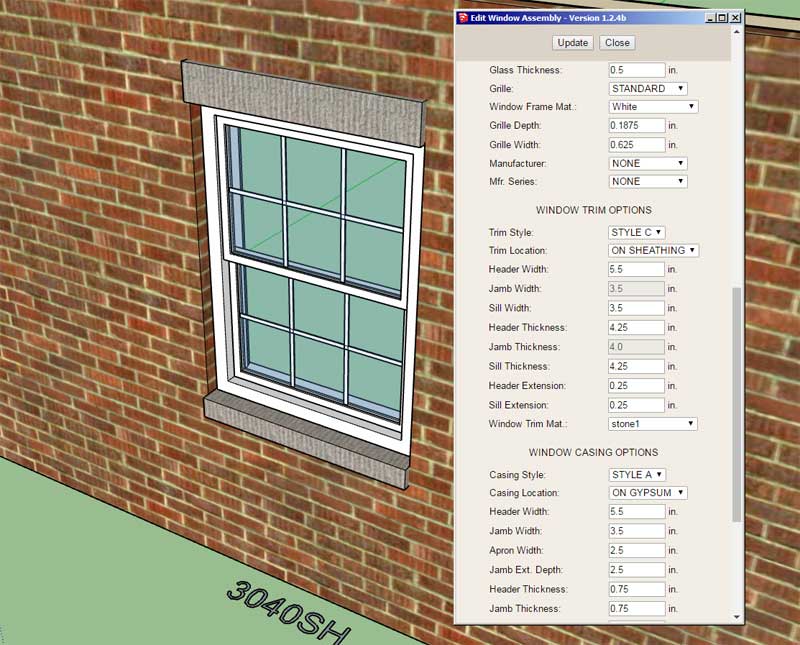
                                          http://design.medeek.com/resources/trussplugin/images/truss_su651_800.jpg

                                          This particular trim style probably is best suited for a brick veneer cladding as shown.
                                          I may also create a Style D which looks similar but includes a keystone.

                                          Nathaniel P. Wilkerson PE
                                          Medeek Engineering Inc
                                          design.medeek.com

                                          1 條回覆 最後回覆 回覆 引用 0
                                          • medeekM 離線
                                            medeek
                                            最後由 編輯

                                            First look at the Tee intersection with gysum backers and midspan blocking enabled:

                                            https://aws1.discourse-cdn.com/sketchup/original/3X/7/a/7a0527e84ffab06d554bfb395d01b738acf4cfea.jpeg

                                            There are at least five or six different ways to frame this up, but initially I will provide four different options:
                                            1.) Three Studs
                                            2.) Two Studs with blocking
                                            3.) Two Studs only
                                            4.) Disabled

                                            Also these options will not be on a per wall basis but can be set in the global settings.

                                            One of the options will be to turn off this feature so that the user can always opt for more energy efficient means of dealing with these type of intersections.


                                            Nathaniel P. Wilkerson PE
                                            Medeek Engineering Inc
                                            design.medeek.com

                                            1 條回覆 最後回覆 回覆 引用 0
                                            • 1
                                            • 2
                                            • 63
                                            • 64
                                            • 65
                                            • 66
                                            • 67
                                            • 75
                                            • 76
                                            • 65 / 76
                                            • 第一個貼文
                                              最後的貼文
                                            Buy SketchPlus
                                            Buy SUbD
                                            Buy WrapR
                                            Buy eBook
                                            Buy Modelur
                                            Buy Vertex Tools
                                            Buy SketchCuisine
                                            Buy FormFonts

                                            Advertisement