sketchucation logo sketchucation
    • Login
    Oops, your profile's looking a bit empty! To help us tailor your experience, please fill in key details like your SketchUp version, skill level, operating system, and more. Update and save your info on your profile page today!
    Mac User? | Join the Rayscaper Beta for Mac Learn More

    Insert Component by "Drawing"

    Scheduled Pinned Locked Moved Extensions & Applications Discussions
    extensions
    13 Posts 6 Posters 2.5k Views 6 Watching
    Loading More Posts
    • Oldest to Newest
    • Newest to Oldest
    • Most Votes
    Reply
    • Reply as topic
    Log in to reply
    This topic has been deleted. Only users with topic management privileges can see it.
    • gillesG
      gilles
      last edited by

      You should post to dynamic components.

      " c'est curieux chez les marins ce besoin de faire des phrases "

      1 Reply Last reply
      Reply Quote 0
      • B
        brad.curnow
        last edited by

        @sdmitch said:

        No it wouldn't be that difficult but be advised that 'everything' in the component's definition gets stretched or shrunk. If you only want the length of the table top to change, that would require creating it 'on the fly'

        What were your expectations?

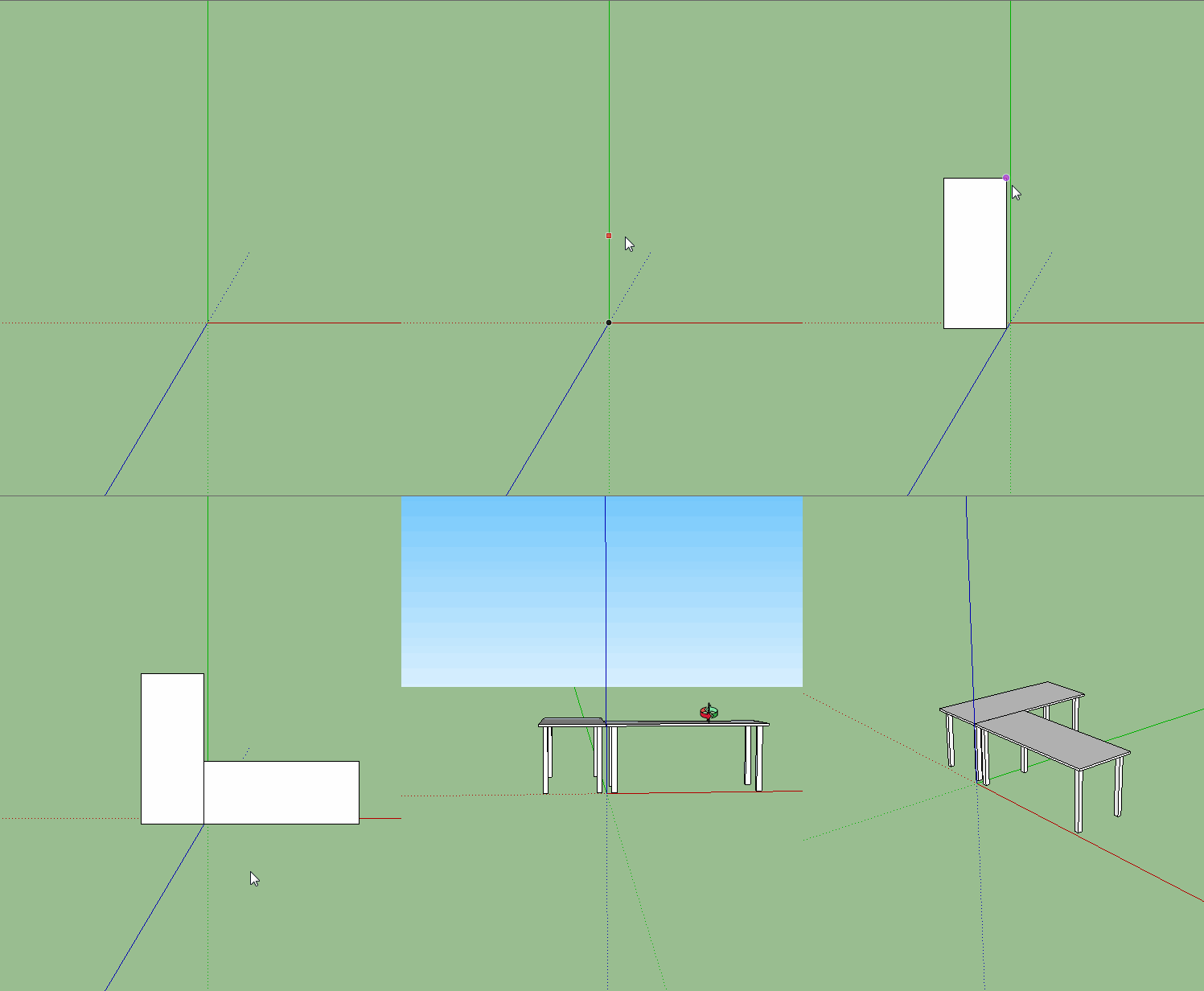
        Yeah I think that's OK - I guess we could do it with a dynamic component to cater for that? This plugin would just select the component to use (from a list of all components in model?), then first click sets insertion point (axes of component) and then second click establishes length of component and scales on one axis only.

        I don't know how the SU universe works but I imagine it would be something like:

        1. Choose Component (drop down list?)
        2. Get Insert point (click 0,0,0)
        3. Get Second point (click 0,400,0)
        4. Insert component (origin 0,0,0 scale Y to 0,400,0)

        Something like that??
        1 Reply Last reply
        Reply Quote 0
        • B
          brad.curnow
          last edited by

          @gilles said:

          You should post to dynamic components.

          Noted, thanks!

          1 Reply Last reply
          Reply Quote 0
          • P
            pcmoor
            last edited by

            See previous post "Revit-like Adaptive Component"

            404 Not Found

            favicon

            (sketchucation.com)

            as a guide

            1 Reply Last reply
            Reply Quote 0
            • sdmitchS
              sdmitch
              last edited by

              @brad.curnow said:

              1. Choose Component (drop down list?)
              2. Get Insert point (click 0,0,0)
              3. Get Second point (click 0,400,0)
              4. Insert component (origin 0,0,0 scale Y to 0,400,0)

              Something like that??


              Scale and Align.gif

              Nothing is worthless, it can always be used as a bad example.

              http://sdmitch.blogspot.com/

              1 Reply Last reply
              Reply Quote 0
              • B
                brad.curnow
                last edited by

                @sdmitch said:

                @brad.curnow said:

                1. Choose Component (drop down list?)
                2. Get Insert point (click 0,0,0)
                3. Get Second point (click 0,400,0)
                4. Insert component (origin 0,0,0 scale Y to 0,400,0)

                Something like that??

                Did you just make that? It's perfect!

                Can I try it?!

                1 Reply Last reply
                Reply Quote 0
                • sdmitchS
                  sdmitch
                  last edited by

                  @brad.curnow said:

                  Did you just make that? It's perfect!

                  Can I try it?!

                  Please check Messages.

                  Nothing is worthless, it can always be used as a bad example.

                  http://sdmitch.blogspot.com/

                  1 Reply Last reply
                  Reply Quote 0
                  • PixeroP
                    Pixero
                    last edited by

                    I'm interested in this also.
                    Care to share?

                    1 Reply Last reply
                    Reply Quote 0
                    • sdmitchS
                      sdmitch
                      last edited by

                      Anyone else?

                      Nothing is worthless, it can always be used as a bad example.

                      http://sdmitch.blogspot.com/

                      1 Reply Last reply
                      Reply Quote 0
                      • jujuJ
                        juju
                        last edited by

                        I would be interested, but to modify this (depending on how it functions, probably the component that has to be set up in a specific way) to be able to cut openings in cavity (or multi skin walls) and heal the wall between the various skins. Doing the healing manually is a real PITA.

                        Save the Earth, it's the only planet with chocolate.

                        1 Reply Last reply
                        Reply Quote 0
                        • sdmitchS
                          sdmitch
                          last edited by

                          @juju said:

                          I would be interested, but to modify this (depending on how it functions, probably the component that has to be set up in a specific way) to be able to cut openings in cavity (or multi skin walls) and heal the wall between the various skins. Doing the healing manually is a real PITA.

                          No this plugin isn't anything that sophisticated. It was initially designed to fit and align a component between two points. Have been working on a three point version with limited success.

                          Yes it always depends on how the component definition is oriented relative to its axis and origin.


                          Nothing is worthless, it can always be used as a bad example.

                          http://sdmitch.blogspot.com/

                          1 Reply Last reply
                          Reply Quote 0

                          Hello! It looks like you're interested in this conversation, but you don't have an account yet.

                          Getting fed up of having to scroll through the same posts each visit? When you register for an account, you'll always come back to exactly where you were before, and choose to be notified of new replies (either via email, or push notification). You'll also be able to save bookmarks and upvote posts to show your appreciation to other community members.

                          With your input, this post could be even better đź’—

                          Register Login
                          • 1 / 1
                          • First post
                            Last post
                          Buy SketchPlus
                          Buy SUbD
                          Buy WrapR
                          Buy eBook
                          Buy Modelur
                          Buy Vertex Tools
                          Buy SketchCuisine
                          Buy FormFonts

                          Advertisement