sketchucation logo sketchucation
    • Login
    🛣️ Road Profile Builder | Generate roads, curbs and pavements easily Download

    [Plugin] Angular Dimension 2

    scheduled pinned locked moved Plugins
    27 Posts 11 Posters 3.0k Views 11 Watching
    loading-more-posts
    • oldest-to-newest
    • newest-to-oldest
    • most-votes
    reply
    • reply-as-topic
    guest-login-reply
    deleted-message
    • S Offline
      slbaumgartner
      last edited by

      Thanks @pilou, that was an oversight that we hadn't fixed yet!

      one-reply-to-this-post last-reply-time reply quote 0
      • S Offline
        slb_jwm
        last edited by

        John and I created a new userid slb_jwm for our joint project (and any future such). If you need to PM us, please use that userid as the target so that we will both see it. Thanks!

        one-reply-to-this-post last-reply-time reply quote 0
        • S Offline
          slb_jwm
          last edited by

          No feedback yet, despite numerous downloads of this extension. How is it working for you? Are there problems or shortcomings we need to address?

          Thanks,

          Steve and John

          one-reply-to-this-post last-reply-time reply quote 0
          • bazB Offline
            baz
            last edited by

            @slb_jwm said:

            No feedback yet, despite numerous downloads of this extension. How is it working for you? Are there problems or shortcomings we need to address?

            Thanks,

            Steve and John

            Haven't had to use it except for testing but seems to work very well. Thanks.

            one-reply-to-this-post last-reply-time reply quote 0
            • D Offline
              db11
              last edited by

              Used it for the first time today. Works as expected on MacOS (El Capitan) / SU Pro 15.

              My only feature request would be for it to pick up the Dimension font and colour settings.

              one-reply-to-this-post last-reply-time reply quote 0
              • cottyC Offline
                cotty
                last edited by

                Great idea to update this often searched plugin!

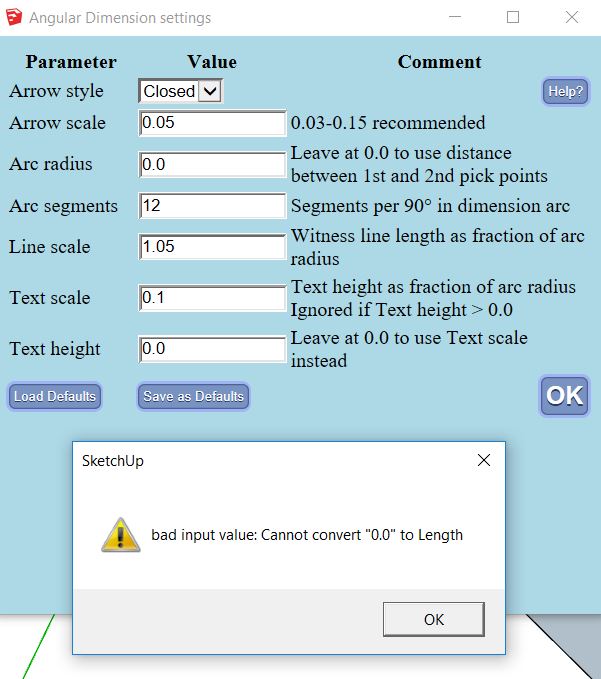
                If I click on "Load Defaults", I've get this:
                ad2.JPG

                my SketchUp gallery

                one-reply-to-this-post last-reply-time reply quote 0
                • S Offline
                  slb_jwm
                  last edited by

                  @cotty, that's interesting. A couple of followup questions to help us track it down:

                  • did you type anything before getting this error, or did it happen the moment you opened the settings dialog?
                  • is your computer set to a locale that uses comma as the decimal point (we may have overlooked that)?
                  one-reply-to-this-post last-reply-time reply quote 0
                  • D Offline
                    driven
                    last edited by

                    cotty, do you use a coma as your decimal separator?

                    john

                    learn from the mistakes of others, you may not live long enough to make them all yourself...

                    one-reply-to-this-post last-reply-time reply quote 0
                    • cottyC Offline
                      cotty
                      last edited by

                      Yes, I do.

                      my SketchUp gallery

                      one-reply-to-this-post last-reply-time reply quote 0
                      • S Offline
                        slb_jwm
                        last edited by

                        Thanks, @Cotty! We can see that we overlooked correct handling of comma-style decimals in some places. We'll get right on it.

                        one-reply-to-this-post last-reply-time reply quote 0
                        • cottyC Offline
                          cotty
                          last edited by

                          Thank you!
                          👍

                          my SketchUp gallery

                          one-reply-to-this-post last-reply-time reply quote 0
                          • S Offline
                            slb_jwm
                            last edited by

                            @db11 said:

                            Used it for the first time today. Works as expected on MacOS (El Capitan) / SU Pro 15.

                            My only feature request would be for it to pick up the Dimension font and colour settings.

                            Alas, at this time the SketchUp Ruby API does not expose any way to get these properties from the Dimension objects or the model.

                            one-reply-to-this-post last-reply-time reply quote 0
                            • S Offline
                              slb_jwm
                              last edited by

                              A brief status report: we are working on automatic handling of '.' vs ',' decimal points throughout the extension. Given how we had implemented the extension, this turned out to be more complicated than we hoped, but we are nearing completion. Stay tuned...

                              one-reply-to-this-post last-reply-time reply quote 0
                              • cottyC Offline
                                cotty
                                last edited by

                                👍

                                my SketchUp gallery

                                one-reply-to-this-post last-reply-time reply quote 0
                                • S Offline
                                  slb_jwm
                                  last edited by

                                  We have just posted version 5.3 beta, which should handle regions in which comma is used as the decimal point. Please test and let us know if you find problems.

                                  Note: this release has partial support for French in some of the prompts, but is incomplete in that language and does not yet translate to other languages. John hopes to take that on as a future project!

                                  one-reply-to-this-post last-reply-time reply quote 0
                                  • B Offline
                                    blajnov
                                    last edited by

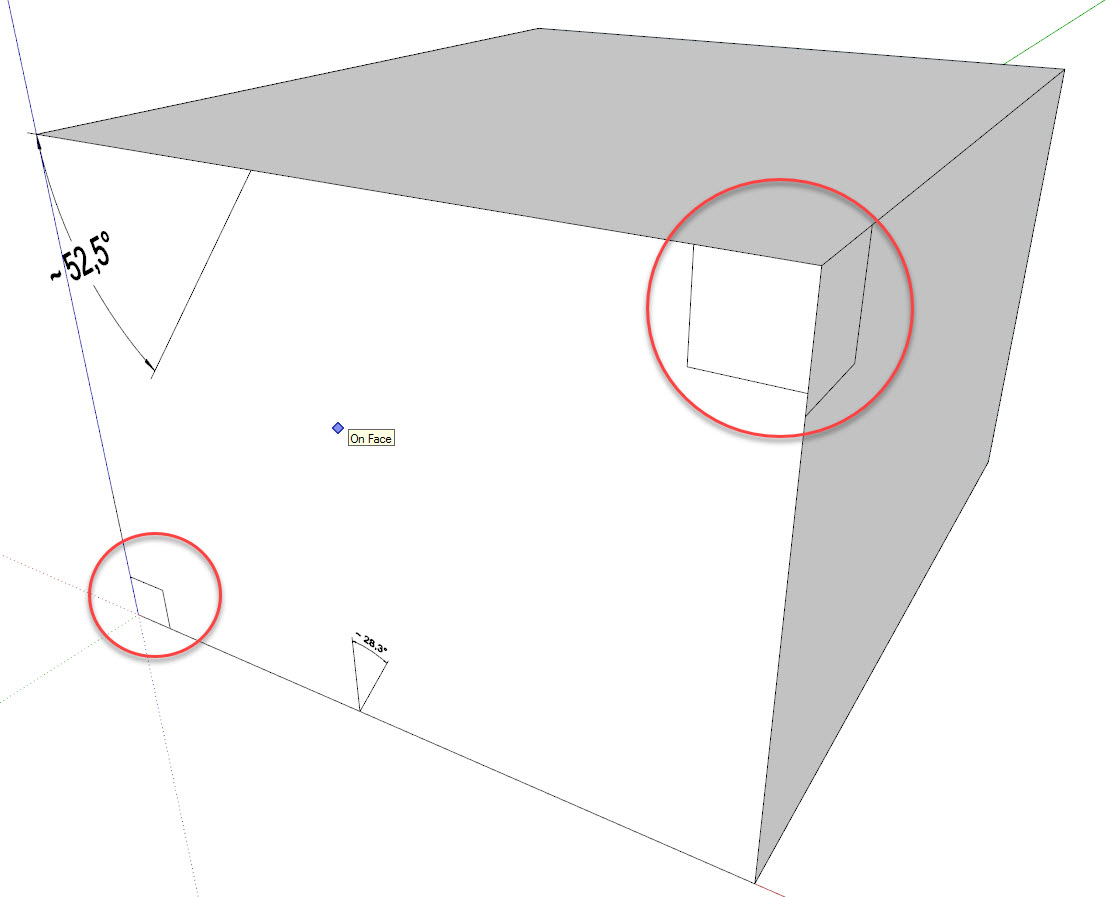
                                    Do not put down the value, if the angle is 90 degrees

                                    2016-12-11_21-51-58.jpg

                                    one-reply-to-this-post last-reply-time reply quote 0
                                    • S Offline
                                      slb_jwm
                                      last edited by

                                      That is an intentional "feature": the extension follows the convention of marking a right angle with a square. We debated whether that was a good idea or not and decided to try it this way and see what users think. It wouldn't be hard to change...opinions?

                                      one-reply-to-this-post last-reply-time reply quote 0
                                      • jujuJ Offline
                                        juju
                                        last edited by

                                        @slb_jwm said:

                                        That is an intentional "feature": the extension follows the convention of marking a right angle with a square. We debated whether that was a good idea or not and decided to try it this way and see what users think. It wouldn't be hard to change...opinions?

                                        in 2D on paper or diagrammatically it makes sense, but may be confusing when used in a 3D modeling environment


                                        Save the Earth, it's the only planet with chocolate.

                                        one-reply-to-this-post last-reply-time reply quote 0
                                        • S Offline
                                          slb_jwm
                                          last edited by

                                          How would you like it if we made a setting with checkbox (default 'on') for 'Use square for 90deg'?

                                          one-reply-to-this-post last-reply-time reply quote 0
                                          • S Offline
                                            slb_jwm
                                            last edited by

                                            In response to the above feedback, we have added an option to choose whether right angles are annotated with a small square or with the same format as other angles. The revised version 5.5 beta is available in the plugin store.

                                            one-reply-to-this-post last-reply-time reply quote 0
                                            • 1
                                            • 2
                                            • 1 / 2
                                            • first-post
                                              last-post
                                            Buy SketchPlus
                                            Buy SUbD
                                            Buy WrapR
                                            Buy eBook
                                            Buy Modelur
                                            Buy Vertex Tools
                                            Buy SketchCuisine
                                            Buy FormFonts

                                            Advertisement

