Label alignment
-
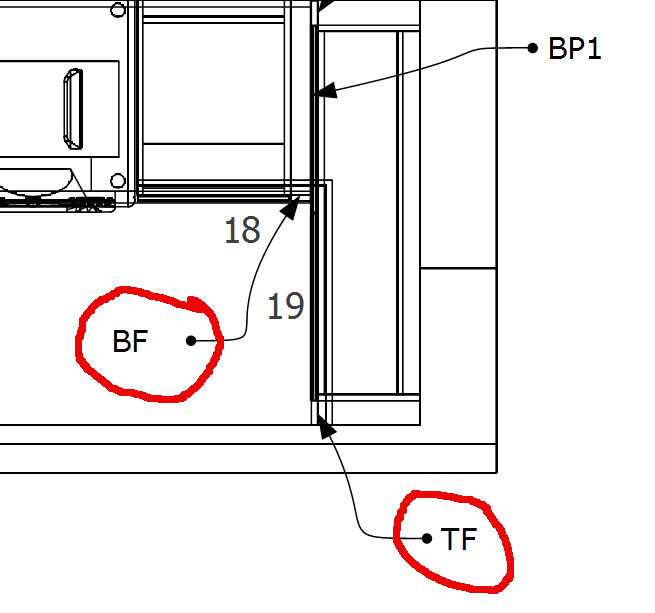
Is there a reason why there is an extra space after the text if is to the left of a leader arrow as opposed to the right? This is too big a gap and its a pain having to keep editing labels.
-
@nickchun said:
Is there a reason why there is an extra space after the text if is to the left of a leader arrow as opposed to the right? This is too big a gap and its a pain having to keep editing labels.
By editing lables do you mean selecting justify "right"?
LO default text is set to justify left, and why the text is closer to the arrow leader.
You can easily edit the text to justify right by selecting the note and selecting the justify right icon in the text palate.Charlie
-
It's not easy for 100 labels and it's not easy if you want to change label position.
-
@jql said:
It's not easy for 100 labels and it's not easy if you want to change label position.
Maybe so, but from 101 to infinity it is fairly easy to set right/left/center justify.

Select Label.....Text Style.......Right/Left justify.....font size etc. and Go.
Now if OP wants auto justify in relation to leader position, than I can see this as a useful feature. (with option to turn on/off if required)
Or, when moving a label and the leader flips from L to R auto text justify would also be a time saver here.
Charlie

Hello! It looks like you're interested in this conversation, but you don't have an account yet.
Getting fed up of having to scroll through the same posts each visit? When you register for an account, you'll always come back to exactly where you were before, and choose to be notified of new replies (either via email, or push notification). You'll also be able to save bookmarks and upvote posts to show your appreciation to other community members.
With your input, this post could be even better 💗
Register Login


Advertisement