sketchucation logo sketchucation
    • Login
    Oops, your profile's looking a bit empty! To help us tailor your experience, please fill in key details like your SketchUp version, skill level, operating system, and more. Update and save your info on your profile page today!
    ⚠️ Important | Libfredo 15.6b introduces important bugfixes for Fredo's Extensions Update

    Cove Shape Finger Pull on Jewelry Box

    Scheduled Pinned Locked Moved Woodworking
    17 Posts 4 Posters 3.4k Views 4 Watching
    Loading More Posts
    • Oldest to Newest
    • Newest to Oldest
    • Most Votes
    Reply
    • Reply as topic
    Log in to reply
    This topic has been deleted. Only users with topic management privileges can see it.
    • M Offline
      mbgeller
      last edited by

      @dave r said:

      That should be easy enough but we need more information. Have you got an image you could share that shows the sort of thing you're after?
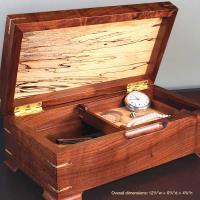

      Here is a pic of the box and cove finger pull - Thanks Mordi

      1 Reply Last reply Reply Quote 0
      • M Offline
        mbgeller
        last edited by

        I posted a pic of the box a few days ago?????

        Thanks,
        Mordi

        1 Reply Last reply Reply Quote 0
        • Dave RD Offline
          Dave R
          last edited by

          Draw a sausage shape and intersect it with the board. Then delete the part of the sausage shape and leave the recess. I'll make an example for you as soon as I can.

          Etaoin Shrdlu

          %

          (THERE'S NO PLACE LIKE)

          G28 X0.0 Y0.0 Z0.0

          M30

          %

          1 Reply Last reply Reply Quote 0
          • BoxB Offline
            Box
            last edited by

            Here's a quick version to tide you over till Dave has time.
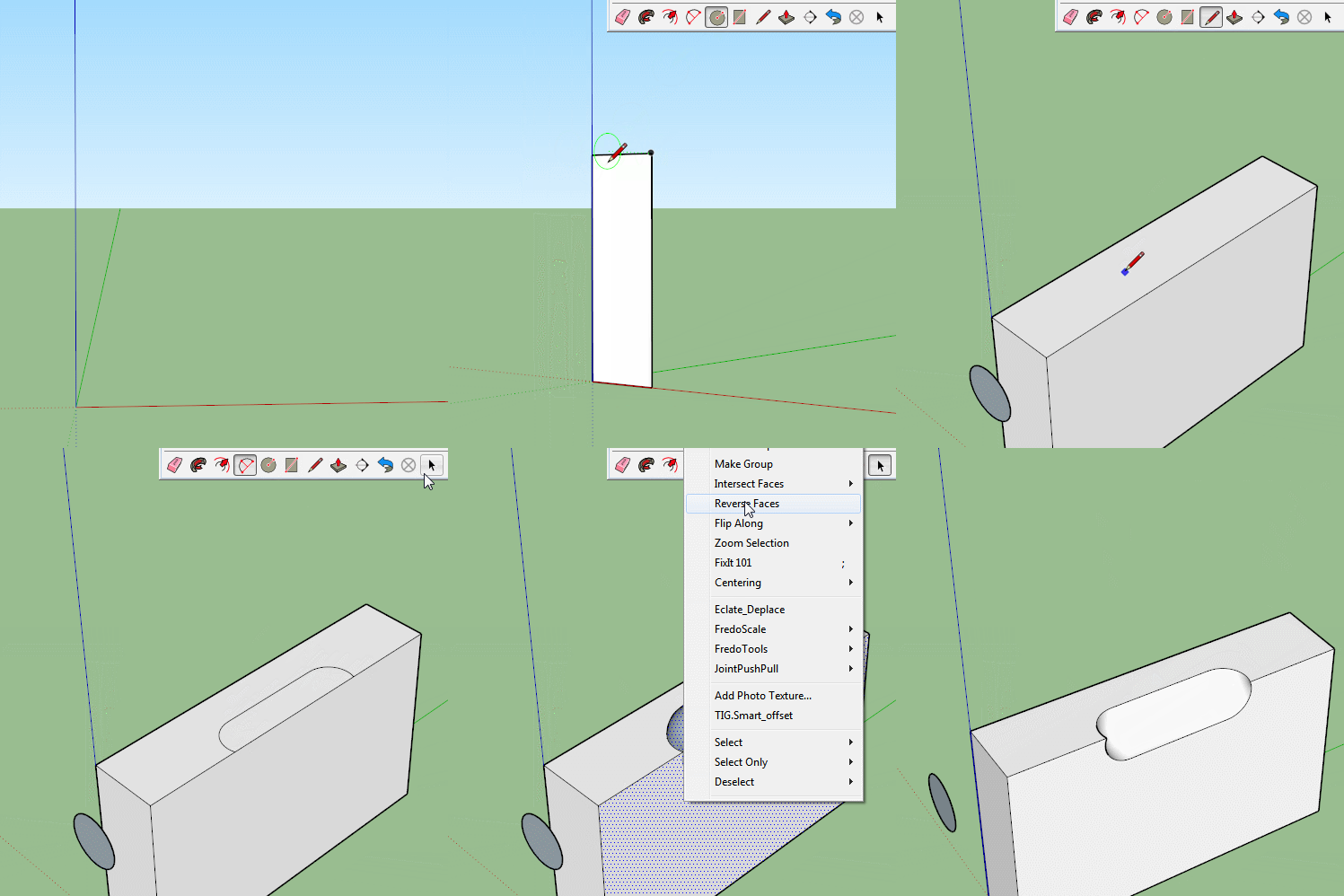

            Cove.gif

            1 Reply Last reply Reply Quote 0
            • Dave RD Offline
              Dave R
              last edited by

              Actually, that'll do. Thank you, sir.

              Etaoin Shrdlu

              %

              (THERE'S NO PLACE LIKE)

              G28 X0.0 Y0.0 Z0.0

              M30

              %

              1 Reply Last reply Reply Quote 0
              • BoxB Offline
                Box
                last edited by

                I'm just too lazy to bother typing directions these days.

                1 Reply Last reply Reply Quote 0
                • Dave RD Offline
                  Dave R
                  last edited by

                  Well, that works. I was going to post a similar thing but don't have LICEcap available so I was going to do it the long way.

                  Etaoin Shrdlu

                  %

                  (THERE'S NO PLACE LIKE)

                  G28 X0.0 Y0.0 Z0.0

                  M30

                  %

                  1 Reply Last reply Reply Quote 0
                  • M Offline
                    mbgeller
                    last edited by

                    Hey,

                    Thanks so much guys.

                    I am going to give that a try and let you know how it goes...

                    How do I copy that great little video to keep for future reference?

                    Mordi

                    1 Reply Last reply Reply Quote 0
                    • cottyC Offline
                      cotty
                      last edited by

                      It's an animated gif, right click and save image as...

                      my SketchUp gallery

                      1 Reply Last reply Reply Quote 0
                      • M Offline
                        mbgeller
                        last edited by

                        I right clicked and saved image as, and gave it a name - but when I click on the downloaded file, it says application not found?

                        Mordi

                        1 Reply Last reply Reply Quote 0
                        • cottyC Offline
                          cotty
                          last edited by

                          You can try to open it with your web browser (or assign the gif file type to it).

                          my SketchUp gallery

                          1 Reply Last reply Reply Quote 0
                          • M Offline
                            mbgeller
                            last edited by

                            I was able to save and open the file on another computer that has different software. Now, what I would like to be able to do is start and stop the file (like watching a video, so I can study and understand what steps are being performed to make the cove shape.

                            Any ideas on how to start and stop the animated gif file?

                            Thanks,
                            Mordi

                            1 Reply Last reply Reply Quote 0
                            • Dave RD Offline
                              Dave R
                              last edited by

                              I'm not sure you can easily do what you are asking with the GIF file. I made a video with some narration showing how it's done. Here's the link. As you can tell I didn't spend a lot of time on it but I hope it is helpful.

                              Etaoin Shrdlu

                              %

                              (THERE'S NO PLACE LIKE)

                              G28 X0.0 Y0.0 Z0.0

                              M30

                              %

                              1 Reply Last reply Reply Quote 0
                              • M Offline
                                mbgeller
                                last edited by

                                Yes Dave it is very helpful indeed!
                                Thanks so much for all your help on this.
                                Mordi

                                1 Reply Last reply Reply Quote 0
                                • Dave RD Offline
                                  Dave R
                                  last edited by

                                  I'm glad it helped. Happy New Year!

                                  Etaoin Shrdlu

                                  %

                                  (THERE'S NO PLACE LIKE)

                                  G28 X0.0 Y0.0 Z0.0

                                  M30

                                  %

                                  1 Reply Last reply Reply Quote 0
                                  • 1 / 1
                                  • First post
                                    Last post
                                  Buy SketchPlus
                                  Buy SUbD
                                  Buy WrapR
                                  Buy eBook
                                  Buy Modelur
                                  Buy Vertex Tools
                                  Buy SketchCuisine
                                  Buy FormFonts

                                  Advertisement


