sketchucation logo sketchucation
    • 登入
    Oops, your profile's looking a bit empty! To help us tailor your experience, please fill in key details like your SketchUp version, skill level, operating system, and more. Update and save your info on your profile page today!
    🔌 Smart Spline | Fluid way to handle splines for furniture design and complex structures. Download

    [Plugin] Mesh Importer

    已排程 已置頂 已鎖定 已移動 Plugins
    32 貼文 6 Posters 6.8k 瀏覽 6 Watching
    正在載入更多貼文
    • 從舊到新
    • 從新到舊
    • 最多點贊
    回覆
    • 在新貼文中回覆
    登入後回覆
    此主題已被刪除。只有擁有主題管理權限的使用者可以查看。
    • J 離線
      Jim
      最後由 編輯

      This topic is for questions about the Mesh importer extension.

      This extension will let you import larger files and import them faster than the Ruby STL extension.

      Mesh Importer is a Windows-only plugin for this release. Mac versions are possible but I need help compiling and testing for the platform.

      Mesh Importer is a compiled converter which uses the assimp library and the SketchUp SDK to convert model files to .skp files. Once converted, the .skp file is imported as a Component at meter scale. Technically, any file type supported by assimp can be imported, but textures are not supported for any formats. At this stage in development it is most useful for .stl and .ply files.

      For the initial release (15.1 - 1st release of 2015) I'm interested in basic feedback such as does it even work. So please give it a try and let me know. Thanks.

      Hi

      1 條回覆 最後回覆 回覆 引用 0
      • D 離線
        driven
        最後由 編輯

        what's not working for mac?

        john

        learn from the mistakes of others, you may not live long enough to make them all yourself...

        1 條回覆 最後回覆 回覆 引用 0
        • J 離線
          Jim
          最後由 編輯

          @driven said:

          what's not working for mac?

          john

          I can't compile the executable because I don't have a Mac. The source is included.

          Hi

          1 條回覆 最後回覆 回覆 引用 0
          • cottyC 離線
            cotty
            最後由 編輯

            I've tried and got this error message:
            skull_error.PNG

            After this, I've tried to start it from the console, but there's a dll missing:
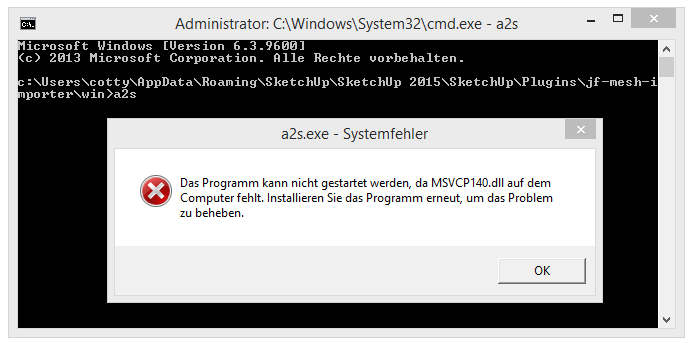
            skull_error2.PNG

            (SU15-64, Win8.1-64)

            my SketchUp gallery

            1 條回覆 最後回覆 回覆 引用 0
            • J 離線
              Jim
              最後由 編輯

              @cotty - I compiled the extension using Microsoft Visual C++ 2015 Express. You would need to install this package from Microsoft to get the msvcp140.dll file.

              There may be a way to use earlier versions of the dll which your computer may already have - I'll look into it.

              Thanks for the feedback. I can only read English 😳 .

              Hi

              1 條回覆 最後回覆 回覆 引用 0
              • cottyC 離線
                cotty
                最後由 編輯

                I've installed the linked package successfully, but the error message is still the same (missing dll).

                my SketchUp gallery

                1 條回覆 最後回覆 回覆 引用 0
                • K 離線
                  kaas
                  最後由 編輯

                  Tried the plugin on several stl files. See a glimpse of a dos-cmd-window that auto closes immediately and then this error in the ruby console.

                  The dll was already present and installed on my system.
                  Win7 X64 , SU v16


                  meshimport.jpg

                  1 條回覆 最後回覆 回覆 引用 0
                  • D 離線
                    driven
                    最後由 編輯

                    Jim it works with the plugin I compiled, and Steve fixed...
                    I thought I sent it to you?
                    on El Capitan the open file panel goes blank and waits for the skp to be made...

                    this is a new behaviour I see in a couple of plugins...
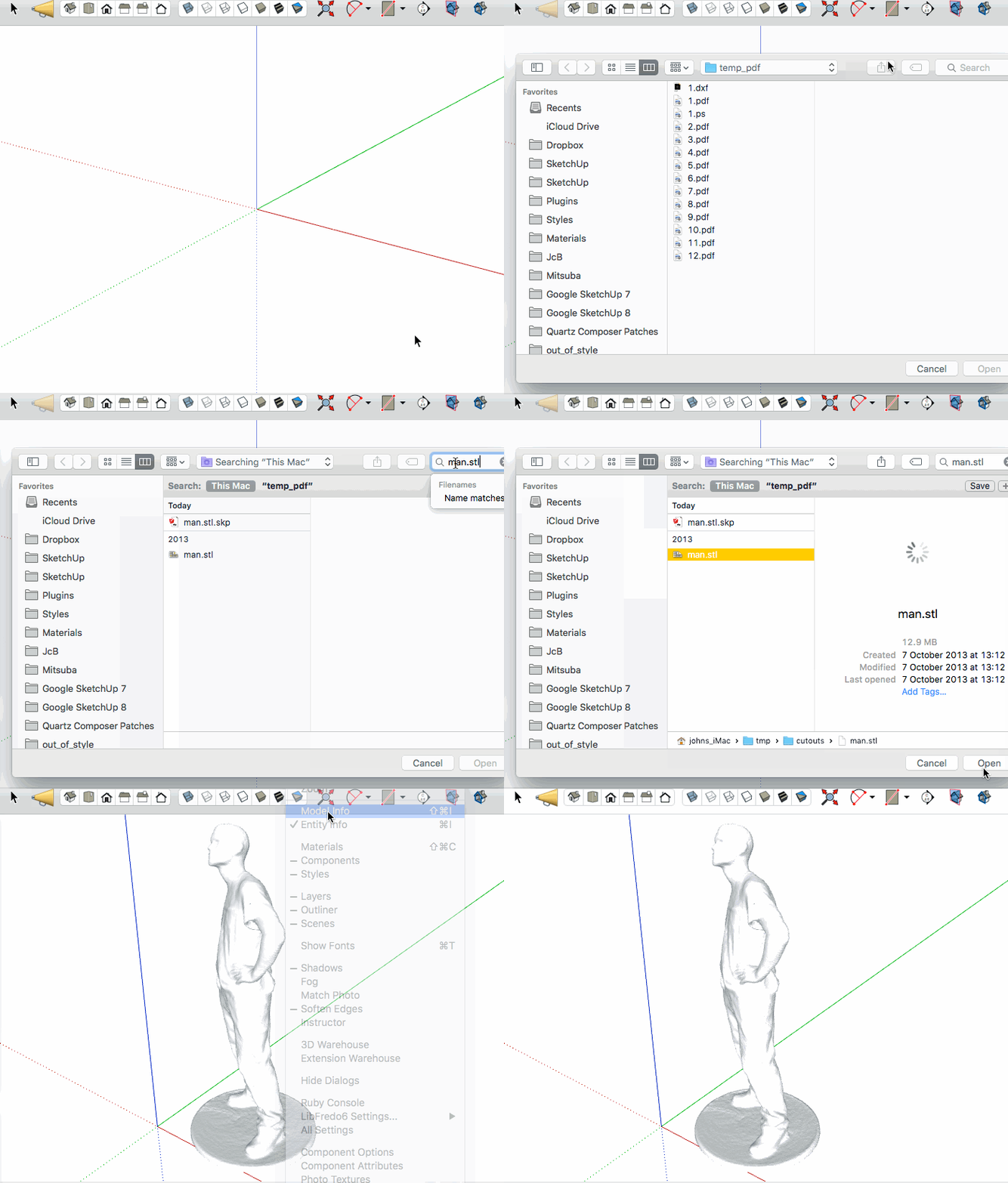
                    click to gif  and wait for the gap where I see the beachball but the gif doesn't...

                    john

                    learn from the mistakes of others, you may not live long enough to make them all yourself...

                    1 條回覆 最後回覆 回覆 引用 0
                    • J 離線
                      Jim
                      最後由 編輯

                      Here is the translation of the dialog for my own understanding.

                      @unknownuser said:

                      The program does not run correctly because of a problem. The program will be closed and you will be notified when a solution is available.

                      Not terribly helpful. I think I need to compile 2 versions for 32 bit and 64 bit.

                      Hi

                      1 條回覆 最後回覆 回覆 引用 0
                      • J 離線
                        Jim
                        最後由 編輯

                        I updated to 15.2. I just added some debugging info. Please try again. Thanks.

                        Hi

                        1 條回覆 最後回覆 回覆 引用 0
                        • K 離線
                          kaas
                          最後由 編輯

                          Still something crashing on my system

                          "C:\Users\Max\Desktop\volt_v3_base.stl.skp" was not created.
                          Error: #<Errno::ENOENT: No such file or directory - C:\Users\Max\Desktop\volt_v3_base.stl.log>
                          C:/Users/Max/AppData/Roaming/SketchUp/SketchUp 2016/SketchUp/Plugins/jf-mesh-importer/main.rb:49:in read' C:/Users/Max/AppData/Roaming/SketchUp/SketchUp 2016/SketchUp/Plugins/jf-mesh-importer/main.rb:49:in main'
                          C:/Users/Max/AppData/Roaming/SketchUp/SketchUp 2016/SketchUp/Plugins/jf-mesh-importer/main.rb:5:in block in <module:MeshImporter>' SketchUp:1:in call'

                          1 條回覆 最後回覆 回覆 引用 0
                          • S 離線
                            smicha
                            最後由 編輯

                            Could you add obj import - this is one of the most important format.

                            1 條回覆 最後回覆 回覆 引用 0
                            • cottyC 離線
                              cotty
                              最後由 編輯

                              @jim said:

                              I updated to 15.2. I just added some debugging info. Please try again. Thanks.

                              Still the same error here (dll).

                              my SketchUp gallery

                              1 條回覆 最後回覆 回覆 引用 0
                              • J 離線
                                Jim
                                最後由 編輯

                                I put up version 15.3. Open the Ruby Console before running to see the errors.

                                Sorry about experimenting on you guys - I am fairly new to creating executables that need to run on a variety of architectures.

                                Thank you for you help.

                                Hi

                                1 條回覆 最後回覆 回覆 引用 0
                                • J 離線
                                  Jim
                                  最後由 編輯

                                  Also, the converter is a console application so it might be helpful if people could attempt to convert a file on the command line. Even double-clicking the a2a.exe file might bring up helpful error dialogs. Thanks again.

                                  Hi

                                  1 條回覆 最後回覆 回覆 引用 0
                                  • J 離線
                                    Jim
                                    最後由 編輯

                                    @smicha said:

                                    Could you add obj import - this is one of the most important format.

                                    If you select Any File Type in the File Selection dialog, you will be able to select .obj files and import them. Textures are not supported, though. Right now I am just trying to figure out how to make it work on different operating systems and versions.

                                    Hi

                                    1 條回覆 最後回覆 回覆 引用 0
                                    • S 離線
                                      smicha
                                      最後由 編輯

                                      @jim said:

                                      @smicha said:

                                      Could you add obj import - this is one of the most important format.

                                      If you select Any File Type in the File Selection dialog, you will be able to select .obj files and import them. Textures are not supported, though. Right now I am just trying to figure out how to make it work on different operating systems and versions.

                                      When I choose - any file - and select obj nothing happens.

                                      1 條回覆 最後回覆 回覆 引用 0
                                      • J 離線
                                        Jim
                                        最後由 編輯

                                        @smicha said:

                                        When I choose - any file - and select obj nothing happens.

                                        Windows or Mac? What version? 32 or 64 bit?

                                        Hi

                                        1 條回覆 最後回覆 回覆 引用 0
                                        • S 離線
                                          smicha
                                          最後由 編輯

                                          @jim said:

                                          @smicha said:

                                          When I choose - any file - and select obj nothing happens.

                                          Windows or Mac? What version? 32 or 64 bit?

                                          win 7 64bit.

                                          1 條回覆 最後回覆 回覆 引用 0
                                          • J 離線
                                            Jim
                                            最後由 編輯

                                            It would help if you could try to import the file while the Ruby Console window is open, and then post any errors here.

                                            Hi

                                            1 條回覆 最後回覆 回覆 引用 0
                                            • 1
                                            • 2
                                            • 1 / 2
                                            • 第一個貼文
                                              最後的貼文
                                            Buy SketchPlus
                                            Buy SUbD
                                            Buy WrapR
                                            Buy eBook
                                            Buy Modelur
                                            Buy Vertex Tools
                                            Buy SketchCuisine
                                            Buy FormFonts

                                            Advertisement