sketchucation logo sketchucation
    • Login
    Oops, your profile's looking a bit empty! To help us tailor your experience, please fill in key details like your SketchUp version, skill level, operating system, and more. Update and save your info on your profile page today!
    Mac User? | Join the Rayscaper Beta for Mac Learn More

    [Plugin] Mesh Importer

    Scheduled Pinned Locked Moved Plugins
    32 Posts 6 Posters 9.1k Views 6 Watching
    Loading More Posts
    • Oldest to Newest
    • Newest to Oldest
    • Most Votes
    Reply
    • Reply as topic
    Log in to reply
    This topic has been deleted. Only users with topic management privileges can see it.
    • D
      driven
      last edited by

      Jim it works with the plugin I compiled, and Steve fixed...
      I thought I sent it to you?
      on El Capitan the open file panel goes blank and waits for the skp to be made...

      this is a new behaviour I see in a couple of plugins...
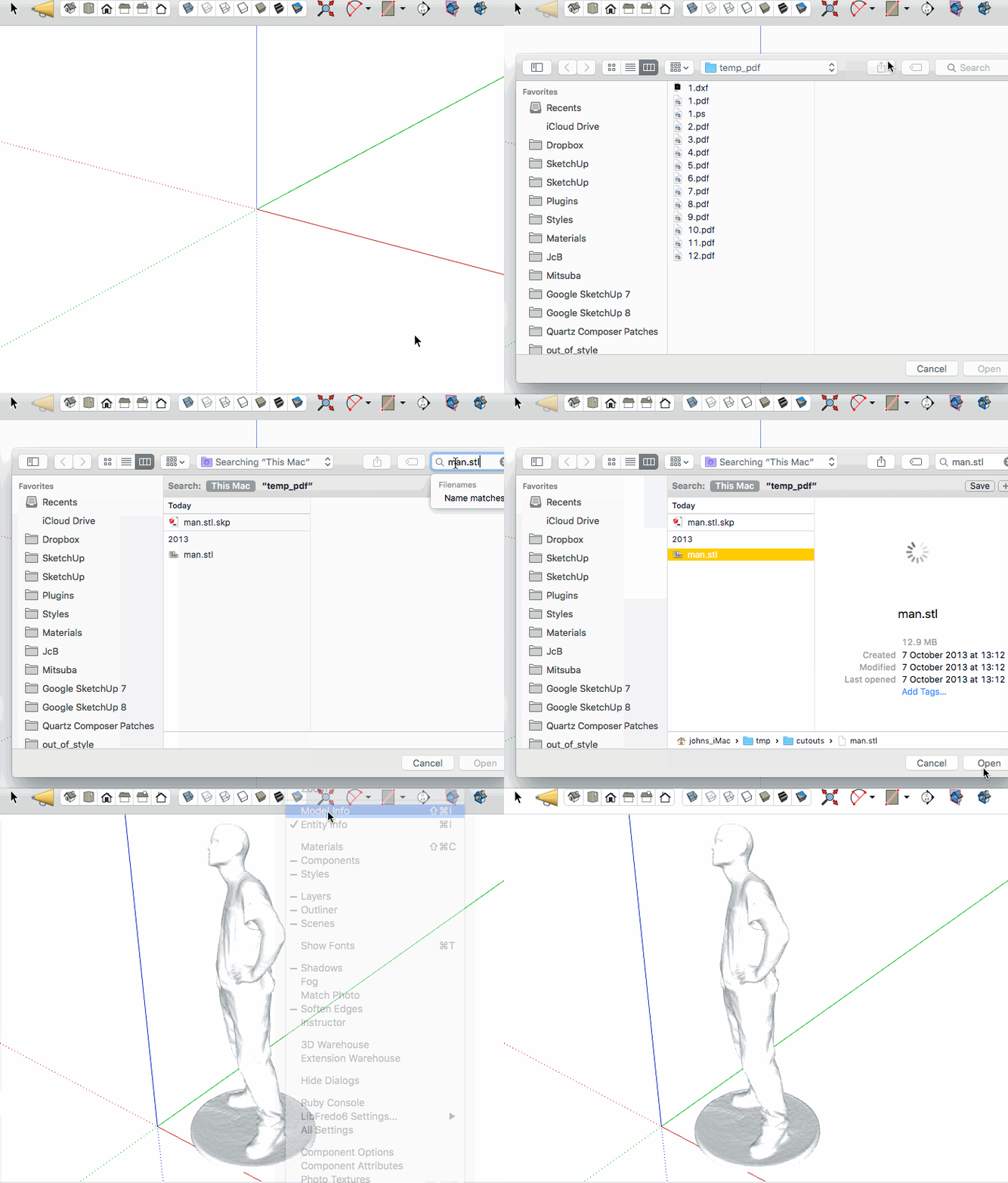
      click to gif  and wait for the gap where I see the beachball but the gif doesn't...

      john

      learn from the mistakes of others, you may not live long enough to make them all yourself...

      1 Reply Last reply
      Reply Quote 0
      • J
        Jim
        last edited by

        Here is the translation of the dialog for my own understanding.

        @unknownuser said:

        The program does not run correctly because of a problem. The program will be closed and you will be notified when a solution is available.

        Not terribly helpful. I think I need to compile 2 versions for 32 bit and 64 bit.

        Hi

        1 Reply Last reply
        Reply Quote 0
        • J
          Jim
          last edited by

          I updated to 15.2. I just added some debugging info. Please try again. Thanks.

          Hi

          1 Reply Last reply
          Reply Quote 0
          • K
            kaas
            last edited by

            Still something crashing on my system

            "C:\Users\Max\Desktop\volt_v3_base.stl.skp" was not created.
            Error: #<Errno::ENOENT: No such file or directory - C:\Users\Max\Desktop\volt_v3_base.stl.log>
            C:/Users/Max/AppData/Roaming/SketchUp/SketchUp 2016/SketchUp/Plugins/jf-mesh-importer/main.rb:49:in read' C:/Users/Max/AppData/Roaming/SketchUp/SketchUp 2016/SketchUp/Plugins/jf-mesh-importer/main.rb:49:in main'
            C:/Users/Max/AppData/Roaming/SketchUp/SketchUp 2016/SketchUp/Plugins/jf-mesh-importer/main.rb:5:in block in <module:MeshImporter>' SketchUp:1:in call'

            1 Reply Last reply
            Reply Quote 0
            • S
              smicha
              last edited by

              Could you add obj import - this is one of the most important format.

              1 Reply Last reply
              Reply Quote 0
              • cottyC
                cotty
                last edited by

                @jim said:

                I updated to 15.2. I just added some debugging info. Please try again. Thanks.

                Still the same error here (dll).

                my SketchUp gallery

                1 Reply Last reply
                Reply Quote 0
                • J
                  Jim
                  last edited by

                  I put up version 15.3. Open the Ruby Console before running to see the errors.

                  Sorry about experimenting on you guys - I am fairly new to creating executables that need to run on a variety of architectures.

                  Thank you for you help.

                  Hi

                  1 Reply Last reply
                  Reply Quote 0
                  • J
                    Jim
                    last edited by

                    Also, the converter is a console application so it might be helpful if people could attempt to convert a file on the command line. Even double-clicking the a2a.exe file might bring up helpful error dialogs. Thanks again.

                    Hi

                    1 Reply Last reply
                    Reply Quote 0
                    • J
                      Jim
                      last edited by

                      @smicha said:

                      Could you add obj import - this is one of the most important format.

                      If you select Any File Type in the File Selection dialog, you will be able to select .obj files and import them. Textures are not supported, though. Right now I am just trying to figure out how to make it work on different operating systems and versions.

                      Hi

                      1 Reply Last reply
                      Reply Quote 0
                      • S
                        smicha
                        last edited by

                        @jim said:

                        @smicha said:

                        Could you add obj import - this is one of the most important format.

                        If you select Any File Type in the File Selection dialog, you will be able to select .obj files and import them. Textures are not supported, though. Right now I am just trying to figure out how to make it work on different operating systems and versions.

                        When I choose - any file - and select obj nothing happens.

                        1 Reply Last reply
                        Reply Quote 0
                        • J
                          Jim
                          last edited by

                          @smicha said:

                          When I choose - any file - and select obj nothing happens.

                          Windows or Mac? What version? 32 or 64 bit?

                          Hi

                          1 Reply Last reply
                          Reply Quote 0
                          • S
                            smicha
                            last edited by

                            @jim said:

                            @smicha said:

                            When I choose - any file - and select obj nothing happens.

                            Windows or Mac? What version? 32 or 64 bit?

                            win 7 64bit.

                            1 Reply Last reply
                            Reply Quote 0
                            • J
                              Jim
                              last edited by

                              It would help if you could try to import the file while the Ruby Console window is open, and then post any errors here.

                              Hi

                              1 Reply Last reply
                              Reply Quote 0
                              • S
                                smicha
                                last edited by

                                @jim said:

                                It would help if you could try to import the file while the Ruby Console window is open, and then post any errors here.

                                Mesh Importer Result:
                                D:...\stone.obj.skp was not created.

                                1 Reply Last reply
                                Reply Quote 0
                                • J
                                  Jim
                                  last edited by

                                  Thanks for your patience. I just want to make sure you gave tried version 15.4 which I uploaded last evening and which fixed a similar problem kaas had?

                                  Hi

                                  1 Reply Last reply
                                  Reply Quote 0
                                  • S
                                    smicha
                                    last edited by

                                    @jim said:

                                    Thanks for your patience. I just want to make sure you gave tried version 15.4 which I uploaded last evening and which fixed a similar problem kaas had?

                                    Yes - the newest version. Feel free to ask more questions. I'd be glad to see the plugin working. For now I stick with TIG's obj importer.

                                    1 Reply Last reply
                                    Reply Quote 0
                                    • S
                                      smicha
                                      last edited by

                                      BTW it seems that a cmd window blinks for a fraction of a second and does nothing.

                                      1 Reply Last reply
                                      Reply Quote 0
                                      • D
                                        driven
                                        last edited by

                                        smicha, will it make one if the original is on your desktop?

                                        learn from the mistakes of others, you may not live long enough to make them all yourself...

                                        1 Reply Last reply
                                        Reply Quote 0
                                        • S
                                          smicha
                                          last edited by

                                          It's not working at all.

                                          1 Reply Last reply
                                          Reply Quote 0
                                          • J
                                            Jim
                                            last edited by

                                            @smicha said:

                                            It's not working at all.

                                            Two things to try:

                                            1. Try double-clicking the a2s.exe from Windows file explorer.

                                            2. Open a command prompt in the "win" folder and try to run a2s.exe, and maybe try to convert a file - something like:

                                            
                                            > .\a2s "C;\users\YOU\Downloads\test.stl"


                                            Are there any errors or dialogs?

                                            Hi

                                            1 Reply Last reply
                                            Reply Quote 0

                                            Hello! It looks like you're interested in this conversation, but you don't have an account yet.

                                            Getting fed up of having to scroll through the same posts each visit? When you register for an account, you'll always come back to exactly where you were before, and choose to be notified of new replies (either via email, or push notification). You'll also be able to save bookmarks and upvote posts to show your appreciation to other community members.

                                            With your input, this post could be even better đź’—

                                            Register Login
                                            • 1
                                            • 2
                                            • 2 / 2
                                            • First post
                                              Last post
                                            Buy SketchPlus
                                            Buy SUbD
                                            Buy WrapR
                                            Buy eBook
                                            Buy Modelur
                                            Buy Vertex Tools
                                            Buy SketchCuisine
                                            Buy FormFonts

                                            Advertisement
