sketchucation logo sketchucation
    • 登入
    Oops, your profile's looking a bit empty! To help us tailor your experience, please fill in key details like your SketchUp version, skill level, operating system, and more. Update and save your info on your profile page today!
    🔌 Smart Spline | Fluid way to handle splines for furniture design and complex structures. Download

    [Plugin] GKWare Cabinet Maker

    已排程 已置頂 已鎖定 已移動 Plugins
    627 貼文 69 Posters 459.1k 瀏覽 70 Watching
    正在載入更多貼文
    • 從舊到新
    • 從新到舊
    • 最多點贊
    回覆
    • 在新貼文中回覆
    登入後回覆
    此主題已被刪除。只有擁有主題管理權限的使用者可以查看。
    • B 離線
      Billy_6_Gun
      最後由 編輯

      @garry k said:

      Currently not. However I have had a number of requests for sliding cabinet doors.

      [attachment=0:28jea4ia]<!-- ia0 -->sliding doors.png<!-- ia0 -->[/attachment:28jea4ia]

      Would love to have Sliding doors!

      Have had projects in the past with sliding by-pass cabinet doors and currently working on one right now as well using CRL Laurence or Richelieu Hardware.

      1 條回覆 最後回覆 回覆 引用 0
      • G 離線
        Garry K
        最後由 編輯

        Billy - Thanks for your kind words.
        Sliding doors is on my radar.

        New versions are now available on my website

        CabMaker Version 6.0.150 – Feb 15, 2020

        1. Door report now has 2 new columns - Part Type and Material.
        2. Fixed Stretcher in Face Frame construction.
        3. Added Alt-D to give user the ability to delete templates - one at a time.
        4. Added Expression Evaluator.
        5. Cleaning up folders – simplifying.
        6. Scene generation Plan wasn't always working. Fixed.

        CutMaster Version 6.0.1.94 - Feb 15, 2020

        1. Angled Tops and Bottoms - no backs - Fixed
        2. Import mapping modified in database
        3. Cleaned up 4 tables in database - no more fixed length characters
        4. Layout listing now adjusts sizing for extra room for small parts.
        5. DXF Reports now use adjusted size but without parts padding.
        6. Angled fixed shelves were not angled. Fixed.
        1 條回覆 最後回覆 回覆 引用 0
        • G 離線
          Garry K
          最後由 編輯

          Bill - Sliding doors are on my radar.

          Currently working on CabMaker 6.0.151

          1. Multi row door panels was flipped in Mid and Tall cabinets. Fixed.

          2. Fixed rounding error with integrated kicks and notching

          3. Renaming of Cabinet templates and Rule templates no longer deleting old name

          4. Now working on Project level materials and rules

          Todo:

          1. Finish Project level materials and rules
          2. Simplify adding textures
          3. c-channel and j-channel
          4. sliding doors
          5. merging - closets
          6. merging - face frames
          1 條回覆 最後回覆 回覆 引用 0
          • G 離線
            Garry K
            最後由 編輯

            The most current version of CabMaker is now available on my website.

            Version 6.0.151 – Feb 29, 2020

            1. Multi row door panels was flipped in Mid and Tall cabinets. Fixed.
            2. Fixed rounding error with integrated kicks and notching.
            3. Renaming of Cabinet templates and Rule templates no longer deleting old name.
            4. Added PROJECT level for resources, Rules, Materials, Doors and Drawer Systems.
            5. Alt-S now works for all resouces.
            6. Dropped Alt-R, no need for rename since we have save as and delete.
            7. PROJECT tab now defaults to all tabs locked.
            8. Added Context help for resources.
            1 條回覆 最後回覆 回覆 引用 0
            • G 離線
              Garry K
              最後由 編輯

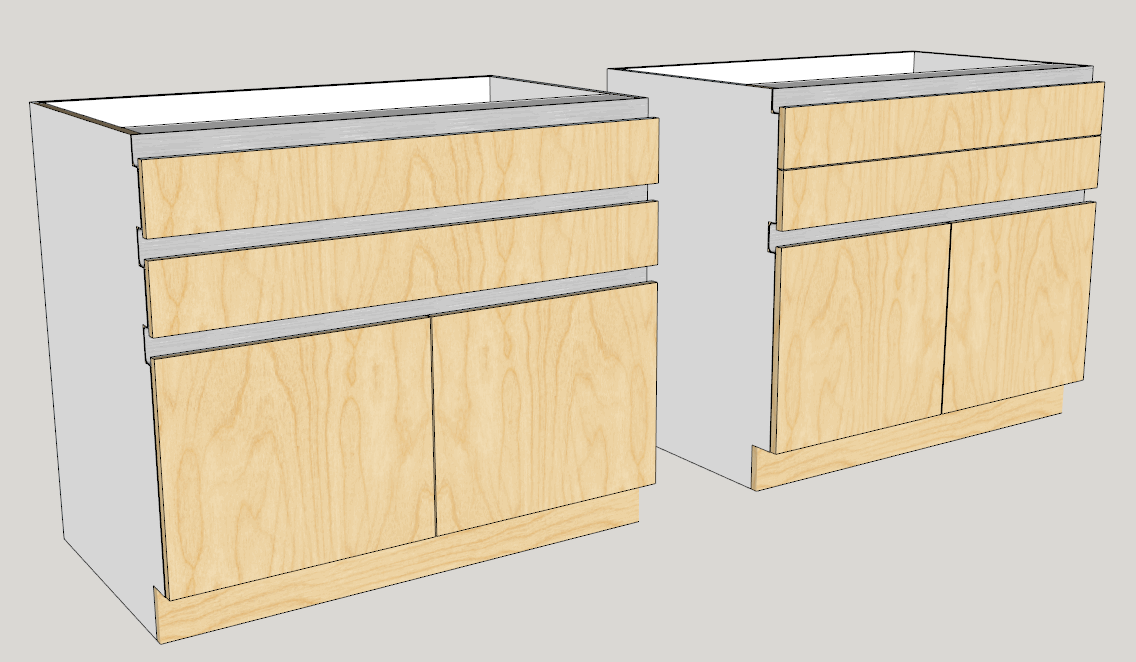
              Working on 6.0.152

              Handless cabinets

              handleless cabinets.png

              1 條回覆 最後回覆 回覆 引用 0
              • H 離線
                henco
                最後由 編輯

                I installed CabMaker on a new computer, but I keep on getting Web Service Error -25... How do I remove the license from the old PC and get it to work on the new one?

                1 條回覆 最後回覆 回覆 引用 0
                • G 離線
                  Garry K
                  最後由 編輯

                  You need to email me requesting a reset. You must provide me with your userid.

                  1 條回覆 最後回覆 回覆 引用 0
                  • G 離線
                    Garry K
                    最後由 編輯

                    CabMaker 6.0.152 is now available from my website.

                    1. Added Handless Cabinet support.
                    2. Modified Parts reports to include new handless information.
                    3. Locks for new project are now in Edit Config.
                    4. CabMaker kept adding same material to project - fixed.

                    I am now working on CutMaster to support the notching for handless cabinets.

                    1 條回覆 最後回覆 回覆 引用 0
                    • G 離線
                      Garry K
                      最後由 編輯

                      CabMaker 6.0.155 is now available from my website.

                      Version 6.0.155 – Apr 20, 2020

                      1. Cabinet merging now works better for face frame cabinets.

                      Version 6.0.154 – Apr 11, 2020
                      2. Standard Drawer backs not positioned correctly when back is sitting on bottom.
                      3. Door and Drawer tabs not updating when changing templates. Fixed
                      4. Now adding a message if reports have nothing to do - cabinet quantity = 0.

                      Version 6.0.153 – Mar 31, 2020

                      1. Edit Config now defaults to false for 'Locks on new project'.
                      1 條回覆 最後回覆 回覆 引用 0
                      • G 離線
                        Garry K
                        最後由 編輯

                        CabMaker 6.0.157 and Cutmaster 6.0.1.99 are now available from my website.

                        CabMaker
                        Version 6.0.157 – Jun 19, 2020

                        1. Modified Merging for closets. Optionally the Left side for the right cabinet is the only panel that is changed. Backs, Tops, Bottoms, hangers are not modified.
                          Version 6.0.156 – Jun 7, 2020
                        2. Modified Leg placement for Return Cabinets and Angled Ends.
                        3. Modified CutMaster report for Side Dado.

                        CutMaster
                        Version 6.0.1.99 - Jun 19, 2020

                        1. Fixed Parts report when using fractions such as 16 29/64”. Had to increase the size of the Width and Length columns.
                        2. Fixed merged panels for DXF. The left panel of the right merged cabinet now goes into a folder named “BackFace”.
                        3. Modified Blind Mortise and Tenon for CNC. More control for handling tenon notches.
                          Version 6.0.1.98 - Jun 7, 2020
                        4. Added Flip Tops, Flip Fixed and Flip Bottoms to General Options.
                        5. Removed “Drill From Bottom”
                        6. Completed Angled Ends for Blind Dado.
                        7. Added Single line tenon cuts instead of pockets.
                        8. Modified Leg positions for Return cabinets and Angled Ends.
                        9. Added pocket option for Construction holes and Dowels. This supports Festool Domino and Lamelo.
                          Version 6.0.1.97 - May 11, 2020
                        10. Configuration settings now has checkboxes to turn on / off DXF sections.
                        11. You can now have any width of blind tenon (stop tenon).
                        12. You can now set full dado width to 0 to get single line instead of a pocket.
                        13. Bottoms, Tops, Stretchers, Fixed Shelves and rails can now have single line choice instead of pocket.
                        14. For Blind Dado's added 4 new parameters, Depth Adjustment, Up Down Adjustment, Tenon Width Adjustment and Reverse Bottoms.
                        15. Reverse bottoms is intended to be used with integrated kicks.
                        16. Added Pocket Length to Construction Holes to support Festool Domino and Lamello.
                        17. Added Start Line indicator for CNC view.
                        1 條回覆 最後回覆 回覆 引用 0
                        • G 離線
                          Garry K
                          最後由 編輯

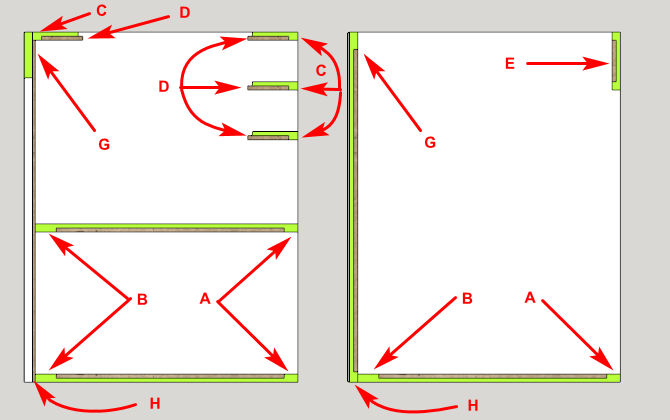
                          Now you have more control over Blind mortise and tenons.
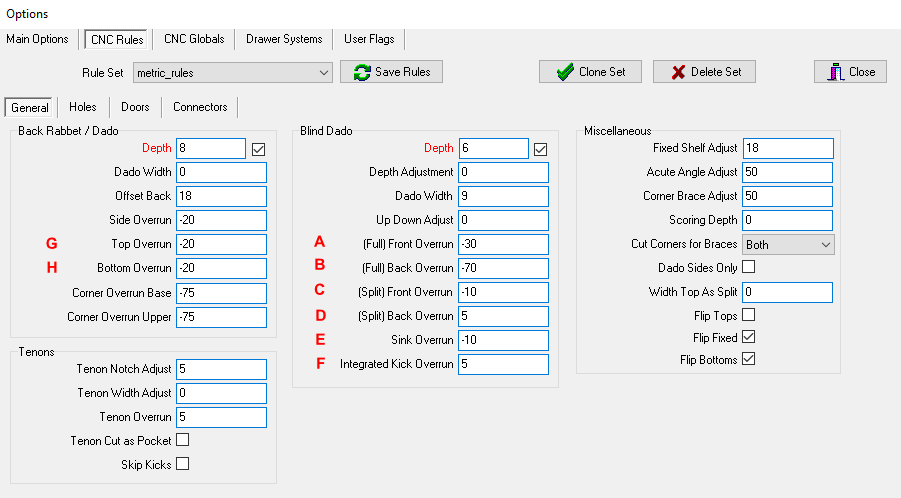
                          Cut 1.png

                          Here are 2 examples with and without integrated kicks.
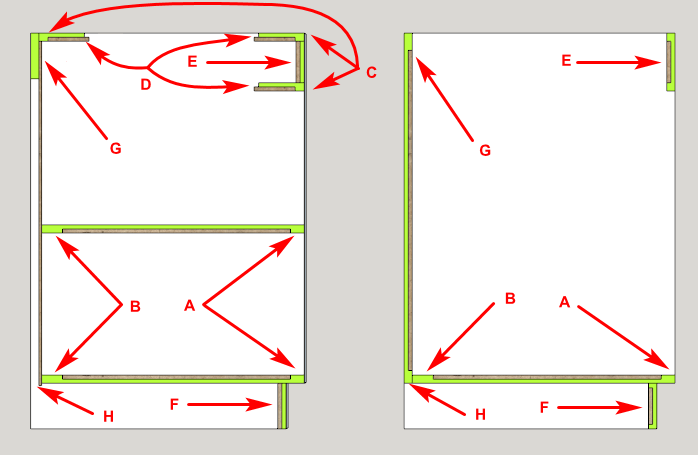
                          tenon 1.png

                          tenon 2.png

                          1 條回覆 最後回覆 回覆 引用 0
                          • G 離線
                            Garry K
                            最後由 編輯

                            A new version of CabMaker is now available
                            Version 6.0.158 – Jul 1, 2020

                            1. Modified Sink cabinet. You can now have side by side drawer fronts without a stretcher.

                            A new versin of CutMaster is now available.
                            Version 6.0.1.101 Jun 30, 2020

                            1. Fixed drawer bottoms for single line routing directionality.
                            2. Added pocket screws for drawer bottoms.
                            3. Added optional X / Y offsets for routed label positioning.
                            1 條回覆 最後回覆 回覆 引用 0
                            • L 離線
                              LusaMx
                              最後由 編輯

                              Just installed the latest version. But once I try to run for first time the login dialogbox appears and ask for "hardware". If i use the ID and password registered at website but "hardware" field blamk. Sketchup freezes and the only way to starover is ctl+alt+del and kill the process.

                              Why?

                              Regards

                              1 條回覆 最後回覆 回覆 引用 0
                              • G 離線
                                Garry K
                                最後由 編輯

                                I am currently helping him via email.

                                1 條回覆 最後回覆 回覆 引用 0
                                • utilerU 離線
                                  utiler
                                  最後由 編輯

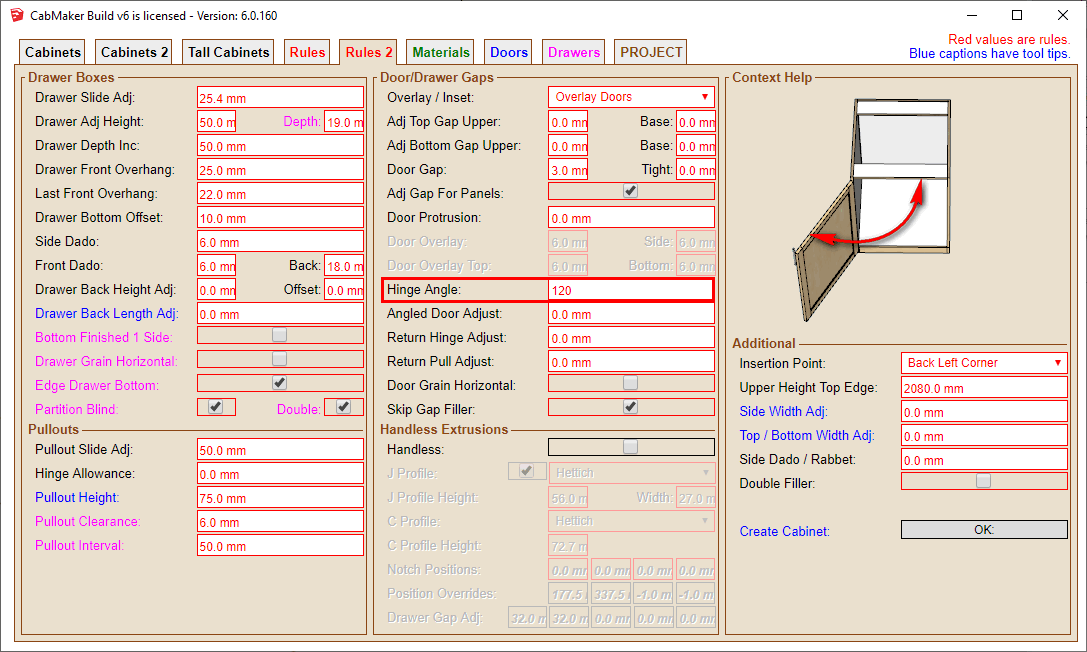
                                  Good morning Garry, is there a way to change the door arc radius? I note that its set to 120 degrees as standard but I'd like to set it to 85-90 degrees.
                                  Can't seem to find it anywhere in the manual.

                                  Cheers,

                                  Just Curious...

                                  1 條回覆 最後回覆 回覆 引用 0
                                  • G 離線
                                    Garry K
                                    最後由 編輯

                                    Try this

                                    hinges.png

                                    1 條回覆 最後回覆 回覆 引用 0
                                    • utilerU 離線
                                      utiler
                                      最後由 編輯

                                      Seriously, I need glasses... Thank you Garry. 😳

                                      Just Curious...

                                      1 條回覆 最後回覆 回覆 引用 0
                                      • M 離線
                                        marcinek12
                                        最後由 編輯

                                        Hi
                                        I got problem with plugin gkware cabinet maker v6
                                        Window come up with Registration
                                        User id i got it
                                        What password i need to tape in
                                        I need to registered somwhere?
                                        Thank you

                                        1 條回覆 最後回覆 回覆 引用 0
                                        • G 離線
                                          Garry K
                                          最後由 編輯

                                          First create an account on my website
                                          https://cabmaker32.com/login/

                                          Use those credentials with any of my plugins.

                                          Garry

                                          1 條回覆 最後回覆 回覆 引用 0
                                          • ajharlanA 離線
                                            ajharlan
                                            最後由 編輯

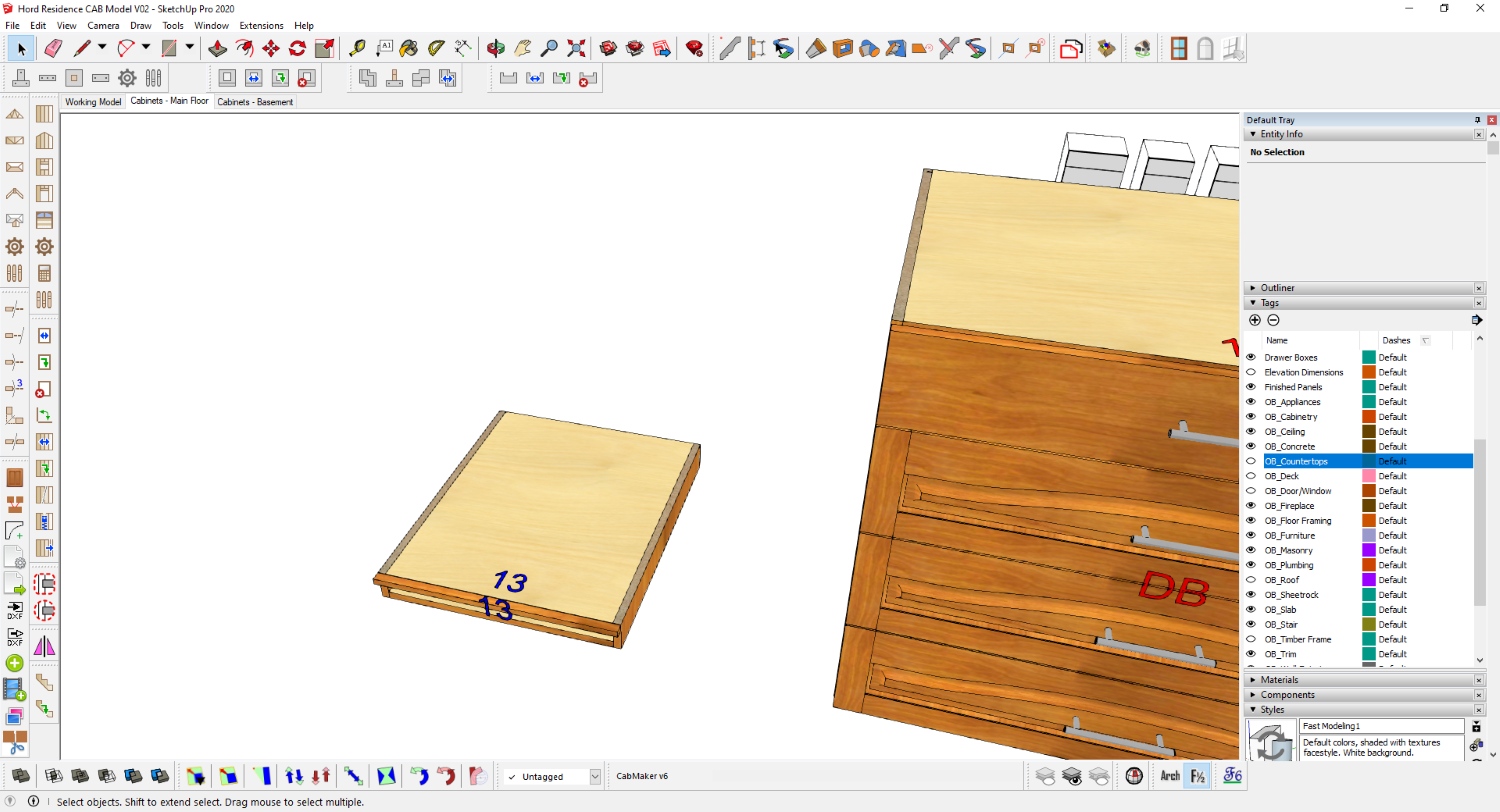
                                            I am scratching my head to try and figure this one out. I've tried multiple permutations of settings but cannot seem to get past this error. Any help appreciated.

                                            "Drawer System Error: Height < = 0"
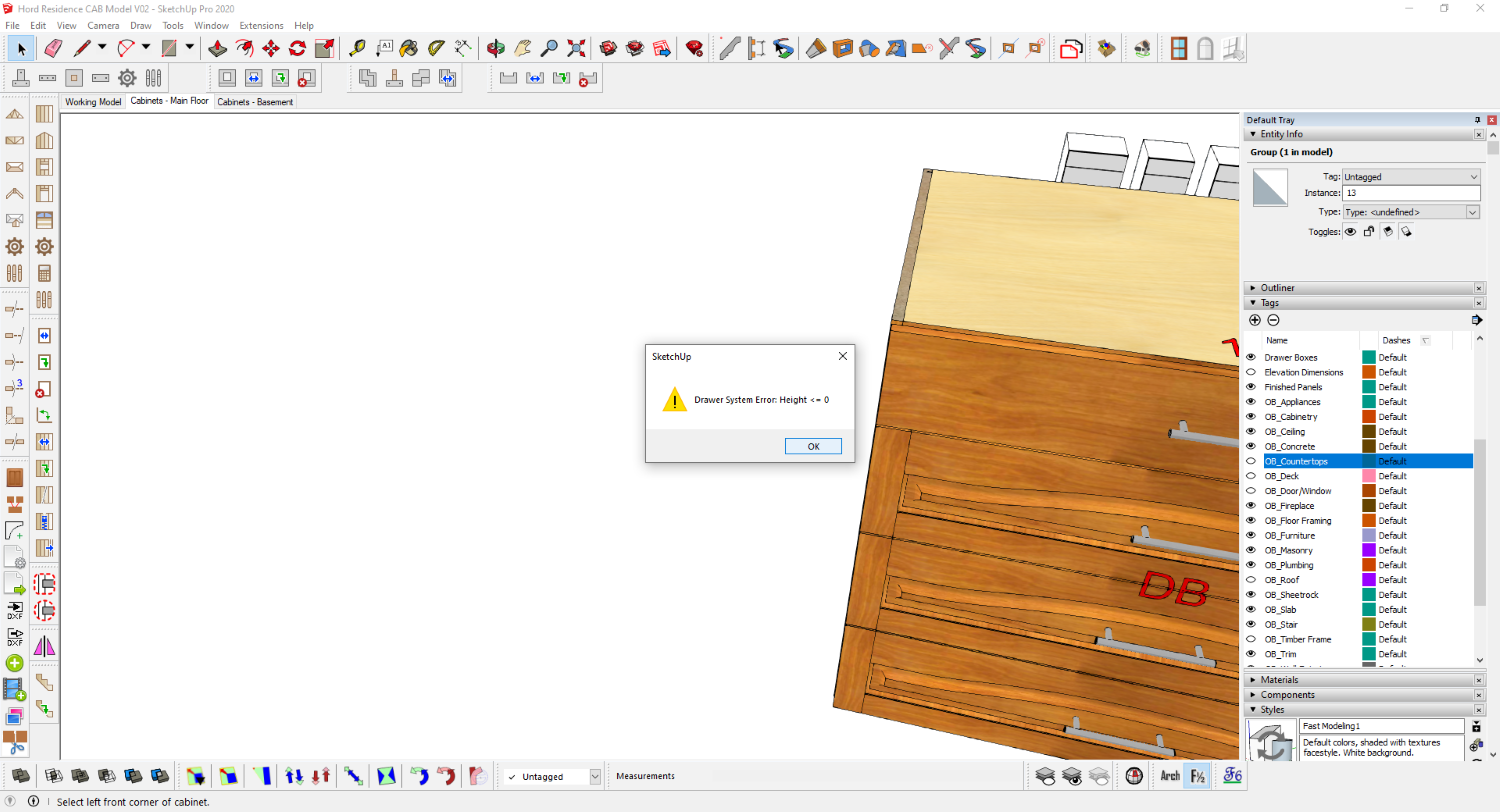

                                            Screenshot 2020-11-12 105223.png


                                            Screenshot 2020-11-12 105254.png

                                            1 條回覆 最後回覆 回覆 引用 0
                                            • 1
                                            • 2
                                            • 28
                                            • 29
                                            • 30
                                            • 31
                                            • 32
                                            • 32 / 32
                                            • 第一個貼文
                                              最後的貼文
                                            Buy SketchPlus
                                            Buy SUbD
                                            Buy WrapR
                                            Buy eBook
                                            Buy Modelur
                                            Buy Vertex Tools
                                            Buy SketchCuisine
                                            Buy FormFonts

                                            Advertisement