sketchucation logo sketchucation
    • Login
    Oops, your profile's looking a bit empty! To help us tailor your experience, please fill in key details like your SketchUp version, skill level, operating system, and more. Update and save your info on your profile page today!
    ⚠️ Update | Sketchucation Tools 5.0.8 released with licensing improvements and bugfixes Download

    Repeating last action

    Scheduled Pinned Locked Moved Woodworking
    21 Posts 6 Posters 6.7k Views 6 Watching
    Loading More Posts
    • Oldest to Newest
    • Newest to Oldest
    • Most Votes
    Reply
    • Reply as topic
    Log in to reply
    This topic has been deleted. Only users with topic management privileges can see it.
    • Dave RD
      Dave R
      last edited by

      There isn't a keyboard shortcut to do what you want to do but I wonder why you wouldn't just put the joist hanger where you need it to be in the first place. Moving it in increments as you suggest would be tedious and time consuming.

      Assuming you've got a joist hanger component, you could set the component's origin (which is also its insertion point) in a logical place to make inserting it easier. And since joist spacing is generally regular, you can use Move/Copy to make a linear array of copies of the hanger.

      Etaoin Shrdlu

      %

      (THERE'S NO PLACE LIKE)

      G28 X0.0 Y0.0 Z0.0

      M30

      %

      1 Reply Last reply
      Reply Quote 0
      • cottyC
        cotty
        last edited by

        To follow Daves suggestion, you should have a look at the great inferencing system which will help you to position your objects: http://help.sketchup.com/de/article/70143

        my SketchUp gallery

        1 Reply Last reply
        Reply Quote 0
        • KrisidiousK
          Krisidious
          last edited by

          Repeat Command was nice in autocad, we have a similar plugin in SU. COPY/ROTATE/REPEAT but it doesn't replace the repeat command. Since it only works for copying and rotating.

          Repeat Command was available on the arrow keys and the mouse and was handy more than you think. It was always there for you once you knew to think about it.

          By: Kristoff Rand
          Home DesignerUnique House Plans

          1 Reply Last reply
          Reply Quote 0
          • Dave RD
            Dave R
            last edited by

            @krisidious said:

            Repeat Command was nice in autocad, we have a similar plugin in SU. COPY/ROTATE/REPEAT but it doesn't replace the repeat command. Since it only works for copying and rotating.

            What have you been smoking Kris? πŸ˜†

            You've forgotten about making linear arrays with Copy/MOVE/Repeat? That works in a straight line.

            Etaoin Shrdlu

            %

            (THERE'S NO PLACE LIKE)

            G28 X0.0 Y0.0 Z0.0

            M30

            %

            1 Reply Last reply
            Reply Quote 0
            • BoxB
              Box
              last edited by

              It's worth noting that Glue To isn't really designed as a Snap to function, although it does do that. Glue to is more about actually gluing one component to anther so they move around together until you physically unglue them.

              1 Reply Last reply
              Reply Quote 0
              • KrisidiousK
                Krisidious
                last edited by

                No, I realize you can do those things with copy and rotate, arrays are nice too... But the Repeat Command is for any command, like if I'm doing square footage, or checking dimensions, it's for anything and for everything. It just repeats whatever the last command was and in the mouse mode repeat you get a list of previous commands.

                By: Kristoff Rand
                Home DesignerUnique House Plans

                1 Reply Last reply
                Reply Quote 0
                • KrisidiousK
                  Krisidious
                  last edited by

                  @dave r said:

                  What have you been smoking Kris? πŸ˜†

                  And mostly cigarettes... Mostly.

                  By: Kristoff Rand
                  Home DesignerUnique House Plans

                  1 Reply Last reply
                  Reply Quote 0
                  • Dave RD
                    Dave R
                    last edited by

                    I never said a repeat function wouldn't be useful but for trying to accurately place a joist hanger, repeating a move operation in steps is a pretty lousy way to do it when it can easily be place accurately the first time it is moved.

                    Etaoin Shrdlu

                    %

                    (THERE'S NO PLACE LIKE)

                    G28 X0.0 Y0.0 Z0.0

                    M30

                    %

                    1 Reply Last reply
                    Reply Quote 0
                    • KrisidiousK
                      Krisidious
                      last edited by

                      Oh of course. I always use arrays when I can. More dependable than setting manually each anyway.

                      By: Kristoff Rand
                      Home DesignerUnique House Plans

                      1 Reply Last reply
                      Reply Quote 0
                      • C
                        Chessnut2
                        last edited by

                        I think I didn't use a very good example by talking about the joist hangers. I was talking about the initial placement of the first hanger after downloading it from 3D warehouse. But I got it done. I'm more interested in the general principle of "Repeat last action", no matter what that action was. I found a previous thread that explains what I'm getting at a little better than I did. http://sketchucation.com/forums/viewtopic.php?f=10%26amp;t=8427

                        1 Reply Last reply
                        Reply Quote 0
                        • Dave RD
                          Dave R
                          last edited by

                          Even the placement of the initial component shouldn't require that you move it in tiny increments to place it.

                          Unfortunately, often authors of components you find in the 3D Warehouse haven't bothered to make them easy to insert with precision. But you can modify the component to make it easily inserted.

                          This is a joist hanger I drew some time ago. I adjusted the location of the component origin and axes so it could be dropped easily where it is needed without screwing around adjusting its location.
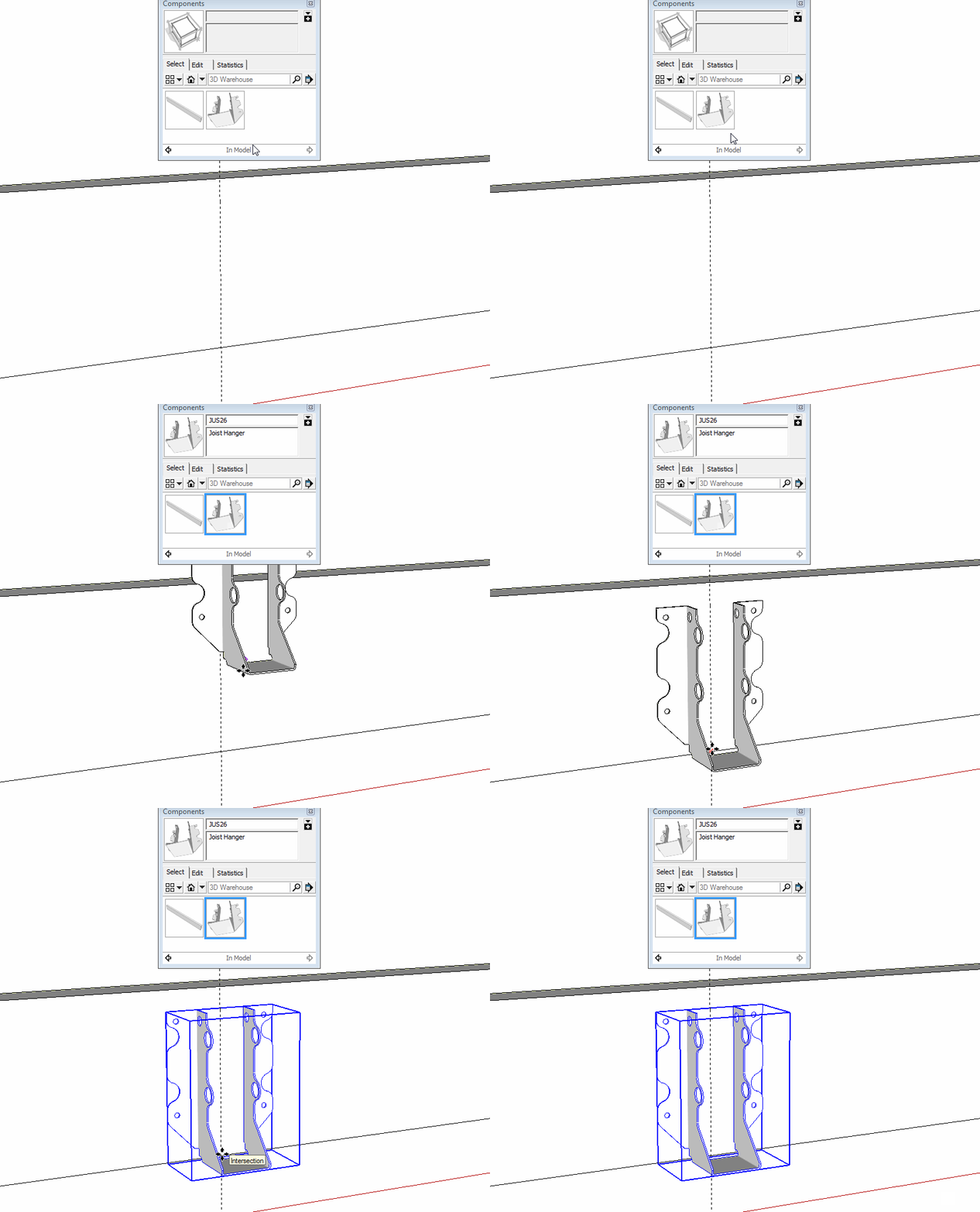
                          hanger.gif

                          It's also worth learning how to use the Move tool correctly. Although you can grab an entity anywhere with the Move tool, it is best to grab it by a point that will correspond to a point at the destination. That will beat trying to nudge the component into place.

                          Etaoin Shrdlu

                          %

                          (THERE'S NO PLACE LIKE)

                          G28 X0.0 Y0.0 Z0.0

                          M30

                          %

                          1 Reply Last reply
                          Reply Quote 0
                          • C
                            Chessnut2
                            last edited by

                            Great idea, Dave. How would I go about adjusting the location of the component origin and axes if I have a component that needs it? Thanks.

                            1 Reply Last reply
                            Reply Quote 0
                            • cottyC
                              cotty
                              last edited by

                              You can have a look at Daves blog post about this topic here:
                              http://www.finewoodworking.com/item/41609/component-insertion

                              my SketchUp gallery

                              1 Reply Last reply
                              Reply Quote 0
                              • Dave RD
                                Dave R
                                last edited by

                                Take a look at this thing I did a few years ago. It should give you some ideas. The key thing is to position the component origin at the same point you'd use as a reference in placing the real object.

                                For the joist hanger I placed the origin so the inside of the hanger, where the joist would sit, is level with the bottom of the rim joist or beam and at its center. It would correspond to a pencil mark on your real rim joist or beam for centering the joist.
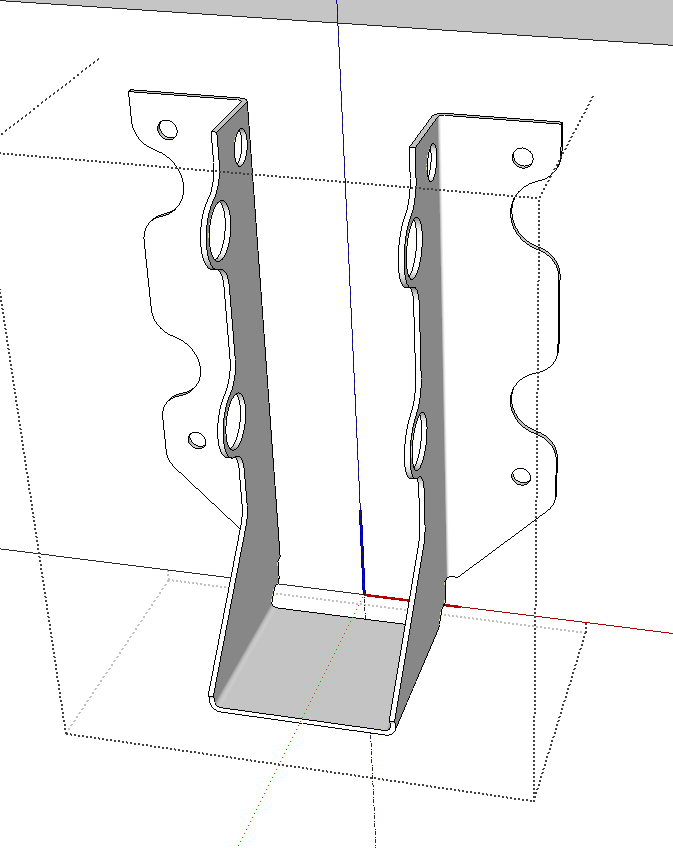
                                Screenshot - 8_23_2015 , 8_25_34 AM.png

                                Edit to add: Cotty, you're quick! πŸ˜†

                                Etaoin Shrdlu

                                %

                                (THERE'S NO PLACE LIKE)

                                G28 X0.0 Y0.0 Z0.0

                                M30

                                %

                                1 Reply Last reply
                                Reply Quote 0
                                • BoxB
                                  Box
                                  last edited by

                                  @chessnut2 said:

                                  Great idea, Dave. How would I go about adjusting the location of the component origin and axes if I have a component that needs it? Thanks.

                                  Right click on the component and select Change Axes then click the relevant location and directions.

                                  1 Reply Last reply
                                  Reply Quote 0
                                  • cottyC
                                    cotty
                                    last edited by

                                    @dave r said:

                                    Edit to add: Cotty, you're quick! πŸ˜†

                                    Because the question was for you, I thought I can answer with your answer πŸ˜‰

                                    my SketchUp gallery

                                    1 Reply Last reply
                                    Reply Quote 0
                                    • KrisidiousK
                                      Krisidious
                                      last edited by

                                      before you ask... Turning on component axis will help know where the axis is one comps you didn't make or forgot where you put it.

                                      By: Kristoff Rand
                                      Home DesignerUnique House Plans

                                      1 Reply Last reply
                                      Reply Quote 0
                                      • pbacotP
                                        pbacot
                                        last edited by

                                        Another note that doesn't really address "repeating last action" request. There IS a "nudge" plugin at sMustard. I believe that's the one I've used, though I don't have it loaded now and don't recall paying for it... I think some people doing more intricate or free form models use it more. Since I do more rectilinear work there always seems to be good points to snap or align to.

                                        MacOSX MojaveSketchUp Pro v19 Twilight v2 Thea v3 PowerCADD

                                        1 Reply Last reply
                                        Reply Quote 0
                                        • C
                                          Chessnut2
                                          last edited by

                                          Thanks to all for the helpful suggestions. I have saved all of them and am looking forward to trying them out (if I can ever catch up with my yard work). This has been a very positive first experience in this forum, and I appreciate the patience and helpfulness you've shown to a Newbie at sketchup. Thanks. Jim

                                          1 Reply Last reply
                                          Reply Quote 0
                                          • KrisidiousK
                                            Krisidious
                                            last edited by

                                            No problem... You'll find this community eager to help and very generous. I've seen a lot of forums in my life, this one stands out as a very active and helpful place.


                                            By: Kristoff Rand
                                            Home DesignerUnique House Plans

                                            1 Reply Last reply
                                            Reply Quote 0

                                            Hello! It looks like you're interested in this conversation, but you don't have an account yet.

                                            Getting fed up of having to scroll through the same posts each visit? When you register for an account, you'll always come back to exactly where you were before, and choose to be notified of new replies (either via email, or push notification). You'll also be able to save bookmarks and upvote posts to show your appreciation to other community members.

                                            With your input, this post could be even better πŸ’—

                                            Register Login
                                            • 1
                                            • 2
                                            • 2 / 2
                                            • First post
                                              Last post
                                            Buy SketchPlus
                                            Buy SUbD
                                            Buy WrapR
                                            Buy eBook
                                            Buy Modelur
                                            Buy Vertex Tools
                                            Buy SketchCuisine
                                            Buy FormFonts

                                            Advertisement

