Change color entity group
-
Hi!
I need your help. I'am beginner and need change color to entity group by Ruby.
I Attach the entity that I need change color.How can find this object and then change color?
Thanks.
Best regards, from Argentina!
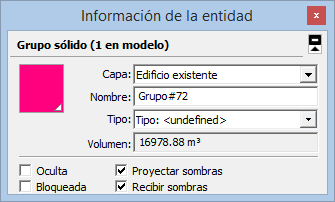
-
You need to find the group.
There are several methods, depending on how your 'tool' is getting its information...
a.group = Sketchup.active_model.selection[0]assuming one group is selected...
Assumingmy_name = "Grupo#72"
b.group = Sketchup.active_model.active_entities.grep(Sketchup::Group).select{|g| g.name = my_name }[0]
which gives you the first group of that name in the current active entities context...
c.named_groups = [] Sketchup.active_model.definitions.select{|d| d.group? }.each{|g| g.instances.each{|i| named_groups << i if i.name == my_name }}
Now you have an array of all groups named 'my_name'
Often there will be only one... but you CAN rename several groups with the exact same name !
If you are sure then there'll only be one, thengroup = named_groups[0]Let's us assume you have a '
group' reference...Now you need to get a material...
There are several ways to get a reference to the material...Assuming
my_material_name = "My_Lovely_Material"
a.material = Sketchup.active_model.materials[my_material_name]
If it returnsnilthen it doesn't exist.
Otherwise it's a reference to that material.
b. To make the new material use:
` if material = Sketchup.active_model.materials[my_material_name]do stuff with 'material'
else ### make the new 'material'
material = Sketchup.active_model.materials.add(my_material_name)
material.color = [123, 123, 123] ### some RGB value
end`Now you have the references to the
groupand thematerial, use them thus...
group.material = material
There are many ways to skin a cat...

-
Excelente!
Thanks very much!

Hello! It looks like you're interested in this conversation, but you don't have an account yet.
Getting fed up of having to scroll through the same posts each visit? When you register for an account, you'll always come back to exactly where you were before, and choose to be notified of new replies (either via email, or push notification). You'll also be able to save bookmarks and upvote posts to show your appreciation to other community members.
With your input, this post could be even better 💗
Register Login


Advertisement