Trouble closing faces
-
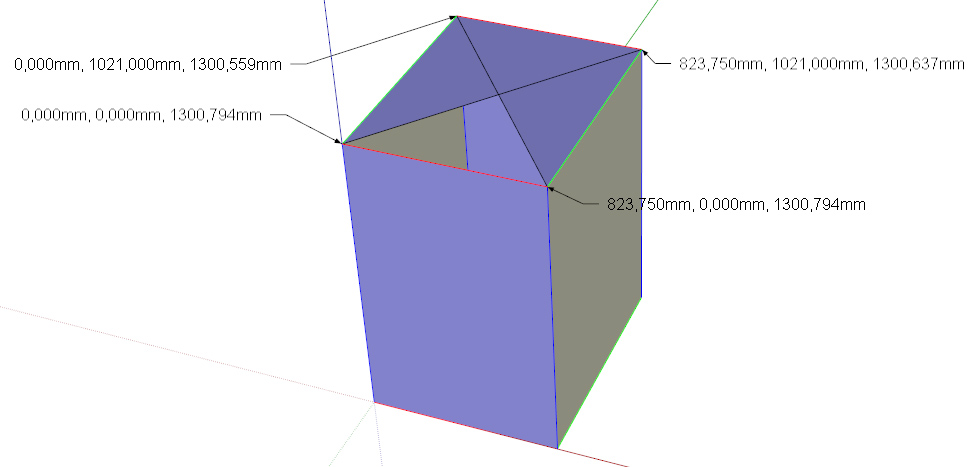
Hi all - I've used sketchup a while but I'm no expert. this is frustrating me. I have part of a model that refuses to let me close a face. I pasted the relevant bit into the attached. It seems to me that if all the edges of this cuboid are on axis - and if you colour them, they are - and there are no stray ends (I used Stray Lines - there are none, and besides, if there were, the side faces wouldn't close), then the top face must be coplanar and close. But it doesn't. And when I draw 2 diagonals, they don't seem to touch each other, as I can't select a one-quarter triangle, only two overlapping one-half triangles, and the fourth quarter won't even fill.
If anyone can explain this before I throw either the computer or myself out of the window I would appreciate it hugely.
Thanks
Alastair
-
The 4 corners don't have the same z-coordinate (are not coplanar). You tried to check this with the "color by axis" option, but this has a little tolerance which was too big in your case! Move all vertices to the same height and it will work...
-
Thanks for your reply cotty - I am gobsmacked that I have to worry about thousandths of a millimetre! Got the test piece to work - now just have to apply it to the model…
Thanks again

Hello! It looks like you're interested in this conversation, but you don't have an account yet.
Getting fed up of having to scroll through the same posts each visit? When you register for an account, you'll always come back to exactly where you were before, and choose to be notified of new replies (either via email, or push notification). You'll also be able to save bookmarks and upvote posts to show your appreciation to other community members.
With your input, this post could be even better 💗
Register Login


Advertisement