sketchucation logo sketchucation
    • Login
    Oops, your profile's looking a bit empty! To help us tailor your experience, please fill in key details like your SketchUp version, skill level, operating system, and more. Update and save your info on your profile page today!
    ⚠️ Update | Sketchucation Tools 5.0.8 released with licensing improvements and bugfixes Download

    Make edges turn into a surface?

    Scheduled Pinned Locked Moved SketchUp Discussions
    sketchup
    22 Posts 5 Posters 1.5k Views 5 Watching
    Loading More Posts
    • Oldest to Newest
    • Newest to Oldest
    • Most Votes
    Reply
    • Reply as topic
    Log in to reply
    This topic has been deleted. Only users with topic management privileges can see it.
    • L
      LARV
      last edited by

      Is there a plugin to make edges turn into surfaces with width to push and pull? Like turn a single edge into two connected. I don´t know all the correct terms so it´s sort of hard to explain sometimes.

      The idea would be if I could turn these walls made of edges into something to push/pull.


      walls.jpg

      1 Reply Last reply
      Reply Quote 0
      • pbacotP
        pbacot
        last edited by

        See TIG's Extrude tools

        The "extrude edges by vector" tool at the end of this video

        404 Not Found

        favicon

        (sketchucation.com)

        For house walls, people often first draw the thickness of the walls then push pull the resulting surface up.

        MacOSX MojaveSketchUp Pro v19 Twilight v2 Thea v3 PowerCADD

        1 Reply Last reply
        Reply Quote 0
        • Dave RD
          Dave R
          last edited by

          I think what you are really wanting to ask is, is there a way to convert the lines you've drawn for the walls and generate faces which could then be extruded upward to create walls. Would that be correct? If so, the native Offset could be used in many cases but there will be times it won't be the tool of choice.

          I think there's a plugin to do what you need but I'll have to hunt for it. It might be easiest to draw rectangles for the rooms and omit the doors until after the lines have been converted to faces.

          Are the lines you drew center lines for the walls or the inside or outside?

          Etaoin Shrdlu

          %

          (THERE'S NO PLACE LIKE)

          G28 X0.0 Y0.0 Z0.0

          M30

          %

          1 Reply Last reply
          Reply Quote 0
          • L
            LARV
            last edited by

            "Would that be correct?"

            Exactly.

            "If so, the native Offset could be used in many cases but there will be times it won't be the tool of choice."

            Yes, it didn´t work in this case.

            "Are the lines you drew center lines for the walls or the inside or outside?"

            I just tried something random here. If I could find a way to do this I´d go with what works.

            1 Reply Last reply
            Reply Quote 0
            • L
              LARV
              last edited by

              @pbacot said:

              See TIG's Extrude tools

              The "extrude edges by vector" tool at the end of this video

              404 Not Found

              favicon

              (sketchucation.com)

              For house walls, people often first draw the thickness of the walls then push pull the resulting surface up.

              Great, I´ll check it out

              1 Reply Last reply
              Reply Quote 0
              • BoxB
                Box
                last edited by

                @larv said:

                Yes, it didn´t work in this case.

                Why not?


                Wall offset.gif

                1 Reply Last reply
                Reply Quote 0
                • L
                  LARV
                  last edited by

                  I don´t know. It works with bent lines. Not straight.

                  1 Reply Last reply
                  Reply Quote 0
                  • L
                    LARV
                    last edited by

                    @pbacot said:

                    For house walls, people often first draw the thickness of the walls then push pull the resulting surface up.

                    Yes I know, and that´s not very effective I´ve come to realise.

                    I tried the extrude by vector, and then used the joint push-pull. Made an apartment in 20 seconds rather than 20 minutes 😄

                    Thanks!

                    1 Reply Last reply
                    Reply Quote 0
                    • BoxB
                      Box
                      last edited by

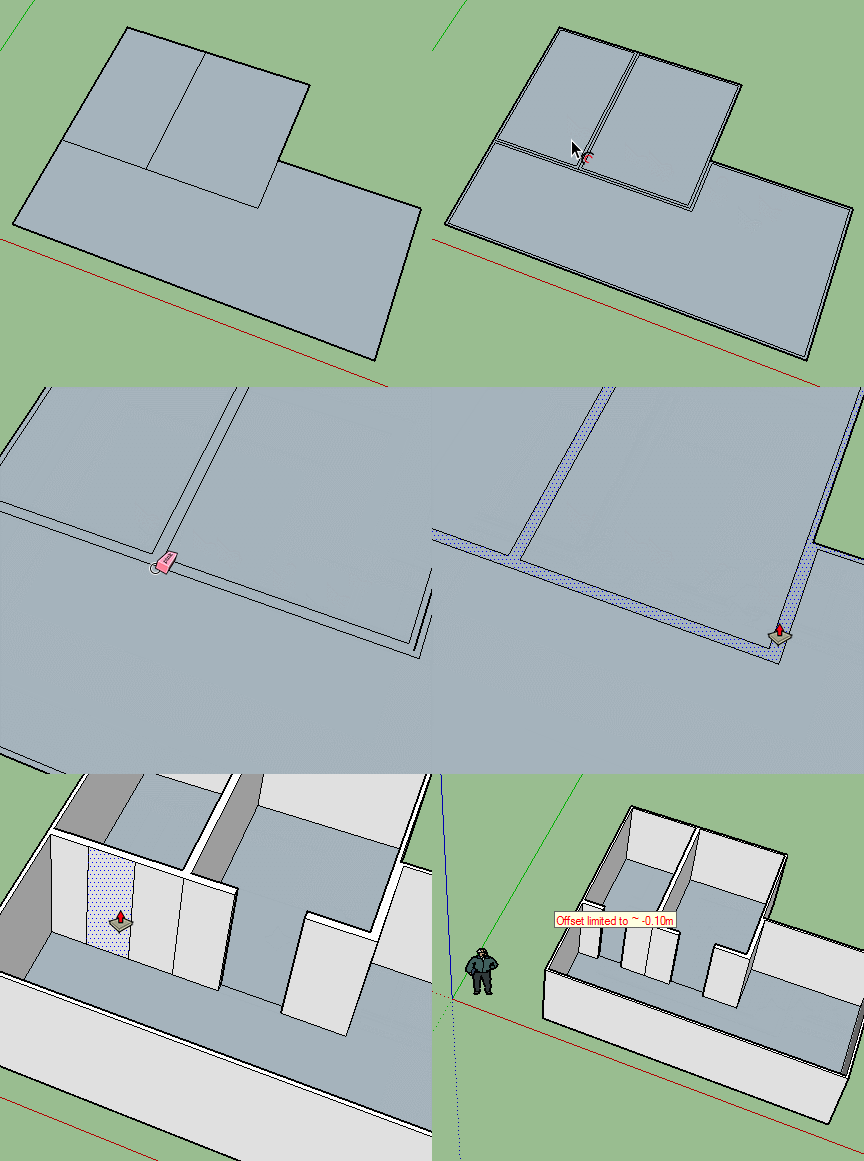
                      I think you find you end up with various errors in the faces doing it that way.
                      Reversed faces will pull the wrong way and tend to twist. You'll get faces that aren't flat in some areas. It may work fine but just pointing out a few things that could go wrong with it.

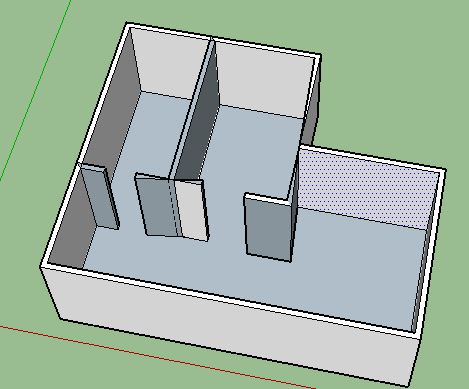
                      Using a multiple offset tool and a bit of line cleanup and you'll have a proper floor plan and correctly made walls in minutes. Rather than an error prone difficult to correct one in seconds.

                      Jpp.JPG

                      1 Reply Last reply
                      Reply Quote 0
                      • L
                        LARV
                        last edited by

                        OK, sounds like a good plugin if only I could find it in the plugin store.

                        1 Reply Last reply
                        Reply Quote 0
                        • BoxB
                          Box
                          last edited by

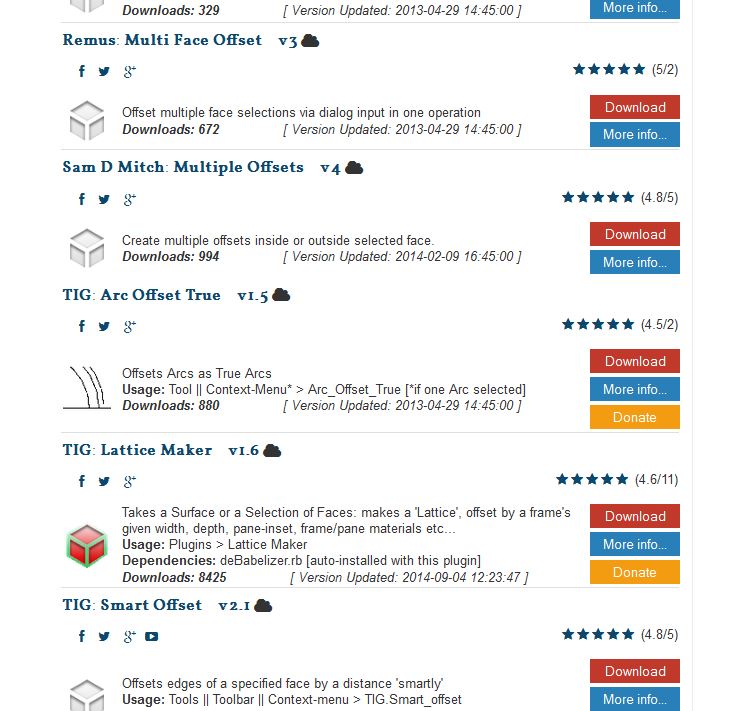
                          Personally I mostly use Tig's


                          Off.JPG

                          1 Reply Last reply
                          Reply Quote 0
                          • L
                            LARV
                            last edited by

                            Checked all plugins by TIG in plugin store. Perhaps you could give me the name of the plugin?

                            1 Reply Last reply
                            Reply Quote 0
                            • BoxB
                              Box
                              last edited by

                              I forgot, you haven't managed to fix it so you can see images on the site.
                              I gave you a whole list, I gave you a gif showing how to do it.
                              I'll not bother in future.
                              Tig's tool that I use is called Smart Offset, but there are several other, I don't understand how you couldn't find them.

                              1 Reply Last reply
                              Reply Quote 0
                              • L
                                LARV
                                last edited by

                                @box said:

                                I forgot, you haven't managed to fix it so you can see images on the site.
                                I gave you a whole list, I gave you a gif showing how to do it.
                                I'll not bother in future.
                                Tig's tool that I use is called Smart Offset, but there are several other, I don't understand how you couldn't find them.

                                Oh yeah, the add blocker.. damn. You know what, I got so used to seeing those red boxes that it became part of the forum design for me. I´ll fix that right away.

                                Well, I searched for "offset", "multiple offset" and several others that I found when searching the web. In threads people name one, then refer to another, etc. I found none of those in the store. It´s really confusing and I got fed up. Seems like any operation I have to do I have to search for a solution, which demands another solution, which demands another solution..

                                This is also the only site I´ve ever come across that blocks attached pictures.

                                Smart offset did come up, I´ll try that.

                                Thank you!

                                1 Reply Last reply
                                Reply Quote 0
                                • BoxB
                                  Box
                                  last edited by

                                  If you are unhappy with accepting the tiny bit of relevant advertising the site uses to help pay for all the free help and information you get, you can always become a premium member, no ads then, or get your questions answered elsewhere.

                                  1 Reply Last reply
                                  Reply Quote 0
                                  • L
                                    LARV
                                    last edited by

                                    I had no idea what was behind my blocked pictures apart from attached files that would provide help. I thought the add blocker just registered attached files as adds for whatever reason. I did not know how to remove this site from blocking pictures, and still don´t, since I can´t find any add blocker on my computer and have never installed one manually. I´m still googling the problem.

                                    EDIT: Now the adblock is off!

                                    1 Reply Last reply
                                    Reply Quote 0
                                    • L
                                      LARV
                                      last edited by

                                      Well, it´s pretty obvious now why my posts must´ve been quite bothering.. 👍

                                      1 Reply Last reply
                                      Reply Quote 0
                                      • L
                                        LARV
                                        last edited by

                                        @box said:

                                        @larv said:

                                        Yes, it didn´t work in this case.

                                        Why not?

                                        Yes, but that doesn´t work with in my example(?). Your example is built of squares, I have lines that don´t close a surface. I know I can easily fix that by pushing afterwards, but this was just a random example. A plugin for that would save time if the lines were more complex. Or at least that´s what I´m hoping for.

                                        Smart Offset was nice, but only seemed to work on surfaces, not empty edges. I´ll try some of the others.

                                        1 Reply Last reply
                                        Reply Quote 0
                                        • pbacotP
                                          pbacot
                                          last edited by

                                          @box said:

                                          If you are unhappy with accepting the tiny bit of relevant advertising the site uses to help pay for all the free help and information you get, you can always become a premium member, no ads then, or get your questions answered elsewhere.

                                          Funny, I didn't notice a difference after the Premium membership. Maybe I'm supposed to pick an option. Don't mind the ads. Sometimes I click off a page too soon and realize I wish I'd checked out the ad.

                                          MacOSX MojaveSketchUp Pro v19 Twilight v2 Thea v3 PowerCADD

                                          1 Reply Last reply
                                          Reply Quote 0
                                          • BoxB
                                            Box
                                            last edited by

                                            If you have a Premium membership you can choose to block ads if not you need to allow them to view other things. I see no point in blocking them as they are all interesting.

                                            1 Reply Last reply
                                            Reply Quote 0

                                            Hello! It looks like you're interested in this conversation, but you don't have an account yet.

                                            Getting fed up of having to scroll through the same posts each visit? When you register for an account, you'll always come back to exactly where you were before, and choose to be notified of new replies (either via email, or push notification). You'll also be able to save bookmarks and upvote posts to show your appreciation to other community members.

                                            With your input, this post could be even better 💗

                                            Register Login
                                            • 1
                                            • 2
                                            • 1 / 2
                                            • First post
                                              Last post
                                            Buy SketchPlus
                                            Buy SUbD
                                            Buy WrapR
                                            Buy eBook
                                            Buy Modelur
                                            Buy Vertex Tools
                                            Buy SketchCuisine
                                            Buy FormFonts

                                            Advertisement