sketchucation logo sketchucation
    • 登入
    Oops, your profile's looking a bit empty! To help us tailor your experience, please fill in key details like your SketchUp version, skill level, operating system, and more. Update and save your info on your profile page today!
    🔌 Smart Spline | Fluid way to handle splines for furniture design and complex structures. Download

    SketchyPhysics 3.5.6 (26 January 2015)

    已排程 已置頂 已鎖定 已移動 SketchyPhysics
    208 貼文 49 Posters 303.3k 瀏覽 49 Watching
    正在載入更多貼文
    • 從舊到新
    • 從新到舊
    • 最多點贊
    回覆
    • 在新貼文中回覆
    登入後回覆
    此主題已被刪除。只有擁有主題管理權限的使用者可以查看。
    • D 離線
      deskpilot
      最後由 編輯

      Thankyou very much Anton, it's all there now. I'll play with it a bit later (only just got up). As you been discussing, this needs to put out there for the wider community.

      1 條回覆 最後回覆 回覆 引用 0
      • A 離線
        Anton_S
        最後由 編輯

        @willeykj said:

        I shared emails with Chris the other day and he and I both agree its time to get the original source code for the libraries out into the community. (Chris really did all the work and created SP, I just did the port to OS X).

        Very well!

        I think GitHub is the best way to share source to the community.

        1 條回覆 最後回覆 回覆 引用 0
        • gillesG 離線
          gilles
          最後由 編輯

          Is there a way to make control panel pop up elsewhere than in the middle of the screen?

          " c'est curieux chez les marins ce besoin de faire des phrases "

          1 條回覆 最後回覆 回覆 引用 0
          • BoxB 離線
            Box
            最後由 編輯

            Could you look at changing the opening state of the toolbars.
            If you have it loaded they will always open on startup whether you closed them last time or not.

            @Gilles Might be different on the Mac, but I moved it aside and it now always opens where I moved it.

            1 條回覆 最後回覆 回覆 引用 0
            • gillesG 離線
              gilles
              最後由 編輯

              @box said:

              Could you look at changing the opening state of the toolbars.
              If you have it loaded they will always open on startup whether you closed them last time or not.

              @Gilles Might be different on the Mac, but I moved it aside and it now always opens where I moved it.

              This does not work on my mac 😠

              " c'est curieux chez les marins ce besoin de faire des phrases "

              1 條回覆 最後回覆 回覆 引用 0
              • R 離線
                RTLMII
                最後由 編輯

                Any Idea when a Sketchup 2015 X64 Sketchyphysics version will be available?

                1 條回覆 最後回覆 回覆 引用 0
                • A 離線
                  Anton_S
                  最後由 編輯

                  It won't be available until people owning C++ source of SketchyPhysics decide to release 64bit compatible libraries that are used by SketchyPhysics.

                  1 條回覆 最後回覆 回覆 引用 0
                  • T 離線
                    TANER TAN
                    最後由 編輯

                    Hello! Very useful plugin! We expect the SketchUp 2015 64-bit compatible version. Thanks.

                    1 條回覆 最後回覆 回覆 引用 0
                    • N 離線
                      N Lindenthal
                      最後由 編輯

                      http://sketchucation.com/forums/download/file.php?id=126705

                      Please excuse me, if I did not lern my English very well.

                      SketchyPhysics gives wings.

                      Above is my sample file. My question is: How can I stabilize the joints so that they don't tremble so strong?

                      Maybe someone can set the parameters in the pattern file or give little hints.

                      Many greetings
                      Norbert Lindenthal

                      1 條回覆 最後回覆 回覆 引用 0
                      • A 離線
                        Anton_S
                        最後由 編輯

                        It says I'm not authorized to download the file. Looks like you have to upload the attachment the other way, in the Upload attachment tab when you post a reply.

                        Meanwhile, to reduce joint flexibility, both bodies the parent and child have to have an identical mass. That is easy to set.

                        1. Select parent body, open control panel, and enable the scripted checkbox.
                        2. In the scripted field write,
                        onStart {
                          this.setMass(1.0)
                        }
                        
                        1. Do same for the child body.

                        You can change the 1.0 to any desired value. As long the values of parent and child bodies are not way off, the joint should remain strong.

                        Here is the video demonstration:
                        https://www.youtube.com/watch?v=qw2C9goxbNk%26amp;list=UUFRTk8PFA2D36yHxwYrulIw
                        Move timestep to 1:20 for visual instruction on how to set identical mass.

                        1 條回覆 最後回覆 回覆 引用 0
                        • A 離線
                          Anton_S
                          最後由 編輯

                          According to Newton Dynamics, it's impossible to make newton joints 100% stiff. So, your model might end up in such situation. However, you can increase joint damp parameter to 100. It will reduce angular speed.
                          Here is the fixed model:
                          Verschraenkt.skp
                          Edit: Sorry, I had to edit this like 5 times.

                          1 條回覆 最後回覆 回覆 引用 0
                          • A 離線
                            Anton_S
                            最後由 編輯

                            No problem 😄
                            Your right, you only had to increase damp of the servo joint.

                            1 條回覆 最後回覆 回覆 引用 0
                            • N 離線
                              N Lindenthal
                              最後由 編輯

                              @anton_s said:

                              … Edit: Sorry, I had to edit this like 5 times.

                              Dear Anton, thank you very much. I did try to increase damp, but not only at first joint with slider, but also the three joints more without slider.
                              Your file is only first joint with damp 100. And it runs well.

                              Thank you, that I could learn much.

                              SketchUp and SketchyPhysics are wonderfull tools!

                              1 條回覆 最後回覆 回覆 引用 0
                              • N 離線
                                N Lindenthal
                                最後由 編輯

                                In my model the parts are like in real life in millimeters. For example 11 x 100 x 2 mm.
                                When I create the Physics joints, they are too big. They cover the view to the model.

                                In this case I have 4 joints. The distance between two joints are about 18 millimeters.

                                How can I adjust the size of Physics joints proper?
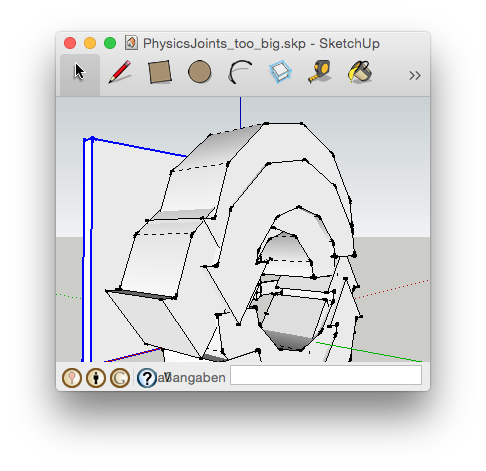

                                Model in Millimeter, Physics Joints become too big

                                1 條回覆 最後回覆 回覆 引用 0
                                • BoxB 離線
                                  Box
                                  最後由 編輯

                                  They are components, so you can just scale them as normal.
                                  Use the corner handle and crtl to scale around center.
                                  You can type in a percentage or size if you want.
                                  And you can turn them on and off using layers, sometimes it's handy to have them big so you can see what you are doing.
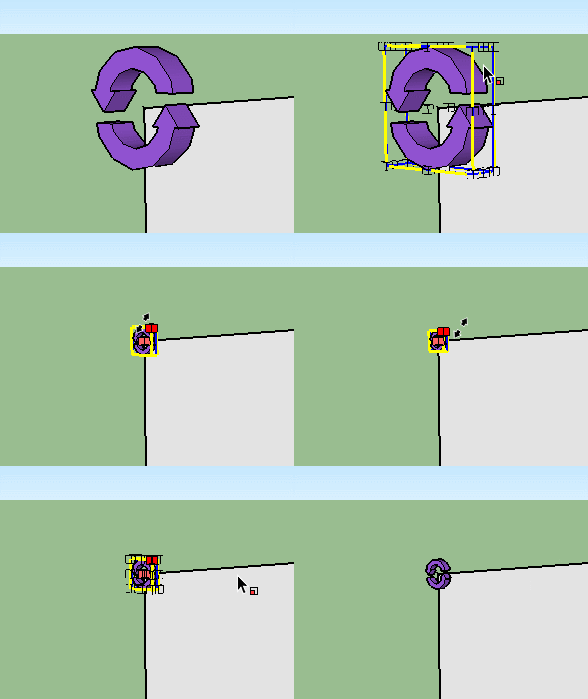

                                  PhScale.gif

                                  1 條回覆 最後回覆 回覆 引用 0
                                  • N 離線
                                    N Lindenthal
                                    最後由 編輯

                                    @box said:

                                    … Use the corner handle and crtl to scale around center. …

                                    Oh, thank you, I was missing the ctrl. key.

                                    Mac: alt key 😄

                                    1 條回覆 最後回覆 回覆 引用 0
                                    • E 離線
                                      eball
                                      最後由 編輯

                                      I am using SU2014 on a MAC
                                      How do I install SketchyPhysics?
                                      Downloaded it, went to preferences/extensions..... but cannot install.

                                      Seems like other have had this issue but i couldn't find an answer for MAC.
                                      Tried SU2013 as well but same problem.Please help!

                                      Thanks

                                      Eric

                                      1 條回覆 最後回覆 回覆 引用 0
                                      • G 離線
                                        gp4tom
                                        最後由 編輯

                                        Hello, I installed Sketchy Physics via the auto-install into 2013 version SU. Problem I am having is when clicking the play button, SU crashes. I have removed the Sketchy Physics from the plugin folder application support/sketchup/plugins and re-downloaded the plugin. It still crashes when clicking the play button. Appreciate some help on this. I can provide the "crash report" that appears which offers an option to be forwarded on to APPLE (as if they really care) LOL.
                                        Thanks
                                        Tom

                                        1 條回覆 最後回覆 回覆 引用 0
                                        • G 離線
                                          gp4tom
                                          最後由 編輯

                                          Greetings & Happy New Year,
                                          I have installed Sketchy Physics via the auto install feature and there was no problem. Opened SU 2013 and the tools were there. My problem is that upon clicking the play button, briefly the control panel appears,then SU crashes.Has anyone else had this issue? I can provide the crash log that appear on the screen if that would help.

                                          Thanks
                                          Tom

                                          1 條回覆 最後回覆 回覆 引用 0
                                          • I 離線
                                            icydee
                                            最後由 編輯

                                            I wiped and re-installed my Mac software, primarily on the basis that I wanted to run Sketchup with this plugin so I was gutted to find it does not work with Sketchup 2015 (I just found the comment hidden away that it does not work with 2015 64bit which I assume is the issue!).

                                            How serious is the problem? Can you give an idea of how big a problem it is (just in case I can help to fix some problems myself) or a timescale if you are planning on fixing it yourself?

                                            Ruby is not my main skill, but I would give it a go if you were to give me some direction as to the problems?

                                            -- icydee

                                            1 條回覆 最後回覆 回覆 引用 0
                                            • 1
                                            • 2
                                            • 5
                                            • 6
                                            • 7
                                            • 8
                                            • 9
                                            • 10
                                            • 11
                                            • 7 / 11
                                            • 第一個貼文
                                              最後的貼文
                                            Buy SketchPlus
                                            Buy SUbD
                                            Buy WrapR
                                            Buy eBook
                                            Buy Modelur
                                            Buy Vertex Tools
                                            Buy SketchCuisine
                                            Buy FormFonts

                                            Advertisement
