SU 2014 Validtiy Check issues
-
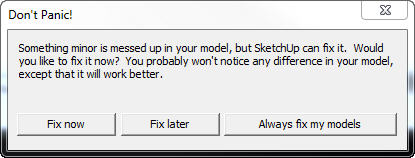
Yes: Sketchup.send_action( 21124 ) brings up the attached pics above.
-
I gather by the non-response, that this is another SU 2014 dialog annoyance that keeps popping up after each save of a project, ....and that we just have to live with!

-
You can control the fixin' via the General panel of the Preferences dialog.
Turn off "auto check" or turn on "auto fix" and the popup should go away.
-
tomot, its telling you what the problem is.
Can you not locate the invalid characters you have in the layer name and rename it?Adam
-
@adamb said:
tomot, its telling you what the problem is.
Can you not locate the invalid characters you have in the layer name and rename it?Adam
That's precisely what I have been struggling with. Doing a search for CLayer in the ruby code turns up nothing. (175) I thought, refers to a line number, but it is not a line number issue. I'm wondering if these validity check statements are part of some undocumented API reference?
-
@tomot said:
@adamb said:
tomot, its telling you what the problem is.
Can you not locate the invalid characters you have in the layer name and rename it?Adam
That's precisely what I have been struggling with. Doing a search for CLayer in the ruby code turns up nothing. (175) I thought, refers to a line number, but it is not a line number issue. I'm wondering if these validity check statements are part of some undocumented API reference?
CLayer is the internal C++ class name in SketchUp. 175 would be the ID number of the layer. The specifics of these messages are for debugging by us. For API developers they can give clues - in this case it would mean looking at code that deal with layers. For users it's very little use - except report to developers.
The Validity Check is not a API feature - it's a SketchUp core feature that is performed every time the model is saved.
Does this happen in any model? Or specific model?
You say it's after the use of one or more extensions. Have you pinpointed which ones? Which actions?
The message says the layer name is invalid - so a good place to look would be any code that sets the layer name. All though, the API shouldn't allow invalid names to be entered. There is also a chance this could be as a result of using an old corrupt model - such as importing a component with an invalid layer.Do you have a sample model - before the layer name is fixed?
-
I remember that the layer name of 0 was changed from language localized names to "Layer0" for all language editions at some point. (We would think the validity check would fix this, in newer SketchUp versions.)
Perhaps unicode characters are causing issues in layer names ?
-
@dan rathbun said:
I remember that the layer name of 0 was changed from language localized names to "Layer0" for all language editions at some point.
True, could be a result of that bug.
@dan rathbun said:
(We would think the validity check would fix this, in newer SketchUp versions.)
Also very likely, I haven't checked the source code though.
@dan rathbun said:
Perhaps unicode characters are causing issues in layer names ?
Another possibility that there are some unexpected byte sequences, true.
-
Here is a little snippet that will recreate the error.
m = Sketchup.active_model m.start_operation("painful", true) ls=m.layers 500.times do |i| ls.add("" << i) end m.commit_operationThat creates 500 layers with various UTF8 characters. One of them is invalid, I'm not sure which. But if you run that snippet, then run the Fix Model, it will pop up that error.
Point is, it is very possible to add characters via Ruby that SketchUp considers invalid and does not reject, but will notice them and fix them in a validity test.
-
Hmm, looking again though, I don't think I recreated your issue. I managed to create a validity error that could not be fixed, while yours was fixable. So maybe that is not the exact problem

-
Oh great - now we got two bugs... thanks Chris...
-
Look it's "Grumpy Cat" !
-
@chris fullmer said:
Point is, it is very possible to add characters via Ruby that SketchUp considers invalid and does not reject, but will notice them and fix them in a validity test.
Yea...
... the
addlayer method allows, but should not :- control characters 00h (0dec) thru 19h (31dec)
- zero width characters \u2000 thru \u200F
- perhaps any of the many punctuation characters
- perhaps replacement characters \uFFFC and \uFFFD
It (
addlayer,) also should not allow 20h or A0h space as the first character (IMHO).
Validity check could replace them with an underscore.And what about bracket characters, should they be allowed ?
-
@dan rathbun said:
I remember that the layer name of 0 was changed from language localized names to "Layer0" for all language editions at some point. (We would think the validity check would fix this, in newer SketchUp versions.)
Perhaps unicode characters are causing issues in layer names ?
I'm wondering if the following code I'm using might be the cause?
      layers=model.layers
      layers.add (@frame)
      activelayer=model.active_layer=layers[@frame]
      layer=model.active_layer

#code that places stuff on layer frame
#goes here
#at the end of this routine I reset layer

# Reset layer back to default layer [0]
       layers = model.layers
       activelayer = model.active_layer=layers[0]
       layer = model.active_layer




Hello! It looks like you're interested in this conversation, but you don't have an account yet.
Getting fed up of having to scroll through the same posts each visit? When you register for an account, you'll always come back to exactly where you were before, and choose to be notified of new replies (either via email, or push notification). You'll also be able to save bookmarks and upvote posts to show your appreciation to other community members.
With your input, this post could be even better 💗
Register Login


Advertisement