Stop fading the rest of the model
-
Ok, I am sure there is a setting for this, however, I am not finding it. I do not want anyfading/graying/ or textures dissapearing out the rest of the model when I select a group. If there is an option for this, what would be the specific settings?
Thanks!
-
@shampoodirections said:
any fading/graying/
You can change this in the model settings:
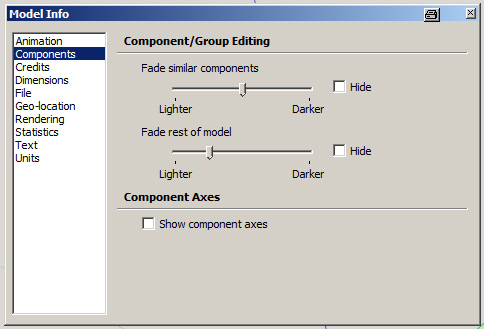
@shampoodirections said:
...textures dissapearing
This is not possible, I think.
-
@unknownuser said:
This is not possible, I think.
Hmmmmm......
Here is my issue.
Example:
I modeled a building with 2 wings. Each wing is a group. When I select one wing, I would like to see the texture of the other wing to compare scaling/rotation of the textures without hopping back out of the group.I could be going about this the wrong way. If so, please explain how I should be doing this.
Thanks!
-
That's a problem. You may have to temporarily paste in place a copy of the other component into your component while adjusting its textures.nen
-
@unknownuser said:
You may have to temporarily paste in place a copy of the other component into your component while adjusting its textures.nen
Yeah, that is what I was doing. Pasting a component or just one of the faces with a texture on it inside the group I have selected. Not a bad alternative, but just wondering if this was an option.
Thanks!


Hello! It looks like you're interested in this conversation, but you don't have an account yet.
Getting fed up of having to scroll through the same posts each visit? When you register for an account, you'll always come back to exactly where you were before, and choose to be notified of new replies (either via email, or push notification). You'll also be able to save bookmarks and upvote posts to show your appreciation to other community members.
With your input, this post could be even better 💗
Register Login


Advertisement