sketchucation logo sketchucation
    • Login
    Oops, your profile's looking a bit empty! To help us tailor your experience, please fill in key details like your SketchUp version, skill level, operating system, and more. Update and save your info on your profile page today!
    ⚠️ Update | Sketchucation Tools 5.0.8 released with licensing improvements and bugfixes Download

    MSPhysics 1.0.3 (16 October 2017)

    Scheduled Pinned Locked Moved Plugins
    930 Posts 173 Posters 1.4m Views 174 Watching
    Loading More Posts
    • Oldest to Newest
    • Newest to Oldest
    • Most Votes
    Reply
    • Reply as topic
    Log in to reply
    This topic has been deleted. Only users with topic management privileges can see it.
    • A
      Anton_S
      last edited by

      So, for a circle/arcs, you right click on them and select "Find Center".

      1 Reply Last reply
      Reply Quote 0
      • D
        delchrys
        last edited by

        Ah thanks you didn't know that option. Also downloaded pointtool plugin. Tonight in my nightshift I'm going to draw some more of the model to make a nice overview to show at work. Really loving this msphysics plugin. Possibilities are almost endless

        1 Reply Last reply
        Reply Quote 0
        • D
          delchrys
          last edited by

          Does someone have any advise in rendering for sketchup?
          Preferably free??
          Like to render some things when i'm done, needs to look good 😄

          1 Reply Last reply
          Reply Quote 0
          • D
            delchrys
            last edited by

            @anton_s said:

            So, for a circle/arcs, you right click on them and select "Find Center".

            So i kind of remodelled a bit, but can't seem to understand why the pipe continues to rotate even when the grippers are open. It kind of get momentum because of the rotation, how can i stop that. So when the cylinder moves back, the grippers open and let go of the pipe and it stands still.
            Made the body static because it will be connected with the other wrench, so that only the gripper head rotates.
            Did i do the pipe right by giving him a plane joint and only allow it to rotate???
            I don't want it to move in any other direction then rotating caused by the grippers.
            Should i accomplish this all by adding friction or is there a simple workaround?
            I doesn't have to be Physics Law proof but only look right.

            A lot of questions but getting there 😍

            PS is ther a plugin for SU2016 to import 2017 files or a simple converter??? I cannot install 2017 at work due to lack of administrative rights 😡


            almost final.skp

            1 Reply Last reply
            Reply Quote 0
            • A
              Anton_S
              last edited by

              Hello, Bert,

              @delchrys said:

              So i kind of remodelled a bit, but can't seem to understand why the pipe continues to rotate even when the grippers are open. It kind of get momentum because of the rotation, how can i stop that. So when the cylinder moves back, the grippers open and let go of the pipe and it stands still.

              To fix this, you need reduce linear friction of the Plane joint from 100 to 1. This will the pipe to require less force to move along the plane. Also, setting the angular friction of the Plane joint to 0.01 should prevent the backward rotation of the pipe.

              @delchrys said:

              Did i do the pipe right by giving him a plane joint and only allow it to rotate???
              Either the tool should move or the pipe should move for the grippers to work properly, presumably even in real case scenario. Above, reducing plane linear friction, allows the pipe to move.

              @delchrys said:

              PS is ther a plugin for SU2016 to import 2017 files or a simple converter??? I cannot install 2017 at work due to lack of administrative rights

              Click onFile->Save As and in the Save As Type, choose the desired SU version.

              Regards,
              Anton

              1 Reply Last reply
              Reply Quote 0
              • D
                delchrys
                last edited by

                Little update


                almost final 2016 complete2.skp

                1 Reply Last reply
                Reply Quote 0
                • alvisA
                  alvis
                  last edited by

                  The first impression is good, but for me it is still too difficult to understand some of the physical characteristics of the movement.

                  Thanks

                  1 Reply Last reply
                  Reply Quote 0
                  • A
                    Anton_S
                    last edited by

                    Nice! If you change joint solver model to iterative 64 passes, the wobbling should be reduced by a bit.

                    1 Reply Last reply
                    Reply Quote 0
                    • pilouP
                      pilou
                      last edited by

                      Found this! ☀

                      Frenchy Pilou
                      Is beautiful that please without concept!
                      My Little site :)

                      1 Reply Last reply
                      Reply Quote 0
                      • ecatiE
                        ecati
                        last edited by

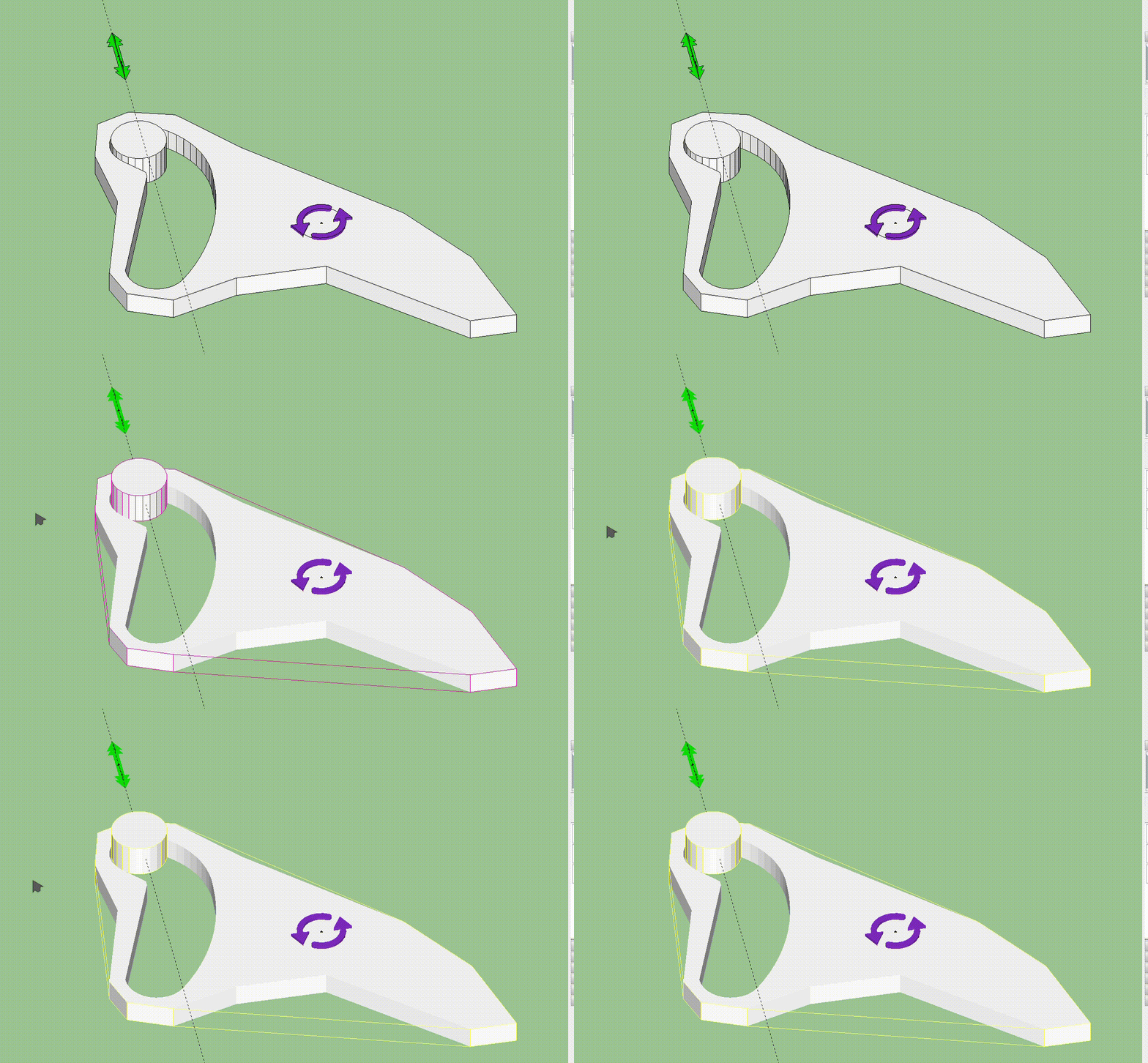
                        I modeled it as shown in the picture, but I could not move it as I wanted. Can you help me.
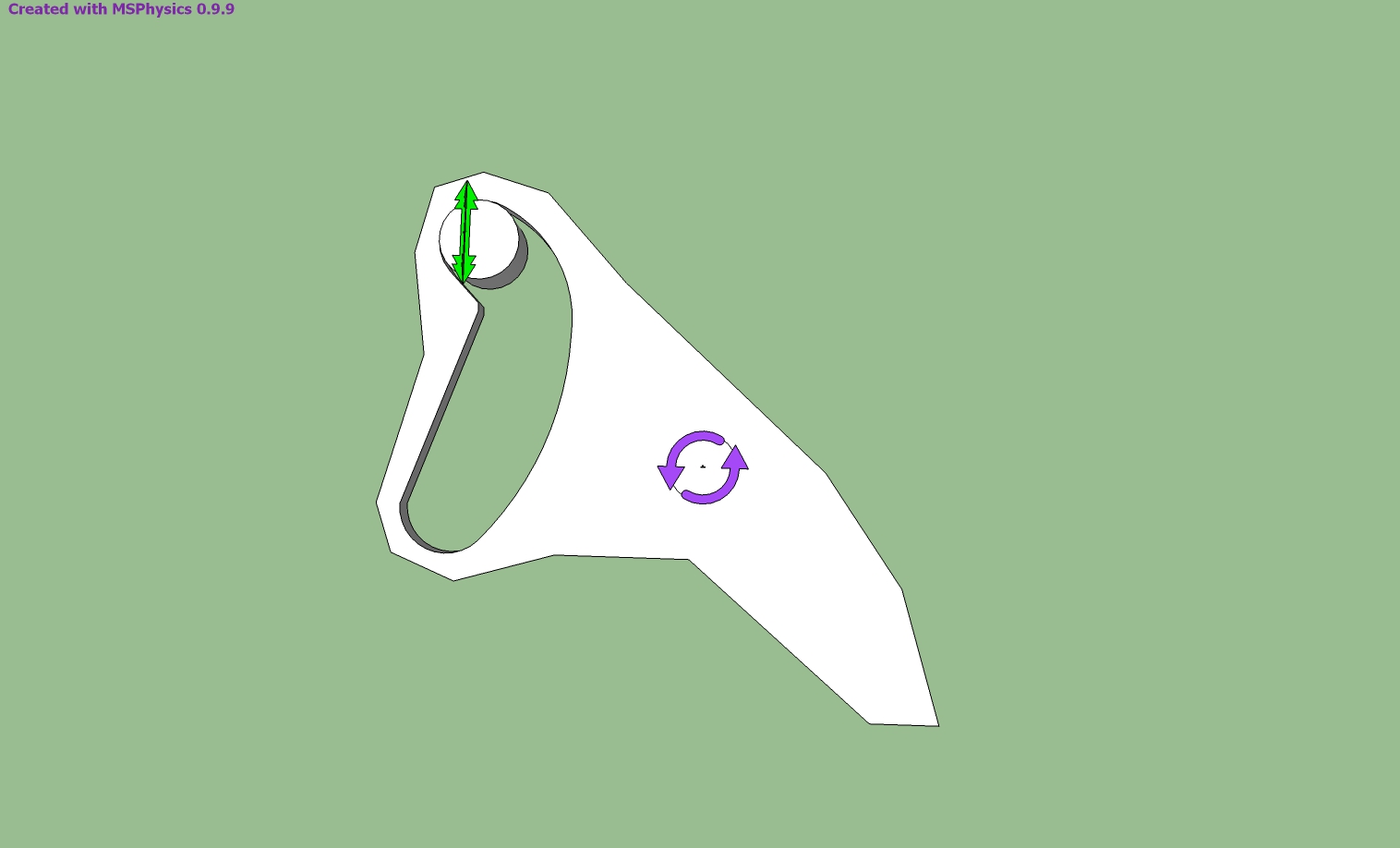

                        ruffler çizim.skp


                        ruffler.jpg

                        1 Reply Last reply
                        Reply Quote 0
                        • A
                          Anton_S
                          last edited by

                          Ecati, the reason it doesn't work as expected is that the collision generated for the concave group is improper. You must divide the concave group into sub convex groups. Use convexify by fredo6 to do it for you. The link to the plugin is at the main post. Also, to see the actual collision generated for shapes, enable the Collision Wireframe in MSPhysics Simulation UI.

                          1 Reply Last reply
                          Reply Quote 0
                          • pilouP
                            pilou
                            last edited by

                            Testing traditional thing! 😄
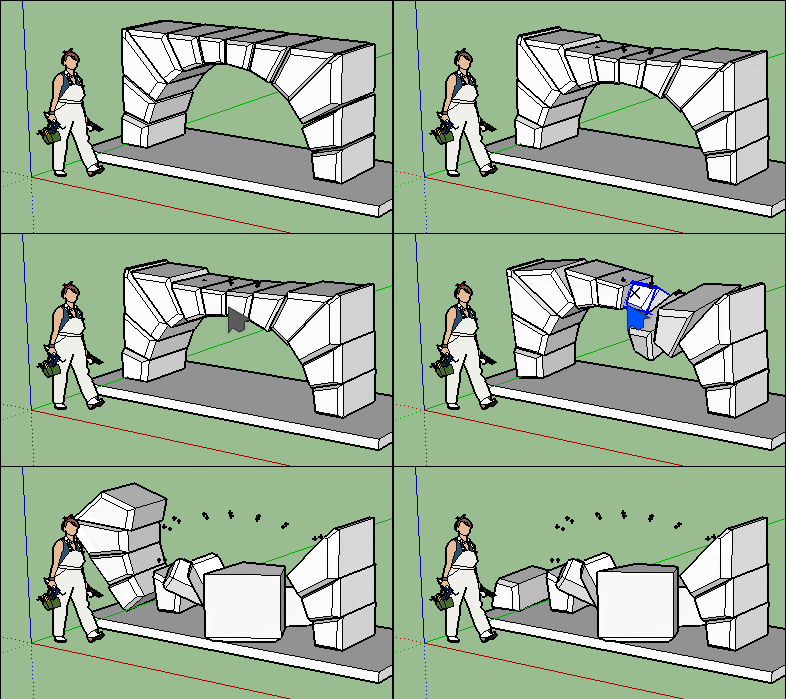
                            GIF_speedarch2.gif

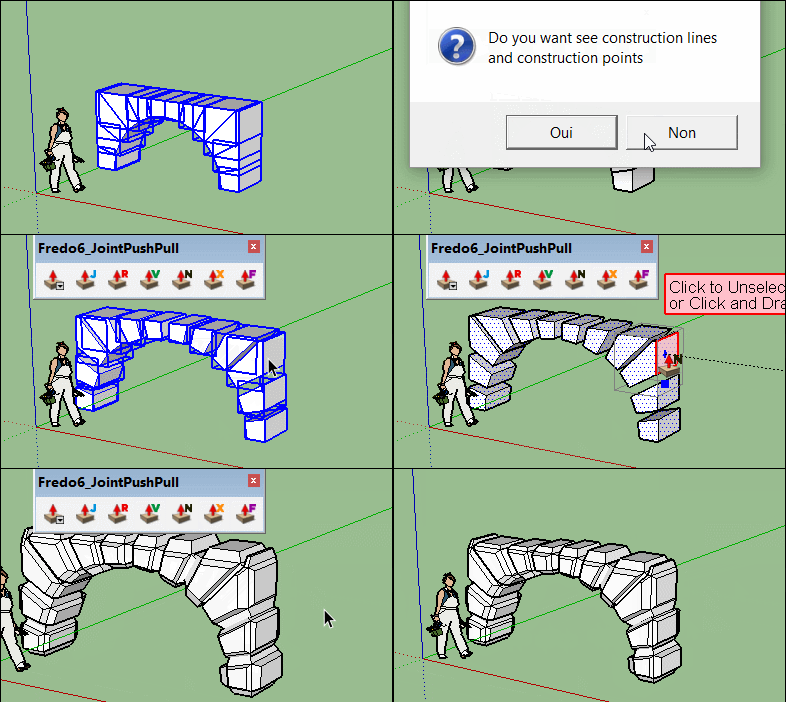
                            Arch was made with the crazzy Convexify by Fredo!
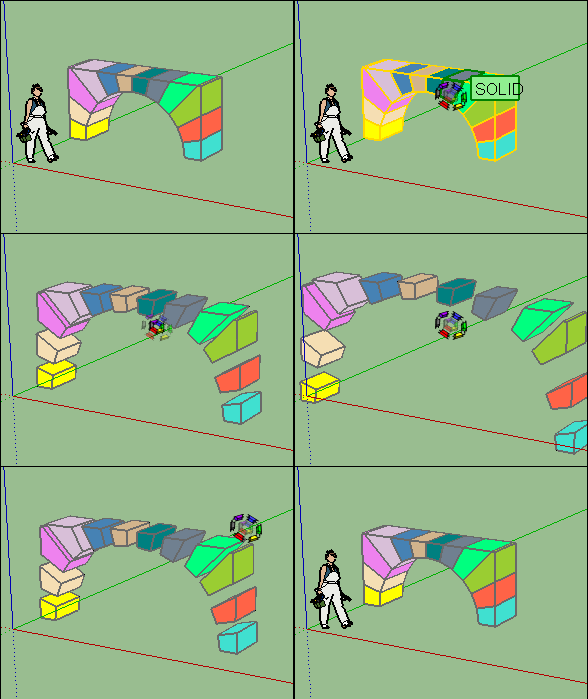
                            GIF_speed arch.gif

                            As convexify don't keep gaps you must use Exploded view ;by CPlassais and me! 😉
                            Carving by Joint Push Pull by Fredo
                            GIF_speedarch1.gif

                            Frenchy Pilou
                            Is beautiful that please without concept!
                            My Little site :)

                            1 Reply Last reply
                            Reply Quote 0
                            • ecatiE
                              ecati
                              last edited by

                              Thank you for your reply. The cylindrical piece moves up when I press play, what could be the reason?

                              ruffler2.gif

                              1 Reply Last reply
                              Reply Quote 0
                              • S
                                SynSuka3D
                                last edited by

                                😄

                                1 Reply Last reply
                                Reply Quote 0
                                • A
                                  Anton_S
                                  last edited by

                                  Hi, Ecati,

                                  @ecati said:

                                  Thank you for your reply. The cylindrical piece moves up when I press play, what could be the reason?

                                  I answered that in my prior post.

                                  Generally there are two ways to do it.

                                  1. Divide the concave thingy into convex sub-groups. Using Convexify plugin by Fredo6 should do it for you. You must ensure that the group you divide is initially a solid group. You can use CleanUp along with Solid Inspector by ThomThom to help you fix it. Then once the group is divided, the collision should generate properly. I did it for you, so you can see what I mean: ruffler çizim - way1.skp
                                  2. A more advanced approach is to have the model rely on joints and have the collision be ignored. I'm not going to explain it in depth, but basically you utilize the curvy joint to have the cylinder move along the curve. If you enable the joints layer, you will see it. Here is the model: ruffler çizim - way2.skp

                                  Regards,
                                  Anton

                                  1 Reply Last reply
                                  Reply Quote 0
                                  • ecatiE
                                    ecati
                                    last edited by

                                    Hi, Anton,
                                    I am thankful to you. Thank you so much.

                                    1 Reply Last reply
                                    Reply Quote 0
                                    • A
                                      Anton_S
                                      last edited by

                                      Hey, y'all,

                                      I just made a tutorial on making collision based and joint based copy-able chains. It's in Russian, but a picture is worth a thousand words...

                                      Here is the chain model basing on collision:
                                      https://drive.google.com/open?id=0B3qg8f4WrNdHTWFYOWtkZ3g0RUk

                                      Here is the chain model basing on joint connections:
                                      https://drive.google.com/open?id=0B3qg8f4WrNdHU2NxYnNWTXgxLWc

                                      So, if you're interested in making chains, you should definitely check it out.

                                      -- Anton

                                      1 Reply Last reply
                                      Reply Quote 0
                                      • F
                                        faust07
                                        last edited by

                                        The tutorial is not only interesting for chains. I can imagine the use for other purposes. Everything that hangs and dangles ... Particularly interesting are the comments on the copiable joints. Thanks!

                                        1 Reply Last reply
                                        Reply Quote 0
                                        • S
                                          SynSuka3D
                                          last edited by

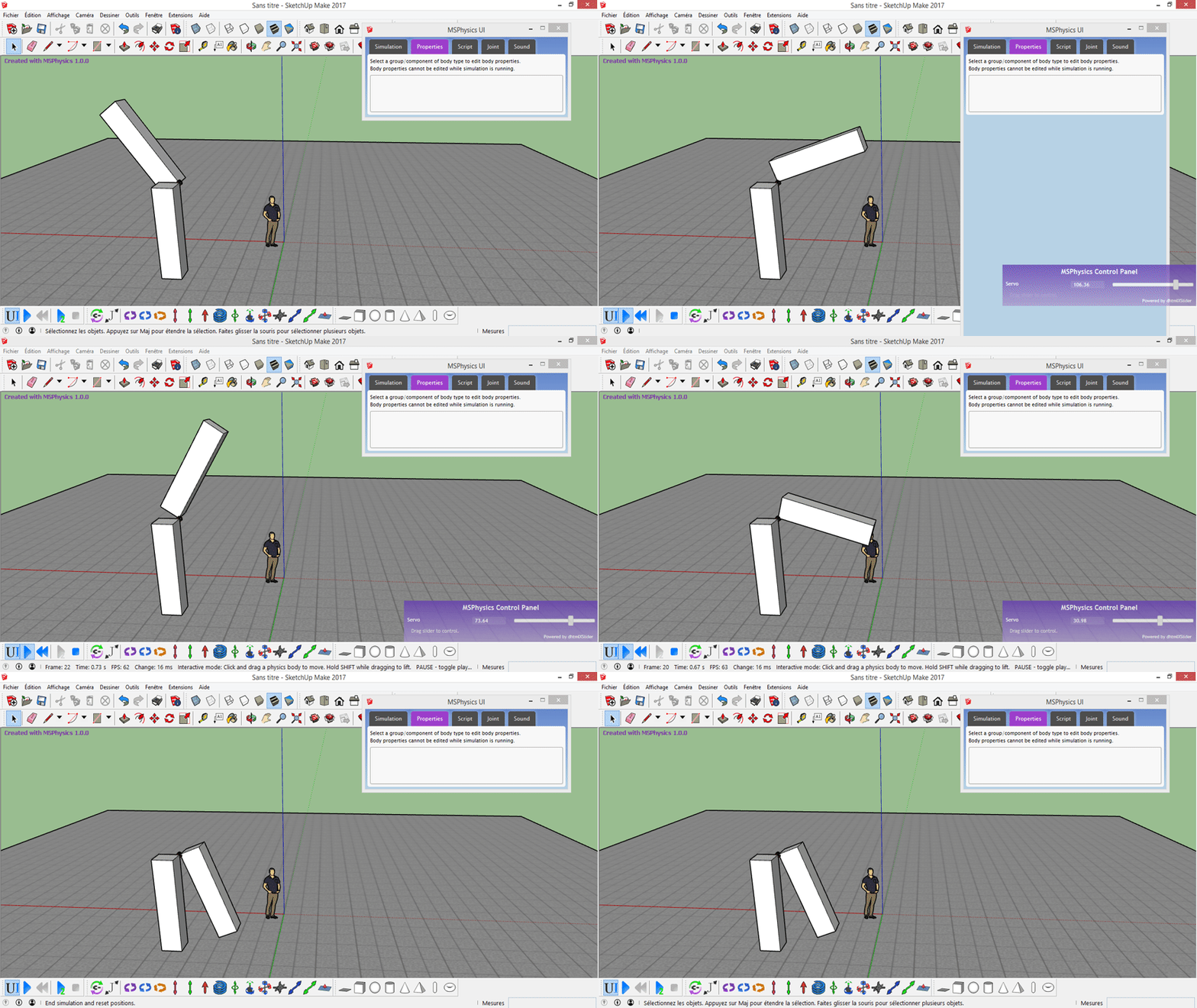
                                          erreur Masse !!!! v1.0.0
                                          no reset position ! big masse

                                          Enregist._2017_03_27_15_46_02_898.gif

                                          1 Reply Last reply
                                          Reply Quote 0
                                          • A
                                            Anton_S
                                            last edited by

                                            @synsuka3d said:

                                            erreur Masse !!!! v1.0.0
                                            no reset position ! big masse

                                            There are two types of buttons to end simulation: one is reset and the other one is stop. If you press the stop button, the group positions will not reset. If you press the reset button, group positions will reset. No I'm not sure if it was an error or you pressing the wrong button. A sample model that causes that error would be appreciated.

                                            Edit: Oops, I didn't know it was an gif animation, not just an image. So, yes, assigning huge masses results in an error. I will ensure that this is fixed in the final release of 1.0.0. Thanks for the report.

                                            1 Reply Last reply
                                            Reply Quote 0

                                            Hello! It looks like you're interested in this conversation, but you don't have an account yet.

                                            Getting fed up of having to scroll through the same posts each visit? When you register for an account, you'll always come back to exactly where you were before, and choose to be notified of new replies (either via email, or push notification). You'll also be able to save bookmarks and upvote posts to show your appreciation to other community members.

                                            With your input, this post could be even better 💗

                                            Register Login
                                            • 1
                                            • 2
                                            • 30
                                            • 31
                                            • 32
                                            • 33
                                            • 34
                                            • 46
                                            • 47
                                            • 32 / 47
                                            • First post
                                              Last post
                                            Buy SketchPlus
                                            Buy SUbD
                                            Buy WrapR
                                            Buy eBook
                                            Buy Modelur
                                            Buy Vertex Tools
                                            Buy SketchCuisine
                                            Buy FormFonts

                                            Advertisement