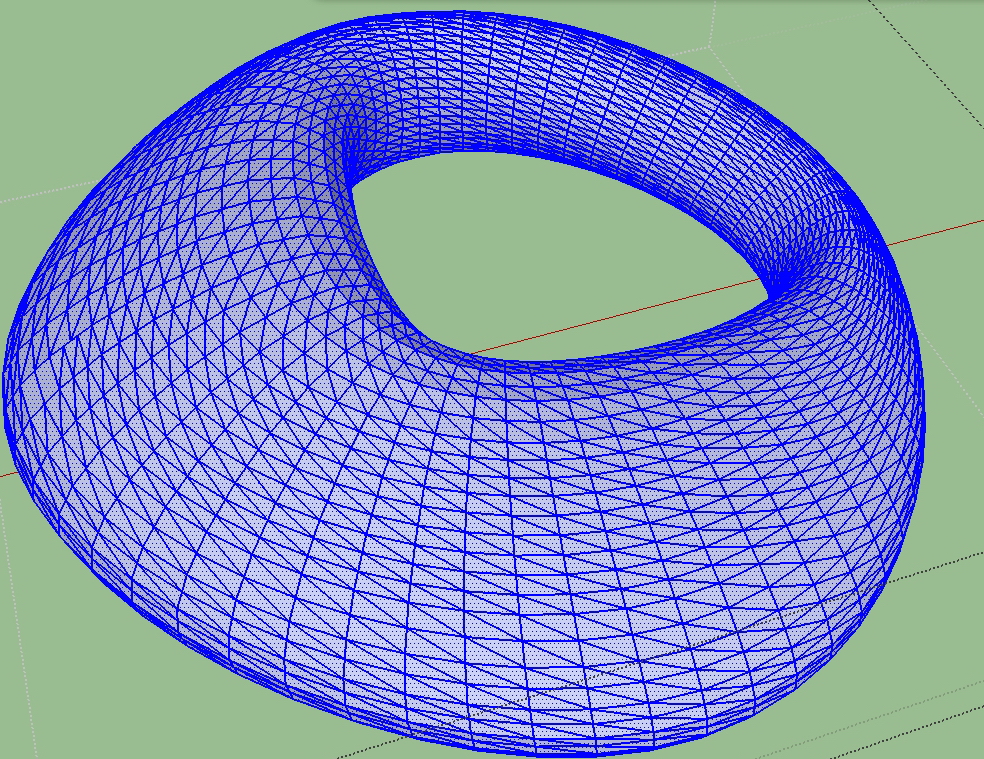
How do I only select the diagonals line?
-
As the image shows, I only want to select the diagonals line how would I make it?
Thanks!
-
Play with Selection Toys by Thomthom
-
@unknownuser said:
Play with Selection Toys by Thomthom
But selection Toys does not work. Is there any other way to select diagonals lines only?
Thank you very much!
-
Quad face tools:
1 - Select loops and rings
2 - Soften selected loops and rings
3 - Deactivate View > Hidden geometry
4 - Box select everything visible (diagonal lines and faces)
5 - Use selection toys to remove faces -
@jql said:
Quad face tools:
1 - Select loops and rings
2 - Soften selected loops and rings
3 - Deactivate View > Hidden geometry
4 - Box select everything visible (diagonal lines and faces)
5 - Use selection toys to remove facesThank you so much for your help!
That is smart!



Hello! It looks like you're interested in this conversation, but you don't have an account yet.
Getting fed up of having to scroll through the same posts each visit? When you register for an account, you'll always come back to exactly where you were before, and choose to be notified of new replies (either via email, or push notification). You'll also be able to save bookmarks and upvote posts to show your appreciation to other community members.
With your input, this post could be even better 💗
Register Login


Advertisement