sketchucation logo sketchucation
    • 登入
    Oops, your profile's looking a bit empty! To help us tailor your experience, please fill in key details like your SketchUp version, skill level, operating system, and more. Update and save your info on your profile page today!
    ⚠️ Important | Libfredo 15.6b introduces important bugfixes for Fredo's Extensions Update

    [Plugin] GKWare Door Maker

    已排程 已置頂 已鎖定 已移動 Plugins
    46 貼文 10 Posters 8.6k 瀏覽 10 Watching
    正在載入更多貼文
    • 從舊到新
    • 從新到舊
    • 最多點贊
    回覆
    • 在新貼文中回覆
    登入後回覆
    此主題已被刪除。只有擁有主題管理權限的使用者可以查看。
    • guanjinG 離線
      guanjin
      最後由 編輯

      1.0.18Not work well in sketcup2014, click on the toolbar icon, you can not open the dialog box.

      I come from China, is to learn

      1 條回覆 最後回覆 回覆 引用 0
      • P 離線
        pomelo3d
        最後由 編輯

        as is download?

        1 條回覆 最後回覆 回覆 引用 0
        • G 離線
          Garry K
          最後由 編輯

          @guanjin said:

          1.0.18Not work well in sketcup2014, click on the toolbar icon, you can not open the dialog box.

          You are right - 1.0.18 does not work with SU 2014

          I uploaded version 1.0.19 to Plugin Stores this morning.

          1 條回覆 最後回覆 回覆 引用 0
          • guanjinG 離線
            guanjin
            最後由 編輯

            @pomelo3d said:

            as is download?

            Activation Tool,No selection dialog。

            I come from China, is to learn

            1 條回覆 最後回覆 回覆 引用 0
            • G 離線
              Garry K
              最後由 編輯

              @guanjin said:

              Activation Tool,No selection dialog。

              Is this SU 2014 and 1.0.19 on Windows??

              1 條回覆 最後回覆 回覆 引用 0
              • guanjinG 離線
                guanjin
                最後由 編輯

                @garry k said:

                @guanjin said:

                Activation Tool,No selection dialog。

                Is this SU 2014 and 1.0.19 on Windows??

                Thank you, have a private letter to you 👍

                I come from China, is to learn

                1 條回覆 最後回覆 回覆 引用 0
                • KrisidiousK 離線
                  Krisidious
                  最後由 編輯

                  Drag option seems to put drawer on backwards starting from bottom right dragging to top left. all other start points put drawer off to sides.

                  can I 'select the area' make doors or drawers.

                  Ability to select lines while in menu to read entity info.

                  By: Kristoff Rand
                  Home DesignerUnique House Plans

                  1 條回覆 最後回覆 回覆 引用 0
                  • G 離線
                    Garry K
                    最後由 編輯

                    @krisidious said:

                    Drag option seems to put drawer on backwards starting from bottom right dragging to top left. all other start points put drawer off to sides.

                    There are 3 drag options - All work from bottom left to bottom top.
                    The bottom left hand corner of the door / drawer is based on the first point chosen.

                    If you bottom right hand corner then top left hand corner then the door will be place backwards as if you are on the other side of the cabinet.

                    @krisidious said:

                    can I 'select the area' make doors or drawers.

                    Ability to select lines while in menu to read entity info.

                    I'm not sure what you are asking?

                    1 條回覆 最後回覆 回覆 引用 0
                    • KrisidiousK 離線
                      Krisidious
                      最後由 編輯

                      @unknownuser said:

                      There are 3 drag options - All work from bottom left to bottom top.
                      The bottom left hand corner of the door / drawer is based on the first point chosen.

                      If you bottom right hand corner then top left hand corner then the door will be place backwards as if you are on the other side of the cabinet.

                      got it. a note to that effect in the info text on the bottom might be good.
                      like "pick bottom left corner"

                      these are two different questions...

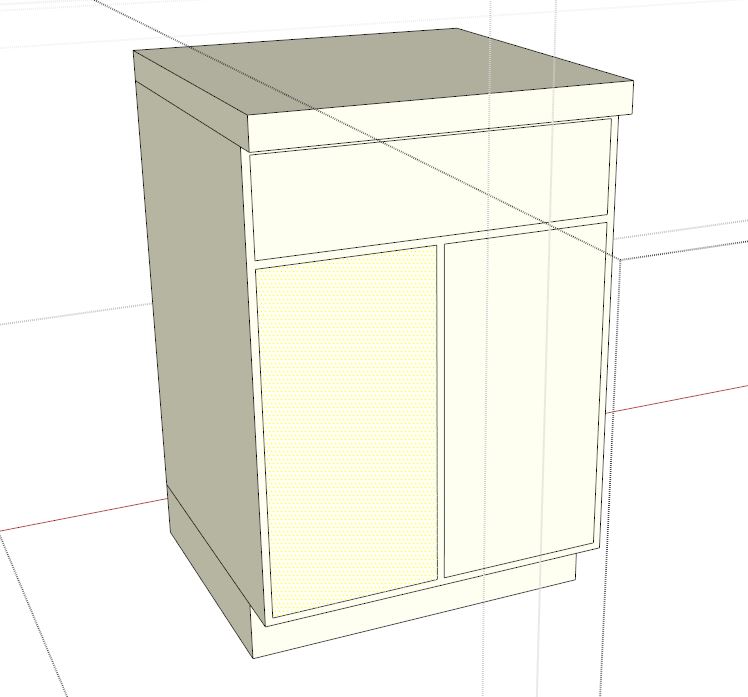
                      Can I 'select the area' make doors or drawers. I draw cabinets out or use my stock base and upper units, then I decide things per project like drawer fronts and tolerances. as you see in the screen grab If I could select a face I want to be drawer or door that would be awesome.
                      Capturecabinets001.JPG

                      Ability to select lines while in menu to read entity info.
                      If I can't select a face and make it a drawer or door, then it would be nice if when I forget to find out what the size of door and drawer fronts are, I could click out side the menu, back in the model, while leaving the menu open. A few plugins do this, most don't.

                      By: Kristoff Rand
                      Home DesignerUnique House Plans

                      1 條回覆 最後回覆 回覆 引用 0
                      • G 離線
                        Garry K
                        最後由 編輯

                        @krisidious said:

                        got it. a note to that effect in the info text on the bottom might be good.
                        like "pick bottom left corner"

                        Good idea! I will add this to my "to do" list for next version. It would also be simple to let user pick top left hand corner and then bottom right hand corner.

                        @krisidious said:

                        Can I 'select the area' make doors or drawers. I draw cabinets out or use my stock base and upper units, then I decide things per project like drawer fronts and tolerances. as you see in the screen grab If I could select a face I want to be drawer or door that would be awesome.

                        I think what you are asking is for a different interface where you pre select 1 or more face, bring up menu, set up tolerances and select door, drawer etc. Then click "OK" and convert ( delete and replace ) the faces with the door / drawer.

                        This would mean for each face I would have to detect which side is in and which side is out otherwise doors / drawers could be put on backwards. What happens if the faces aren't rectangular or if they are on a weird plane? I'm thinking there are a lot of tests.

                        Next version may include items like door handles ( positioning and selection ), user added profiles for edge and for panel raising etc.

                        I'm not sure that I could work with multiple faces and figure out door pull positions at the same time. I suppose for example, if user picked multiple faces where all of them could have a handle on the same relative location, that might work. But it might just add to the confusion because it would mean doing things in a very specific order.

                        @krisidious said:

                        Ability to select lines while in menu to read entity info.
                        If I can't select a face and make it a drawer or door, then it would be nice if when I forget to find out what the size of door and drawer fronts are, I could click out side the menu, back in the model, while leaving the menu open. A few plugins do this, most don't.

                        Are you saying you want to suspend the door / drawer operation so you can perform some other sketchup operation like right click a line and read entity? So that you can get its length etc.

                        Currently if you make changes to the door menu (input box) and click OK or press enter, then the settings are still intact when you go back into the door menu. So you could:

                        1. make changes to door menu
                        2. click ok or press enter - box disappears and mouse cursor changes to door insert
                        3. press escape, choose a line, right click and choose "entity"
                        4. go back into door menu - last choices are all still intact. Adjust something based on what is in "entity". press enter or click ok.

                        Leaving a menu open means a rewrite for the interface. Change the sketchup inputbox to a web dialog box.

                        1 條回覆 最後回覆 回覆 引用 0
                        • G 離線
                          Garry K
                          最後由 編輯

                          Kristoff,

                          Version 1.0.20

                          1. Fixed the draging operation. User can now chose any corner and drag to the opposite diagonal corner.
                          2. Added config folder. Users should put their edited defaults.txt and or textures.txt files in this folder. They will be preserved with future updates.
                          3. Added Chinese(Simplified) language file zh_cn.lang
                          1 條回覆 最後回覆 回覆 引用 0
                          • KrisidiousK 離線
                            Krisidious
                            最後由 編輯

                            Koooool. I'll give it a try.

                            By: Kristoff Rand
                            Home DesignerUnique House Plans

                            1 條回覆 最後回覆 回覆 引用 0
                            • OxerO 離線
                              Oxer
                              最後由 編輯

                              Thanks for the plugin!!
                              I have created the Spanish Language file.

                              Spanish Language

                              "The result is the end what is important is the process" by Oxer
                              [http://www.oxervision.blogspot.com/(http://www.oxervision.blogspot.com/)]

                              1 條回覆 最後回覆 回覆 引用 0
                              • G 離線
                                Garry K
                                最後由 編輯

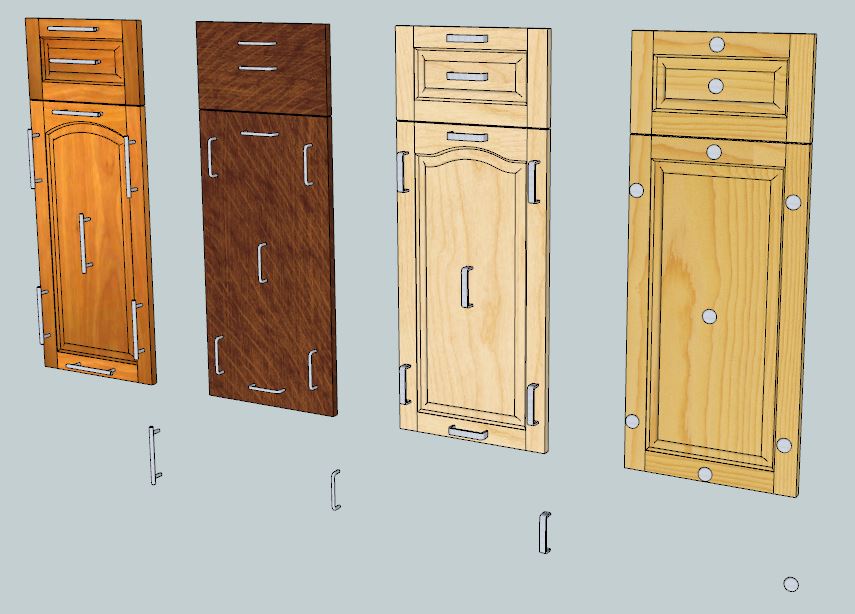
                                I am now working on the "pro" version of door maker.

                                New menu items

                                1. Add Edge Profile
                                2. Add Panel Raise profile
                                3. Add Handle

                                New input values / drop downs

                                1. Handle Style including "None"
                                  128 mm bar pul
                                  96 mm wire pull
                                  96 mm flat bar pull
                                  Round knob
                                2. Handle location drop down possibilties:
                                  Top Left
                                  Top Center
                                  Top Right
                                  Center
                                  Bottom Left
                                  Bottom Center
                                  Bottom Right
                                3. Handle Offset input value
                                4. Front Edge profile drop down default values include:
                                  None
                                  Round over
                                  Bead
                                  Chamfer
                                  Cupboard
                                5. Back Edge profile drop down default values include:
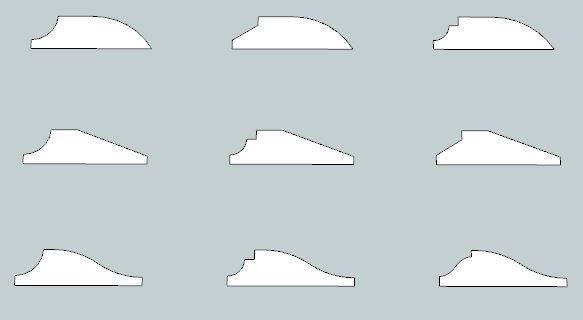
                                6. Panel profile drop down default values include:
                                  Cove with bead
                                  Cove with ogee
                                  Cove with slant
                                  Slant with bead
                                  Slant with ogee
                                  Slant with slant
                                  Ogee with bead
                                  Ogee with ogee
                                  Ogee with slant
                                7. Lower Rail height input value
                                8. Lowest Panel height input value

                                door handles.JPG


                                panel profiles.JPG

                                1 條回覆 最後回覆 回覆 引用 0
                                • KrisidiousK 離線
                                  Krisidious
                                  最後由 編輯

                                  Looks great Garry...

                                  By: Kristoff Rand
                                  Home DesignerUnique House Plans

                                  1 條回覆 最後回覆 回覆 引用 0
                                  • G 離線
                                    Garry K
                                    最後由 編輯

                                    You will also be able to add door handles and pulls into the gkware_doormaker/handles folder and they will appear in the drop down list of handles.

                                    You will get 1 skp file with Edge profiles and 1 skp file as panel profiles. You can add more profiles and use the Add Edge Profiles button or Add Panel Profiles button. This will go through the geometry and add a file into the appropriate folder. The entries will then appear in the various drop down lists.

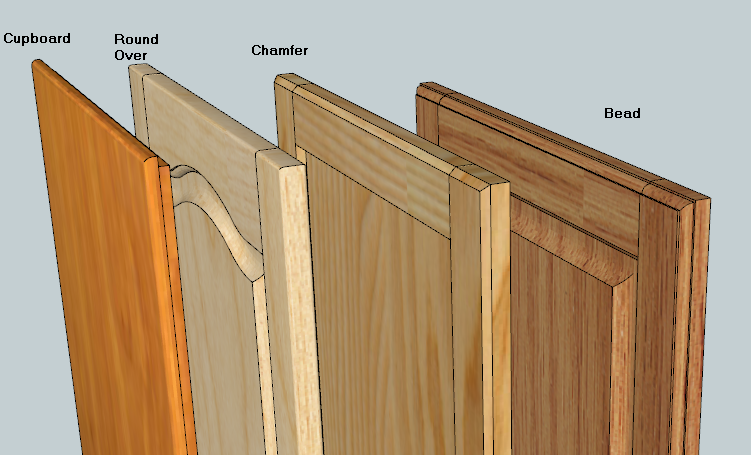
                                    These are examples of the supplied edge profiles.

                                    The one marked "Cupboard" is designed for the old style American Face Frame construction complete with a 10 mm x 10 mm rabbet. This can be accomplished by choosing "inlay" and by setting the gap to 8 mm and the protrusion to 12 mm.

                                    Door edges.png

                                    1 條回覆 最後回覆 回覆 引用 0
                                    • MacG333M 離線
                                      MacG333
                                      最後由 編輯

                                      Thanks for the plugin! Very nice and complete.
                                      I have created the italian language file.
                                      I hope you helpful.


                                      it.lang

                                      1 條回覆 最後回覆 回覆 引用 0
                                      • unclebimU 離線
                                        unclebim
                                        最後由 編輯

                                        Very nice options! Adding some more profiles and handles is very useful too, e.g. many customers want longer handles.

                                        What would be the pricing for the pro version of your DoorMaker plugin?

                                        1 條回覆 最後回覆 回覆 引用 0
                                        • KrisidiousK 離線
                                          Krisidious
                                          最後由 編輯

                                          @unclebim said:

                                          Very nice options! Adding some more profiles and handles is very useful too, e.g. many customers want longer handles.

                                          What would be the pricing for the pro version of your DoorMaker plugin?

                                          You'll be able to add profiles and handles to the library as you wish and I think the price will be between $10-$20US. Not sure though.

                                          By: Kristoff Rand
                                          Home DesignerUnique House Plans

                                          1 條回覆 最後回覆 回覆 引用 0
                                          • G 離線
                                            Garry K
                                            最後由 編輯

                                            Kristoff is correct. That is the range for the pricing for the Door Maker Pro.
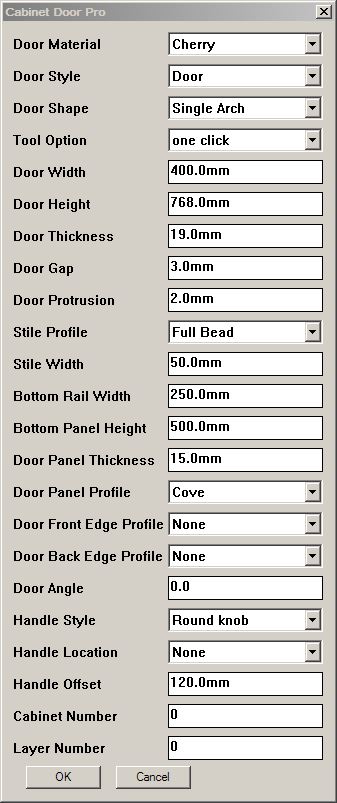
                                            Here is the Input Box for Door Maker Pro.

                                            If anyone has suggestions or comments - now is the time to start talking.

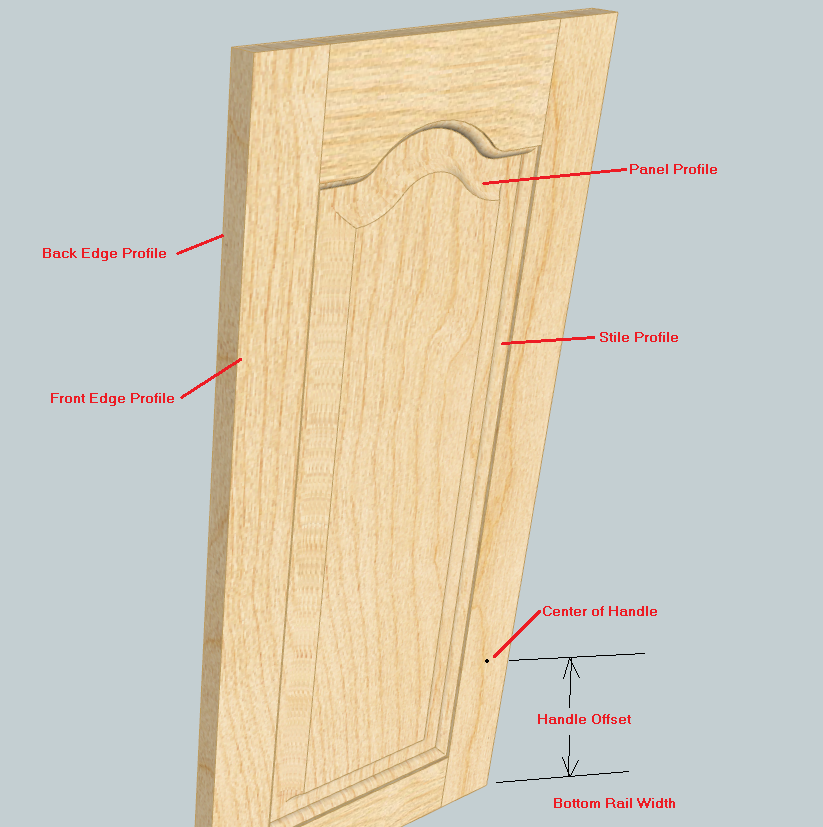
                                            Door Maker Pro InputBox


                                            Some InputBox terms

                                            1 條回覆 最後回覆 回覆 引用 0
                                            • 1
                                            • 2
                                            • 3
                                            • 3 / 3
                                            • 第一個貼文
                                              最後的貼文
                                            Buy SketchPlus
                                            Buy SUbD
                                            Buy WrapR
                                            Buy eBook
                                            Buy Modelur
                                            Buy Vertex Tools
                                            Buy SketchCuisine
                                            Buy FormFonts

                                            Advertisement