[Plugin] Components manager plugin
-
Thanks for the update!!

Some questions in OSX:
1. If you select Yes in "Show list in tree-style" Option it doesn't appear like tree-style but if you select No then it appears the list in tree-style, is it the option upside down?
2. In Filters window the option "Component has no defined date" has a blue color but in Component Manager window it appears in black, is it an error?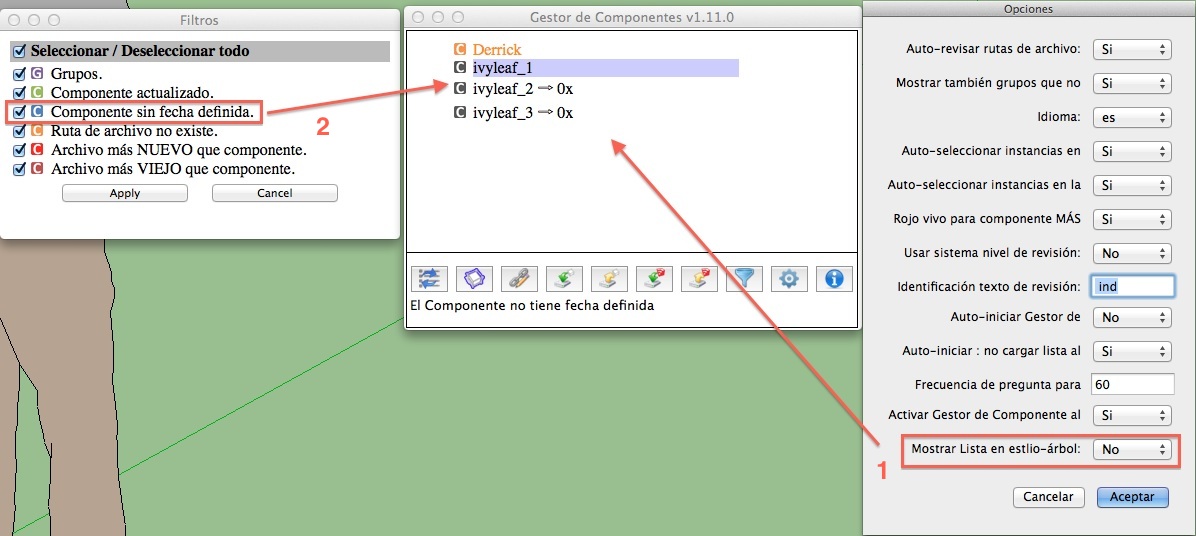
PS. The tooltips in Component Manager window don't translate to Spanish.
EDIT: I had not understood the functionality, it works correctly but if you push Filter button when you have selected YES in option "Show list in tree-style", it appears a pop-up window with this message "You must choose option Show list in tree-style.", I think that it should say --> "You must choose NO in option Show list in tree-style." because with YES it isn't appear the Filters window.
-
Hello Oxer,
Just post new version 1.11.1 that solve your issues:
Corrected : New filter for components which were not checked (option "Auto-check file paths")
Optimized : Improve warning message for filter window
Optimized : Component without modification date are shown in blue
Optimized : Message shown if filter make the list empty
Optimized : Allow more translations -
Hi again,
I'll test it. -
@inteloide said:
Hello,
Some updates today !
JQL, one of your request is complete (filters) !
Unbelieaveble!
I have not had the time to work with your plugin recently, but this week I will try it for sure. Thanks for all the recent excellent updates, this is growing strong.
JQL
-
There are yet some problems:
1. To work fine the Filter function you must to change the line#50 in Localization.rb fileOf @strTreeListOptionToBeSelected="You must set option '"+@strOptionVerifierChemin+"' to '"+@strNon+"'."
to @strTreeListOptionToBeSelected="You must set option '"+@strAfficherArbre+"' to '"+@strNon+"'."
2. The Filter only works the first time, then when you push Filter again all items are unselected, and if you select one or various items and push Apply button nothing happens in the List window, it appears only the message "Nothing to show due to filters". The Ruby Console is empty.
PS. The tooltips continue without translation in Component Manager window. I send you a new spanish language by PM.
-
Thank to Oxer a big bug is corrected in version 1.11.2.
Everybody should download this version to avoid problem using the plugin.Updates :
1.11.2:
Corrected : Major error while linking component to file of reloading component
Corrected : In non tree style, numbers of instances of components filtered still appeared
Corrected : A bug appear in consol when leaving the plugin due to observers still working
Corrected : Change context menu javascript position which may imply some Safari problems
Optimized : Add translation for component updating while opening new sketchup instance.Oxer, we keep in touch for your button title issue.
-
I'm testing the last version on Mac and the Filters doesn't work.

-
@oxer said:
I'm testing the last version on Mac and the Filters doesn't work.
Hello Oxer,
Could you tell me what's goes wrong ? -
When I push the Filter button the first time it appear the Filters window with all items selected, I unselect for example "Group" and "File path doesn't exist" and I push Apply button, then the Filters window disappears and it appears this message in the Component Manager window "Nothing to show due to filters".
I had groups, component linked and component unlinked in the model. I suppose that the Filters function works showing only the items selected in Filter windows but it isn't so.
If I open the Filters window a second time, all items are unselected.Mac OSX 10.9.1 and SU2013
-
Hello Gents,
Please download last version of the plugins which solve the 2 issues you raised me :
Version 1.11.3:
Optimized : The modification of components don't add lots of undo/redo action in Edit menu.
Corrected : Bug when changing filtersOxer, could you tell me also if the last version solve your issue about button title translation in main window ?
JQL, thx for chasing me on the undo/redo action, actually it was just simple as reading the sketchup rubi api...
Just one thing : for example if you delete an edge linked to a face, so edge and face are deleted, when undo the action, the component manager will tells you that your component has been modified (even if it actually reverse back to original design).
It's not a big bug, but I'll keep thinking about a solution.Inteloide
-
@jql said:
4 - There is a feature that is not working as I would expect too. If one refreshes the list by whatever reason it collapses (some commands also refresh it). You loose the context on the list you were on. Of course it's easy now to choose from model so this is just a minor question.
JQLExcept this request, I think I've complete all the other request.

But don't worry I have one idea for this request, even if I think that at the end using list in a non-tree style is easier to use.Other steps for plugin optimization would be :
- Add possibility to auto-update the list when change the model with defining the update time (from 1 sec for small model, too minutes for big one) I could link this frequency to the time required to update the list : frequency auto-defined !
- Add possibility to attached current time as modification time for component in model. This could be usefull for old model designed before having the plugin, or designed while plugin was desactivated.
- change Option interface (options are mixed, and design just horrorful !)
- change actions button at bottom of main window. Or allow user to defined which button he wants to have.
If you have other request...they will be welcomed.
If few days I will open a new topic to find some beta tester for an industrial 6 axis robot manager plugin. This will be the second plugin I'll officially release even if they are months I'm working on.
So if you have other requests it's time, even if I won't let you down !
Inteloide
-
Congratulations on this Milestone!
I'll try this one... but don't worry, I'll find some feature requests for you to deal with

Thanks,
JQL
-
Hello,
Today update :
Optimized : New options windows in HTML mode.
Corrected : Little change in code to avoid error when deleting components with merge faces (to be verified...)
Added : Prompt before upload all définitionsOptions texts translation have to be done again...sorry for that...
Inteloide
-
Test v1.12 on Mac:
The Options button doesn't work, it appears this message in Ruby Console when you push the button:%(#FF0040)[Error: #<TypeError: can't convert false into String>
/Users/Oxer/Library/Application Support/SketchUp 2013/SketchUp/Plugins/BGSketchup/Composants/Rb/Composants_Main.rb:794:in `+'
/Users/Oxer/Library/Application Support/SketchUp 2013/SketchUp/Plugins/BGSketchup/Composants/Rb/Composants_Main.rb:794:in `options'
/Users/Oxer/Library/Application Support/SketchUp 2013/SketchUp/Plugins/BGSketchup/Composants/Rb/Composants_Main.rb:793:in `each'
/Users/Oxer/Library/Application Support/SketchUp 2013/SketchUp/Plugins/BGSketchup/Composants/Rb/Composants_Main.rb:793:in `options'
/Users/Oxer/Library/Application Support/SketchUp 2013/SketchUp/Plugins/BGSketchup/Composants/Rb/Composants_Main.rb:52:in `initialize_window'] -
Hello Oxer,
Version 1.12.1 should solve your issue.
Inteloide
-
Other problems

1. The Options "Auto-select instances in model" & "Auto-select instances in list" worked only the first time that I ran the plugin.
2. The Groups don't appear in the List although you have marked them in the Filters windows.
3. I don't know if this is important but when I create a "New File" with the Ruby Console opens, it appears this message:%(#FF0040)[Error: #<NoMethodError: undefined method `execute_script' for nil:NilClass>
/Users/Oxer/Library/Application Support/SketchUp 2013/SketchUp/Plugins/BGSketchup/Composants/Rb/Composants_Main.rb:132:in `maj_liste'
/Users/Oxer/Library/Application Support/SketchUp 2013/SketchUp/Plugins/BGSketchup/Composants/Rb/Composants_Main.rb:1100:in `onNewModel'
/Users/Oxer/Library/Application Support/SketchUp 2013/SketchUp/Plugins/BGSketchup/Composants/Rb/Composants_Main.rb:1073
Error: #<NoMethodError: undefined method `execute_script' for nil:NilClass>
/Users/Oxer/Library/Application Support/SketchUp 2013/SketchUp/Plugins/BGSketchup/Composants/Rb/Composants_Main.rb:132:in `maj_liste'
/Users/Oxer/Library/Application Support/SketchUp 2013/SketchUp/Plugins/BGSketchup/Composants/Rb/Composants_Main.rb:1100:in `onNewModel'
/Users/Oxer/Library/Application Support/SketchUp 2013/SketchUp/Plugins/BGSketchup/Composants/Rb/Composants_Main.rb:132
Error: #<NoMethodError: undefined method `execute_script' for nil:NilClass>
/Users/Oxer/Library/Application Support/SketchUp 2013/SketchUp/Plugins/BGSketchup/Composants/Rb/Composants_Main.rb:132:in `maj_liste'
/Users/Oxer/Library/Application Support/SketchUp 2013/SketchUp/Plugins/BGSketchup/Composants/Rb/Composants_Main.rb:1100:in `onNewModel'
/Users/Oxer/Library/Application Support/SketchUp 2013/SketchUp/Plugins/BGSketchup/Composants/Rb/Composants_Main.rb:132] -
Great work!!
All work fine now *****, nice Options window, perhaps a scrollbar, the windows size is very small on Mac and you have to resize them manually.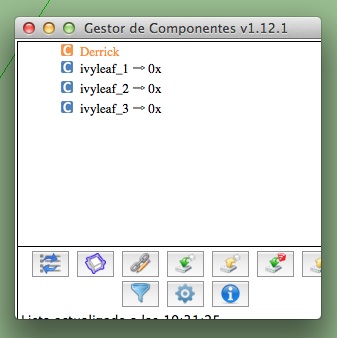
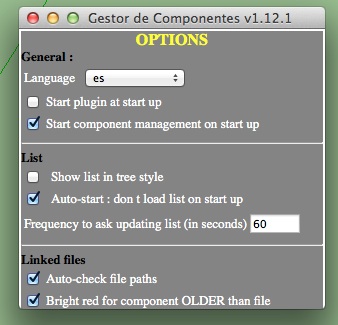
The translation works partially.
It works in:
- Plugins Menu
1. Titles of the windows.
1. Tooltips of the items in the List.
1. Tooltip of the toolbar icon.
1. All the strings in the Filters window.
1. String: "List update at "
1. All pop-up windows.
The rest no.
***** See the next post.
- Plugins Menu
-
Inteloide,
For me undo is working badly again, this time it says undo BGSketchup instead of undo EDIT Properties.
Besides that, if I do a push pull I can't define a distance I have to get a reference point.
I have to disable plugin and restart SU for undo or pushpull to work.
Best regards,
JQL
-
ok guys.
Last version should solve some of your issues.Oxer, for the issue of option for selecting components....very strange, everything work perfect on my PC. Is it not working with groups ? (
I didn't implemented this function for groups. I should include it).
Same remarks with Group filter. I tried successfully lot of model.
For your point 3, this error involve also JSQL issues, then this version should solved everything.
JQL please try again your undo issue, on my it works.Oxer, is this version solve the scrollbar issue in option window ?
We keep in touch.
Inteloide -
Pushpull is working nicely outside groups and components, but inside a component you still are unable to set a dimension for pushpull, or Undo. This time it doesn't even undo if you press CTRL+Z a lot.
I'm going to PM you a model for you to test.



Hello! It looks like you're interested in this conversation, but you don't have an account yet.
Getting fed up of having to scroll through the same posts each visit? When you register for an account, you'll always come back to exactly where you were before, and choose to be notified of new replies (either via email, or push notification). You'll also be able to save bookmarks and upvote posts to show your appreciation to other community members.
With your input, this post could be even better 💗
Register Login


Advertisement